Table of Contents
Share Article
How To Rank Higher In Google Local Listings Without Hiring An SEO Agency
How To Rank Higher In Google Local Listings Without Hiring An SEO Agency
How To Rank Higher In Google Local Listings Without Hiring An SEO Agency

Learn how to rank higher in Google local listings through Google Business Profile optimization, NAP consistency, review velocity, and local SEO tactics proven to boost visibility.
Ranking higher in Google local listings requires optimizing your Google Business Profile with accurate NAP (name, address, phone) data, maintaining consistent review velocity, and building local citations across authoritative directories.
Google evaluates local rankings using three core factors: relevance, proximity, and prominence, businesses that excel in all three appear in the coveted Local Pack above organic results.
If you're searching for ways to improve your Google local listings, you've probably noticed something frustrating. Your competitor with fewer reviews keeps showing up in the top 3 map results while your business sits on page two.
You've claimed your Google Business Profile, added your hours, and uploaded a few photos, but nothing seems to move the needle.
The truth is, local SEO has evolved far beyond simply claiming your listing. Google now evaluates over 180 ranking factors to determine which businesses appear in the Local Pack.
This guide breaks down the exact tactics working in 2026, from Google Business Profile signals that account for 32% of local pack rankings to review velocity strategies that can boost your position within 30 minutes.
You'll learn how to compete with better-funded competitors by focusing on the ranking factors that actually matter, without guessing, without wasting budget on tools you don't need, and without hiring an agency.
Understanding Google's Local Ranking Algorithm
Google determines local search rankings based on three primary factors that work together to surface the most relevant businesses for each query.
The Three Pillars: Relevance, Proximity, and Prominence
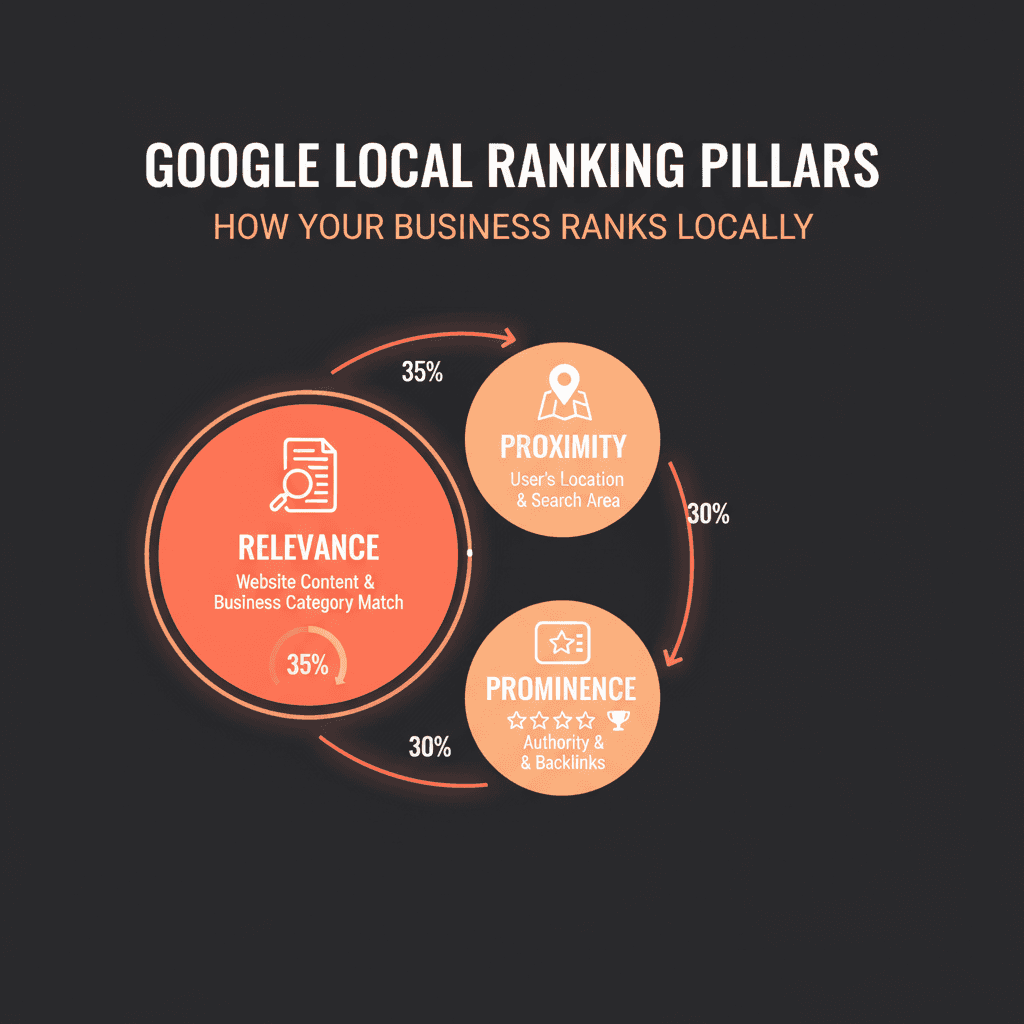
Relevance measures how well your business listing matches what someone is searching for. When a user types "emergency plumber santa monica,"
Google analyzes your business categories, services, descriptions, and keywords to determine if you're a match.
Businesses with complete Google Business Profile information and detailed service descriptions rank higher because Google can confidently match them to specific queries.
Proximity refers to how far your business is located from the searcher or the location term used in the search. For "near me" searches, Google prioritizes businesses physically closest to the user.
If you're not within a reasonable distance, you're unlikely to rank, no amount of optimization can overcome poor geographic relevance. This is why you'll see different Local Pack results when searching from different neighborhoods.
Prominence looks at how well-known and trusted your business is within its community or industry. Google assesses prominence through multiple signals:
Online reviews (quantity, quality, recency, velocity)
Backlinks from authoritative local websites
Citations and mentions across the web
Social media presence and engagement
Brand search volume
According to the 2026 Local Search Ranking Factors survey by Whitespark, "GBP signals can account for as much as 32%" of local pack rankings, with review signals contributing over 15%.
These three pillars form the backbone of Google's local algorithm, and mastering them is non-negotiable for top rankings.
Is the recent Google update silently cutting off your content? Check if your page exceeds 2MB now.
How Google Business Profile Signals Impact Rankings
Your Google Business Profile is the single most important factor for ranking in the Google Maps pack. Google uses signals from your profile to evaluate all three ranking pillars simultaneously.
Key GBP signals include:
Primary category selection: Your primary category is the #1 ranking factor for local pack visibility. Choosing "Personal Injury Attorney" instead of the generic "Law Firm" dramatically improves your chances of ranking for specific queries. You can add 2-4 secondary categories to capture additional service-related searches.
Business name with keywords: While Google's guidelines prohibit keyword stuffing, businesses whose names naturally include service terms tend to rank higher. This doesn't mean you should violate guidelines—it means your actual business name matters.
Completeness and accuracy: Google prioritizes profiles with every section filled out: services, attributes, hours, photos, Q&A, and description. Incomplete profiles signal lower quality and receive lower rankings.
Activity signals: Regular Google Posts, photo uploads, and Q&A responses tell Google your business is actively managed and current. Businesses that post weekly consistently outrank those with stale profiles.
Business hours status: Businesses open during a search query rank higher than closed businesses for non-navigational searches. This change encourages accurate operating hours and can impact visibility significantly.
What Changed in the 2025 Vicinity Update
Google's Vicinity update in late 2024 fundamentally changed how proximity affects local rankings. Previously, businesses could optimize to rank far from their actual location through aggressive citation building and content strategies.
As BrightLocal reports, "Google now appears to be clamping down on this," making local search results more geographically relevant.
Businesses now compete primarily with others in their immediate vicinity rather than those across town. This levels the playing field for small businesses but means you need to focus on dominating your specific service area rather than the entire city.
The practical impact: If you're a dentist in Brooklyn Heights, you'll now compete mainly with other Brooklyn Heights dentists rather than practices in Manhattan or Queens who previously optimized their way into your territory. This makes hyper-local optimization more valuable than ever.
Optimizing Your Google Business Profile for Maximum Visibility
Your Google Business Profile isn't just a listing—it's your primary visibility asset in local search.
Claiming and Verifying Your Profile
The foundational step is claiming ownership of your Google Business Profile. Visit business.google.com and search for your business name. If it appears, claim it; if not, create a new profile manually.
Google requires verification to confirm ownership. You'll receive a postcard to your physical address with a verification code (this typically takes 5-7 days).
Alternative verification methods include phone, email, or Search Console, depending on your business type. Service area businesses without a public storefront can hide their address while still appearing in local searches by setting a service radius.
Critical point: If you don't verify your business location, you won't access all Google Business Profile features, and your ranking potential will be severely limited.
Choosing the Right Business Categories
Category selection is the #1 ranking factor for your Google Business Profile. Get this wrong, and you'll never rank for your most valuable keywords.
Primary category strategy:
Select the single most relevant category that precisely describes your core business
Be specific: "Chinese Restaurant" beats "Restaurant"
"Personal Injury Attorney" beats "Law Firm"
"Emergency Plumber" beats "Plumber" for emergency queries
Secondary categories (2-4 recommended):
Add categories for sub-services or secondary products
These help you rank for related searches where you face less competition
Example: A personal injury attorney might add "Car Accident Attorney" and "Workers Compensation Attorney"
Common mistake: Adding too many irrelevant categories dilutes your primary focus and can actually hurt rankings. Google gets confused about what you actually do.
Use the Pleper Chrome extension to analyze competitor categories—look at businesses ranking in positions 1-3 for your target keywords and mirror their category strategy.
Completing Every Profile Section
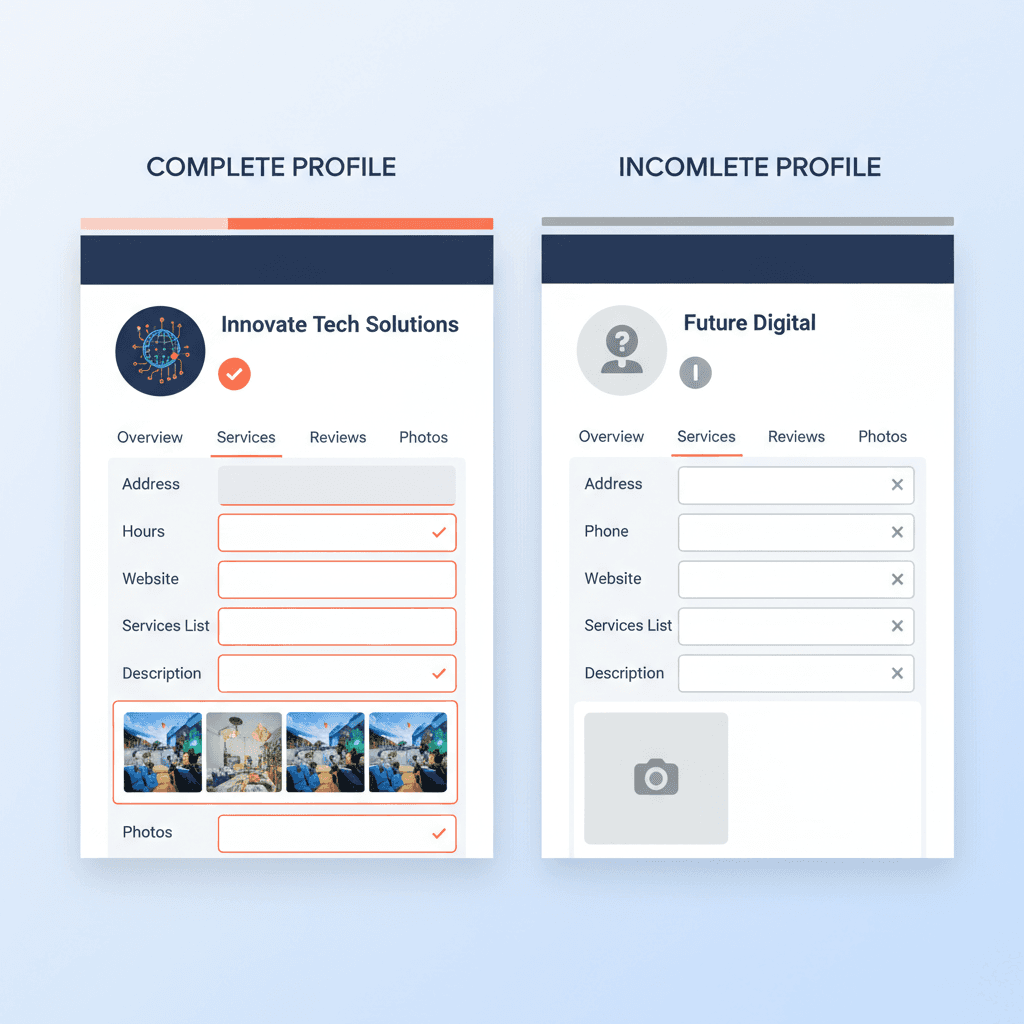
Profile completeness directly impacts how often you appear in search results. Google's algorithm favors businesses that provide comprehensive information.
Essential sections to complete:
Business description (750 characters): Write a keyword-optimized description that clearly explains what you do, who you serve, and what makes you different. Include your primary keyword naturally in the first sentence. Avoid generic phrases and focus on specific services and locations.
Services list: Add every service you offer with detailed descriptions. Each service becomes a potential keyword ranking opportunity. Include pricing when possible—transparency builds trust.
Attributes: Select all applicable attributes (women-led, veteran-owned, wheelchair accessible, outdoor seating, etc.). These help Google match you to specific user preferences.
Hours of operation: Keep these accurate and current. Businesses marked "open" during a search rank higher than closed competitors. Update holiday hours proactively.
Phone number and website: Use a local phone number (not a tracking number) in your NAP data. Link to a location-specific landing page on your website, not your homepage.
Products: If you're a retail business, showcase in-store products. These can appear in local search results and help customers see what's in stock before visiting.
According to Google's own guidance, "Businesses with complete and accurate information are easier to match with the right searches."
Adding High-Quality Photos and Videos
Visual content dramatically impacts both rankings and click-through rates. According to Google, customers are 42% more likely to request driving directions and 35% more likely to click through to websites when a profile has photos.
A BrightLocal study found businesses with more than 100 photos get:
520% more calls
2,717% more direction requests
1,065% more website clicks
Photo strategy:
Add at least one new photo every 7 days (signals active management)
Include exterior shots, interior shots, team photos, product photos, and service photos
Use high-resolution images (not pixelated or stretched)
Add before/after photos for service businesses (combine in one image)
Photograph your company vehicle at job sites if you're mobile
Capture real customer interactions (with permission)
Video content (critical in 2026): Google is prioritizing short-form video content in local search results. Videos now display in position two of the map pack next to images for many industries. Create 30-second videos showing:
Your signature service or product in action
Team introductions and expertise demonstrations
Facility walkthroughs
Customer testimonials (with permission)
Leveraging Google Posts for Fresh Content Signals
Google Posts are mini-updates that appear directly in your Business Profile. They signal to Google that your business is actively managed and current. Businesses that post weekly consistently outrank those with stale profiles.
Post types and strategy:
What's New posts: Announce new services, products, team members, or business updates. These stay visible for 7 days.
Event posts: Promote upcoming events, workshops, or special hours. These automatically disappear after the event date.
Offer posts: Highlight limited-time promotions or discounts. Include a clear call-to-action and expiration date.
Product posts: Showcase specific products with images, descriptions, and pricing.
Posting frequency: Aim for 2-3 posts per week minimum. Use a scheduling tool or Keytomic's content automation workflows to maintain consistency without manual effort.
Include relevant keywords in your post text, but write naturally for humans. Google's AI analyzes post content to better understand your services and match you to relevant queries.
Building NAP Consistency Across the Web
NAP consistency; your Name, Address, and Phone Number appearing identically across all online platforms—is a top-five local ranking factor.
What is NAP and Why It Matters
NAP refers to how your business information appears online. Google cross-references your information across thousands of websites, directories, and data aggregators to verify your business is legitimate and determine where you're geographically relevant.
Why consistency matters:
Google's algorithm can't determine that "Mark's Detailing" and "Mark's Car and Truck Detailing" are the same business. Minor variations create separate entities in Google's understanding, which:
Dilutes your authority across multiple profiles
Confuses customers who see different information
Causes ranking drops as Google loses confidence in your data
Can result in duplicate listings that split your reviews and visibility
According to Moz's Local Search Ranking Factors survey, "citation quantity, quality, and consistency" represent 3 of the top 6 foundational ranking factors. Citations account for approximately 7-15% of local pack ranking influence.
How to Check Your Current NAP Consistency
Before building new citations, audit your existing ones to identify and fix inconsistencies.
Manual audit process:
Create a "single source of truth" document with your official NAP:
Exact business name (as registered)
Full address with consistent abbreviations
Primary business phone (local number, not tracking)
Website URL
Search Google for these queries:
"your business name" + city
"your business name" + phone number
site:yelp.com "your business name"
site:yellowpages.com "your business name"
Check major directories manually:
Google Business Profile
Yelp
Facebook
Better Business Bureau
Yellow Pages
Apple Maps
Bing Places
Automated audit tools:
Whitespark's Local Citation Finder can scan the web for existing listings and identify inconsistencies. Moz Local and BrightLocal offer similar citation audit features. These tools are worth the investment if you have multiple locations or have been in business for years.
Common inconsistencies to fix:
Using "St." on one listing and "Street" on another
Suite numbers formatted differently (Suite 100 vs Ste. 100 vs #100)
Phone numbers with different formatting
Business name variations (LLC included on some, not others)
Old addresses from previous locations
Building Citations on High-Authority Directories
After cleaning up existing citations, build new ones on relevant, high-authority directories. Quality and relevance matter more than quantity.
Tier 1 directories (claim these first):
Google Business Profile
Bing Places for Business
Apple Maps
Facebook Business Page
Yelp
Better Business Bureau
Yellow Pages (YP.com)
Manta
Tier 2 directories (industry-specific): Seek out directories relevant to your specific industry:
Restaurants: OpenTable, TripAdvisor, Zomato
Legal: Avvo, Justia, FindLaw
Medical: Healthgrades, Vitals, Zocdoc
Home services: Angi, HomeAdvisor, Thumbtack
Retail: Google Merchant Center, Yelp
Tier 3 directories (local/regional):
Local Chamber of Commerce
Regional business associations
City-specific directories
Local news websites
Community organization websites
Data aggregators (fix these first): These supply information to hundreds of other directories:
Acxiom
Express Update (Infogroup)
Factual
Localeze (Neustar)
Fixing your information on data aggregators prevents incorrect data from spreading back to directories you've already cleaned up.
Manual vs. automated citation building:
Manual citation building is time-consuming but free. For 25-50 citations, expect to invest 10-20 hours of work. For 100+ citations, consider using a local citation building service that handles submissions while maintaining consistency.
Handling Multiple Locations and Service Areas
Managing local SEO across multiple locations creates unique NAP challenges, but the fundamentals remain the same.
Multi-location strategy:
Create unique landing pages: Build separate location pages on your website for each physical location. Include unique content, NAP data, hours, photos, FAQs, and local reviews per location.
Individual Google Business Profiles: Create and verify separate profiles for each location. Avoid shared phone numbers—each location should have its own.
Location-specific citations: Build citations for each location separately with the corresponding address and landing page URL.
Bulk management tools: For businesses with 10+ locations, Google offers bulk verification and management options. Tools like Keytomic's multi-location content automation can help manage content and optimization at scale.
Service area businesses (no physical location):
If you're a service area business like a plumber or mobile detailer:
Set your service radius in Google Business Profile
Hide your physical address (Google allows this)
Build citations using your mailing address consistently
Generate reviews from customers across your entire service area to signal geographic relevance
Mastering Review Velocity and Review Management
Review velocity—the rate and consistency at which you receive new reviews—has emerged as one of the most underrated local ranking factors in 2026.
Why Review Velocity Matters More Than Total Review Count
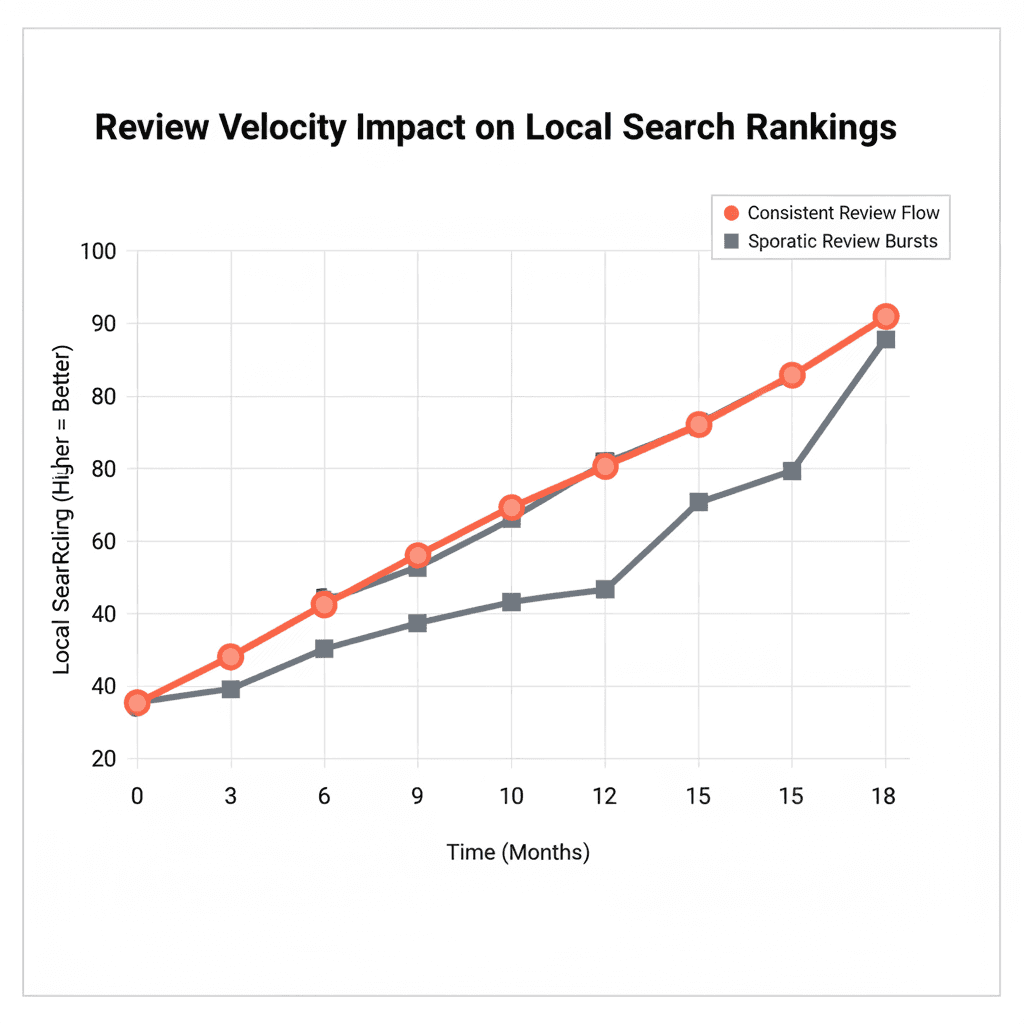
You've probably noticed competitors with fewer total reviews outranking your business despite your higher rating. The answer lies in review velocity and recency.
Google considers four key review factors:
Volume: Total review count
Quality: Average star rating
Recency: How recently reviews were posted
Velocity: Consistency and pace of new reviews
Whitespark's 2026 research elevated review recency to a top-5 ranking factor. Multiple local SEO practitioners report that "a single new review can trigger ranking improvements within 30 minutes to 24 hours" of posting.
Why velocity beats volume:
A business with 150 reviews but none in the last 3 months signals to Google:
The business may be declining or closed
Customer experience may have deteriorated
The listing is stale and less relevant
A business with 75 reviews but receiving new ones weekly signals:
Active, thriving business
Consistent customer satisfaction
Current, trustworthy recommendation
Google's algorithm treats consistent review activity as proof your business remains active and continues satisfying customers. A steady stream of reviews (rather than sudden bursts) positively impacts rankings.
How to Maintain Healthy Review Velocity
The optimal review velocity varies by industry and market competitiveness.
Industry benchmarks:
High competition industries (restaurants, salons, medical practices):
Target: 1-4 new reviews per week
Minimum: 8-12 reviews per month to maintain competitive visibility
Moderate competition industries (professional services, auto repair, retail):
Target: 2-4 new reviews per month
Minimum: 1-2 reviews per month to avoid ranking drops
Low competition industries (niche B2B services, specialized trades):
Target: 2-4 new reviews per quarter
Minimum: Consistent activity every 4-6 weeks
Warning signs of poor review velocity:
6-8 weeks without new reviews (competitive markets)
Sudden bursts of reviews followed by months of silence (looks artificial)
All reviews collected in one week
Case study: A nail salon in the competitive Los Angeles market dropped from top 3 rankings to position 15-20 after just 6-8 weeks without new reviews. Within 30 minutes of receiving a single new 5-star review, rankings began climbing back.
Building a Compliant Review Collection System
Building review velocity requires a systematic approach that doesn't violate Google's policies.
Compliant review request strategies:
1. Ask at the right moment: Request reviews immediately after a positive customer interaction when satisfaction is highest:
After a successful service completion
When receiving thank-you feedback
At checkout after a positive experience
In follow-up communication 24-48 hours post-service
2. Make it easy:
Generate a direct Google review link from your Business Profile dashboard
Create a shortened URL (bit.ly) for easy sharing
Display QR codes on invoices, receipts, or signage
Include the link in post-service emails or SMS
Train staff to verbally request reviews during positive interactions
3. Spread requests over time: Avoid blasting 100 review requests in one day. Instead:
Request 2-5 reviews per week consistently
Rotate through your customer list gradually
Set calendar reminders to maintain consistency
4. Make it personal: Generic automated emails get ignored. Personalize your requests:
Reference the specific service or interaction
Thank them for their business
Explain how their feedback helps your business improve
Keep the message short (2-3 sentences maximum)
What's prohibited:
Incentivizing reviews (discounts, rewards, or payments)
Writing reviews yourself or having employees write fake reviews
Buying reviews from services claiming to be "verified"
Selectively soliciting only happy customers (must ask all customers)
Review gating (pre-screening customers before asking for reviews)
Responding to Reviews for SEO and Trust Signals
Responding to reviews is both an engagement signal for Google and a trust signal for potential customers.
Response strategy:
Positive reviews:
Respond within 24-48 hours
Thank the customer by name
Reference specific details from their review
Include relevant keywords naturally ("We're glad you loved our emergency plumbing service")
Keep responses 2-3 sentences
Negative reviews:
Respond within 24 hours (shows you care)
Acknowledge their frustration professionally
Apologize for their experience (even if you disagree)
Offer to resolve the issue offline (provide contact info)
Never argue or get defensive publicly
Follow up after resolution to ask if they'd update their review
SEO benefit of responses: Google's AI reads your review responses. Using relevant keywords and service terminology naturally in responses helps Google better understand your business and match you to relevant queries. It also signals active management and customer engagement.
Beyond Google reviews:
While Google reviews carry the most weight for local SEO, maintain presence on:
Facebook (for social proof)
Yelp (influences rankings through business information syndication)
Industry-specific platforms (builds topical authority)
Your own website (structured data helps Google find and display them)
Optimizing Your Website for Local Search Signals
Your website's local optimization directly impacts your Google Maps ranking. Google cross-references your Business Profile with your website's content and authority to validate your listing.
Creating Location-Specific Landing Pages
Dedicated location pages send powerful local relevance signals to Google.
Essential elements for location pages:
1. Unique, valuable content (300-500 words minimum): Write unique content for each location—never duplicate. Include:
Services offered at this specific location
Local landmarks and neighborhood information
Driving directions from major areas
Parking information
Team members at this location
Location-specific FAQs
2. NAP data in HTML (not just images): Display your Name, Address, and Phone Number in text format (not embedded in images). Place it prominently:
In the page header or sidebar
In the footer of every page
In schema markup (explained below)
3. Embedded Google Map: Embed your Google Map location directly on the page. This creates a direct link between your website and your Business Profile.
4. Location-specific keywords: Include city and neighborhood names naturally throughout the content:
In the H1 heading: "Emergency Plumbing Services in Santa Monica, CA"
In subheadings (H2/H3)
In body content (2-3 times naturally)
In meta title and description
In image alt text
5. Local customer testimonials: Include reviews and testimonials from customers in that specific location. Add photos and video testimonials when possible.
6. Local photos: Use photos from that actual location—your team, your facility, your vehicles at local job sites.
Implementing Schema Markup for Local Businesses
Schema markup is code that explicitly labels your business information for search engines, making it easy for Google to understand and trust your data.
LocalBusiness schema essentials:
Add LocalBusiness schema markup to your location pages with these properties:
Name
Address (streetAddress, addressLocality, addressRegion, postalCode)
Phone (telephone)
URL (website)
GeoCoordinates (latitude, longitude)
OpeningHours
PriceRange
Image (logo and photos)
Review (aggregate rating)
You can generate schema markup using Google's Structured Data Markup Helper or schema generators like Technical SEO's schema tool. Place the code in the header or footer of your location pages.
Why schema matters: Encapsulating your NAP in schema sends high-quality signals to search engines regarding the relevance and authority of your business's proximity. It helps Google confirm your location and match you to relevant local queries.
Optimizing Title Tags, Meta Descriptions, and Headers
On-page SEO signals account for approximately 24% of local organic rankings and 14% of local pack rankings according to Whitespark's 2026 data.
Title tag optimization:
Format: Primary Keyword | City/Neighborhood | Brand Name
Example: "Emergency Plumber Santa Monica | 24/7 Service | [Company Name]"
Keep under 60 characters to avoid truncation
Include your primary local keyword and location exactly once
Meta description optimization:
Include primary keyword, location, and unique value proposition
Use action words and create urgency when appropriate
Keep 150-160 characters maximum
Example: "Need an emergency plumber in Santa Monica? [Company] offers 24/7 service with 30-min response times. Licensed, insured, and locally owned. Call now!"
Header hierarchy:
H1: Use your primary local keyword naturally (one H1 per page)
Example: "Emergency Plumbing Services in Santa Monica"
H2: Break content into clear service sections with local modifiers
Example: "Why Santa Monica Residents Choose [Company] for Emergency Plumbing"
H3: Further break down services and details
Example: "Serving All Santa Monica Neighborhoods: Ocean Park, Wilshire Montana, Sunset Park"
Never dump content under a single H1 and H2. Use proper nesting (H1 → H2 → H3 → H4) to create skimmable, hierarchical content that both users and Google can easily understand.
Building Local Backlinks for Authority
Backlinks from authoritative local websites signal to Google that your business is trusted and part of the local community.
High-value local backlink sources:
1. Local news outlets and publications:
Get featured in local newspaper websites
Contribute expert commentary on local issues
Sponsor local events and get coverage
2. Local business partnerships:
Partner with complementary local businesses
Offer reciprocal referrals with links
Join local business associations and directories
3. Chamber of Commerce and business organizations:
Join your local Chamber of Commerce (usually includes a directory link)
Participate in local trade organizations
Get listed in community directories
4. Local sponsorships and events:
Sponsor local sports teams, school events, or charity fundraisers
Event websites typically link to sponsors
These links are highly relevant and authoritative
5. Local blogger outreach:
Reach out to local bloggers in your industry
Offer to be featured in local guides or roundups
Provide expert tips for their content in exchange for a link
Link quality indicators:
Links from sites with high Domain Authority (DA 30+)
Links from .org, .edu, or .gov sites (when relevant)
Links from sites in your geographic area
Links from sites topically related to your industry
Links with relevant anchor text (but varied—not always exact match)
Use Semrush's Link Building Tool or Keytomic's content automation to identify local link opportunities and build backlinks at scale.
How Keytomic Automates Local Content Production at Scale
Managing all these local SEO factors manually across multiple locations is time-consuming and error-prone. This is where automation becomes your competitive advantage.
Why Manual Local SEO Doesn't Scale
If you're managing 5+ locations, you know the pain:
Creating unique location pages for each business
Writing location-specific service pages that aren't duplicates
Maintaining consistent NAP across 50+ directories per location
Publishing regular blog content with local modifiers
Monitoring and responding to reviews across multiple profiles
Building local citations for each location
Updating schema markup when business information changes
One location takes 10-20 hours per month to manage properly. Five locations require 50-100 hours. Ten locations become unmanageable without a team or automation.
Automating Local Landing Page Creation
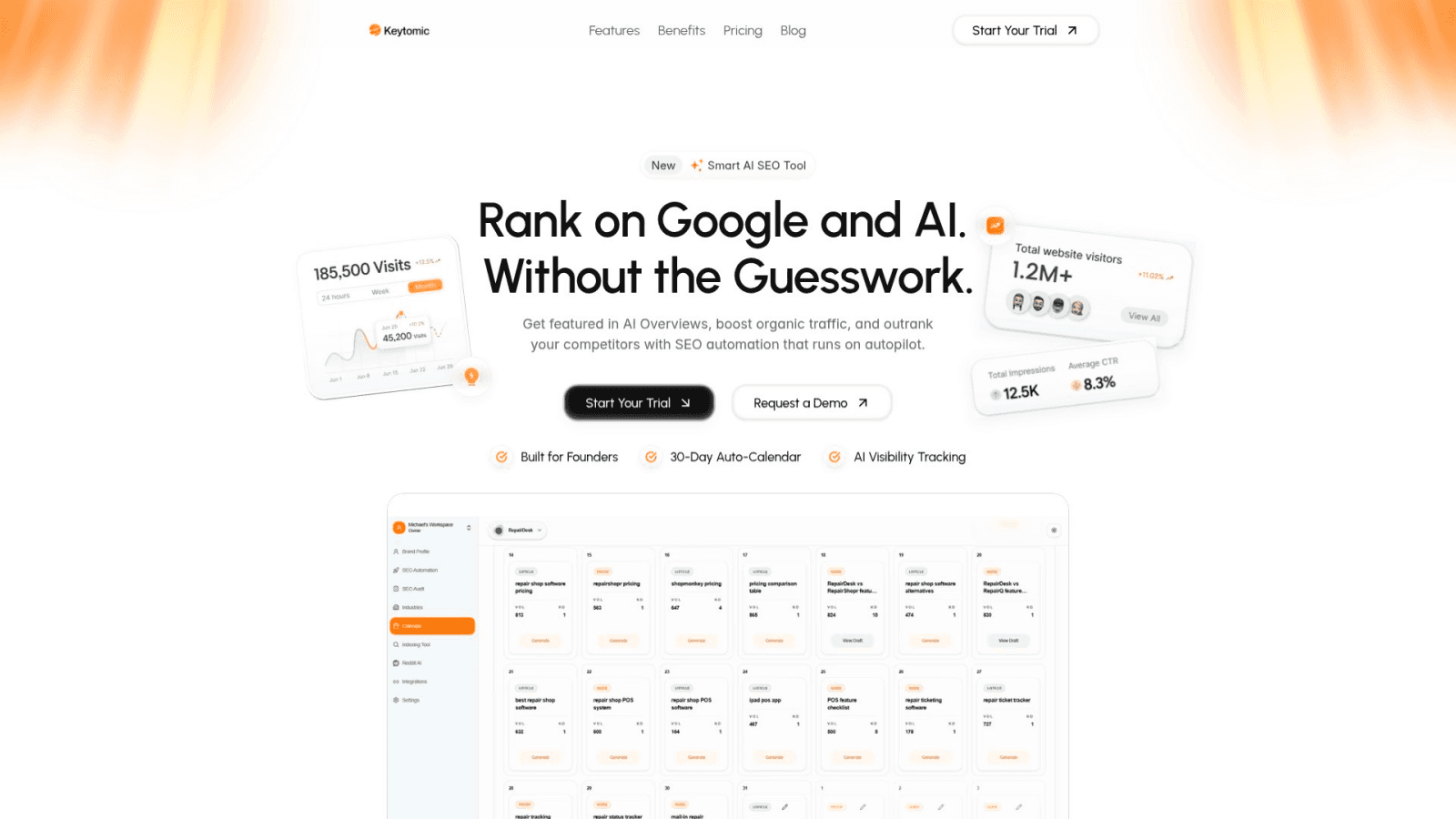
Keytomic's AI-powered content engine generates E-E-A-T-optimized location pages automatically while maintaining uniqueness across all locations.
Here's what that looks like in practice:
Input: Your business information, services, and target locations
Output: Unique, 500+ word location pages with:
Proper heading hierarchy (H1, H2, H3)
Location-specific keywords and modifiers
Embedded schema markup
Internal linking to service pages
Optimized title tags and meta descriptions
Placeholder sections for local photos and testimonials
Time savings: 3-5 hours per location page → 15 minutes with automation
One-Click Publishing to WordPress, Shopify, and Headless CMS
Once your location content is generated, Keytomic's auto-publishing workflows handle distribution:
Supported platforms:
WordPress (via plugin or API)
Shopify (product pages and blog posts)
Contentful, Strapi, Sanity (headless CMS via API)
Custom CMS integrations via webhook
What auto-publishing includes:
Proper formatting and heading structure
Internal linking to related content
Schema markup injection
Image optimization and placement
Meta data population
Automatic indexing requests to Google Search Console
The result: You create location content once and publish to 10 locations simultaneously, maintaining consistency while saving 90% of the manual effort.
Auto-Indexing and Performance Tracking
Creating content means nothing if Google doesn't index it. Keytomic automatically submits new and updated pages to Google Search Console for indexing, reducing wait time from weeks to 24-48 hours.
Tracking and reporting:
Monitor rankings for each location independently
Track review velocity and total review count per location
Analyze organic traffic by location page
Identify which locations need citation cleanup or review campaigns
Get actionable insights without switching between tools
This level of automation reduces content production time from 8 hours to 90 minutes per location while maintaining quality that ranks. That's the difference between managing local SEO yourself and competing with agencies that have full teams.
Common Local SEO Mistakes That Kill Rankings
Even experienced marketers make critical errors that tank local visibility. Avoid these.
Mistake 1: Inconsistent NAP Data Across Platforms
This is the most common and most damaging mistake. Having "St." on one listing and "Street" on another, or using tracking numbers instead of your primary business line, confuses Google and dilutes your authority.
Case study: One client moved locations but kept the same phone number. That was enough to confuse Google so badly they lost their top 3 position for 2 years. Fixing NAP inconsistencies isn't easy, but it's necessary—if you don't fix it, you'll never rank for anything but non-competitive keywords.
Fix: Create a single source of truth document and use copy-paste for every single citation submission. Never type NAP data manually.
Mistake 2: Stopping Review Collection After Reaching 100 Reviews
Many businesses work hard to get 100+ reviews, then stop actively collecting them. Within 6-8 weeks, they notice ranking drops as competitors with fewer total reviews but consistent velocity surpass them.
Review velocity matters more than total volume. Google wants to see ongoing customer satisfaction, not past accomplishments.
Fix: Build review collection into your standard customer follow-up process. Set calendar reminders to request 2-5 reviews weekly.
Mistake 3: Using Generic Content Across Multiple Locations
Duplicating the same content across 10 location pages with only the city name changed is a fast track to penalties or de-indexing. Google recognizes duplicate content and will suppress pages that don't offer unique value.
Fix: Write unique content for each location or use automation tools that generate genuinely unique content with location-specific information, not just find-and-replace keyword swapping.
Mistake 4: Neglecting Google Posts and Photos
Your competitor who posts weekly is sending stronger activity signals than you, even if you have more reviews. Fresh content signals (posts, photos, Q&A responses) tell Google your business is actively managed.
Fix: Schedule time weekly to add 2-3 Google Posts and at least one new photo. Automate this with scheduling tools if necessary.
Mistake 5: Ignoring Mobile Optimization and Site Speed
With 52% of traffic coming from smartphones and 33% of mobile searches being location-related, a slow or unresponsive website kills conversions even if you rank well.
Core Web Vitals—Google's metrics for user experience—directly influence rankings. Your site needs:
LCP (Largest Contentful Paint) under 2.5 seconds
INP (Interaction to Next Paint) under 200ms
CLS (Cumulative Layout Shift) less than 0.1
Fix: Run your site through Google PageSpeed Insights and address flagged issues. Compress images, enable caching, minimize JavaScript, and use a CDN.
Taking Action: Your 30-Day Local SEO Action Plan
Ranking higher in Google local listings doesn't happen overnight, but you can see movement in 4-6 weeks with consistent effort.
Week 1: Foundation
Claim and verify your Google Business Profile
Audit your current NAP consistency across top 10 directories
Create your single source of truth NAP document
Choose your primary and secondary business categories
Complete every section of your Google Business Profile
Week 2: Content and Optimization
Create or update location-specific landing pages with unique content
Implement LocalBusiness schema markup on location pages
Optimize title tags, meta descriptions, and header hierarchy
Add 10-20 high-quality photos to your Google Business Profile
Create and upload your first short-form video
Week 3: Citations and Reviews
Claim and optimize listings on Tier 1 directories
Fix NAP inconsistencies on existing citations
Set up your review collection system (email templates, QR codes, staff training)
Request your first 5-10 reviews from recent satisfied customers
Respond to all existing reviews (positive and negative)
Week 4: Ongoing Maintenance and Monitoring
Publish your first 3 Google Posts
Start building local backlinks (reach out to Chamber, local bloggers)
Set calendar reminders for ongoing review requests (weekly)
Set calendar reminders for Google Posts (2-3 per week)
Monitor rankings for your top 3-5 local keywords
Month 2 and Beyond:
Maintain review velocity (target 2-5 new reviews weekly for competitive markets)
Continue Google Posts 2-3 times per week
Add 1-2 photos weekly
Build 5-10 new citations monthly
Publish 2-4 location-specific blog posts monthly
Respond to all new reviews within 24-48 hours
Frequently Asked Questions
How long does it take to rank in the Google Local Pack? There's no time-based obstacle once your listing is created and verified. A brand new business can rank immediately in low-competition markets. Competitive markets typically take 6-12 weeks of consistent optimization to break into the top 3.
Do I need to rank #1 organically to appear in the Local Pack? No. The Local Pack uses a different algorithm than organic search results. Businesses with strong Google Business Profile optimization, reviews, and local citations can dominate the Local Pack while ranking lower in organic results.
Can I rank for multiple cities from one location? It's difficult and getting harder. Google's Vicinity update prioritized businesses physically located in or very near the search area. Service area businesses can rank across their service radius, but brick-and-mortar businesses struggle to rank outside their immediate area.
How many reviews do I need to rank in the Local Pack? There's no magic number. In competitive markets, top-ranking businesses often have 100+ reviews with consistent velocity. In less competitive markets, 20-50 quality reviews with good velocity can be enough. Focus on matching or exceeding your top 3 competitors.
What happens if I stop getting reviews for 2 months? Most businesses experience noticeable ranking drops within 6-8 weeks without new reviews, particularly in competitive markets. A steady flow of recent reviews is more valuable than a large backlog of old reviews.
Ranking higher in Google local listings requires optimizing your Google Business Profile with accurate NAP (name, address, phone) data, maintaining consistent review velocity, and building local citations across authoritative directories.
Google evaluates local rankings using three core factors: relevance, proximity, and prominence, businesses that excel in all three appear in the coveted Local Pack above organic results.
If you're searching for ways to improve your Google local listings, you've probably noticed something frustrating. Your competitor with fewer reviews keeps showing up in the top 3 map results while your business sits on page two.
You've claimed your Google Business Profile, added your hours, and uploaded a few photos, but nothing seems to move the needle.
The truth is, local SEO has evolved far beyond simply claiming your listing. Google now evaluates over 180 ranking factors to determine which businesses appear in the Local Pack.
This guide breaks down the exact tactics working in 2026, from Google Business Profile signals that account for 32% of local pack rankings to review velocity strategies that can boost your position within 30 minutes.
You'll learn how to compete with better-funded competitors by focusing on the ranking factors that actually matter, without guessing, without wasting budget on tools you don't need, and without hiring an agency.
Understanding Google's Local Ranking Algorithm
Google determines local search rankings based on three primary factors that work together to surface the most relevant businesses for each query.
The Three Pillars: Relevance, Proximity, and Prominence
Relevance measures how well your business listing matches what someone is searching for. When a user types "emergency plumber santa monica,"
Google analyzes your business categories, services, descriptions, and keywords to determine if you're a match.
Businesses with complete Google Business Profile information and detailed service descriptions rank higher because Google can confidently match them to specific queries.
Proximity refers to how far your business is located from the searcher or the location term used in the search. For "near me" searches, Google prioritizes businesses physically closest to the user.
If you're not within a reasonable distance, you're unlikely to rank, no amount of optimization can overcome poor geographic relevance. This is why you'll see different Local Pack results when searching from different neighborhoods.
Prominence looks at how well-known and trusted your business is within its community or industry. Google assesses prominence through multiple signals:
Online reviews (quantity, quality, recency, velocity)
Backlinks from authoritative local websites
Citations and mentions across the web
Social media presence and engagement
Brand search volume
According to the 2026 Local Search Ranking Factors survey by Whitespark, "GBP signals can account for as much as 32%" of local pack rankings, with review signals contributing over 15%.
These three pillars form the backbone of Google's local algorithm, and mastering them is non-negotiable for top rankings.
Is the recent Google update silently cutting off your content? Check if your page exceeds 2MB now.
How Google Business Profile Signals Impact Rankings
Your Google Business Profile is the single most important factor for ranking in the Google Maps pack. Google uses signals from your profile to evaluate all three ranking pillars simultaneously.
Key GBP signals include:
Primary category selection: Your primary category is the #1 ranking factor for local pack visibility. Choosing "Personal Injury Attorney" instead of the generic "Law Firm" dramatically improves your chances of ranking for specific queries. You can add 2-4 secondary categories to capture additional service-related searches.
Business name with keywords: While Google's guidelines prohibit keyword stuffing, businesses whose names naturally include service terms tend to rank higher. This doesn't mean you should violate guidelines—it means your actual business name matters.
Completeness and accuracy: Google prioritizes profiles with every section filled out: services, attributes, hours, photos, Q&A, and description. Incomplete profiles signal lower quality and receive lower rankings.
Activity signals: Regular Google Posts, photo uploads, and Q&A responses tell Google your business is actively managed and current. Businesses that post weekly consistently outrank those with stale profiles.
Business hours status: Businesses open during a search query rank higher than closed businesses for non-navigational searches. This change encourages accurate operating hours and can impact visibility significantly.
What Changed in the 2025 Vicinity Update
Google's Vicinity update in late 2024 fundamentally changed how proximity affects local rankings. Previously, businesses could optimize to rank far from their actual location through aggressive citation building and content strategies.
As BrightLocal reports, "Google now appears to be clamping down on this," making local search results more geographically relevant.
Businesses now compete primarily with others in their immediate vicinity rather than those across town. This levels the playing field for small businesses but means you need to focus on dominating your specific service area rather than the entire city.
The practical impact: If you're a dentist in Brooklyn Heights, you'll now compete mainly with other Brooklyn Heights dentists rather than practices in Manhattan or Queens who previously optimized their way into your territory. This makes hyper-local optimization more valuable than ever.
Optimizing Your Google Business Profile for Maximum Visibility
Your Google Business Profile isn't just a listing—it's your primary visibility asset in local search.
Claiming and Verifying Your Profile
The foundational step is claiming ownership of your Google Business Profile. Visit business.google.com and search for your business name. If it appears, claim it; if not, create a new profile manually.
Google requires verification to confirm ownership. You'll receive a postcard to your physical address with a verification code (this typically takes 5-7 days).
Alternative verification methods include phone, email, or Search Console, depending on your business type. Service area businesses without a public storefront can hide their address while still appearing in local searches by setting a service radius.
Critical point: If you don't verify your business location, you won't access all Google Business Profile features, and your ranking potential will be severely limited.
Choosing the Right Business Categories
Category selection is the #1 ranking factor for your Google Business Profile. Get this wrong, and you'll never rank for your most valuable keywords.
Primary category strategy:
Select the single most relevant category that precisely describes your core business
Be specific: "Chinese Restaurant" beats "Restaurant"
"Personal Injury Attorney" beats "Law Firm"
"Emergency Plumber" beats "Plumber" for emergency queries
Secondary categories (2-4 recommended):
Add categories for sub-services or secondary products
These help you rank for related searches where you face less competition
Example: A personal injury attorney might add "Car Accident Attorney" and "Workers Compensation Attorney"
Common mistake: Adding too many irrelevant categories dilutes your primary focus and can actually hurt rankings. Google gets confused about what you actually do.
Use the Pleper Chrome extension to analyze competitor categories—look at businesses ranking in positions 1-3 for your target keywords and mirror their category strategy.
Completing Every Profile Section
Profile completeness directly impacts how often you appear in search results. Google's algorithm favors businesses that provide comprehensive information.
Essential sections to complete:
Business description (750 characters): Write a keyword-optimized description that clearly explains what you do, who you serve, and what makes you different. Include your primary keyword naturally in the first sentence. Avoid generic phrases and focus on specific services and locations.
Services list: Add every service you offer with detailed descriptions. Each service becomes a potential keyword ranking opportunity. Include pricing when possible—transparency builds trust.
Attributes: Select all applicable attributes (women-led, veteran-owned, wheelchair accessible, outdoor seating, etc.). These help Google match you to specific user preferences.
Hours of operation: Keep these accurate and current. Businesses marked "open" during a search rank higher than closed competitors. Update holiday hours proactively.
Phone number and website: Use a local phone number (not a tracking number) in your NAP data. Link to a location-specific landing page on your website, not your homepage.
Products: If you're a retail business, showcase in-store products. These can appear in local search results and help customers see what's in stock before visiting.
According to Google's own guidance, "Businesses with complete and accurate information are easier to match with the right searches."
Adding High-Quality Photos and Videos
Visual content dramatically impacts both rankings and click-through rates. According to Google, customers are 42% more likely to request driving directions and 35% more likely to click through to websites when a profile has photos.
A BrightLocal study found businesses with more than 100 photos get:
520% more calls
2,717% more direction requests
1,065% more website clicks
Photo strategy:
Add at least one new photo every 7 days (signals active management)
Include exterior shots, interior shots, team photos, product photos, and service photos
Use high-resolution images (not pixelated or stretched)
Add before/after photos for service businesses (combine in one image)
Photograph your company vehicle at job sites if you're mobile
Capture real customer interactions (with permission)
Video content (critical in 2026): Google is prioritizing short-form video content in local search results. Videos now display in position two of the map pack next to images for many industries. Create 30-second videos showing:
Your signature service or product in action
Team introductions and expertise demonstrations
Facility walkthroughs
Customer testimonials (with permission)
Leveraging Google Posts for Fresh Content Signals
Google Posts are mini-updates that appear directly in your Business Profile. They signal to Google that your business is actively managed and current. Businesses that post weekly consistently outrank those with stale profiles.
Post types and strategy:
What's New posts: Announce new services, products, team members, or business updates. These stay visible for 7 days.
Event posts: Promote upcoming events, workshops, or special hours. These automatically disappear after the event date.
Offer posts: Highlight limited-time promotions or discounts. Include a clear call-to-action and expiration date.
Product posts: Showcase specific products with images, descriptions, and pricing.
Posting frequency: Aim for 2-3 posts per week minimum. Use a scheduling tool or Keytomic's content automation workflows to maintain consistency without manual effort.
Include relevant keywords in your post text, but write naturally for humans. Google's AI analyzes post content to better understand your services and match you to relevant queries.
Building NAP Consistency Across the Web
NAP consistency; your Name, Address, and Phone Number appearing identically across all online platforms—is a top-five local ranking factor.
What is NAP and Why It Matters
NAP refers to how your business information appears online. Google cross-references your information across thousands of websites, directories, and data aggregators to verify your business is legitimate and determine where you're geographically relevant.
Why consistency matters:
Google's algorithm can't determine that "Mark's Detailing" and "Mark's Car and Truck Detailing" are the same business. Minor variations create separate entities in Google's understanding, which:
Dilutes your authority across multiple profiles
Confuses customers who see different information
Causes ranking drops as Google loses confidence in your data
Can result in duplicate listings that split your reviews and visibility
According to Moz's Local Search Ranking Factors survey, "citation quantity, quality, and consistency" represent 3 of the top 6 foundational ranking factors. Citations account for approximately 7-15% of local pack ranking influence.
How to Check Your Current NAP Consistency
Before building new citations, audit your existing ones to identify and fix inconsistencies.
Manual audit process:
Create a "single source of truth" document with your official NAP:
Exact business name (as registered)
Full address with consistent abbreviations
Primary business phone (local number, not tracking)
Website URL
Search Google for these queries:
"your business name" + city
"your business name" + phone number
site:yelp.com "your business name"
site:yellowpages.com "your business name"
Check major directories manually:
Google Business Profile
Yelp
Facebook
Better Business Bureau
Yellow Pages
Apple Maps
Bing Places
Automated audit tools:
Whitespark's Local Citation Finder can scan the web for existing listings and identify inconsistencies. Moz Local and BrightLocal offer similar citation audit features. These tools are worth the investment if you have multiple locations or have been in business for years.
Common inconsistencies to fix:
Using "St." on one listing and "Street" on another
Suite numbers formatted differently (Suite 100 vs Ste. 100 vs #100)
Phone numbers with different formatting
Business name variations (LLC included on some, not others)
Old addresses from previous locations
Building Citations on High-Authority Directories
After cleaning up existing citations, build new ones on relevant, high-authority directories. Quality and relevance matter more than quantity.
Tier 1 directories (claim these first):
Google Business Profile
Bing Places for Business
Apple Maps
Facebook Business Page
Yelp
Better Business Bureau
Yellow Pages (YP.com)
Manta
Tier 2 directories (industry-specific): Seek out directories relevant to your specific industry:
Restaurants: OpenTable, TripAdvisor, Zomato
Legal: Avvo, Justia, FindLaw
Medical: Healthgrades, Vitals, Zocdoc
Home services: Angi, HomeAdvisor, Thumbtack
Retail: Google Merchant Center, Yelp
Tier 3 directories (local/regional):
Local Chamber of Commerce
Regional business associations
City-specific directories
Local news websites
Community organization websites
Data aggregators (fix these first): These supply information to hundreds of other directories:
Acxiom
Express Update (Infogroup)
Factual
Localeze (Neustar)
Fixing your information on data aggregators prevents incorrect data from spreading back to directories you've already cleaned up.
Manual vs. automated citation building:
Manual citation building is time-consuming but free. For 25-50 citations, expect to invest 10-20 hours of work. For 100+ citations, consider using a local citation building service that handles submissions while maintaining consistency.
Handling Multiple Locations and Service Areas
Managing local SEO across multiple locations creates unique NAP challenges, but the fundamentals remain the same.
Multi-location strategy:
Create unique landing pages: Build separate location pages on your website for each physical location. Include unique content, NAP data, hours, photos, FAQs, and local reviews per location.
Individual Google Business Profiles: Create and verify separate profiles for each location. Avoid shared phone numbers—each location should have its own.
Location-specific citations: Build citations for each location separately with the corresponding address and landing page URL.
Bulk management tools: For businesses with 10+ locations, Google offers bulk verification and management options. Tools like Keytomic's multi-location content automation can help manage content and optimization at scale.
Service area businesses (no physical location):
If you're a service area business like a plumber or mobile detailer:
Set your service radius in Google Business Profile
Hide your physical address (Google allows this)
Build citations using your mailing address consistently
Generate reviews from customers across your entire service area to signal geographic relevance
Mastering Review Velocity and Review Management
Review velocity—the rate and consistency at which you receive new reviews—has emerged as one of the most underrated local ranking factors in 2026.
Why Review Velocity Matters More Than Total Review Count
You've probably noticed competitors with fewer total reviews outranking your business despite your higher rating. The answer lies in review velocity and recency.
Google considers four key review factors:
Volume: Total review count
Quality: Average star rating
Recency: How recently reviews were posted
Velocity: Consistency and pace of new reviews
Whitespark's 2026 research elevated review recency to a top-5 ranking factor. Multiple local SEO practitioners report that "a single new review can trigger ranking improvements within 30 minutes to 24 hours" of posting.
Why velocity beats volume:
A business with 150 reviews but none in the last 3 months signals to Google:
The business may be declining or closed
Customer experience may have deteriorated
The listing is stale and less relevant
A business with 75 reviews but receiving new ones weekly signals:
Active, thriving business
Consistent customer satisfaction
Current, trustworthy recommendation
Google's algorithm treats consistent review activity as proof your business remains active and continues satisfying customers. A steady stream of reviews (rather than sudden bursts) positively impacts rankings.
How to Maintain Healthy Review Velocity
The optimal review velocity varies by industry and market competitiveness.
Industry benchmarks:
High competition industries (restaurants, salons, medical practices):
Target: 1-4 new reviews per week
Minimum: 8-12 reviews per month to maintain competitive visibility
Moderate competition industries (professional services, auto repair, retail):
Target: 2-4 new reviews per month
Minimum: 1-2 reviews per month to avoid ranking drops
Low competition industries (niche B2B services, specialized trades):
Target: 2-4 new reviews per quarter
Minimum: Consistent activity every 4-6 weeks
Warning signs of poor review velocity:
6-8 weeks without new reviews (competitive markets)
Sudden bursts of reviews followed by months of silence (looks artificial)
All reviews collected in one week
Case study: A nail salon in the competitive Los Angeles market dropped from top 3 rankings to position 15-20 after just 6-8 weeks without new reviews. Within 30 minutes of receiving a single new 5-star review, rankings began climbing back.
Building a Compliant Review Collection System
Building review velocity requires a systematic approach that doesn't violate Google's policies.
Compliant review request strategies:
1. Ask at the right moment: Request reviews immediately after a positive customer interaction when satisfaction is highest:
After a successful service completion
When receiving thank-you feedback
At checkout after a positive experience
In follow-up communication 24-48 hours post-service
2. Make it easy:
Generate a direct Google review link from your Business Profile dashboard
Create a shortened URL (bit.ly) for easy sharing
Display QR codes on invoices, receipts, or signage
Include the link in post-service emails or SMS
Train staff to verbally request reviews during positive interactions
3. Spread requests over time: Avoid blasting 100 review requests in one day. Instead:
Request 2-5 reviews per week consistently
Rotate through your customer list gradually
Set calendar reminders to maintain consistency
4. Make it personal: Generic automated emails get ignored. Personalize your requests:
Reference the specific service or interaction
Thank them for their business
Explain how their feedback helps your business improve
Keep the message short (2-3 sentences maximum)
What's prohibited:
Incentivizing reviews (discounts, rewards, or payments)
Writing reviews yourself or having employees write fake reviews
Buying reviews from services claiming to be "verified"
Selectively soliciting only happy customers (must ask all customers)
Review gating (pre-screening customers before asking for reviews)
Responding to Reviews for SEO and Trust Signals
Responding to reviews is both an engagement signal for Google and a trust signal for potential customers.
Response strategy:
Positive reviews:
Respond within 24-48 hours
Thank the customer by name
Reference specific details from their review
Include relevant keywords naturally ("We're glad you loved our emergency plumbing service")
Keep responses 2-3 sentences
Negative reviews:
Respond within 24 hours (shows you care)
Acknowledge their frustration professionally
Apologize for their experience (even if you disagree)
Offer to resolve the issue offline (provide contact info)
Never argue or get defensive publicly
Follow up after resolution to ask if they'd update their review
SEO benefit of responses: Google's AI reads your review responses. Using relevant keywords and service terminology naturally in responses helps Google better understand your business and match you to relevant queries. It also signals active management and customer engagement.
Beyond Google reviews:
While Google reviews carry the most weight for local SEO, maintain presence on:
Facebook (for social proof)
Yelp (influences rankings through business information syndication)
Industry-specific platforms (builds topical authority)
Your own website (structured data helps Google find and display them)
Optimizing Your Website for Local Search Signals
Your website's local optimization directly impacts your Google Maps ranking. Google cross-references your Business Profile with your website's content and authority to validate your listing.
Creating Location-Specific Landing Pages
Dedicated location pages send powerful local relevance signals to Google.
Essential elements for location pages:
1. Unique, valuable content (300-500 words minimum): Write unique content for each location—never duplicate. Include:
Services offered at this specific location
Local landmarks and neighborhood information
Driving directions from major areas
Parking information
Team members at this location
Location-specific FAQs
2. NAP data in HTML (not just images): Display your Name, Address, and Phone Number in text format (not embedded in images). Place it prominently:
In the page header or sidebar
In the footer of every page
In schema markup (explained below)
3. Embedded Google Map: Embed your Google Map location directly on the page. This creates a direct link between your website and your Business Profile.
4. Location-specific keywords: Include city and neighborhood names naturally throughout the content:
In the H1 heading: "Emergency Plumbing Services in Santa Monica, CA"
In subheadings (H2/H3)
In body content (2-3 times naturally)
In meta title and description
In image alt text
5. Local customer testimonials: Include reviews and testimonials from customers in that specific location. Add photos and video testimonials when possible.
6. Local photos: Use photos from that actual location—your team, your facility, your vehicles at local job sites.
Implementing Schema Markup for Local Businesses
Schema markup is code that explicitly labels your business information for search engines, making it easy for Google to understand and trust your data.
LocalBusiness schema essentials:
Add LocalBusiness schema markup to your location pages with these properties:
Name
Address (streetAddress, addressLocality, addressRegion, postalCode)
Phone (telephone)
URL (website)
GeoCoordinates (latitude, longitude)
OpeningHours
PriceRange
Image (logo and photos)
Review (aggregate rating)
You can generate schema markup using Google's Structured Data Markup Helper or schema generators like Technical SEO's schema tool. Place the code in the header or footer of your location pages.
Why schema matters: Encapsulating your NAP in schema sends high-quality signals to search engines regarding the relevance and authority of your business's proximity. It helps Google confirm your location and match you to relevant local queries.
Optimizing Title Tags, Meta Descriptions, and Headers
On-page SEO signals account for approximately 24% of local organic rankings and 14% of local pack rankings according to Whitespark's 2026 data.
Title tag optimization:
Format: Primary Keyword | City/Neighborhood | Brand Name
Example: "Emergency Plumber Santa Monica | 24/7 Service | [Company Name]"
Keep under 60 characters to avoid truncation
Include your primary local keyword and location exactly once
Meta description optimization:
Include primary keyword, location, and unique value proposition
Use action words and create urgency when appropriate
Keep 150-160 characters maximum
Example: "Need an emergency plumber in Santa Monica? [Company] offers 24/7 service with 30-min response times. Licensed, insured, and locally owned. Call now!"
Header hierarchy:
H1: Use your primary local keyword naturally (one H1 per page)
Example: "Emergency Plumbing Services in Santa Monica"
H2: Break content into clear service sections with local modifiers
Example: "Why Santa Monica Residents Choose [Company] for Emergency Plumbing"
H3: Further break down services and details
Example: "Serving All Santa Monica Neighborhoods: Ocean Park, Wilshire Montana, Sunset Park"
Never dump content under a single H1 and H2. Use proper nesting (H1 → H2 → H3 → H4) to create skimmable, hierarchical content that both users and Google can easily understand.
Building Local Backlinks for Authority
Backlinks from authoritative local websites signal to Google that your business is trusted and part of the local community.
High-value local backlink sources:
1. Local news outlets and publications:
Get featured in local newspaper websites
Contribute expert commentary on local issues
Sponsor local events and get coverage
2. Local business partnerships:
Partner with complementary local businesses
Offer reciprocal referrals with links
Join local business associations and directories
3. Chamber of Commerce and business organizations:
Join your local Chamber of Commerce (usually includes a directory link)
Participate in local trade organizations
Get listed in community directories
4. Local sponsorships and events:
Sponsor local sports teams, school events, or charity fundraisers
Event websites typically link to sponsors
These links are highly relevant and authoritative
5. Local blogger outreach:
Reach out to local bloggers in your industry
Offer to be featured in local guides or roundups
Provide expert tips for their content in exchange for a link
Link quality indicators:
Links from sites with high Domain Authority (DA 30+)
Links from .org, .edu, or .gov sites (when relevant)
Links from sites in your geographic area
Links from sites topically related to your industry
Links with relevant anchor text (but varied—not always exact match)
Use Semrush's Link Building Tool or Keytomic's content automation to identify local link opportunities and build backlinks at scale.
How Keytomic Automates Local Content Production at Scale
Managing all these local SEO factors manually across multiple locations is time-consuming and error-prone. This is where automation becomes your competitive advantage.
Why Manual Local SEO Doesn't Scale
If you're managing 5+ locations, you know the pain:
Creating unique location pages for each business
Writing location-specific service pages that aren't duplicates
Maintaining consistent NAP across 50+ directories per location
Publishing regular blog content with local modifiers
Monitoring and responding to reviews across multiple profiles
Building local citations for each location
Updating schema markup when business information changes
One location takes 10-20 hours per month to manage properly. Five locations require 50-100 hours. Ten locations become unmanageable without a team or automation.
Automating Local Landing Page Creation
Keytomic's AI-powered content engine generates E-E-A-T-optimized location pages automatically while maintaining uniqueness across all locations.
Here's what that looks like in practice:
Input: Your business information, services, and target locations
Output: Unique, 500+ word location pages with:
Proper heading hierarchy (H1, H2, H3)
Location-specific keywords and modifiers
Embedded schema markup
Internal linking to service pages
Optimized title tags and meta descriptions
Placeholder sections for local photos and testimonials
Time savings: 3-5 hours per location page → 15 minutes with automation
One-Click Publishing to WordPress, Shopify, and Headless CMS
Once your location content is generated, Keytomic's auto-publishing workflows handle distribution:
Supported platforms:
WordPress (via plugin or API)
Shopify (product pages and blog posts)
Contentful, Strapi, Sanity (headless CMS via API)
Custom CMS integrations via webhook
What auto-publishing includes:
Proper formatting and heading structure
Internal linking to related content
Schema markup injection
Image optimization and placement
Meta data population
Automatic indexing requests to Google Search Console
The result: You create location content once and publish to 10 locations simultaneously, maintaining consistency while saving 90% of the manual effort.
Auto-Indexing and Performance Tracking
Creating content means nothing if Google doesn't index it. Keytomic automatically submits new and updated pages to Google Search Console for indexing, reducing wait time from weeks to 24-48 hours.
Tracking and reporting:
Monitor rankings for each location independently
Track review velocity and total review count per location
Analyze organic traffic by location page
Identify which locations need citation cleanup or review campaigns
Get actionable insights without switching between tools
This level of automation reduces content production time from 8 hours to 90 minutes per location while maintaining quality that ranks. That's the difference between managing local SEO yourself and competing with agencies that have full teams.
Common Local SEO Mistakes That Kill Rankings
Even experienced marketers make critical errors that tank local visibility. Avoid these.
Mistake 1: Inconsistent NAP Data Across Platforms
This is the most common and most damaging mistake. Having "St." on one listing and "Street" on another, or using tracking numbers instead of your primary business line, confuses Google and dilutes your authority.
Case study: One client moved locations but kept the same phone number. That was enough to confuse Google so badly they lost their top 3 position for 2 years. Fixing NAP inconsistencies isn't easy, but it's necessary—if you don't fix it, you'll never rank for anything but non-competitive keywords.
Fix: Create a single source of truth document and use copy-paste for every single citation submission. Never type NAP data manually.
Mistake 2: Stopping Review Collection After Reaching 100 Reviews
Many businesses work hard to get 100+ reviews, then stop actively collecting them. Within 6-8 weeks, they notice ranking drops as competitors with fewer total reviews but consistent velocity surpass them.
Review velocity matters more than total volume. Google wants to see ongoing customer satisfaction, not past accomplishments.
Fix: Build review collection into your standard customer follow-up process. Set calendar reminders to request 2-5 reviews weekly.
Mistake 3: Using Generic Content Across Multiple Locations
Duplicating the same content across 10 location pages with only the city name changed is a fast track to penalties or de-indexing. Google recognizes duplicate content and will suppress pages that don't offer unique value.
Fix: Write unique content for each location or use automation tools that generate genuinely unique content with location-specific information, not just find-and-replace keyword swapping.
Mistake 4: Neglecting Google Posts and Photos
Your competitor who posts weekly is sending stronger activity signals than you, even if you have more reviews. Fresh content signals (posts, photos, Q&A responses) tell Google your business is actively managed.
Fix: Schedule time weekly to add 2-3 Google Posts and at least one new photo. Automate this with scheduling tools if necessary.
Mistake 5: Ignoring Mobile Optimization and Site Speed
With 52% of traffic coming from smartphones and 33% of mobile searches being location-related, a slow or unresponsive website kills conversions even if you rank well.
Core Web Vitals—Google's metrics for user experience—directly influence rankings. Your site needs:
LCP (Largest Contentful Paint) under 2.5 seconds
INP (Interaction to Next Paint) under 200ms
CLS (Cumulative Layout Shift) less than 0.1
Fix: Run your site through Google PageSpeed Insights and address flagged issues. Compress images, enable caching, minimize JavaScript, and use a CDN.
Taking Action: Your 30-Day Local SEO Action Plan
Ranking higher in Google local listings doesn't happen overnight, but you can see movement in 4-6 weeks with consistent effort.
Week 1: Foundation
Claim and verify your Google Business Profile
Audit your current NAP consistency across top 10 directories
Create your single source of truth NAP document
Choose your primary and secondary business categories
Complete every section of your Google Business Profile
Week 2: Content and Optimization
Create or update location-specific landing pages with unique content
Implement LocalBusiness schema markup on location pages
Optimize title tags, meta descriptions, and header hierarchy
Add 10-20 high-quality photos to your Google Business Profile
Create and upload your first short-form video
Week 3: Citations and Reviews
Claim and optimize listings on Tier 1 directories
Fix NAP inconsistencies on existing citations
Set up your review collection system (email templates, QR codes, staff training)
Request your first 5-10 reviews from recent satisfied customers
Respond to all existing reviews (positive and negative)
Week 4: Ongoing Maintenance and Monitoring
Publish your first 3 Google Posts
Start building local backlinks (reach out to Chamber, local bloggers)
Set calendar reminders for ongoing review requests (weekly)
Set calendar reminders for Google Posts (2-3 per week)
Monitor rankings for your top 3-5 local keywords
Month 2 and Beyond:
Maintain review velocity (target 2-5 new reviews weekly for competitive markets)
Continue Google Posts 2-3 times per week
Add 1-2 photos weekly
Build 5-10 new citations monthly
Publish 2-4 location-specific blog posts monthly
Respond to all new reviews within 24-48 hours
Frequently Asked Questions
How long does it take to rank in the Google Local Pack? There's no time-based obstacle once your listing is created and verified. A brand new business can rank immediately in low-competition markets. Competitive markets typically take 6-12 weeks of consistent optimization to break into the top 3.
Do I need to rank #1 organically to appear in the Local Pack? No. The Local Pack uses a different algorithm than organic search results. Businesses with strong Google Business Profile optimization, reviews, and local citations can dominate the Local Pack while ranking lower in organic results.
Can I rank for multiple cities from one location? It's difficult and getting harder. Google's Vicinity update prioritized businesses physically located in or very near the search area. Service area businesses can rank across their service radius, but brick-and-mortar businesses struggle to rank outside their immediate area.
How many reviews do I need to rank in the Local Pack? There's no magic number. In competitive markets, top-ranking businesses often have 100+ reviews with consistent velocity. In less competitive markets, 20-50 quality reviews with good velocity can be enough. Focus on matching or exceeding your top 3 competitors.
What happens if I stop getting reviews for 2 months? Most businesses experience noticeable ranking drops within 6-8 weeks without new reviews, particularly in competitive markets. A steady flow of recent reviews is more valuable than a large backlog of old reviews.
FREE AI Visibility Audit
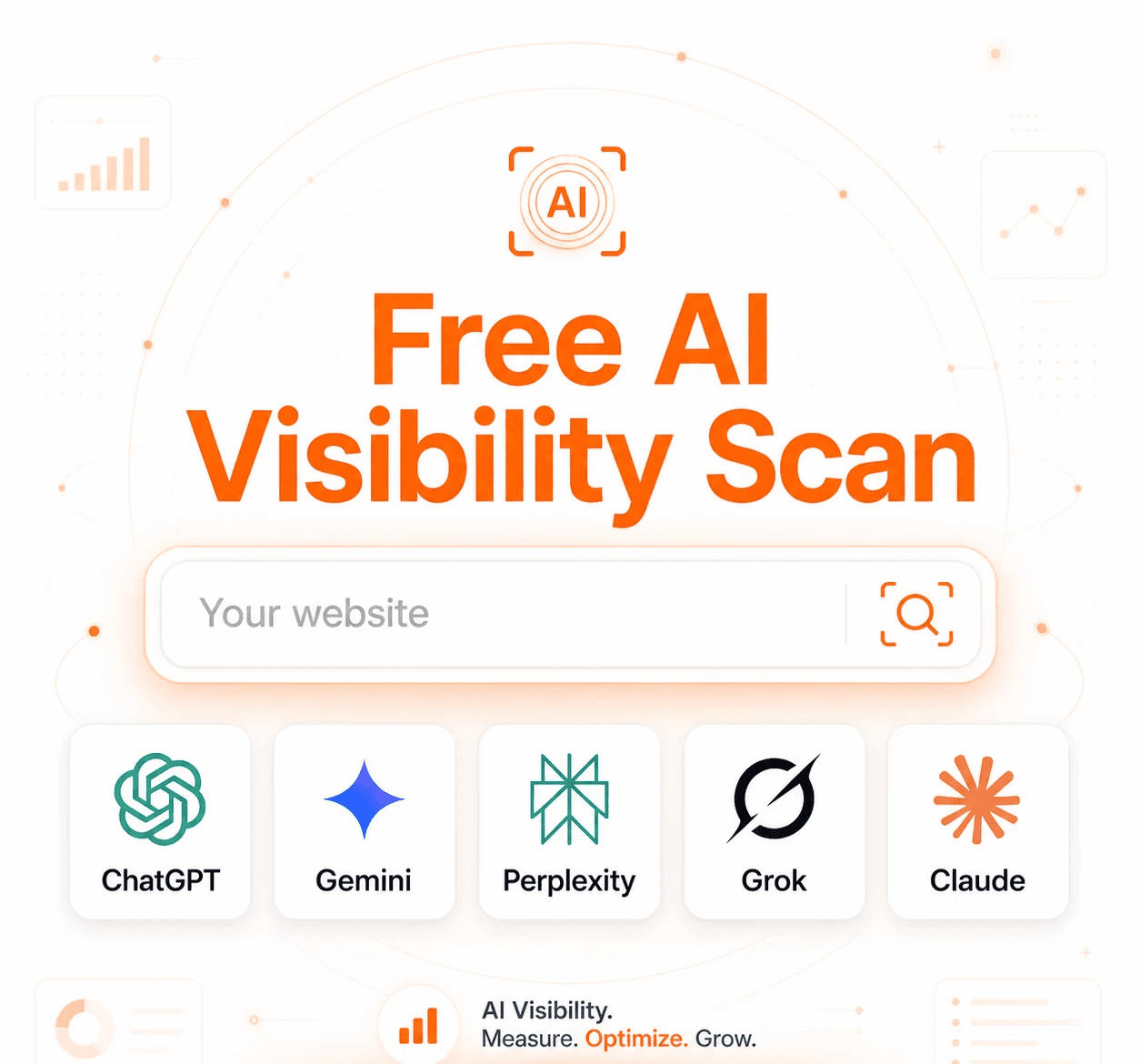
Is Your Brand Visible in AI Searches?
Free AI Visibility Audit → See where you appear (and where competitors appear).
Read More From Our Blog...
Best AI Tools for Increasing Visibility in LLMs 2026

Peec AI vs Keytomic (2026): Which AI Visibility Platform Is Better?

Top 10 best AI SEO tools for content automation in 2026

Start Getting Cited By Google
and AI Searches on Auto-Pilot


AI SEO agents research keywords, write & publish ranking content, track AI citations, and grow your brand visibility — while you focus on the business.


Trusted by 300+ users

4.5
Start Getting Cited By Google
and AI Searches on Auto-Pilot
Automate your SEO to rank faster, and showing up in AI search, without the guesswork.
Trusted by 300+ users
4.5
Start Getting Cited By Google
and AI Searches on Auto-Pilot
AI SEO agents research keywords, write & publish ranking content, track AI citations, and grow your brand visibility — while you focus on the business.
Trusted by 300+ users