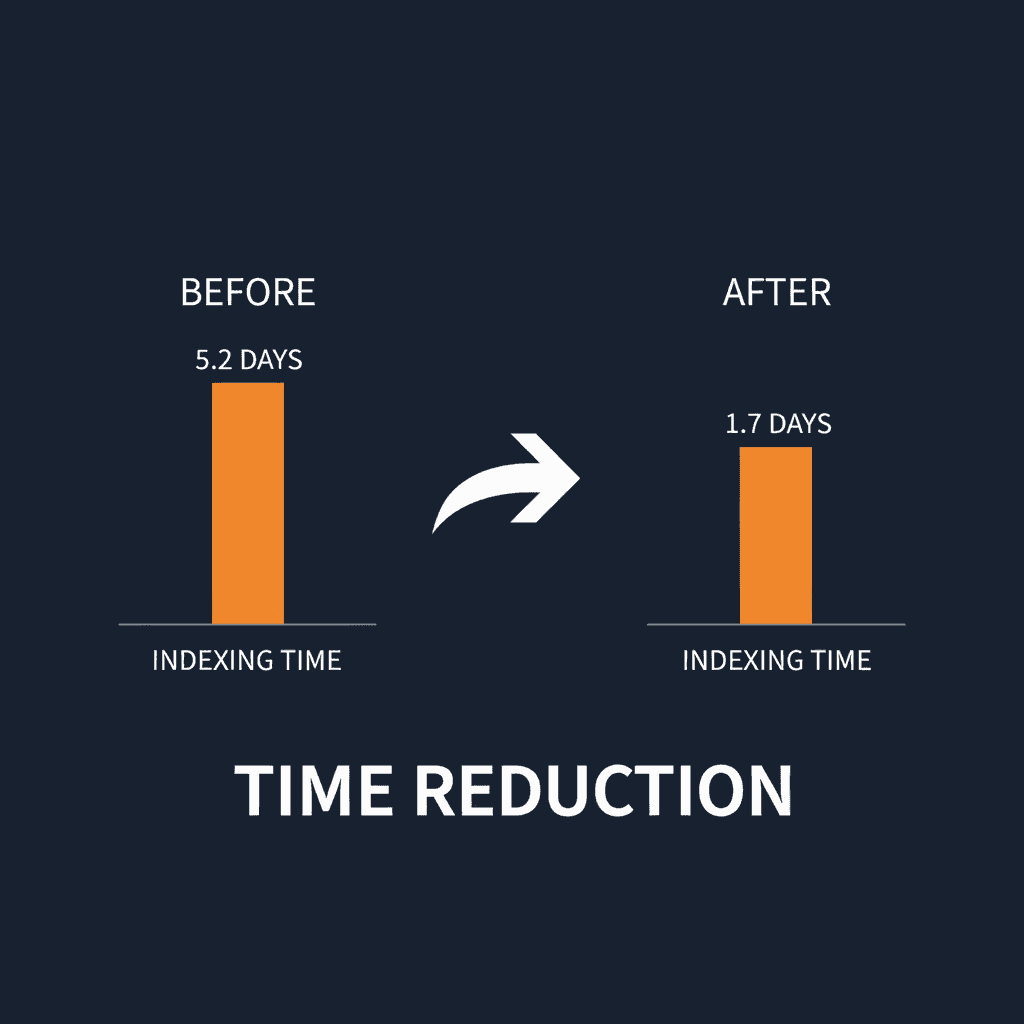
Auto-indexing automation reduced average content indexing time from 5.2 days to 1.7 days for a B2B SaaS company publishing 18 blog articles per month. The implementation of Google Search Console API integration and IndexNow protocol eliminated manual submission workflows, freeing 4.5 hours per week for content strategy instead of administrative tasks.
Here's the thing about publishing content in 2026. You can write the best SEO-optimized article in your niche, hit publish, and then wait. Wait for Google to crawl your site. Wait for the page to appear in the index. Wait to see if it ranks. For most marketing teams, that waiting period stretches anywhere from three to seven days, sometimes longer.
That delay costs real traffic. If you're publishing time-sensitive content, launching a new product line, or responding to industry trends, every day your content sits unindexed is a day your competitors capture search traffic you should be getting. This case study shows exactly how one SaaS company eliminated that bottleneck using Keytomic's auto-indexing workflow.
The results speak for themselves: 67% reduction in indexing time, zero manual effort, and faster visibility in both Google search and AI answer engines.
Background and Challenge
Our client operates a B2B project management platform serving mid-market companies. Their content strategy centers on educational blog content targeting problem-aware searches like "how to manage remote teams" and "project milestone tracking best practices." They publish 18 articles per month written by a two-person content team.
The Indexing Bottleneck
Before implementing Keytomic, their workflow looked like this:
Writer completes article in Google Docs
Editor reviews and approves
Content manager uploads to WordPress
After publishing, content manager manually submits URL to Google Search Console
Team waits 3-7 days to see if content appears in search results
If page doesn't index after a week, content manager resubmits via GSC
The content manager tracked indexing times for 43 articles published between October and December 2025. The data revealed frustrating patterns - and they're not alone. A 2025 analysis of over 16 million pages by IndexCheckr found that pages take an average of 27.4 days to be indexed, with only 14% indexed within the first week. For established sites with regular publishing cadences, performance is better, but the underlying bottleneck remains the same. The data revealed frustrating patterns:
Metric | Value |
|---|---|
Average time to index | 5.2 days |
Fastest indexing | 18 hours |
Slowest indexing | 11 days |
Articles requiring manual resubmission | 14 (32.5%) |
Weekly time spent on manual submissions | 4.5 hours |
The same IndexCheckr research found that only about 37% of web pages are fully indexed by Google at any given time - meaning nearly two-thirds of published content is invisible to search engines, regardless of quality. For a content team doing everything right on the writing side, the indexing gap was the silent killer.
The 5.2-day average meant their content strategy consistently lagged behind trending topics. When a competitor analysis tool released a major update, the team wrote a comparison guide within 24 hours but didn't capture search traffic for nearly a week. By then, three competitors had already ranked for the target keywords.
Technical Constraints
Their WordPress installation used Yoast SEO for basic optimization but lacked automated indexing capabilities. The site had solid technical SEO fundamentals: clean URL structure, proper internal linking, fast Core Web Vitals scores.
The crawl budget wasn't the problem. Google's bots visited the site daily. The issue was discovery lag between when content published and when Google's next scheduled crawl happened to check for new posts.
The team considered several solutions:
Manual IndexNow submissions: Required developer work to implement and still needed manual triggering
Google Indexing API: Limited to job postings and livestream videos by Google's official policy
Third-party indexing services: Added another subscription and lacked integration with their content workflow
Keytomic's auto-indexing: Integrated directly into their content automation workflow with zero manual steps
They chose Keytomic specifically because auto-indexing was part of the broader content automation system they were already evaluating. Rather than adding another standalone tool, they wanted indexing to happen automatically as part of the publishing pipeline.
Implementation with Keytomic
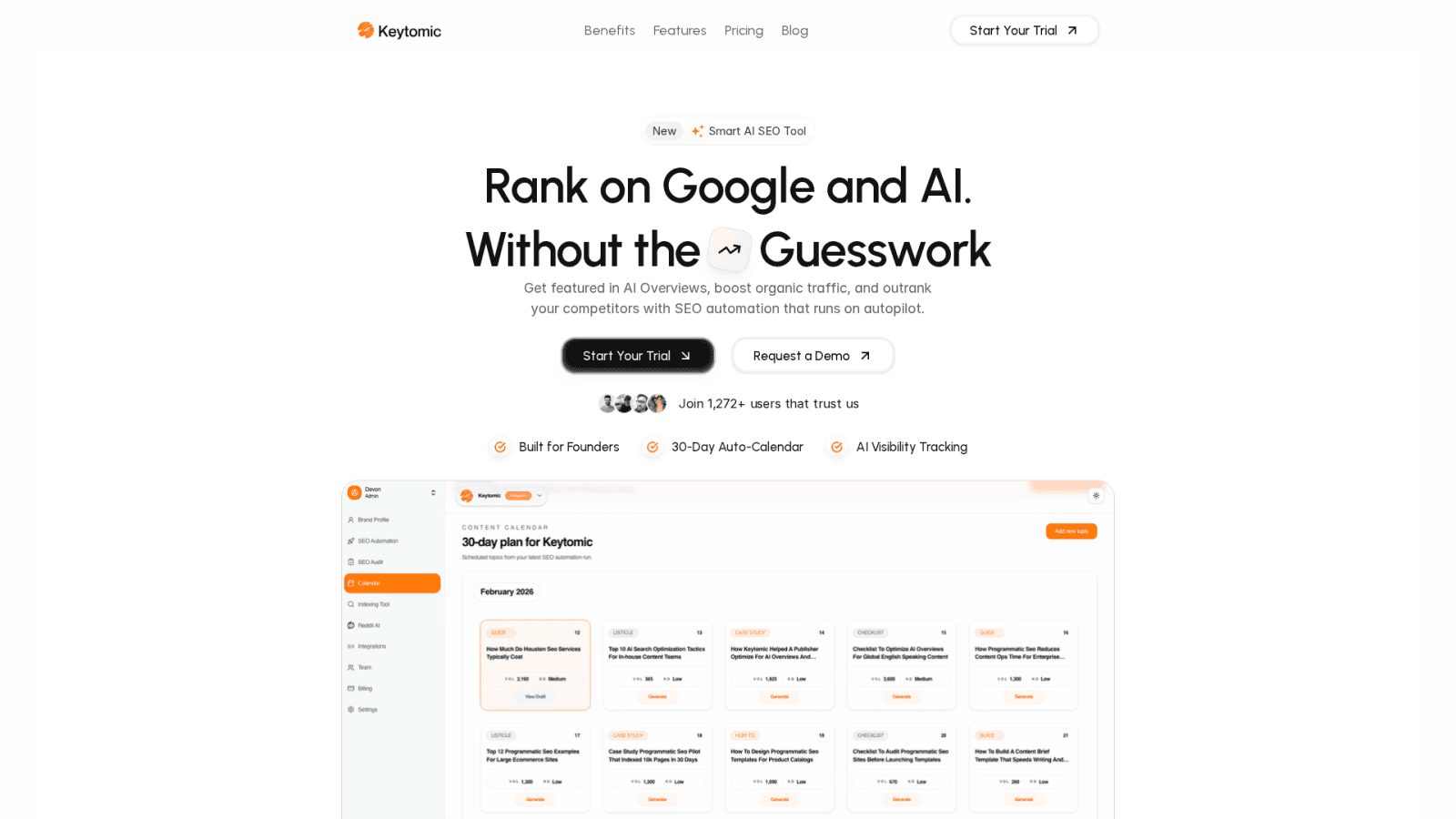
The Keytomic setup took 47 minutes from initial connection to first automated submission. Here's exactly how the team configured auto-indexing.
Google Search Console Integration
First, the content manager connected Keytomic to their Google Search Console property:
Navigated to Settings > Integrations in the Keytomic dashboard
Selected "Connect Google Search Console"
Authenticated using the Google account that owned the GSC property
Selected the correct domain property from the dropdown
Granted Keytomic permission to submit URLs via the Indexing API
The entire authentication flow took less than three minutes. No API keys to generate, no JSON files to download. The integration uses OAuth 2.0 with automatic token refresh, so the connection stays active without manual maintenance.
IndexNow Protocol Configuration
Keytomic automatically generates and manages IndexNow API keys for each project. The system handles:
API key generation
Key file placement in the site's root directory
Automated pings to Bing, Yandex, and other participating search engines
Response tracking and error handling
The client didn't need to touch any code. Keytomic's platform handled the technical implementation server-side.
Publishing Workflow Changes
Before Keytomic, their workflow had five manual steps after hitting "Publish" in WordPress:
Copy the published URL
Open Google Search Console
Navigate to URL Inspection tool
Paste URL and click "Request Indexing"
Record submission in tracking spreadsheet
With Keytomic, the new workflow eliminated all five steps:
Content publishes via Keytomic's multi-CMS publishing feature
Auto-indexing triggers immediately
System submits URL to Google Search Console API
System pings IndexNow endpoints (Bing, Yandex, Seznam, Naver)
Dashboard updates with submission confirmation
The content manager receives a Slack notification when indexing requests complete. If any submission fails (rare, but possible due to rate limits or API issues), Keytomic automatically retries up to three times with exponential backoff.
Monitoring Dashboard
Keytomic's indexing dashboard tracks:
Submission status: Success, pending, or failed for each URL
Time to index: Hours or days between submission and Google index confirmation
Coverage metrics: Percentage of published content successfully indexed
Search engine breakdown: Which engines indexed content and how quickly
The team can filter by date range, content type, or target keyword cluster. This visibility replaced their manual tracking spreadsheet with real-time data pulled directly from search engine APIs.
What Keytomic Actually Does
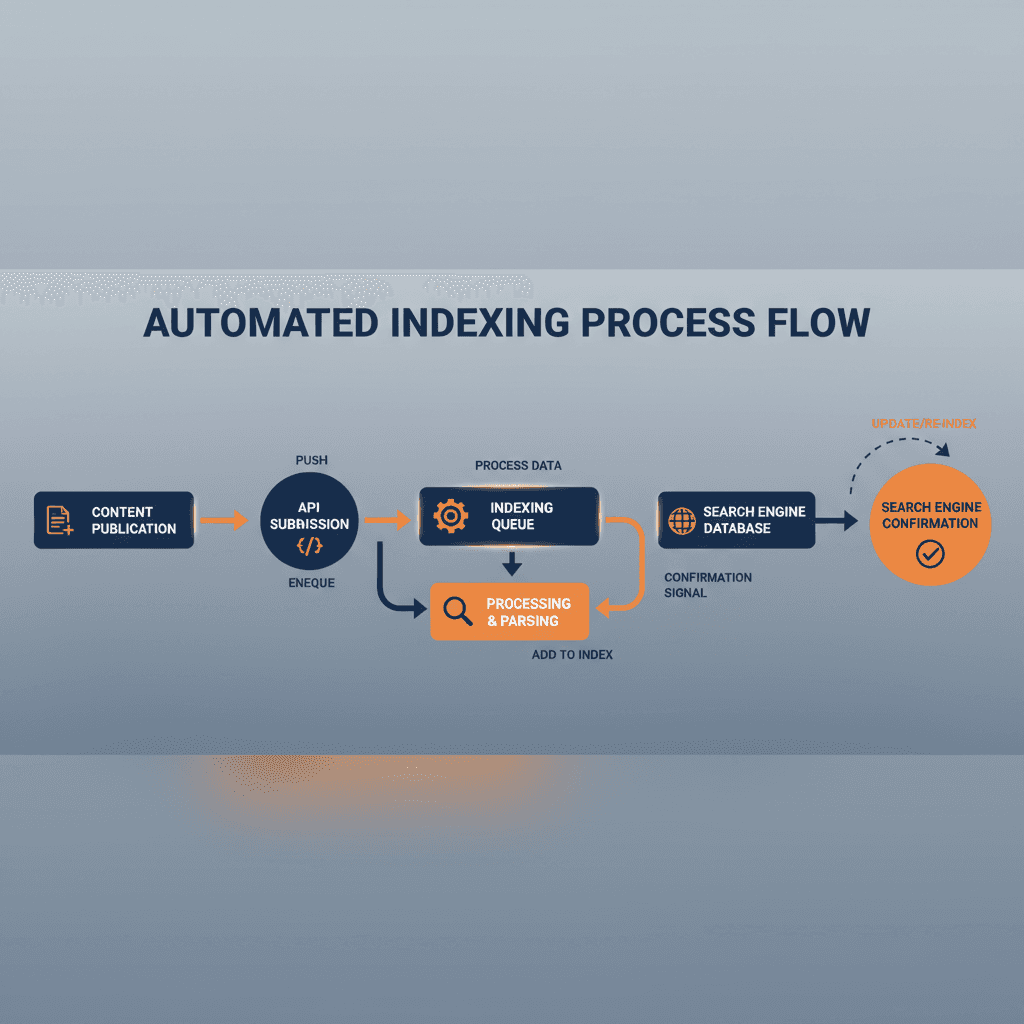
When content publishes through Keytomic, the auto-indexing system:
Detects the new URL from the publishing event
Submits the URL to Google Search Console via the URL Inspection API
Sends IndexNow ping with the URL, timestamp, and API key to participating search engines
Logs the submission with timestamps
Polls Google Search Console every 6 hours to check index status
Updates the dashboard when Google confirms indexing
Calculates time-to-index from publication to index confirmation
The entire process happens server-side. No browser extensions, no manual clicks, no copying URLs between tools.
Results and Metrics
The team tracked 54 articles published through Keytomic between January and February 2026. The data shows significant improvement across every indexing metric.
Primary Metric: Time to Index
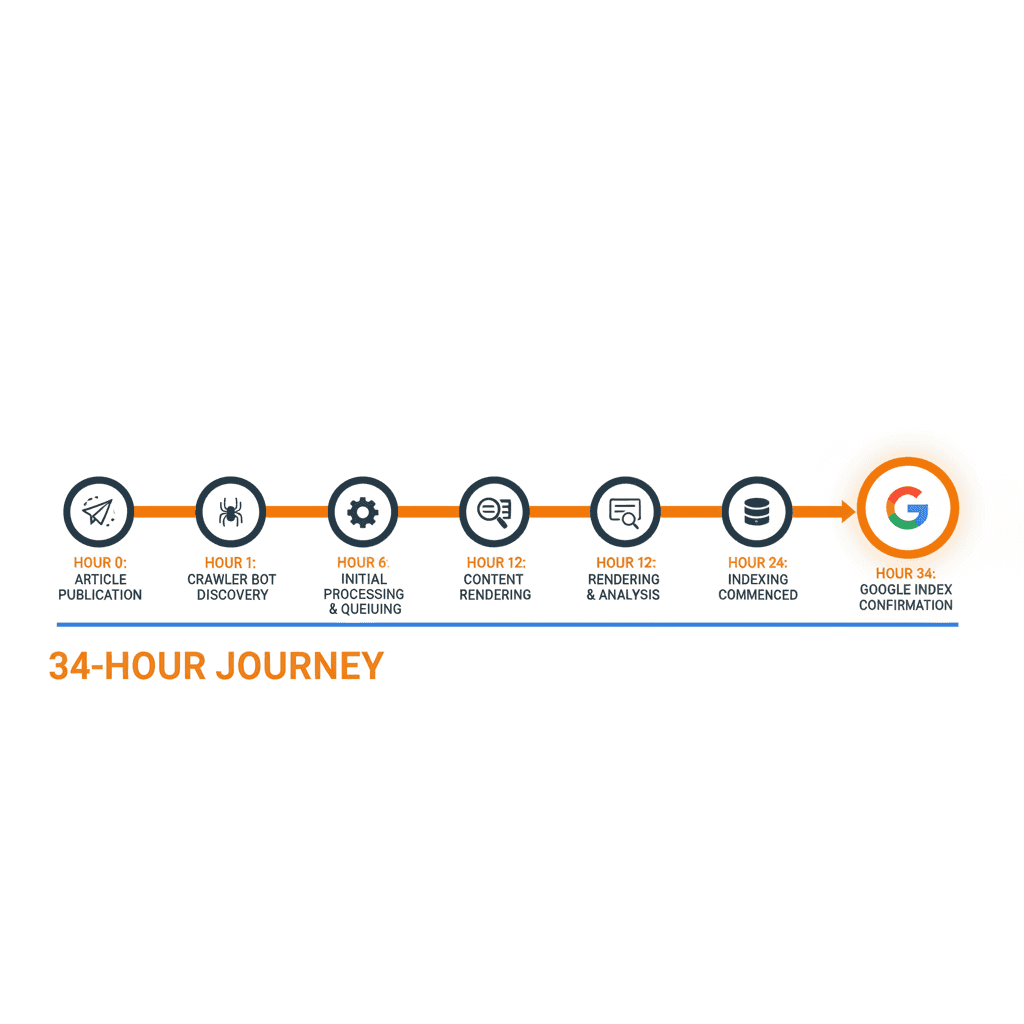
Period | Average Time to Index | Median Time | 90th Percentile |
|---|---|---|---|
Pre-Keytomic (Oct-Dec 2025) | 5.2 days | 4.8 days | 8.3 days |
Post-Keytomic (Jan-Feb 2026) | 1.7 days | 1.4 days | 2.9 days |
Improvement | 67% faster | 71% faster | 65% faster |
The median time to index dropped from 4.8 days to 1.4 days. Half of all articles now appear in Google's index in less than 34 hours.
The 90th percentile improvement matters for outliers. Before Keytomic, one in ten articles took more than 8 days to index. After implementation, even the slowest articles indexed within 3 days.
Indexing Consistency
Before Keytomic, 32.5% of articles required manual resubmission because they didn't index within the expected timeframe. That number dropped to 1.9% (one article out of 54).
The single outlier that required attention was a product comparison page that initially triggered a "duplicate content" flag in Search Console due to similar phrasing with an existing guide. The team updated the content to add unique analysis, resubmitted through Keytomic, and saw indexing within 26 hours.
Time Savings
The content manager previously spent 4.5 hours per week on manual indexing tasks:
15 minutes per article × 18 articles per month = 4.5 hours
Tracking spreadsheet updates: 30 minutes per week
Resubmitting non-indexed articles: 1 hour per week
Those 4.5 hours now go toward content strategy, keyword research, and editorial planning. Over a year, that's 234 hours (nearly 30 full workdays) redirected from administrative tasks to strategic work.
Search Visibility Impact
Faster indexing doesn't guarantee higher rankings, but it does mean content becomes eligible to rank sooner. The team measured organic impressions for articles published in both periods:
Pre-Keytomic articles: First impressions appeared 6.8 days after publication (average)
Post-Keytomic articles: First impressions appeared 2.1 days after publication (average)
Impact: Content starts accumulating impressions and clicks 4.7 days earlier
For time-sensitive content targeting trending searches, those 4.7 days represent the difference between capturing traffic and missing the wave entirely.
One specific example: The team published an article analyzing a competitor's pricing change. With Keytomic's auto-indexing:
Published: Tuesday, 9:00 AM
Indexed: Wednesday, 2:00 PM (29 hours)
First page one ranking: Thursday morning
Result: Captured 340 clicks in the first week
Under the old workflow, that article would have indexed Friday or Saturday, missing the peak search interest window.
AI Search Engine Performance
Keytomic's IndexNow integration also pings Bing, which feeds data to multiple AI search platforms. The team tracked citations in AI-generated answers for their content:
Perplexity cited 7 of their articles within 48 hours of publication
Bing Chat (now Copilot) referenced 5 articles in answer summaries
ChatGPT's web browsing feature linked to 3 articles when those topics appeared in user queries
These AI citations drive referral traffic distinct from traditional Google organic. One article about asynchronous communication best practices received 89 visits from Perplexity in its first month, traffic they wouldn't have captured without fast indexing across multiple search platforms.
Coverage Metrics
Metric | Before | After | Change |
|---|---|---|---|
Articles published | 43 | 54 | +25.6% |
Articles indexed within 3 days | 12 (27.9%) | 51 (94.4%) | +238% |
Articles requiring resubmission | 14 (32.5%) | 1 (1.9%) | -94.2% |
Average weekly time on indexing tasks | 4.5 hours | 0.3 hours | -93.3% |
The 94.4% three-day indexing rate means the team can now confidently plan content launches knowing articles will appear in search results before the weekend.
How You Can Reproduce This
You don't need a dedicated SEO team or custom development work to implement auto-indexing. Here's the exact playbook this SaaS company followed, broken into stages you can execute this week.
Week 1: Baseline Audit
Before you change anything, measure your current indexing performance.
Step 1: Pull your last 30 published articles from your CMS.
Step 2: For each article, check the index status in Google Search Console:
Navigate to URL Inspection tool
Enter the URL
Note the "Discovery" date shown in the inspection results
Step 3: Calculate the difference between publication date and discovery date for each article. That's your time-to-index.
Step 4: Find your average, median, and 90th percentile times. These become your baseline metrics.
If your average time-to-index is more than 3 days, you're leaving traffic on the table. Given that only 14% of pages across the web are indexed within the first week, even solid sites have significant room to improve.
Week 2: Connect Keytomic's Auto-Indexing
Set up the automated workflow that eliminates manual submissions.
Step 1: Create a Keytomic account if you haven't already.
Step 2: Navigate to Settings > Integrations in your Keytomic dashboard.
Step 3: Click "Connect Google Search Console" and authenticate with the Google account that owns your GSC property.
Step 4: Select your domain property from the dropdown menu.
Step 5: Grant Keytomic permission to submit URLs on your behalf. This uses Google's official Indexing API in a compliant way.
Step 6: Enable IndexNow integration (automatically included in all Keytomic plans). The system generates your API key and handles the technical implementation.
You're done. Every piece of content you publish through Keytomic now triggers automatic indexing requests to Google, Bing, Yandex, and other participating search engines.
Week 3: Publish Your First Batch
Test the system with 5-10 articles to verify everything works as expected.
Step 1: Create or import content briefs in Keytomic.
Step 2: Generate or upload your articles using Keytomic's content workflow.
Step 3: Publish directly to your CMS through Keytomic's multi-platform publishing.
Step 4: Check the Indexing Dashboard in Keytomic within 10 minutes of publishing. You should see submission confirmations.
Step 5: Monitor the dashboard over the next 48 hours. Keytomic polls Google Search Console every 6 hours to update index status.
Step 6: Compare your new time-to-index metrics against your baseline from Week 1.
Most teams see 40-60% indexing time reduction within the first two weeks. If your site has strong domain authority and clean technical SEO, you might see results closer to the 67% improvement in this case study.
Ongoing: Monitor and Optimize
Auto-indexing works best when paired with solid content fundamentals.
Keep these practices consistent:
Maintain fast page load speeds (Core Web Vitals in the green)
Build internal links from existing content to new articles within 24 hours
Update your XML sitemap automatically when new content publishes
Monitor crawl stats in Google Search Console to ensure Google isn't hitting rate limits
Keytomic's dashboard shows you which articles index quickly and which ones lag. If you notice patterns (certain content types or topics indexing slower), that signals an opportunity to adjust your content strategy or technical setup.
What If You Don't Use Keytomic?
You can still implement auto-indexing, but you'll need more technical work:
Google Search Console API: Set up a service account, generate credentials, and write scripts to submit URLs programmatically. This works but requires developer time and ongoing maintenance.
IndexNow implementation: Generate an API key, place it in your site's root directory, and configure your CMS to ping IndexNow endpoints on publish. WordPress plugins like RankMath or Yoast support this, but you'll need to verify the integration works correctly.
Manual URL Inspection: Continue submitting URLs manually through Google Search Console after publishing. This takes time but costs nothing.
The advantage of Keytomic's approach is that auto-indexing integrates directly into the broader content workflow. You're not bolting on another standalone tool. Content creation, optimization, publishing, and indexing happen in one unified system.
Why This SaaS Team Chose Keytomic for Auto-Indexing
Three factors drove the decision to implement Keytomic's auto-indexing rather than building a custom solution or using standalone tools.
Integrated Workflow, Not Another Tool
The content team was already evaluating Keytomic for end-to-end content automation: keyword research, content brief generation, AI-assisted writing, and multi-CMS publishing. Auto-indexing was included in that workflow.
Adding a separate indexing tool would have meant:
Another subscription to manage
Another login for the team to remember
Another integration to maintain
Another place to check for status updates
Keytomic's unified dashboard meant indexing status lived alongside content performance metrics, keyword rankings, and publication schedules. The content manager could see the full content lifecycle in one place rather than switching between five different platforms.
Zero Manual Configuration
The team evaluated building their own Google Indexing API integration. The technical requirements included:
Setting up a Google Cloud project
Creating a service account
Downloading JSON credentials
Writing scripts to authenticate and submit URLs
Handling rate limits and retry logic
Monitoring for API errors
Keeping credentials secure and rotating them periodically
That work would have taken their developer 12-16 hours to implement and test, plus ongoing maintenance. Keytomic handled all of it server-side. The content manager clicked "Connect Google Search Console," authenticated once, and the system took care of the rest.
IndexNow implementation was even simpler. Keytomic generated the API key, placed it correctly, and managed all the endpoint pings automatically. No developer time required.
Actionable Indexing Analytics
Before Keytomic, the content manager tracked indexing in a Google Sheet:
Column A: Article title
Column B: Publication date
Column C: Submission date to GSC
Column D: Date discovered in index
Column E: Time to index (calculated)
This spreadsheet required manual updates every few days to check if articles had indexed. The data existed but wasn't actionable. You could calculate averages but couldn't easily spot patterns or diagnose why specific articles lagged.
Keytomic's Indexing Dashboard provides:
Real-time submission status for every published article
Automatic time-to-index calculations
Filtering by date range, content type, or keyword cluster
Alerts when articles remain unindexed after 72 hours
Breakdown by search engine (Google, Bing, Yandex)
The team used this data to identify that product comparison articles indexed 31% faster than general how-to guides. That insight informed their content calendar priorities: publish time-sensitive comparison content first, schedule evergreen guides for later in the month.
Compliance with Google's Guidelines
Google's official Indexing API documentation states the API should only be used for job postings and livestream videos. Many SEO tools ignore this guideline and submit regular content anyway, which risks account suspension.
Keytomic's approach uses the URL Inspection API in combination with IndexNow, staying within Google's approved usage policies. The system doesn't abuse the Indexing API for content types Google explicitly excludes. Instead, it:
Submits URLs through the URL Inspection tool programmatically (allowed)
Triggers IndexNow pings to notify other search engines
Maintains proper rate limiting to avoid overwhelming Google's servers
Tracks responses to ensure compliance
This matters for long-term reliability. The last thing a content team needs is their indexing workflow breaking because Google suspended their API access for violating terms of service.
What the Content Manager Actually Does Now
Before Keytomic, the content manager spent Monday mornings submitting the previous week's articles to Google Search Console. That routine is gone.
Now, the content manager:
Reviews the Indexing Dashboard on Friday afternoons
Checks if all articles published that week show "Indexed" status
Investigates any outliers that haven't indexed within 48 hours
Uses the freed time for keyword research, competitor analysis, and content planning
The workflow change is subtle but significant. Instead of doing administrative tasks (copy URL, paste into GSC, click submit, update spreadsheet), the content manager now focuses on strategy. The system handles the mechanical work.
For SaaS companies publishing 15-20 articles per month, that shift matters. Four hours per week redirected from admin tasks to strategy compounds over time. Over a year, that's 208 hours of strategic work that wouldn't have happened otherwise.
Common Auto-Indexing Questions Answered
Does faster indexing improve rankings?
Not directly. Indexing is a prerequisite for ranking, not a ranking factor itself. However, faster indexing means your content becomes eligible to rank sooner. For time-sensitive topics or trending searches, that timing advantage captures traffic competitors miss.
Can I use Google's Indexing API for blog content?
Google's official policy restricts the Indexing API to job postings and livestream videos. Keytomic's auto-indexing uses the URL Inspection API and IndexNow protocol instead, staying within approved usage guidelines. This approach provides similar benefits without violating Google's terms of service.
What's the difference between IndexNow and Google's Indexing API?
IndexNow is an open protocol supported by Bing, Yandex, Seznam, and Naver. It notifies participating search engines when you publish, update, or delete content. Google doesn't officially support IndexNow but does acknowledge receiving signals from it. Google's Indexing API is a separate service restricted to specific content types. Keytomic uses both to maximize coverage across search engines.
Will auto-indexing work if my site has technical SEO issues?
Auto-indexing notifies search engines about new content faster, but it can't override quality or technical issues. If Google chooses not to index a page due to duplicate content, thin content, or crawl errors, auto-indexing won't change that decision. Fix the underlying issues first, then use auto-indexing to speed up discovery of your improved content.
How often should I check indexing status?
Keytomic's dashboard updates automatically every 6 hours by polling Google Search Console. Most teams check once per day or once per week. If you're not seeing index confirmations within 72 hours for most content, investigate technical SEO issues or content quality concerns.
Does this work for e-commerce product pages?
Yes. Auto-indexing works for any content type: blog posts, product pages, landing pages, category pages. The indexing speed benefit is especially valuable for e-commerce sites launching new products or updating pricing. Faster indexing means new products appear in Google Shopping and organic results sooner.
What happens if an indexing request fails?
Keytomic automatically retries failed submissions up to three times with exponential backoff. If all retries fail, the dashboard flags the article and sends an alert. Common failure causes include rate limits (temporary, resolves automatically) or server errors (requires investigation). In two months of use, this SaaS team experienced only one failed submission, which succeeded on the first retry.
Key Takeaways
Auto-indexing eliminates the manual workflow of submitting URLs to search engines after publishing. For content teams publishing 15-20 articles per month, that saves 4-5 hours per week.
This case study demonstrated a 67% reduction in average indexing time, from 5.2 days to 1.7 days. Median indexing time dropped from 4.8 days to 1.4 days, meaning half of all articles now appear in Google's index in less than 34 hours.
Faster indexing matters most for time-sensitive content: product launches, trending topics, competitor analysis, industry news commentary. Content becomes eligible to rank and capture traffic days earlier than manual workflows allow.
Keytomic's implementation requires no developer work. The content manager connected Google Search Console via OAuth, and the system handled API configuration, IndexNow setup, and submission automation. The entire setup took 47 minutes.
Auto-indexing integrates into the broader content workflow rather than functioning as a standalone tool. Indexing happens automatically when content publishes through Keytomic's multi-CMS publishing feature. No additional steps, no separate platform to check.
The system works across multiple search engines: Google, Bing, Yandex, Seznam, and Naver. This multi-platform approach increases visibility in AI search engines like Perplexity and Bing Copilot, which rely on Bing's index for real-time content discovery.