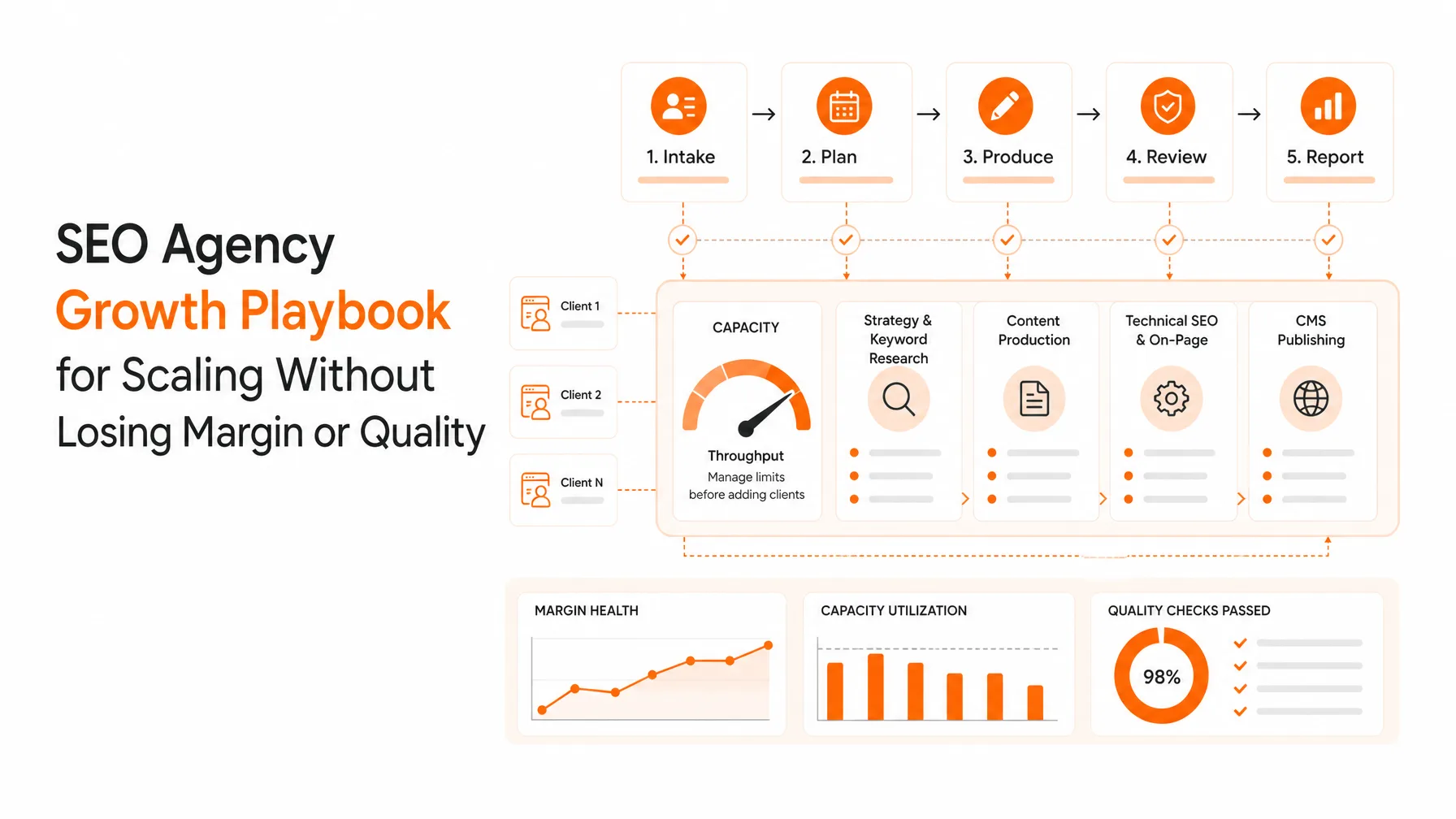
SEO automation tools are software platforms that automate repetitive SEO work like keyword research, content briefs, drafting, on-page checks, CMS publishing, and indexing notifications. The best SEO automation tools add governance and reporting so teams can ship more pages per month, reduce errors, and measure indexing and traffic impact by topic and intent.
If your team ships content weekly but indexing lags for days, you are paying for content that cannot rank yet. The right seo automation tools reduce that gap by standardizing keyword discovery, speeding publishing, and pushing the right indexing signals right after launch.
You also need a workflow that does not break when the founder is busy, the agency changes writers, or the CMS changes permissions. That is why seo automation tools are now less about “writing faster” and more about repeatable execution: discover keywords, map intent, publish safely, and confirm discovery.
Start here if you want an automation-first workflow with governance built in: Keytomic.
The buyer jobs-to-be-done are consistent across founders, marketing teams, and agencies:
You want more content shipped per month without hiring 2 more people.
You want faster discovery so new pages can start competing sooner.
You want fewer production mistakes like missing canonicals, wrong templates, duplicate pages, or unapproved drafts going live.
And in 2026, you also want visibility in AI-driven search answers, which rewards clear topical coverage and consistent publishing cadence.
Automation is not a free pass to publish low-value pages. Google has tightened spam policies around scaled content abuse and site reputation abuse, so your system must include quality gates and ownership controls, not just volume.
For example, Google’s March 2024 update expanded spam policies targeting scaled content abuse, and Google reported completing changes with “45% less low-quality, unoriginal content” showing in results. See: Google Search update March 2024.
Also note: “instant indexing” claims are often misleading. Google’s Indexing API is limited to specific page types like job postings and livestreaming pages, so for most sites, faster indexing is mainly about clean publishing, internal linking, sitemaps, crawl efficiency, and valid submission channels to other engines. See: Google Indexing API usage limits.
Here is the practical reason teams adopt seo automation tools anyway: they turn SEO from a set of one-off tasks into a pipeline you can forecast.
When you can predict output, you can tie it to pipeline, revenue, and retention. That is what founders and agencies care about.
Why choose seo automation tools today
If your team ships content weekly but indexing lags for days, you are paying for content that cannot rank yet. The right seo automation tools reduce that gap by standardizing keyword discovery, speeding publishing, and pushing the right indexing signals right after launch.
You also need a workflow that does not break when the founder is busy, the agency changes writers, or the CMS changes permissions. That is why seo automation tools are now less about “writing faster” and more about repeatable execution: discover keywords, map intent, publish safely, and confirm discovery.
What “faster indexing” realistically means
Faster indexing is not one trick. It is a chain of events that either happens smoothly or stalls.
First, a page must be published cleanly with correct status codes, canonicals, and indexability rules.
Second, the page must be discoverable through internal links, sitemaps, and feeds. If it is orphaned, it will wait.
Third, search engines must decide it is worth crawling soon. That depends on site quality, crawl budget, and change frequency.
Fourth, the engine must process and potentially index it. That can lag even after a crawl.
Good seo automation tools help at steps 1 and 2 every time, and then provide a consistent workflow to improve step 3 over time.
Where teams lose time without automation
Most teams do not lose time in writing. They lose time in rework.
A writer drafts without the right intent.
An editor rewrites to match the SERP.
A marketer waits for dev to add internal links.
A page is published with the wrong template or missing schema.
Then someone checks Search Console two weeks later and finds the page never got discovered.
Automation reduces these misses by making the “right way” the default.
Quick reality check on indexing APIs
If a vendor promises Google “auto-indexing” for all pages, ask them to show exactly what they mean.
Google’s Indexing API is explicitly scoped to job posting and livestream pages. See: Indexing API Quickstart.
Bing, on the other hand, offers URL submission APIs with high daily limits, including mention of up to 10,000 URLs per day depending on site and quota. See: Bing URL Submission API.
So when we talk about seo automation tools for indexing, you should evaluate:
Which engines they can submit to.
What they do for discovery signals.
How they prevent indexation blockers.
And how they verify outcomes.
Key capabilities to compare

Most teams compare seo automation tools by “how good the content sounds.” That is the wrong lens for decision-stage buyers.
You should compare them like you would compare any production system: inputs, controls, outputs, and failure modes.
In practice, five capability buckets decide whether your automation works for months, not just one sprint.
1) Keyword research that outputs a publishable plan
Strong keyword research is not a list. It is a plan your team can execute.
Look for:
Clear intent labels (informational, commercial, transactional) with a consistent method.
Topic clustering and internal link suggestions, not just “related keywords.”
Content type guidance: landing page vs blog vs comparison vs integration page.
SERP reality checks: what already ranks and what the winning format is.
When evaluating seo automation tools, ask for a sample output:
Give them one seed topic and your target customer.
Request 30 keywords that map to a 30-day calendar.
Request titles, target pages, and internal links.
If the tool cannot produce a calendar your team can actually publish, it is not automation. It is data.
2) Autopublish that respects your CMS and approvals
Autopublish is only helpful when it respects permissions.
Your content pipeline should support:
Draft creation in the CMS.
Human review gates.
Scheduling.
Template selection.
Slug rules.
Canonical rules.
Noindex controls for experiments.
This matters because the fastest way to tank trust is to publish 50 pages that should have stayed in draft.
A good autopublish feature makes “draft-first” the default and “publish-now” an explicit action.
3) Auto-indexing that is honest and measurable
Auto-indexing is a loaded term.
What you actually want is “faster discovery + fewer indexing blockers + optional submissions where allowed.”
A credible system will:
Ping sitemaps when pages ship.
Update RSS feeds when applicable.
Create internal links from existing high-crawl pages.
Submit URLs to Bing via API.
Track status changes over time.
And it will not claim it can force Google to index arbitrary pages via the Indexing API, because that API is scoped. See: Google Indexing API usage limits.
4) Integrations that remove handoffs
The best seo automation tools integrate with the systems your team already runs:
CMS (WordPress, Webflow, headless CMS, Shopify).
Search Console and Bing Webmaster Tools.
Analytics (GA4).
Rank tracking.
Slack or email alerts.
If the platform forces CSV exports, it is not automation. It is busywork.
5) Governance and brand safety
If you are publishing at scale, governance is not optional.
You need guardrails that prevent:
Duplicate topics.
Keyword cannibalization.
Thin pages.
Off-brand tone.
Unapproved claims.
Uncited statistics.
Compliance issues.
This is also where SEO meets policy. Google has reinforced enforcement against site reputation abuse, clarifying that third-party content intended to exploit a host site’s ranking signals can violate policy even with “involvement.” See: Google Search Central policy update.
Comparison table you can use in vendor demos
Use this table in your next 30-minute demo. It forces vendors to show receipts.
Capability | What to ask | What good looks like | Red flag |
|---|---|---|---|
Keyword research plan | “Show me a 30-day calendar from one seed keyword.” | Clusters + intent + titles + internal links | Keyword list only |
Autopublish | “Can it create drafts and schedule posts in our CMS?” | Draft-first, approvals, templates | Direct publish by default |
Auto-indexing | “Which engines? How do you verify indexing?” | Bing API + sitemap pings + status tracking | Claims Google instant indexing |
Integrations | “What’s native vs via Zapier?” | Native CMS + analytics + search tools | CSV workflows |
Governance | “How do you prevent low-quality scaled pages?” | QA gates, duplication checks, rules | ‘Just generate more’ |
Pick 3–5 vendors, run them through the same prompts, and score outputs, not promises.
Semantic entities to ensure your tool supports
When judging content automation quality, check whether the tool naturally handles the entities your audience expects. For this topic, that includes:
Google Search Console
Bing Webmaster Tools
GA4
XML sitemap
robots.txt
canonical tags
structured data (Schema.org)
internal links
crawl budget
index coverage / indexing status
core updates and spam policies
site reputation abuse
If a platform cannot talk clearly about these, it will not ship reliable SEO.
Step-by-step selection checklist

Buying seo automation tools should feel like buying a production system, not a writing assistant.
This checklist is designed to prevent the two most common failure modes:
You buy a tool that writes, but cannot publish.
You buy a tool that publishes, but cannot protect quality.
Follow these steps in order. Do not skip the baseline.
Step 1 Run a baseline audit of your current pipeline
Start with a 60-minute internal audit.
Write down your current process from “keyword idea” to “indexed page.” Keep it literal.
Include:
Who does keyword research.
Where briefs live.
Where drafts are written.
Who edits.
Who publishes.
How pages are linked.
How you check indexing.
Now measure three numbers from the last 30 days:
Pages published.
Median time from publish to first crawl (if you can estimate).
Percent of pages that were not indexed after 14 days.
If you do not have these numbers, that is already a reason to pick seo automation tools with reporting.
Step 2 Define what “good” indexing looks like for you
Be specific.
A realistic starting target for many teams is:
80% of new pages discovered within 7 days.
60% indexed within 14 days.
Trend improves month over month.
Do not promise “index in hours.” You cannot control that. You can control inputs.
Step 3 Create a vendor scorecard (copy this)
Use a 0–3 scoring model so reviews stay consistent.
0 = missing
1 = weak
2 = good
3 = best-in-class
Score these criteria:
Keyword discovery quality
Intent mapping accuracy
Brief quality and on-page guidance
Editorial workflow (drafts, approvals)
Autopublish reliability
Auto-indexing honesty and verification
Internal linking support
Schema support
Integrations
Governance controls
Team permissions
Reporting
Step 4 Run the same paid pilot across 2 finalists
Do not do a “demo-only” decision.
Run a pilot that produces real pages.
Pilot requirements:
10 articles in 14 days.
At least 2 different intents (informational + commercial).
Published to your real CMS.
Tracked from publish to discovery and indexing.
Include at least 1 internal link block in each article.
If a vendor cannot support this pilot, they will not support scale.
Step 5 Verify what the platform calls “auto-indexing”
Ask the vendor to show the actual mechanism.
Acceptable answers:
Sitemap pinging and feed updates.
Bing URL submissions.
Internal link creation workflows.
Search Console monitoring.
Unacceptable answers:
Anything implying Google Indexing API for normal content pages. Google documents the limited scope of that API. See: Using the Indexing API.
Step 6 Check governance against spam policy risk
If you are scaling content output, you must ensure quality and ownership.
Google expanded spam policies around scaled content abuse, focused on low-value pages made to manipulate rankings. See: March 2024 core update and spam policies.
Your tool should help you avoid:
Publishing pages that do not answer the query.
Duplicating topics with slightly different keywords.
Hosting third-party content that exists only to exploit your domain’s authority.
Step 7 Make a 90-day rollout plan
A good rollout has phases.
Phase 1 (weeks 1–2): connect CMS, set templates, define review flow.
Phase 2 (weeks 3–6): publish 2–4 posts per week; refine briefs.
Phase 3 (weeks 7–12): expand to 30-day calendar; add internal linking system; build reporting.
This is where seo automation tools pay off: consistent volume with fewer mistakes.
Simple scorecard template (table)
Use this as a copy-paste template in a spreadsheet.
Category | Weight | Vendor A score (0–3) | Vendor B score (0–3) | Notes |
|---|---|---|---|---|
Keyword plan quality | 15% |
|
|
|
Intent mapping | 10% |
|
|
|
Draft quality | 10% |
|
|
|
Editorial approvals | 10% |
|
|
|
Autopublish | 10% |
|
|
|
Auto-indexing verification | 10% |
|
|
|
Integrations | 10% |
|
|
|
Governance | 15% |
|
|
|
Reporting | 10% |
|
|
|
If you cannot weight a category, you do not know what you are buying yet.
How Keytomic solves each criteria
If you want seo automation tools that behave like a production engine, you want three things at once: planning, execution, and proof.
Keytomic is built around that loop. It is designed to automate keyword research, map intent, create content, publish through CMS workflows, and push discovery workflows so pages have a clean path to indexing.
This section maps the exact selection criteria from the checklist to what you should demand from a platform, and where Keytomic fits.
Keyword research to a 30-day calendar
Keytomic is positioned as an automation engine that turns keyword discovery into a rolling plan, not a spreadsheet you never ship.
What to look for in practice:
A topic cluster per product or ICP.
A mix of informational and commercial pages.
Clear titles and slugs.
Internal linking direction so each page is not orphaned.
Keytomic’s “30-day rolling content calendar” positioning matters because it forces planning into a cadence you can execute.
If you are an agency, this also gives you a repeatable deliverable: “here is what we ship next month and why.”
Intent mapping and brief quality
Bad intent mapping is the hidden cost of content scale.
When the intent is wrong, editors rewrite, PMs argue, and pages do not rank.
Keytomic’s value here should show up as:
Clear intent labels.
Briefs that include page structure guidance.
Entity coverage recommendations.
Internal links and CTAs aligned to funnel stage.
That is the difference between “content generation” and SEO production.
Autopublish with governance
Publishing is where most automation tools fall apart.
They can draft, but they cannot publish safely.
Keytomic is positioned around CMS publishing workflows, which is what decision-stage buyers need.
Your requirements should be:
Draft-first publishing.
Scheduling.
Template control.
Team permissions.
When Keytomic is configured correctly, your team can spend time on review, not copy-paste.
Auto-indexing as a system, not a promise
Keytomic’s positioning around “faster discovery via auto-indexing” should be evaluated the right way.
For most sites, “auto-indexing” should mean:
Automatic submission to engines that support it.
Sitemap and feed updates.
Internal link creation or prompts.
Monitoring so you know what got discovered.
Remember the constraint: Google’s Indexing API is scoped to job posting and livestream pages. Any seo automation tools claiming otherwise should explain their method clearly. See: Google Indexing API scope.
For Bing, URL submission via API is a real channel, and Bing documents high submission limits in its webmaster tooling. See: Bing URL Submission API.
So in a Keytomic demo, ask to see:
How it triggers submissions.
How it tracks indexing status.
How it alerts you when a page is not discovered.
Integrations that reduce handoffs
Keytomic’s all-in-one positioning matters most when it reduces tool sprawl.
Your team should not have to stitch together:
Keyword tool
Brief tool
Writer tool
CMS plugin
Indexing tool
Spreadsheet
Slack reminders
When those live in separate systems, mistakes multiply.
Keytomic’s promise is simple: one system that connects keyword discovery → content creation → CMS publishing → indexing workflows.
Reporting you can show a founder
A founder does not want “SEO activity.” They want outcomes.
Your seo automation tools should report:
Pages shipped per week.
Indexing status over time.
Early impressions and clicks.
Winners by topic cluster.
Keytomic should make it easy to answer: “What did we ship, what got discovered, and what is moving?”
Why Keytomic stands out
Most seo automation tools focus on content output. Keytomic focuses on execution.
That difference shows up in three ways:
It is designed as an autopilot workflow, not a writing app.
It connects planning to publishing so content actually goes live.
It treats indexing and discovery as part of the pipeline, not an afterthought.
If you want to see whether Keytomic fits your stack, start with a real pilot: one seed topic, one ICP, one 30-day calendar, then publish the first 10 pages.
Get the system working before you scale volume.
Next steps and checklist download

You do not need perfect tooling to start. You need a process you can repeat every week.
If you are choosing seo automation tools, the fastest path is:
Pick the workflow you want.
Run a 14-day pilot.
Measure indexing and early traction.
Then scale.
Here is a simple next-steps plan you can run this week.
1) Decide your publishing cadence for the next 30 days
Pick a number your team can hit without burnout.
For most small teams, that is 8 to 16 posts in 30 days.
For agencies with approvals, start with 8.
Consistency beats a one-time sprint.
2) Download the checklist and scorecard
If you are building a vendor evaluation doc, the scorecard from this article is your starting point.
Also create a one-page “definition of done” for each published page:
Correct template
Correct canonical
Indexable
In sitemap
Has 3 internal links
Has 1 clear CTA
Has citations for every statistic
3) Build a 30-day calendar sample
Your “lead magnet” is not a PDF. It is a calendar your team can publish.
Create a 30-day calendar sample with:
10 informational posts
10 commercial posts
10 comparison or alternatives posts
Even if you publish only 12 next month, the calendar becomes your backlog.
Keytomic is designed around this rolling calendar approach, so you can keep production steady instead of restarting every month. See: Keytomic.
4) Run one pilot workflow end to end
Choose one topic cluster, publish 10 pages, then measure:
How fast pages are discovered.
How many are indexed in 14 days.
Which topics get impressions first.
Where you have technical blockers.
If you want help building the pipeline, Keytomic is a strong fit for teams that want automation from keyword discovery through CMS publishing and indexing workflows.
Final key takeaways
Choose seo automation tools that produce a publishable calendar, not just keyword lists.
Prioritize CMS autopublish with approvals and template controls to prevent production mistakes.
Treat auto-indexing as discovery workflows plus measurable submissions, not a magic button.
Run a 14-day pilot with 10 real pages to compare tools using the same inputs.
Keytomic is built for execution: rolling calendars, CMS publishing, and discovery workflows.
FAQs
For a broader comparison, see choosing automation software for clients.