Table of Contents
Share Article
How Important Is Page Speed for SEO in 2026?
How Important Is Page Speed for SEO in 2026?
How Important Is Page Speed for SEO in 2026?

Kashaf
SEO Manager
Slow sites lose rankings. Discover why page speed for SEO is more critical than ever in 2026 and get the latest optimization tips.
I have been in the SEO game for years now and have optimized hundreds of websites in ecommerce, SaaS, and service industries. One pattern I see all the time is that businesses invest a lot of effort in content, backlinks and keyword strategy - then totally neglect page speed. The outcome is predictable; well optimized content that is never able to achieve its ranking potential because the site it sits on is too slow for Google to reward. Page speed is no longer a nice to have, in 2026 it is one of the clearest levers an SEO practitioner can pull that is measurable and tangible.
Page speed refers to how fast a web page loads and is usable to a visitor. It is different than general site speed which is the average performance of the entire domain. A slow page generates friction at every point of the user journey - from the point the searcher clicks one of the results, to the point they try to interact with a form, product grid or navigation element. Yottaa's 2025 Web Performance Index, which analyzed more than 500 million visits to 1,300 ecommerce sites, found that 63% of visitors bounce from pages that take more than four seconds to load - and that one second of time saved can increase mobile conversions by 3% on average. These are not marginal gains. They are the difference between a converting page and a page that bleeds revenue.
The pain points I find most commonly are: slow websites falling off page one even with good content quality, high bounce rates on mobile due to images never fully rendering and ecommerce stores losing transactions to competitors with a faster loading page. In 2026, given that Google's Core Web Vitals are fully integrated into its ranking systems and that AI search engines are focusing on well-structured and fast-loading pages for citation, page speed is directly linked to visibility, engagement and revenue. Understanding how to measure it, why it is important and how to fix it is non-negotiable when it comes to any serious SEO strategy. I discussed broader patterns of performance in this overview of SEO performance trends that is still worth reading in conjunction with this guide.
What Is Page Speed in SEO?
Page speed is the speed at which the visible content of a given page is loaded for a user. It is distinct from site speed, which is an aggregate score across multiple pages and is used in tools such as Google Search Console to flag systemic performance issues across a domain. A site may have an acceptable average speed but will have individual high traffic pages - like category pages or landing pages - which are critically slow and dragging down rankings.
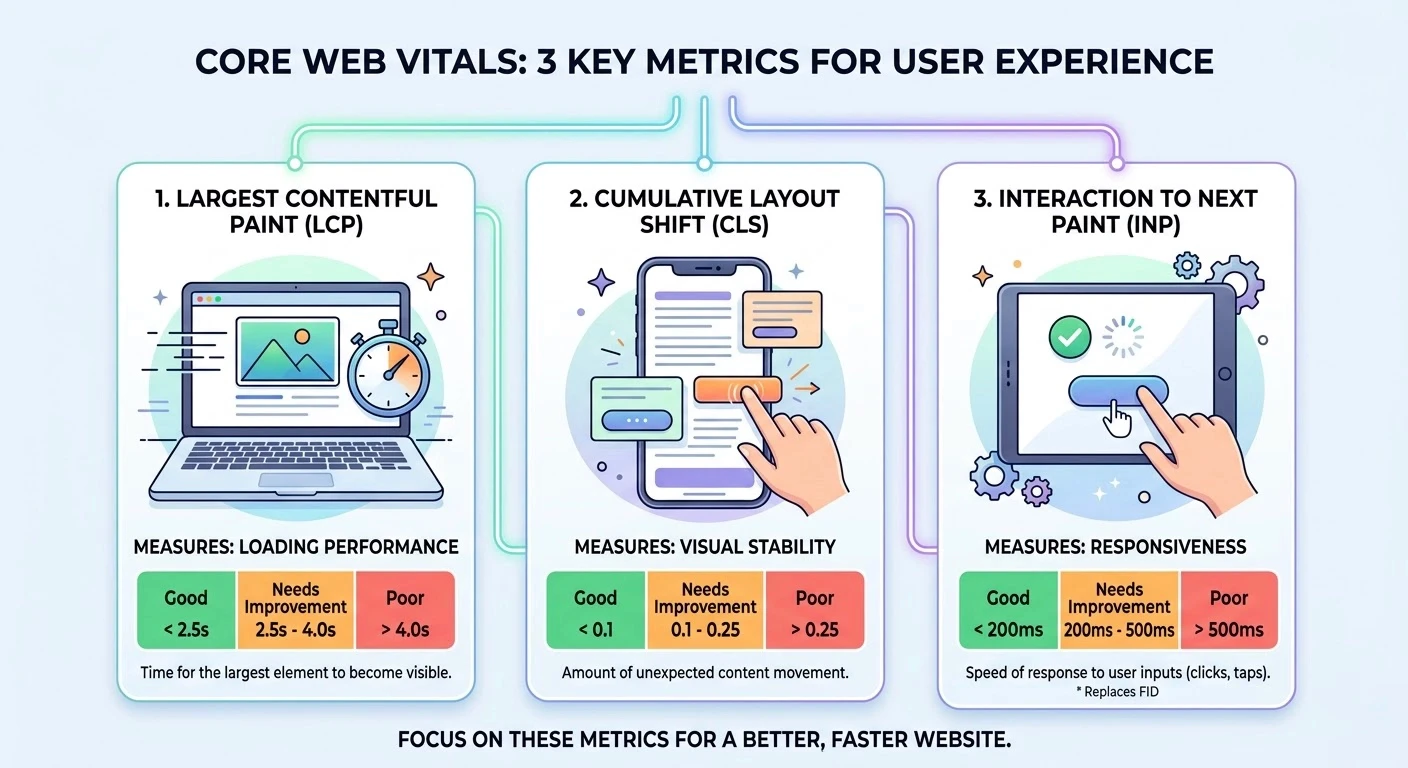
The best available framework for determining page speed in an SEO context is Google's Core Web Vitals - a suite of three standardized metrics released as official ranking signals and now hard-wired into Google's Page Experience algorithm. Understanding the following three metrics is the starting point of any page speed audit:
Largest Contentful Paint (LCP)
LCP is a measure of how long it takes for the largest visible content element - typically a hero image, heading or above-the-fold text block - to fully render. Google's Core Web Vitals documentation states that a 'Good' LCP is less than 2.5 seconds. Pages which miss this threshold take a long time to load from the user's perspective, even if technically the page has started to render before this. In my experience, the LCP failures are almost always caused by unoptimized hero images or render blocking third-party scripts.
Interaction to Next Paint (INP)
INP replaced First Input Delay (FID) as an official Core Web Vital in March 2024, and has been weighted in Google's ranking systems throughout 2025. INP measures how fast a page will respond to each user interaction - clicks, taps, keyboard inputs - over the course of the entire session, and not just the first one. A 'Good' score is below 200 milliseconds. Poor INP is often the result of bloated JavaScript that prevents the browser's main thread from running on the page, so even once the page visually loads, it feels sluggish.
Cumulative Layout Shift (CLS)
CLS measures visual stability - in particular, how much of the page content moves unexpectedly during the loading of the page. A 'Good' CLS score is under 0.1. High CLS scores indicate that elements such as text, buttons and images move around when the page is loaded, causing users to misclick or lose their place. It is one of the most frustrating user experience problems and is completely avoidable with the correct dimensions declaration of images and font loading strategies.
Why Page Speed Matters for SEO
Google Ranking Factor
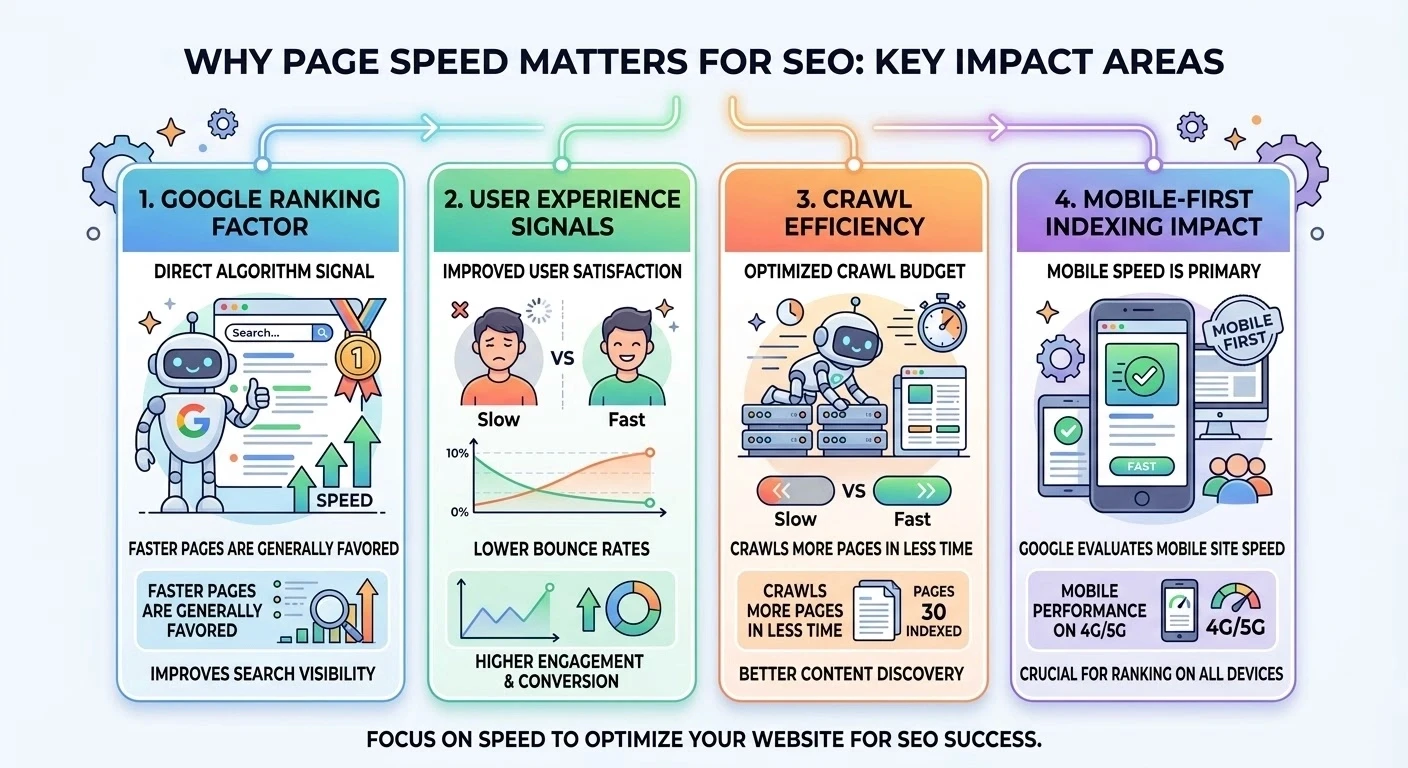
Page speed was an explicit Google ranking factor for mobile search in 2018 and desktop in 2021 through the Page Experience update. Core Web Vitals are now a direct input into Google's ranking systems. Research from 2025 states that only 57.8% of websites currently pass Google's LCP threshold - meaning that if a site only had a 'Good' LCP, it would put the site ahead of over 40% of other competitor pages. In cases where the quality of content between two competing pages is similar, Core Web Vitals performance may decide which page ranks above the fold.
User Experience Signals
Beyond outranking signals, page speed has a heavy influence on the behavioral signals that Google considers to be indirect ranking factors. Bounce rate, scroll depth, time on page and return visits are all impacted by how fast a page loads. Research published by Upward Engine (2025) confirms that when load time increases from one second to three seconds the probability of a bounce increases by 32%. When a page takes ten seconds to load that bounce probability rises to more than 123%. These are no abstract metrics - they are a direct indication to Google of whether users are finding the page useful.
Crawl Efficiency
Googlebot works within a crawl budget - a limited number of time and resources Googlebot will spend on crawling each domain. Slow pages eat up crawl budget disproportionately and there is less left over for the rest of the site. This is particularly problematic for large ecommerce stores and websites with a large amount of content where hundreds or thousands of pages are competing for attention from the crawler. Using Keytomic's Googlebot page size checker is a good place to start when looking at pages that are serving bloated payloads to Googlebot - a common cause of slow speed as well as poor crawl efficiency.
Mobile-First Indexing Impact
Google's mobile-first indexing means that it is Google's mobile version of a page that Google will primarily use for crawling, indexing, and ranking. A page that is loading in 1.8 seconds on the desktop, but takes 5.5 seconds on the mobile will be ranked on the mobile experience. Mobile performance is not a side consideration - it's the battlefield for both rankings and conversions.
Real Impact of Page Speed on Rankings and Conversions
The correlation between page speed and revenue is straight and well-documented. Data from Lucky Orange's analysis of Yottaa's Web Performance Index for the year 2025 reveals that a second saved can lead to a 3% increase in mobile conversions, and that 22% of the conversions can be lost due to a lack of speed optimization in mobile. For an ecommerce store with $500,000 in monthly revenue, a 22% loss of conversion represents more than $100,000 of monthly revenue at risk.
The conversion data at the extreme end is even more stark. Research compiled by Weblogic (2025) states that a site that took one second to load has a three times higher conversion rate than a site that took five seconds to load. On lead generation pages, load times of less than one second equate to average conversion rates of 39% while three second load times see that number fall to 29% - a 26% decrease in conversions for a two second difference. These figures are the reason why page speed optimization provides some of the best ROI of any technical SEO activity.
Real-world case studies are used to back up data. The Economic Times managed to improve their CLS score by 250% and LCP by 80% with a consequent reduction of 43% of bounce rates. Rakuten optimized Core Web Vitals and saw the conversion rates jump 33% with revenue per visitor increasing 53%. These are not outliers - they are consistent with the pattern I have seen across client projects where speed improvements were the primary intervention.
Page Speed vs Competitors: The SEO Advantage
In the competitive SERPs where there is more than one page targeting the same keyword with similar content quality and domain authority, the performance of Core Web Vitals often becomes the deciding factor. Analysis of the ranking data in 2025 reveals that 'slow' domains - those that fail Core Web Vitals benchmarks - were an average of 3.7 percentage points lower in search visibility than 'fast' domains. In practical terms, this means that there is a significant difference in organic click-through rates considering position one will receive 39.8% of clicks compared to position four's 7.4%.
Beyond the advantages of search rankings, the competitive UX advantage is cumulative over time. Visitors that have a fast, frictionless experience are more likely to return, more likely to convert, and less likely to look for a competitor. A business that consistently loads in less than two seconds has an advantage of measurable trust and loyalty over slower competitors - even when the quality of products, pricing, and content are equivalent. I have seen this time and time again in audits where a technically better competitor was outranking a better resourced brand simply because their pages were faster.
Page Speed Optimization Best Practices (2026)
1) Image Optimization
Images are the single largest factor in slow LCP scores. Every image above the fold should be served in WebP format or AVIF - both formats have much smaller file sizes than their corresponding visual quality in the form of a JPG or PNG. Images have to be compressed, sized appropriately enough to the resolution on which they are displayed and should be served with explicit width and height attributes in order to avoid CLS.
2) Lazy Loading
Lazy loading is the technique of loading the off-screen images and iframes only when the user scrolls near the image. This helps to reduce the initial page payload and helps to speed up LCP by giving the browser more resources to focus on above the fold content first. The native lazy attribute of the host html is enough for the majority of cases, and does not require a dependency on JavaScript, that is, loading="lazy".
3) CDN Usage
A Content Delivery Network (CDN) is a network of servers that deliver static assets - images, CSS, JavaScript - that are geographically located near the person that is visiting. This helps to reduce Time to First Byte (TTFB) and help LCP for audiences around the globe. For any site with serious international traffic, CDN implementation is one of the most impactful single speed interventions available.
4) Minifying CSS & JavaScript
Minification is the removal of unnecessary whitespace, comments and redundant code from CSS and JavaScript files without affecting the functionality of the code. Combined with code splitting - loading only the JavaScript required for the current page, instead of the whole application bundle - minification can have a significant impact on page weight reduction, and better parse times, which have a direct impact on INP and LCP scores.
5) Reducing Server Response Time
A high TTFB (Time to First Byte) retards every other measurement. Server response time depends on hosting quality, database query efficiency, server side caching and geographical proximity to the user. The single highest leverage change on sites that are currently loading slowly (across all metrics) is often an upgrade to quality managed hosting or serverless infrastructure.
6) Caching Strategies
Browser caching, which stores static resources on the visitor's device for a specific period of time, meaning the next time the visitor comes and the website is loaded again, it doesn't have to fetch the same static files again if they have not been changed. Server-side caching (including full-page caching for CMS-based sites) and is used to reduce the work that the server is doing on each request. Both strategies cut down on load times for returning visitors and also cut server costs at the same time.
7) Removing Render-Blocking Resources
CSS and JavaScript documents loaded synchronously in the document head prevent the browser from rendering any content in the document until they all complete their download. Moving non-critical CSS to load asynchronously and adding the defer or async attributes to non-essential JavaScript eliminates this bottleneck and goes a long way towards speeding up LCP.
8) Mobile Optimization
Mobile optimization for page speed is not limited only to responsive design. It includes using appropriately sized images for smaller screens, removing large hover state animations that do not translate to touch interfaces, ensuring tap targets are large enough to meet Google's minimum recommendations, and testing Core Web Vitals specifically on mobile using tools like Google PageSpeed Insights. Mobile scores, not desktop scores, affect Google's decisions on rankings using mobile-first indexing.
Page Speed Optimization Checklist
Factor | Action | SEO Impact |
Image Size | Compress images and convert to WebP/AVIF | Reduces file size; faster load time |
Server Speed | Use fast hosting and a CDN | Cuts TTFB; improves global delivery |
Code Optimization | Minify CSS, JavaScript, and HTML | Reduces page weight; faster parsing |
Caching | Enable browser and server-side caching | Faster repeat visits; lower server load |
Lazy Loading | Defer off-screen images and iframes | Speeds up initial render and LCP |
Render Blocking | Defer or async non-critical JS/CSS | Unblocks browser paint; improves LCP |
Mobile UX | Optimize for Core Web Vitals on mobile | Google mobile-first ranking benefit |
Hosting | Upgrade to performant, reliable hosting | Foundation of all speed improvements |
Common Page Speed Mistakes I've Seen
In many audits I have performed, I have seen websites spending a lot of money building content and link building and totally ignoring page speed. Fixing speed alone has often led to immediate ranking and traffic improvement within weeks - without any changes in content or backlinks. The kinds of mistakes I encounter most often are completely avoidable and many of them have been addressed on platforms such as the common Shopify SEO mistakes guide - but they are equally true for any CMS.
Heavy unoptimized images are the most common problem. I regularly find sites serving 3 - 5MB of jpeg images where 150KB of webp would render identically to the human eye. For a page containing 15 product images, this difference alone can cause three to five seconds added to LCP.
Too many 3rd party plugins and scripts are the second most common culprit. Chat widgets, analytics tags, social sharing buttons, retargeting pixels and A/B testing tools are all adding JavaScript that is competing for the main thread of the browser. I have audited some websites that have 40+ third-party scripts firing on page load and each of them adds dozens of milliseconds to the INP and LCP scores.
Poor hosting choices set a ceiling to the speed that could not be overcome by any amount of front-end optimization. Shared hosting with overloaded servers results in TTFB values of 1 - 3 seconds before any single byte of content is delivered. Upgrading hosting is often the most impactful single change possible for sites that are on an entry level hosting plan.
Ignoring mobile performance is one of the most self-defeating mistakes I see. Teams will often test speed on desktop and assume mobile will follow. It does not. Mobile networks, processing power of devices, and screen rendering pipelines are very different than desktop and a page that passes Core Web Vitals on desktop can easily fail on mobile.
Conclusion
Page speed is no longer an option in 2026 - it is an essential ranking signal, a direct conversion-driving signal, and one with growing importance in whether or not AI search systems opt to cite a page at all. With more than 40% of websites still failing the threshold criteria set by Google for LCP and the behavioral effects of slow pages well-documented, the competitive advantage on offer to businesses that prioritize speed is huge. Every second of waiting is measurable costing rankings, engagement and revenue at the same time.
In my experience, page speed is one of the easiest and at the same time most consistently ignored SEO wins. When it is optimized correctly - through image compression, CDN deployment, Core Web Vitals-focused development, and continuous monitoring - not only does it improve rankings, but it also increases user experience across every channel and brings about massive increases in conversions. The businesses who are furthest behind in 2026 are not the ones with weak content strategies, but the ones who have fast competitors and slow websites. Speed is the foundation upon which all other SEO work is built and no amount of keyword optimization, link building or investment in content makes up for a page which is frustrating to users before they get a chance to read a single word.
FAQs
Is page speed a SEO ranking factor?
Yes. Page speed is now an official Google ranking factor for both mobile and desktop in 2018 and 2021 respectively via the Page Experience update. Core Web Vitals - LCP, INP and CLS - are now part of Google's ranking algorithm. While strong content and backlinks have a greater overall impact, page speed serves as a tiebreaker between competing pages and has a direct impact on the behavioral signals (bounce rate, engagement) that contribute to rankings indirectly.
How fast should a website load?
The generally accepted goal is under two seconds for the first page load with LCP being under 2.5 seconds as per Google's Core Web Vitals thresholds.
Does page speed have an impact on conversions?
Significantly. Research by Lucky Orange's 2025 analysis concluded that one second that is saved on mobile can increase conversions by 3% on average. A 100ms delay in page response will reduce conversion rates by up to 7%. Sites loading in one second have three times higher conversion rates than sites loading in five seconds.
What is a good Core Web Vitals score?
Google defines 'Good' thresholds as: LCP under 2.5 seconds (largest content element is rendered quickly), INP under 200 milliseconds (page responds quickly to all user interactions), and CLS under 0.1 (minimal unexpected layout shifts during loading).
How do I check my website speed?
Google PageSpeed Insights is the most authoritative free tool - it uses actual Chrome user data from Google's CrUX data set in addition to lab-based diagnostics to show actual Core Web Vitals scores for mobile and desktop.
Is mobile speed more important than desktop?
Yes, in an SEO context. Google uses mobile-first indexing, which means that the mobile version of a page is the primary version of the page that is used for ranking. Mobile Core Web Vitals scores - not desktop scores - determine search visibility.
What tools should I use to monitor page speed?
The core monitoring stack I use is: Google PageSpeed Insights (per-page real-user and lab data), Google Search Console (domain-wide Core Web Vitals trends).
I have been in the SEO game for years now and have optimized hundreds of websites in ecommerce, SaaS, and service industries. One pattern I see all the time is that businesses invest a lot of effort in content, backlinks and keyword strategy - then totally neglect page speed. The outcome is predictable; well optimized content that is never able to achieve its ranking potential because the site it sits on is too slow for Google to reward. Page speed is no longer a nice to have, in 2026 it is one of the clearest levers an SEO practitioner can pull that is measurable and tangible.
Page speed refers to how fast a web page loads and is usable to a visitor. It is different than general site speed which is the average performance of the entire domain. A slow page generates friction at every point of the user journey - from the point the searcher clicks one of the results, to the point they try to interact with a form, product grid or navigation element. Yottaa's 2025 Web Performance Index, which analyzed more than 500 million visits to 1,300 ecommerce sites, found that 63% of visitors bounce from pages that take more than four seconds to load - and that one second of time saved can increase mobile conversions by 3% on average. These are not marginal gains. They are the difference between a converting page and a page that bleeds revenue.
The pain points I find most commonly are: slow websites falling off page one even with good content quality, high bounce rates on mobile due to images never fully rendering and ecommerce stores losing transactions to competitors with a faster loading page. In 2026, given that Google's Core Web Vitals are fully integrated into its ranking systems and that AI search engines are focusing on well-structured and fast-loading pages for citation, page speed is directly linked to visibility, engagement and revenue. Understanding how to measure it, why it is important and how to fix it is non-negotiable when it comes to any serious SEO strategy. I discussed broader patterns of performance in this overview of SEO performance trends that is still worth reading in conjunction with this guide.
What Is Page Speed in SEO?
Page speed is the speed at which the visible content of a given page is loaded for a user. It is distinct from site speed, which is an aggregate score across multiple pages and is used in tools such as Google Search Console to flag systemic performance issues across a domain. A site may have an acceptable average speed but will have individual high traffic pages - like category pages or landing pages - which are critically slow and dragging down rankings.
The best available framework for determining page speed in an SEO context is Google's Core Web Vitals - a suite of three standardized metrics released as official ranking signals and now hard-wired into Google's Page Experience algorithm. Understanding the following three metrics is the starting point of any page speed audit:
Largest Contentful Paint (LCP)
LCP is a measure of how long it takes for the largest visible content element - typically a hero image, heading or above-the-fold text block - to fully render. Google's Core Web Vitals documentation states that a 'Good' LCP is less than 2.5 seconds. Pages which miss this threshold take a long time to load from the user's perspective, even if technically the page has started to render before this. In my experience, the LCP failures are almost always caused by unoptimized hero images or render blocking third-party scripts.
Interaction to Next Paint (INP)
INP replaced First Input Delay (FID) as an official Core Web Vital in March 2024, and has been weighted in Google's ranking systems throughout 2025. INP measures how fast a page will respond to each user interaction - clicks, taps, keyboard inputs - over the course of the entire session, and not just the first one. A 'Good' score is below 200 milliseconds. Poor INP is often the result of bloated JavaScript that prevents the browser's main thread from running on the page, so even once the page visually loads, it feels sluggish.
Cumulative Layout Shift (CLS)
CLS measures visual stability - in particular, how much of the page content moves unexpectedly during the loading of the page. A 'Good' CLS score is under 0.1. High CLS scores indicate that elements such as text, buttons and images move around when the page is loaded, causing users to misclick or lose their place. It is one of the most frustrating user experience problems and is completely avoidable with the correct dimensions declaration of images and font loading strategies.
Why Page Speed Matters for SEO
Google Ranking Factor
Page speed was an explicit Google ranking factor for mobile search in 2018 and desktop in 2021 through the Page Experience update. Core Web Vitals are now a direct input into Google's ranking systems. Research from 2025 states that only 57.8% of websites currently pass Google's LCP threshold - meaning that if a site only had a 'Good' LCP, it would put the site ahead of over 40% of other competitor pages. In cases where the quality of content between two competing pages is similar, Core Web Vitals performance may decide which page ranks above the fold.
User Experience Signals
Beyond outranking signals, page speed has a heavy influence on the behavioral signals that Google considers to be indirect ranking factors. Bounce rate, scroll depth, time on page and return visits are all impacted by how fast a page loads. Research published by Upward Engine (2025) confirms that when load time increases from one second to three seconds the probability of a bounce increases by 32%. When a page takes ten seconds to load that bounce probability rises to more than 123%. These are no abstract metrics - they are a direct indication to Google of whether users are finding the page useful.
Crawl Efficiency
Googlebot works within a crawl budget - a limited number of time and resources Googlebot will spend on crawling each domain. Slow pages eat up crawl budget disproportionately and there is less left over for the rest of the site. This is particularly problematic for large ecommerce stores and websites with a large amount of content where hundreds or thousands of pages are competing for attention from the crawler. Using Keytomic's Googlebot page size checker is a good place to start when looking at pages that are serving bloated payloads to Googlebot - a common cause of slow speed as well as poor crawl efficiency.
Mobile-First Indexing Impact
Google's mobile-first indexing means that it is Google's mobile version of a page that Google will primarily use for crawling, indexing, and ranking. A page that is loading in 1.8 seconds on the desktop, but takes 5.5 seconds on the mobile will be ranked on the mobile experience. Mobile performance is not a side consideration - it's the battlefield for both rankings and conversions.
Real Impact of Page Speed on Rankings and Conversions
The correlation between page speed and revenue is straight and well-documented. Data from Lucky Orange's analysis of Yottaa's Web Performance Index for the year 2025 reveals that a second saved can lead to a 3% increase in mobile conversions, and that 22% of the conversions can be lost due to a lack of speed optimization in mobile. For an ecommerce store with $500,000 in monthly revenue, a 22% loss of conversion represents more than $100,000 of monthly revenue at risk.
The conversion data at the extreme end is even more stark. Research compiled by Weblogic (2025) states that a site that took one second to load has a three times higher conversion rate than a site that took five seconds to load. On lead generation pages, load times of less than one second equate to average conversion rates of 39% while three second load times see that number fall to 29% - a 26% decrease in conversions for a two second difference. These figures are the reason why page speed optimization provides some of the best ROI of any technical SEO activity.
Real-world case studies are used to back up data. The Economic Times managed to improve their CLS score by 250% and LCP by 80% with a consequent reduction of 43% of bounce rates. Rakuten optimized Core Web Vitals and saw the conversion rates jump 33% with revenue per visitor increasing 53%. These are not outliers - they are consistent with the pattern I have seen across client projects where speed improvements were the primary intervention.
Page Speed vs Competitors: The SEO Advantage
In the competitive SERPs where there is more than one page targeting the same keyword with similar content quality and domain authority, the performance of Core Web Vitals often becomes the deciding factor. Analysis of the ranking data in 2025 reveals that 'slow' domains - those that fail Core Web Vitals benchmarks - were an average of 3.7 percentage points lower in search visibility than 'fast' domains. In practical terms, this means that there is a significant difference in organic click-through rates considering position one will receive 39.8% of clicks compared to position four's 7.4%.
Beyond the advantages of search rankings, the competitive UX advantage is cumulative over time. Visitors that have a fast, frictionless experience are more likely to return, more likely to convert, and less likely to look for a competitor. A business that consistently loads in less than two seconds has an advantage of measurable trust and loyalty over slower competitors - even when the quality of products, pricing, and content are equivalent. I have seen this time and time again in audits where a technically better competitor was outranking a better resourced brand simply because their pages were faster.
Page Speed Optimization Best Practices (2026)
1) Image Optimization
Images are the single largest factor in slow LCP scores. Every image above the fold should be served in WebP format or AVIF - both formats have much smaller file sizes than their corresponding visual quality in the form of a JPG or PNG. Images have to be compressed, sized appropriately enough to the resolution on which they are displayed and should be served with explicit width and height attributes in order to avoid CLS.
2) Lazy Loading
Lazy loading is the technique of loading the off-screen images and iframes only when the user scrolls near the image. This helps to reduce the initial page payload and helps to speed up LCP by giving the browser more resources to focus on above the fold content first. The native lazy attribute of the host html is enough for the majority of cases, and does not require a dependency on JavaScript, that is, loading="lazy".
3) CDN Usage
A Content Delivery Network (CDN) is a network of servers that deliver static assets - images, CSS, JavaScript - that are geographically located near the person that is visiting. This helps to reduce Time to First Byte (TTFB) and help LCP for audiences around the globe. For any site with serious international traffic, CDN implementation is one of the most impactful single speed interventions available.
4) Minifying CSS & JavaScript
Minification is the removal of unnecessary whitespace, comments and redundant code from CSS and JavaScript files without affecting the functionality of the code. Combined with code splitting - loading only the JavaScript required for the current page, instead of the whole application bundle - minification can have a significant impact on page weight reduction, and better parse times, which have a direct impact on INP and LCP scores.
5) Reducing Server Response Time
A high TTFB (Time to First Byte) retards every other measurement. Server response time depends on hosting quality, database query efficiency, server side caching and geographical proximity to the user. The single highest leverage change on sites that are currently loading slowly (across all metrics) is often an upgrade to quality managed hosting or serverless infrastructure.
6) Caching Strategies
Browser caching, which stores static resources on the visitor's device for a specific period of time, meaning the next time the visitor comes and the website is loaded again, it doesn't have to fetch the same static files again if they have not been changed. Server-side caching (including full-page caching for CMS-based sites) and is used to reduce the work that the server is doing on each request. Both strategies cut down on load times for returning visitors and also cut server costs at the same time.
7) Removing Render-Blocking Resources
CSS and JavaScript documents loaded synchronously in the document head prevent the browser from rendering any content in the document until they all complete their download. Moving non-critical CSS to load asynchronously and adding the defer or async attributes to non-essential JavaScript eliminates this bottleneck and goes a long way towards speeding up LCP.
8) Mobile Optimization
Mobile optimization for page speed is not limited only to responsive design. It includes using appropriately sized images for smaller screens, removing large hover state animations that do not translate to touch interfaces, ensuring tap targets are large enough to meet Google's minimum recommendations, and testing Core Web Vitals specifically on mobile using tools like Google PageSpeed Insights. Mobile scores, not desktop scores, affect Google's decisions on rankings using mobile-first indexing.
Page Speed Optimization Checklist
Factor | Action | SEO Impact |
Image Size | Compress images and convert to WebP/AVIF | Reduces file size; faster load time |
Server Speed | Use fast hosting and a CDN | Cuts TTFB; improves global delivery |
Code Optimization | Minify CSS, JavaScript, and HTML | Reduces page weight; faster parsing |
Caching | Enable browser and server-side caching | Faster repeat visits; lower server load |
Lazy Loading | Defer off-screen images and iframes | Speeds up initial render and LCP |
Render Blocking | Defer or async non-critical JS/CSS | Unblocks browser paint; improves LCP |
Mobile UX | Optimize for Core Web Vitals on mobile | Google mobile-first ranking benefit |
Hosting | Upgrade to performant, reliable hosting | Foundation of all speed improvements |
Common Page Speed Mistakes I've Seen
In many audits I have performed, I have seen websites spending a lot of money building content and link building and totally ignoring page speed. Fixing speed alone has often led to immediate ranking and traffic improvement within weeks - without any changes in content or backlinks. The kinds of mistakes I encounter most often are completely avoidable and many of them have been addressed on platforms such as the common Shopify SEO mistakes guide - but they are equally true for any CMS.
Heavy unoptimized images are the most common problem. I regularly find sites serving 3 - 5MB of jpeg images where 150KB of webp would render identically to the human eye. For a page containing 15 product images, this difference alone can cause three to five seconds added to LCP.
Too many 3rd party plugins and scripts are the second most common culprit. Chat widgets, analytics tags, social sharing buttons, retargeting pixels and A/B testing tools are all adding JavaScript that is competing for the main thread of the browser. I have audited some websites that have 40+ third-party scripts firing on page load and each of them adds dozens of milliseconds to the INP and LCP scores.
Poor hosting choices set a ceiling to the speed that could not be overcome by any amount of front-end optimization. Shared hosting with overloaded servers results in TTFB values of 1 - 3 seconds before any single byte of content is delivered. Upgrading hosting is often the most impactful single change possible for sites that are on an entry level hosting plan.
Ignoring mobile performance is one of the most self-defeating mistakes I see. Teams will often test speed on desktop and assume mobile will follow. It does not. Mobile networks, processing power of devices, and screen rendering pipelines are very different than desktop and a page that passes Core Web Vitals on desktop can easily fail on mobile.
Conclusion
Page speed is no longer an option in 2026 - it is an essential ranking signal, a direct conversion-driving signal, and one with growing importance in whether or not AI search systems opt to cite a page at all. With more than 40% of websites still failing the threshold criteria set by Google for LCP and the behavioral effects of slow pages well-documented, the competitive advantage on offer to businesses that prioritize speed is huge. Every second of waiting is measurable costing rankings, engagement and revenue at the same time.
In my experience, page speed is one of the easiest and at the same time most consistently ignored SEO wins. When it is optimized correctly - through image compression, CDN deployment, Core Web Vitals-focused development, and continuous monitoring - not only does it improve rankings, but it also increases user experience across every channel and brings about massive increases in conversions. The businesses who are furthest behind in 2026 are not the ones with weak content strategies, but the ones who have fast competitors and slow websites. Speed is the foundation upon which all other SEO work is built and no amount of keyword optimization, link building or investment in content makes up for a page which is frustrating to users before they get a chance to read a single word.
FAQs
Is page speed a SEO ranking factor?
Yes. Page speed is now an official Google ranking factor for both mobile and desktop in 2018 and 2021 respectively via the Page Experience update. Core Web Vitals - LCP, INP and CLS - are now part of Google's ranking algorithm. While strong content and backlinks have a greater overall impact, page speed serves as a tiebreaker between competing pages and has a direct impact on the behavioral signals (bounce rate, engagement) that contribute to rankings indirectly.
How fast should a website load?
The generally accepted goal is under two seconds for the first page load with LCP being under 2.5 seconds as per Google's Core Web Vitals thresholds.
Does page speed have an impact on conversions?
Significantly. Research by Lucky Orange's 2025 analysis concluded that one second that is saved on mobile can increase conversions by 3% on average. A 100ms delay in page response will reduce conversion rates by up to 7%. Sites loading in one second have three times higher conversion rates than sites loading in five seconds.
What is a good Core Web Vitals score?
Google defines 'Good' thresholds as: LCP under 2.5 seconds (largest content element is rendered quickly), INP under 200 milliseconds (page responds quickly to all user interactions), and CLS under 0.1 (minimal unexpected layout shifts during loading).
How do I check my website speed?
Google PageSpeed Insights is the most authoritative free tool - it uses actual Chrome user data from Google's CrUX data set in addition to lab-based diagnostics to show actual Core Web Vitals scores for mobile and desktop.
Is mobile speed more important than desktop?
Yes, in an SEO context. Google uses mobile-first indexing, which means that the mobile version of a page is the primary version of the page that is used for ranking. Mobile Core Web Vitals scores - not desktop scores - determine search visibility.
What tools should I use to monitor page speed?
The core monitoring stack I use is: Google PageSpeed Insights (per-page real-user and lab data), Google Search Console (domain-wide Core Web Vitals trends).
FREE AI Visibility Audit

Is Your Brand Visible in AI Searches?
Free AI Visibility Audit → See where you appear (and where competitors appear).
Read More From Our Blog...

Best AI Tools for Increasing Visibility in LLMs 2026

Peec AI vs Keytomic (2026): Which AI Visibility Platform Is Better?

Top 10 best AI SEO tools for content automation in 2026

Start Getting Cited By Google
and AI Searches on Auto-Pilot


AI SEO agents research keywords, write & publish ranking content, track AI citations, and grow your brand visibility — while you focus on the business.


Trusted by 300+ users

4.5
Start Getting Cited By Google
and AI Searches on Auto-Pilot
Automate your SEO to rank faster, and showing up in AI search, without the guesswork.
Trusted by 300+ users
4.5
Start Getting Cited By Google
and AI Searches on Auto-Pilot
AI SEO agents research keywords, write & publish ranking content, track AI citations, and grow your brand visibility — while you focus on the business.
Trusted by 300+ users