Everything We Shipped in October (Till 19th)
1.1.7

October 2026
This round of updates brings deeper website audits, a clearer Project Overview, more control over articles and images, and new ways to work through your AI assistant. We’re also sharing what is coming next for content improvements and MCP.
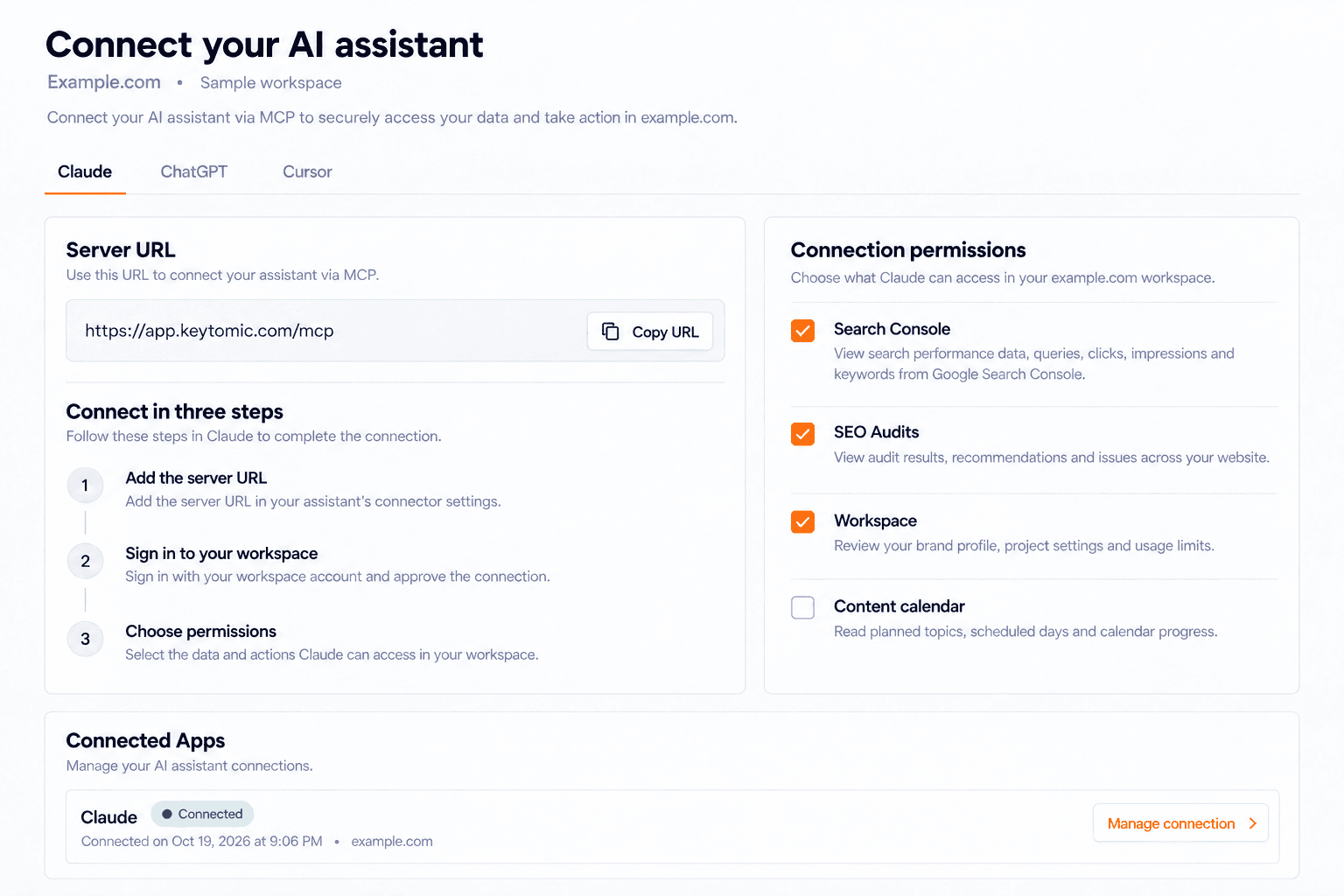
Connect Keytomic to your AI assistant
New Feature · October 19, 2026
Review search performance and act on SEO opportunities without leaving the conversation.
Keytomic MCP connects your workspace to ChatGPT, Claude, Cursor, Claude Code, and other compatible remote MCP clients. Sign in with your Keytomic account, choose the workspace, and approve the permissions your assistant can use. The connection gives your assistant access to your site’s actual project context and search data.
Ask which pages and queries are gaining or losing Google visibility.
Start an SEO Audit, follow its progress, and inspect findings, evidence, affected pages, and recommended fixes.
Review your Brand Profile, author profiles, article settings, calendar topics, and usage limits.
Research related keywords with volume, difficulty, CPC, competition, and monthly trends.
Search Console tools require a connected property. Website audits can run without one. Your workspace permissions and usage limits still apply.
More Search Console insight through MCP
Improvement · October 19, 2026
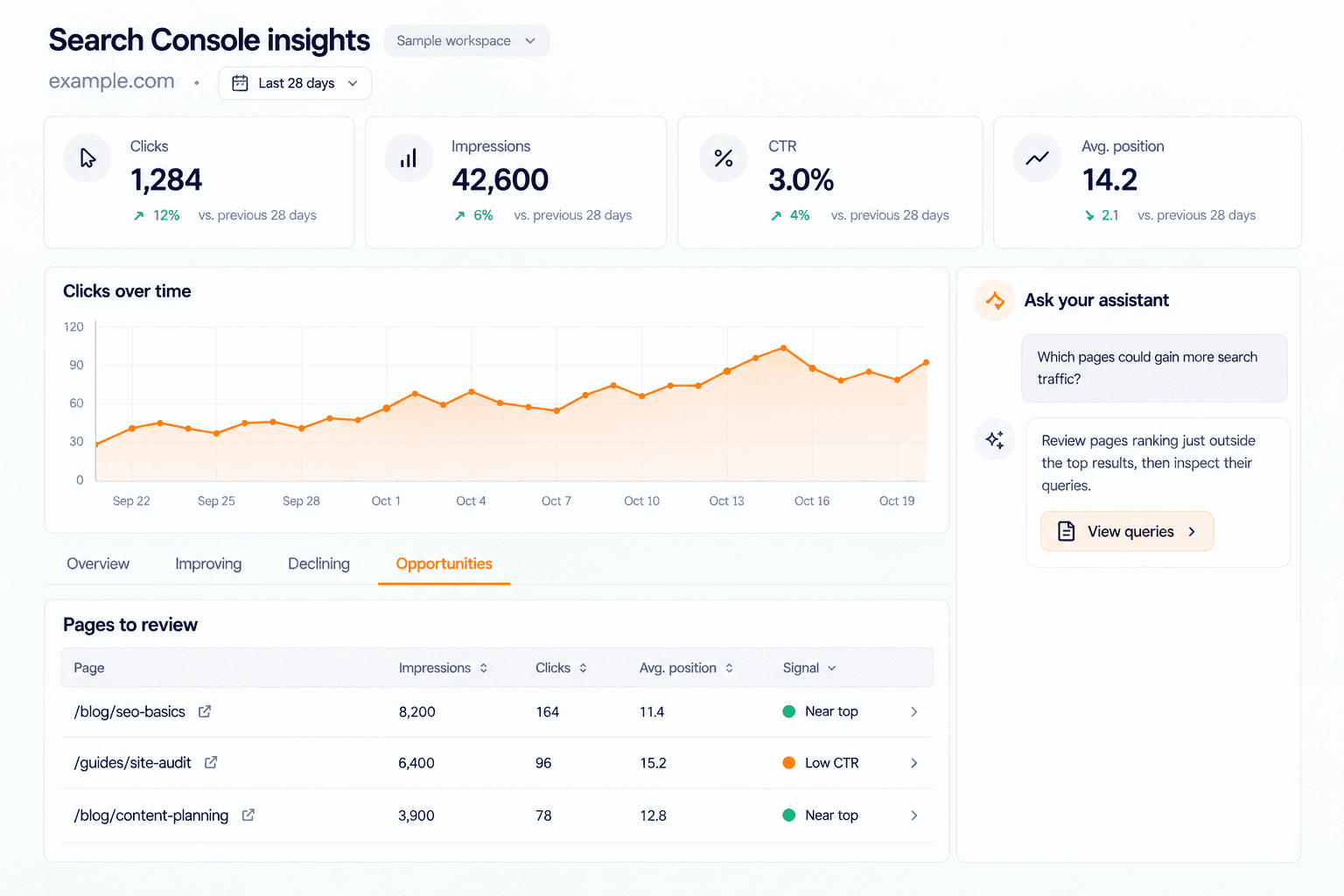
Turn real search data into a clearer next action.
Go beyond a traffic summary. Ask your assistant to compare clicks, impressions, CTR, and average position across periods, then investigate the pages and queries behind the change. The tools cover top and new rankings, improving and declining results, near-top opportunities, and pages receiving impressions but fewer clicks than expected.
Review queries shared by multiple pages as potential overlap signals.
Find submitted sitemap pages with no reported impressions in the observation window.
Discover question queries and longer conversational searches.
Inspect URLs and read, submit, or sync sitemaps through the connected Google property.
These findings provide evidence for content decisions. A shared query is a signal to investigate, rather than proof that two pages serve the same intent.
A new Project Overview
New Feature · October 19, 2026
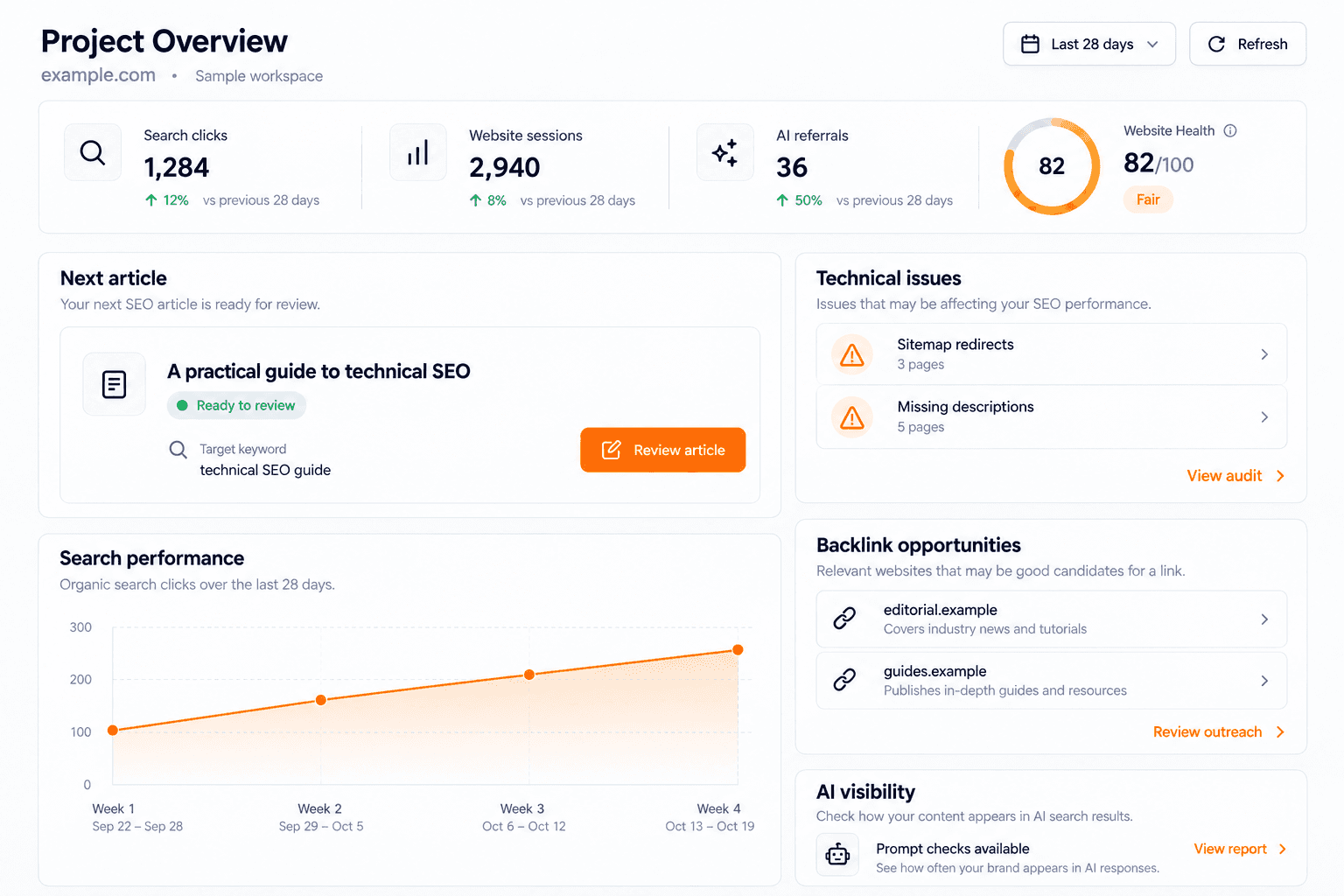
See the state of your SEO work and decide what needs attention next.
The new overview brings content, search performance, website traffic, detected AI referrals, technical issues, and opportunities into one workspace view. Open the next article ready for review, inspect changes in pages and queries, and move into the relevant feature from the finding.
Review the next actionable article and its calendar context.
Compare Search Console and Google Analytics performance over supported periods.
See detected referrals from AI services separately from prompt visibility.
Review saved Website Health, technical issues, backlink opportunities, and Reddit opportunities.
Open an exact audit finding or backlink outreach opportunity from its overview card.
The overview uses available connected and saved data. Missing connections or unavailable evidence remain visible, so an empty metric is not presented as measured performance.
More control over every new article
New Feature · October 19, 2026
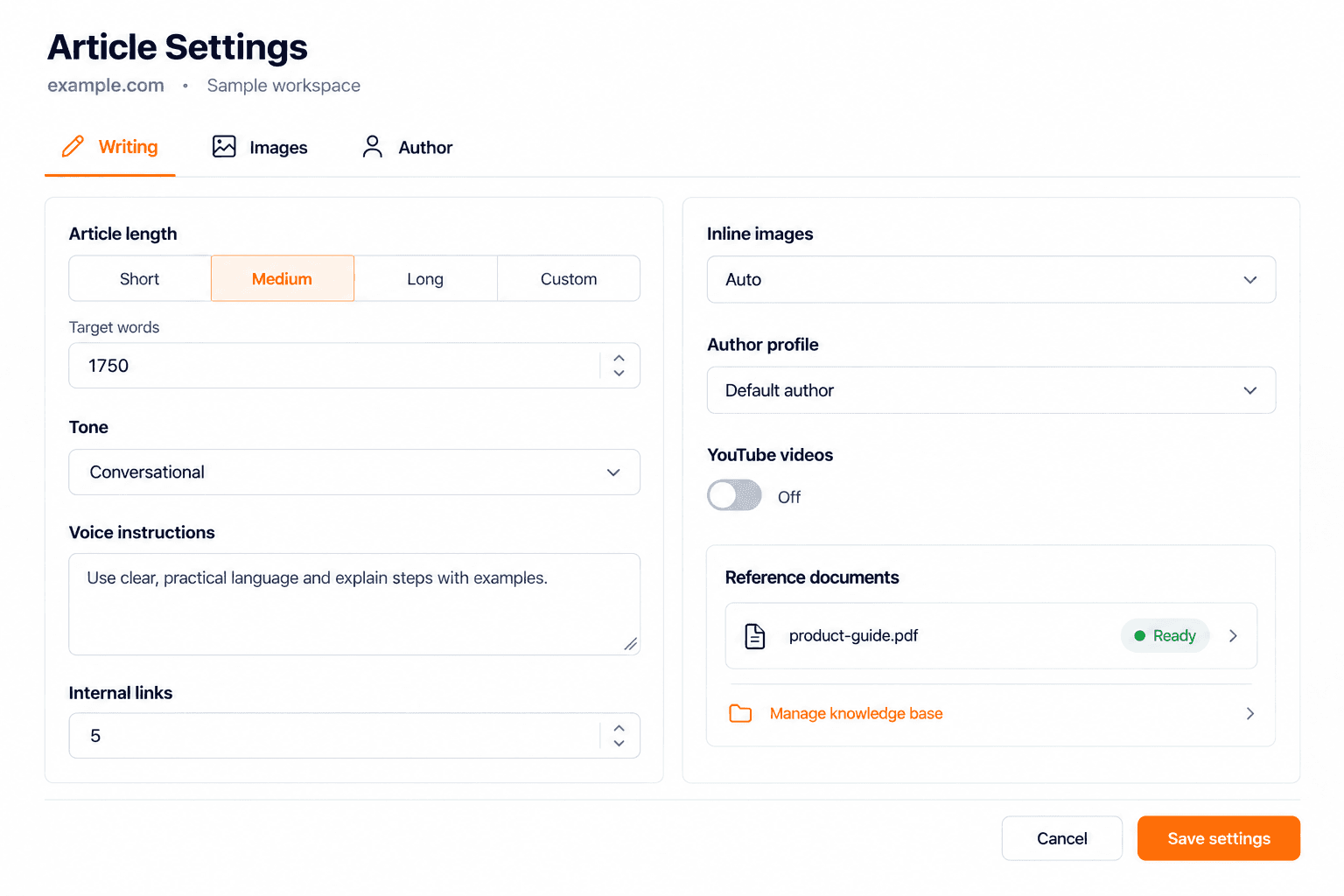
Give Keytomic your preferences before it starts writing.
Article Settings let you choose the target length, tone, voice instructions, internal-link target, inline-image count, author profile, and YouTube preferences. Use project defaults for consistency, then add topic-level instructions when an article needs a particular angle, product reference, or editorial direction.
Choose length presets or a custom target between 600 and 4,000 words.
Set internal-link and generated-image targets, including automatic image selection.
Choose an author and control whether relevant YouTube videos are included.
Supply brand and product reference documents through the Brand Profile knowledge base.
Saved settings and reference material feed the brief and writing workflow, helping you guide the content before review and editing.
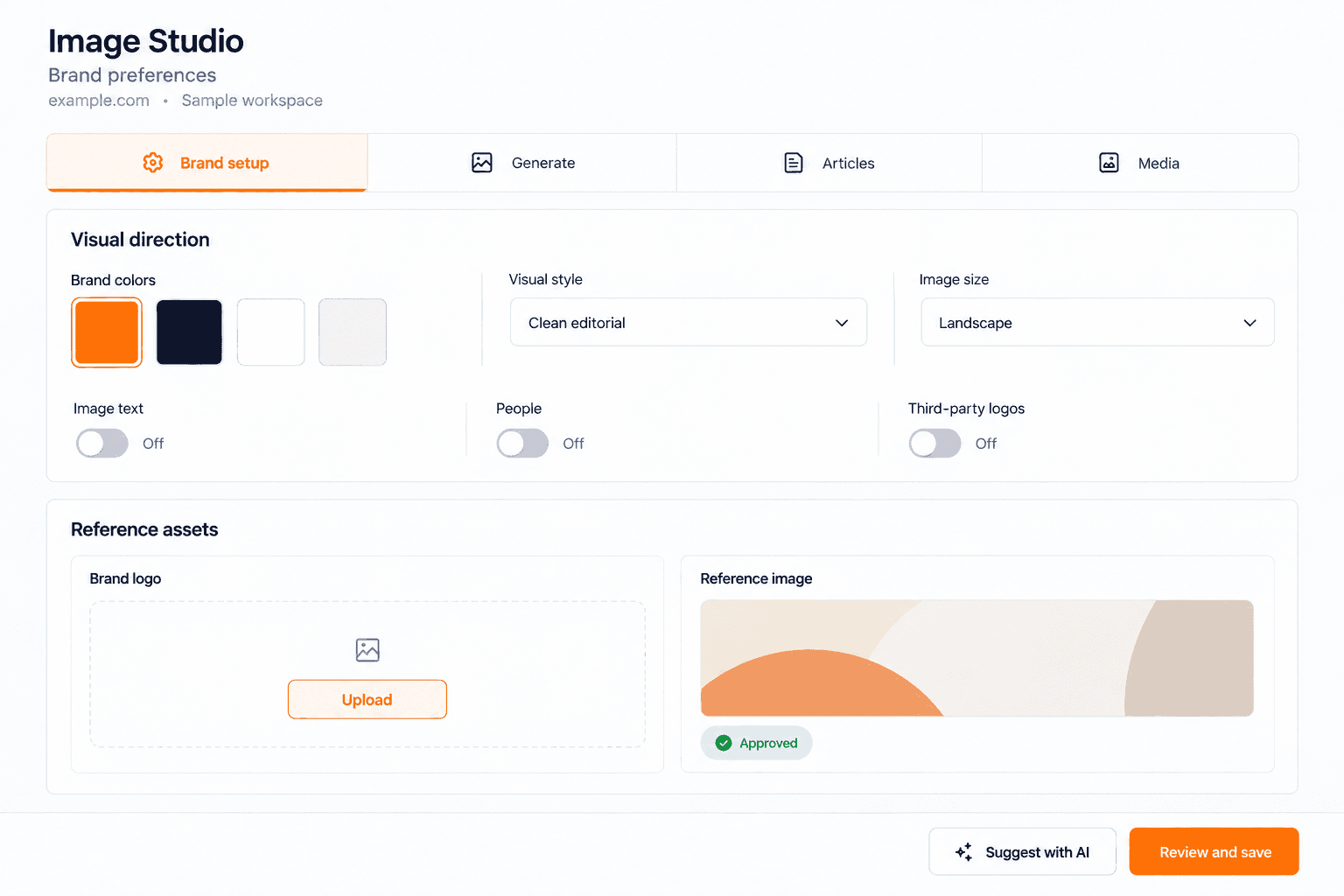
Images that match your brand
Improvement · October 19, 2026
Set the visual direction once, then use it across generated content.
Image Studio setup brings your palette, visual style, approved logo, and reference image together. Start from your saved Brand Profile colors or request suggestions based on your business and stored website screenshot, then review and save the choices yourself.
Set your brand colors and preferred visual style.
Upload and approve a logo and an image reference.
Control image size, image text, people, and third-party logo preferences.
Use AI suggestions while retaining control of your saved brand choices.
The setup is shared with dependent content and image workflows, so generated visuals start from a reviewed direction rather than generic defaults.
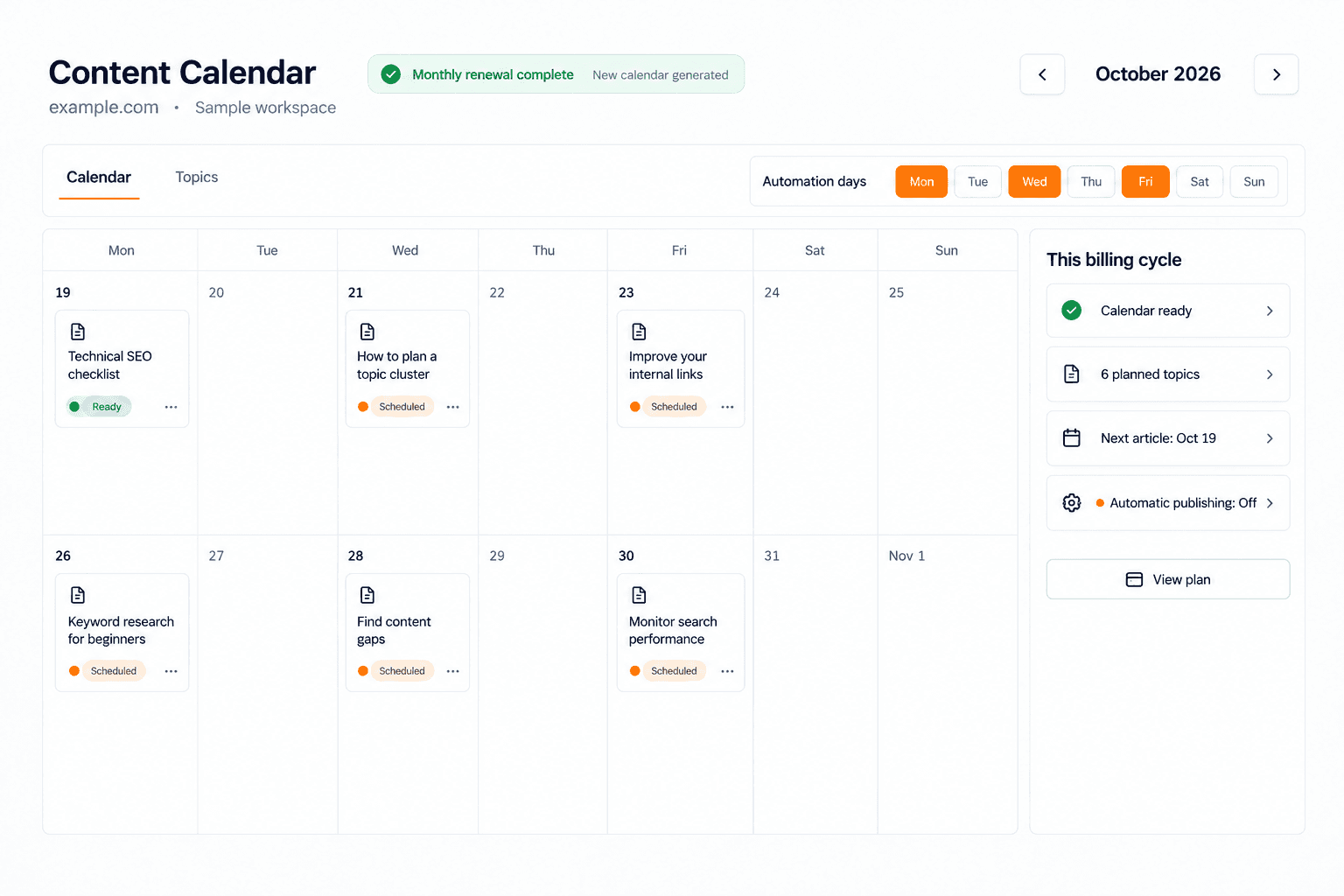
Automatic monthly content planning
Improvement · October 19, 2026
Keep the next content plan moving after a successful renewal.
Eligible projects can start a new content-calendar run after a successful paid monthly renewal. The workflow checks project readiness, calendar capacity, existing runs, and the project’s automation days before starting work. Repeated payment notifications do not create duplicate renewal runs.
Generate the next plan after an eligible monthly subscription renewal.
Use the project’s configured automation days within the billing period.
Respect setup requirements, usage limits, and available article capacity.
This is tied to successful monthly renewals. A failed payment, incomplete setup, or a project without usable planning days does not guarantee a new calendar.
Explore automated content planning →
Spot what’s holding your site back. Fix it.
Enhanced Technical SEO Audit · October 19, 2026
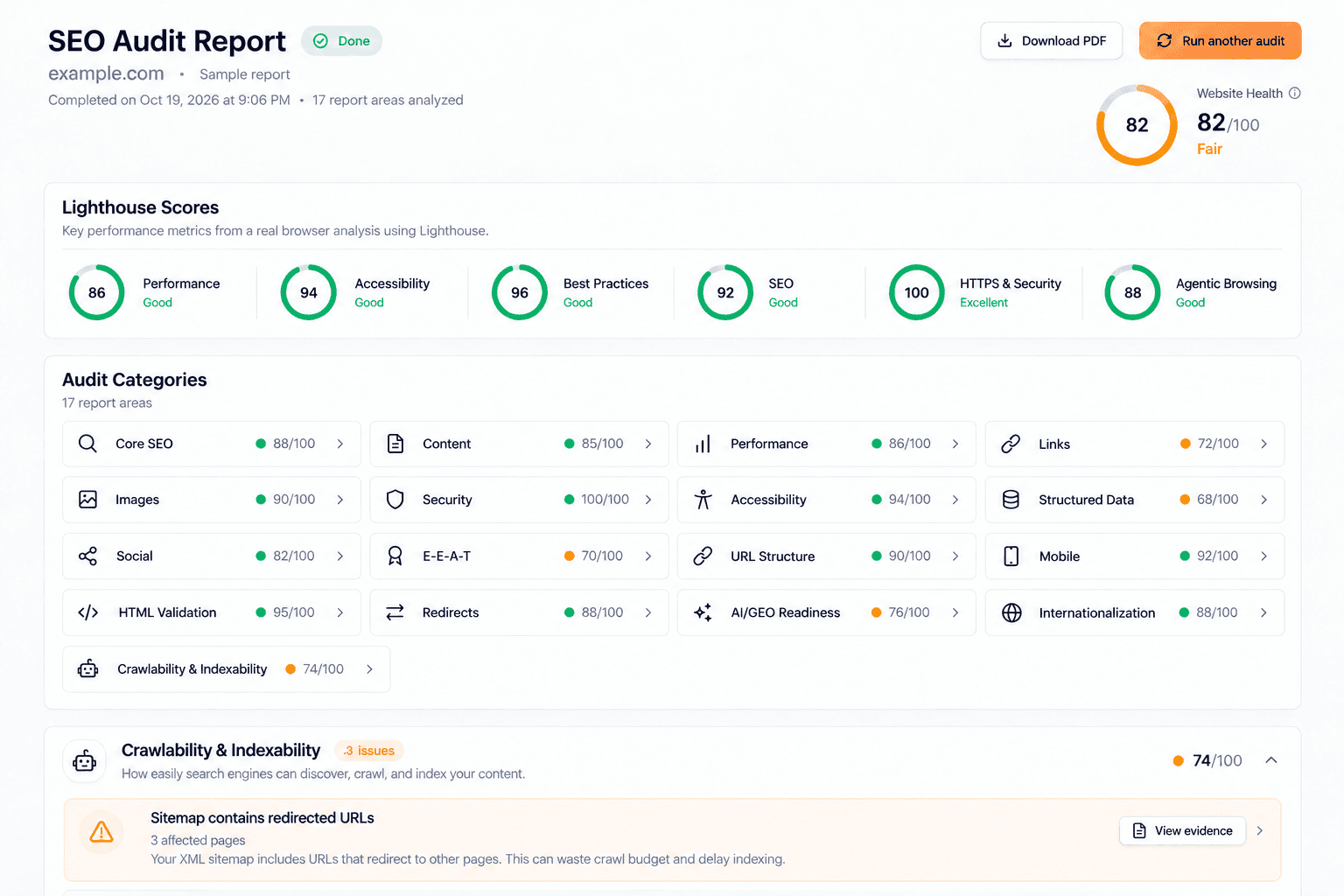
Go deeper into the issues that affect discovery, performance, and how your pages can be understood.
The enhanced audit covers 15 technical categories and organizes its findings into 17 report areas. It goes beyond a checklist with Website Health, area scores, affected-page evidence, recommended fixes, and a downloadable PDF report. With PageSpeed enabled, the audit adds Lighthouse testing; coverage varies with the run and the checks that apply.
Review crawling, indexing, robots rules, sitemaps, canonicals, redirects, and site architecture.
Inspect titles, descriptions, headings, content duplication, links, images, and structured data.
Check security, social previews, international signals, and local-search readiness.
Review desktop and optional mobile Lighthouse results, including performance, accessibility, SEO, and Agentic Browsing.
Inspect AI/GEO readiness signals, including AI-crawler access and llms.txt discovery.
Open the evidence behind an issue, identify affected items, and follow its fix guidance.
The crawl catalog contains more than 100 checks, with additional Lighthouse audits when PageSpeed runs. AI-readiness findings describe technical access and structure; they do not promise that an assistant will cite your website.
Run a deeper technical SEO Audit →
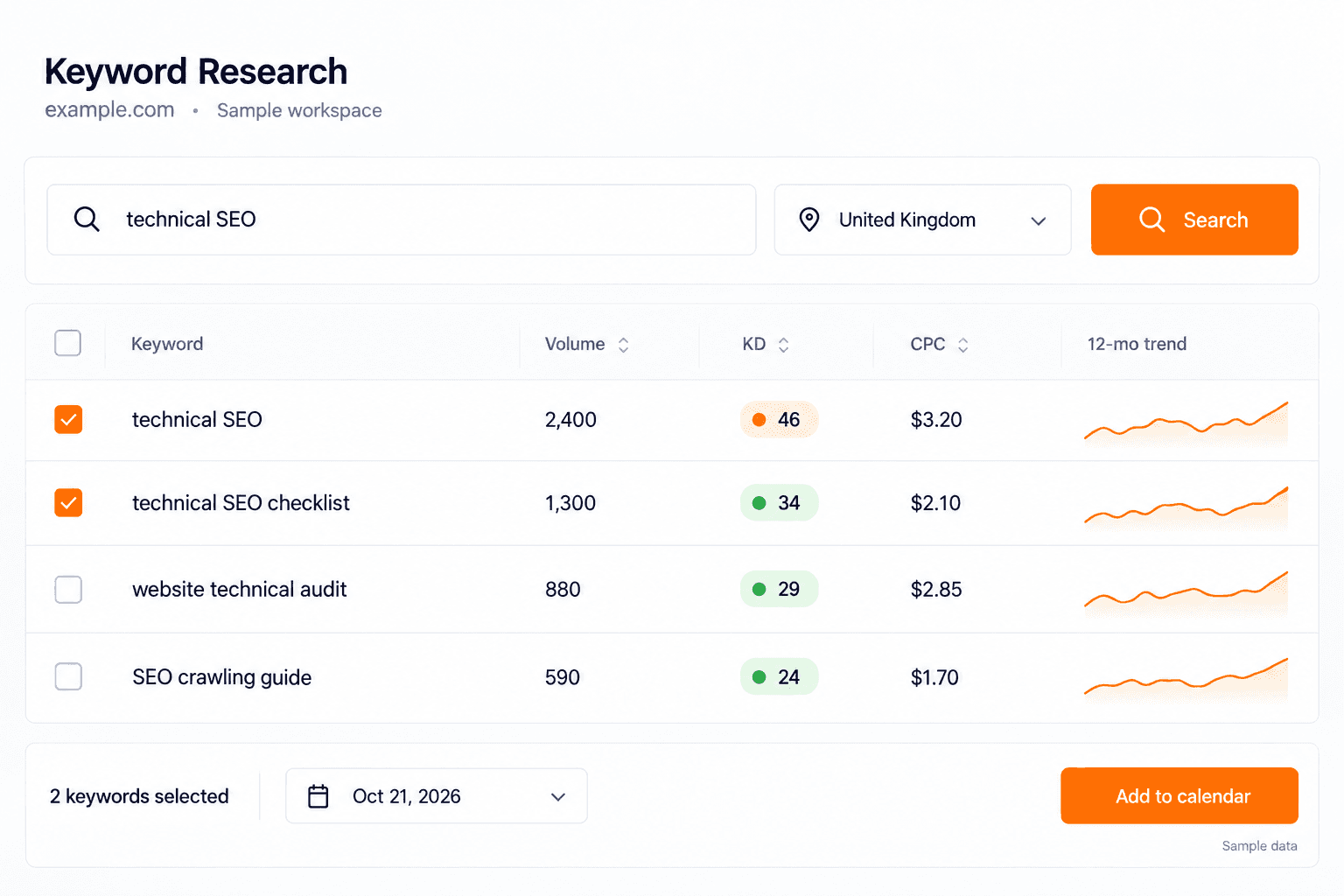
Keyword research, connected to your calendar
New Feature · October 19, 2026
Find real search demand and turn selected keywords into planned work.
The dedicated Keyword Research page takes a seed keyword and returns related ideas for your project’s market. Compare search volume, keyword difficulty, CPC, and the 12-month trend before choosing what to target. Selected keywords can become calendar topics, with checks for overlap against existing pages and topics.
Review keyword metrics together in one results table.
Select keywords with reported search volume.
Add selected ideas to the calendar on your automation days.
See remaining searches for the project’s monthly allowance.
Backlink and brand outreach with a ready email draft
Improvement · October 19, 2026
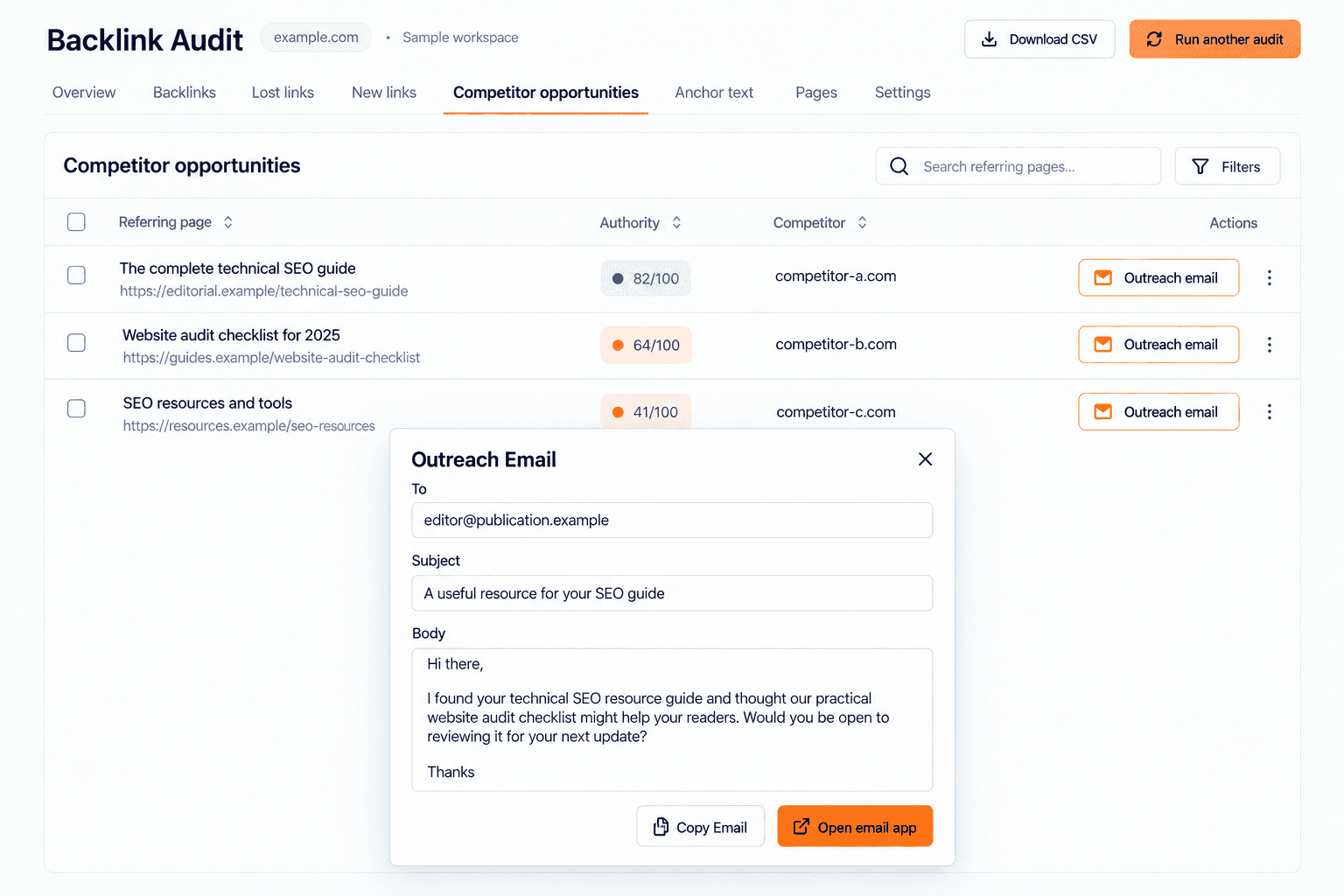
Move from a competitor link gap to a message you can review.
Backlink opportunities show referring pages that link to competitors, together with the referring domain, page URL, authority metric, and opportunity context. Open Outreach to review the available recipient, subject, and message. Copy the draft or open it in your email app to edit and send.
AI Visibility also supports exporting cited-source opportunities as an outreach CSV. These are starting points for reviewed outreach; Keytomic does not automatically send the emails or guarantee a backlink or brand mention.
Explore backlink opportunities →
AI Visibility: prompts, sentiment, and citations
Feature Update · October 19, 2026
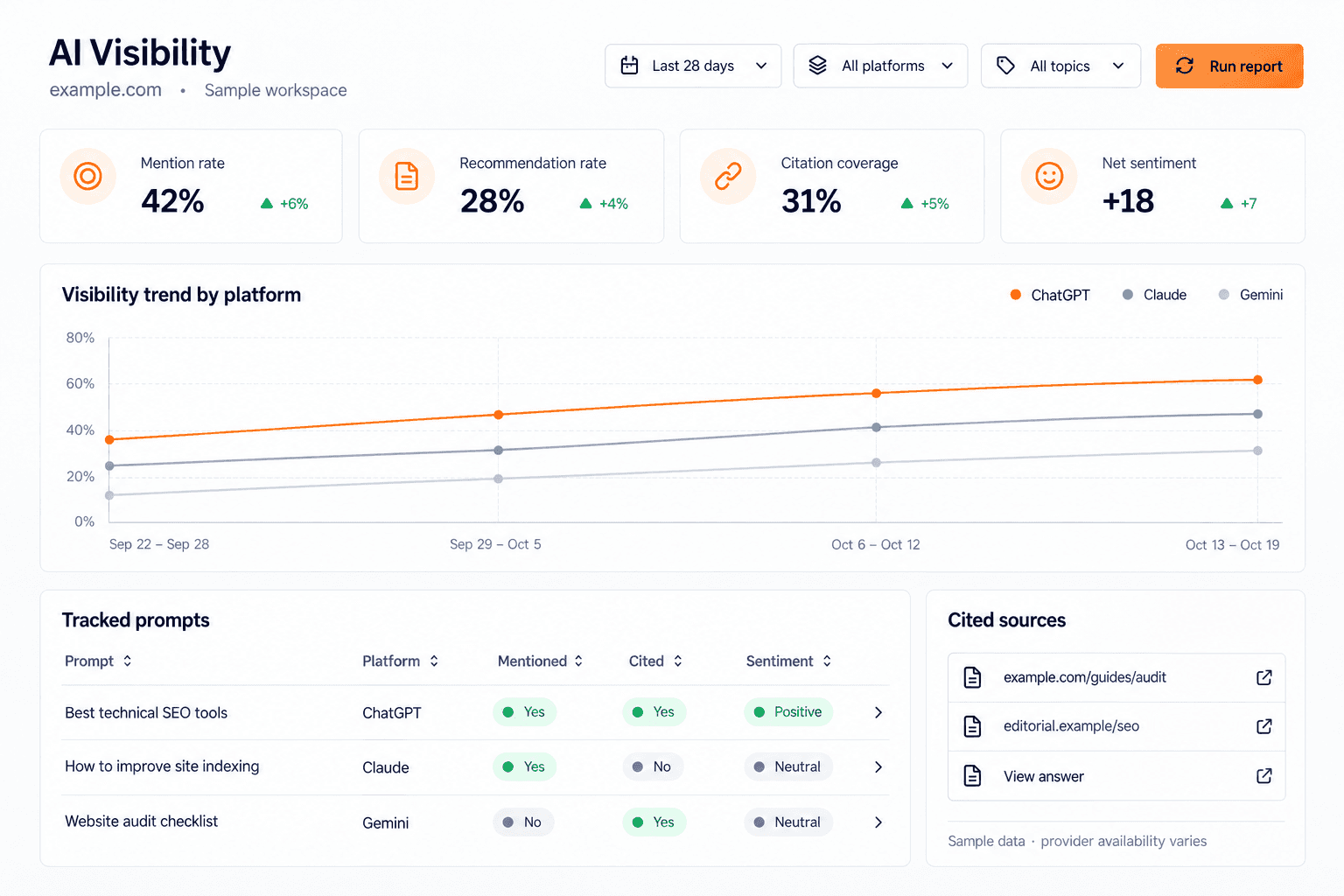
Understand where your brand appears and the evidence behind each result.
Track relevant prompts across supported, enabled AI platforms and inspect the saved answers. The report keeps brand mentions, recommendations, retrieved sources, and citations separate, so you can see whether a source was found, cited, or used alongside a brand mention.
Review prompt results by platform, topic, intent, locale, and outcome.
Inspect sentiment, recommendations, competitor comparisons, and cited pages.
Compare visibility trends and source movement across completed checks.
Review sample size and confidence, then export the relevant evidence.
Use evidence-backed opportunities to guide content, audits, or source outreach.
Availability depends on the enabled providers and their supported evidence. AI referral traffic in Analytics and visibility in sampled answers remain different measurements.
In development
Content Improvements: review what to refresh
Preview · October 19, 2026
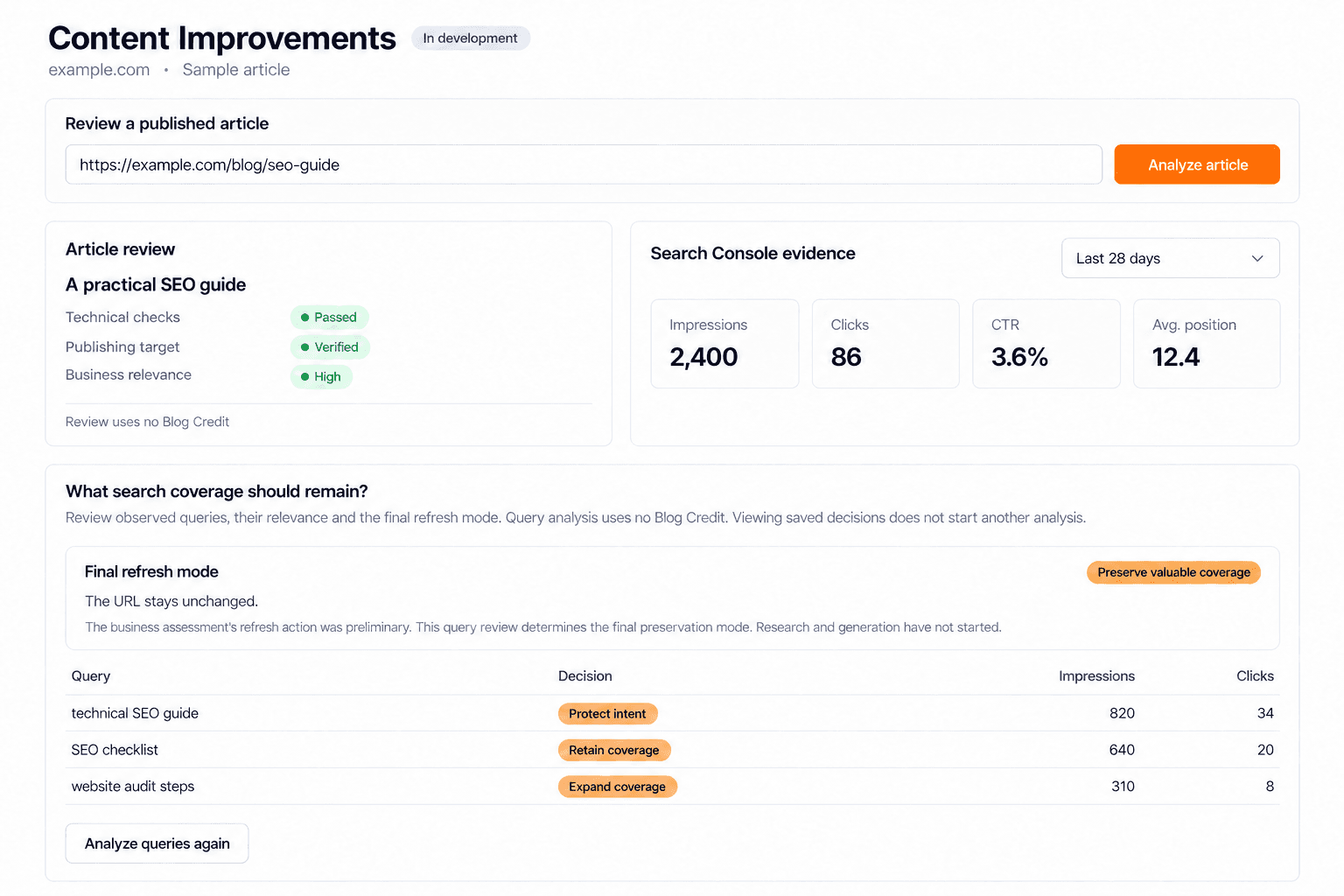
The Content Improvements branch adds review of an existing published article, its Search Console evidence, business relevance, and the queries worth preserving. It can distinguish technical blockers, limited search history, and cases that need a full refresh. A separate opportunity-scan branch is also under review.
Automatic rewriting, update scheduling, and publishing are later work. The current branches do not yet deliver automatic article updates, so this preview should not be read as an auto-update launch.
The next MCP workflows
Preview · October 19, 2026
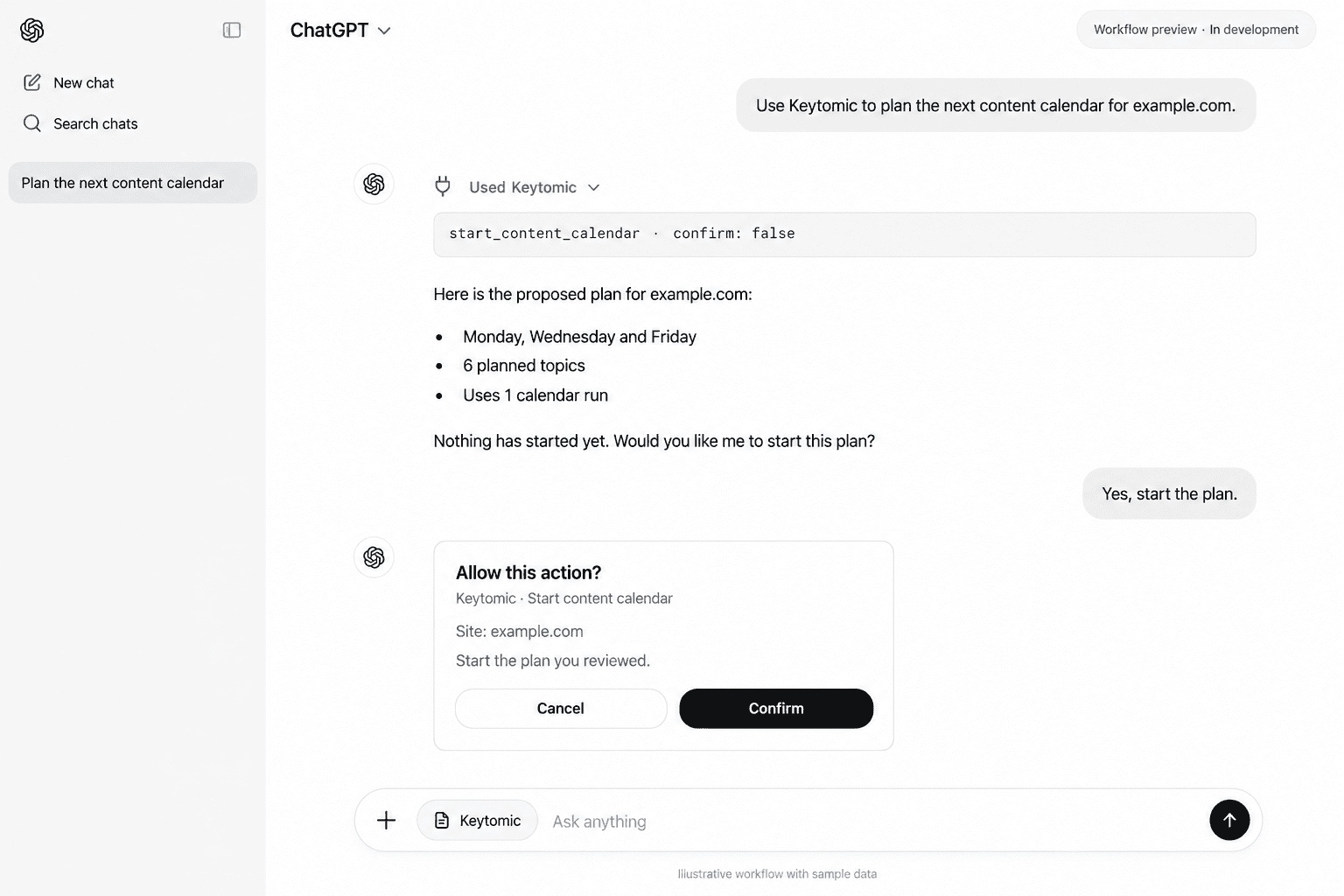
The content-planning release candidate adds topic edits, adding researched keywords to the calendar, creating a topic, and starting a calendar run after reviewing its plan. Scheduled generation and optional publishing then follow your existing project settings.
The analytics and distribution branch currently adds integration-status discovery and scopes for later tools. Direct GA4 performance reads, Bing reads, indexing diagnostics, and Google/Bing indexing submissions remain planned work. Dedicated content-analysis and automatic content-refresh execution are not registered MCP tools in the inspected release.
Free AI Visibility Audit
Are AI Assistants Recommending Your SaaS Yet?
See whether your brand shows up when buyers ask AI about your category, use cases, and competitors.
No signup. No card details.
“What are the best CRM tools for a 10-person sales team?”
“Compare HubSpot alternatives for an early-stage startup.”
“Which project management software works best for remote teams?”
“Best invoicing software for freelancers and small SaaS teams?”