WordPress Integration with Keytomic
WordPress Integration with Keytomic
Publish drafts directly to WordPress through the Keytomic plugin.
WordPress Integration with Keytomic
Generate the site key here, then finish the handshake inside WordPress
WordPress connections are intentionally simple: issue one key per site, install the Keytomic plugin, paste the key once, and let draft publishing run through the plugin endpoint.
01. Install and activate the Keytomic plugin
Open the official WordPress.org plugin page, install the plugin in WordPress, and activate it on the site you want Keytomic to publish into.
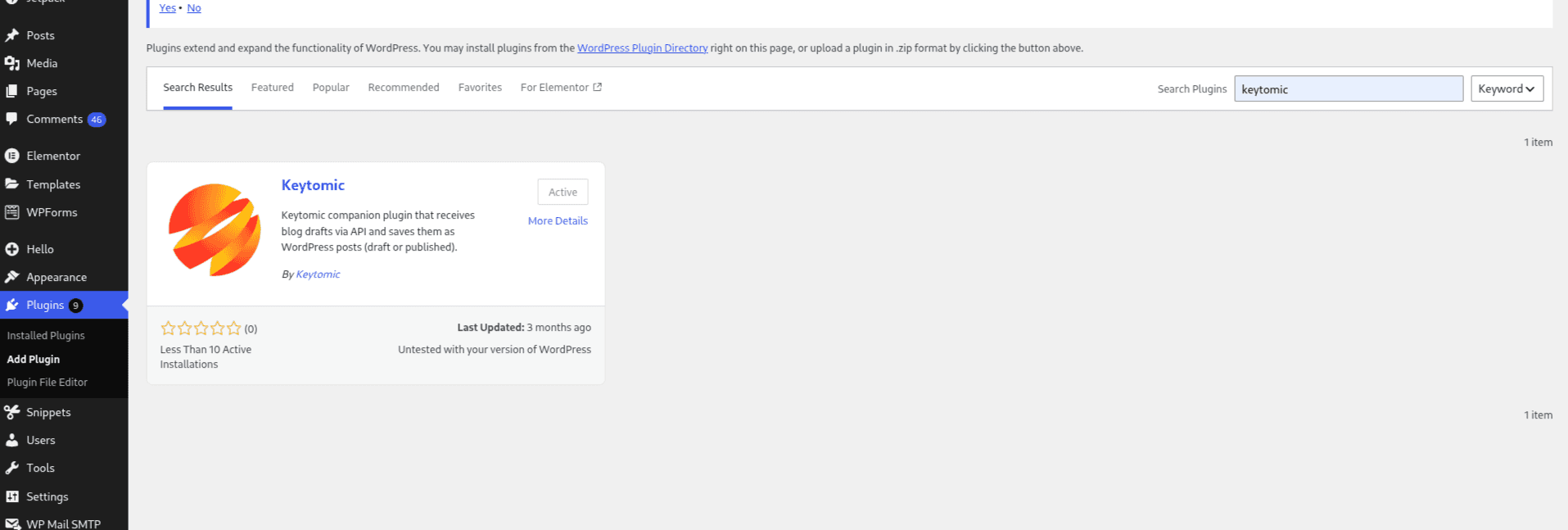
02. Open the Keytomic settings screen in wp-admin
After activation, go to Plugins → Installed Plugins → Keytomic or open Settings → Keytomic to reach the plugin configuration screen.
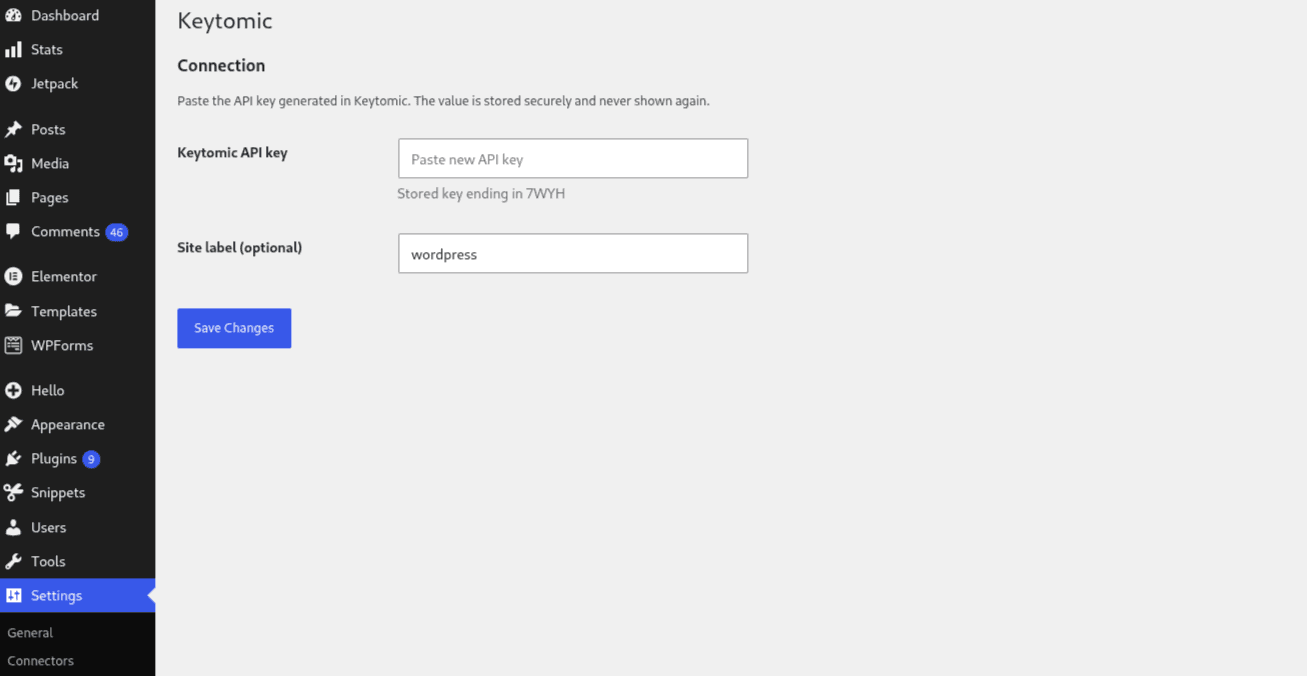
03. Generate one API key per site and paste it once
Create the connection here, copy the generated key immediately, and paste it into the WordPress plugin settings to complete the handshake.
Keytomic targets /index.php?rest_route=/keytomic/v1/drafts automatically on the site host you enter.
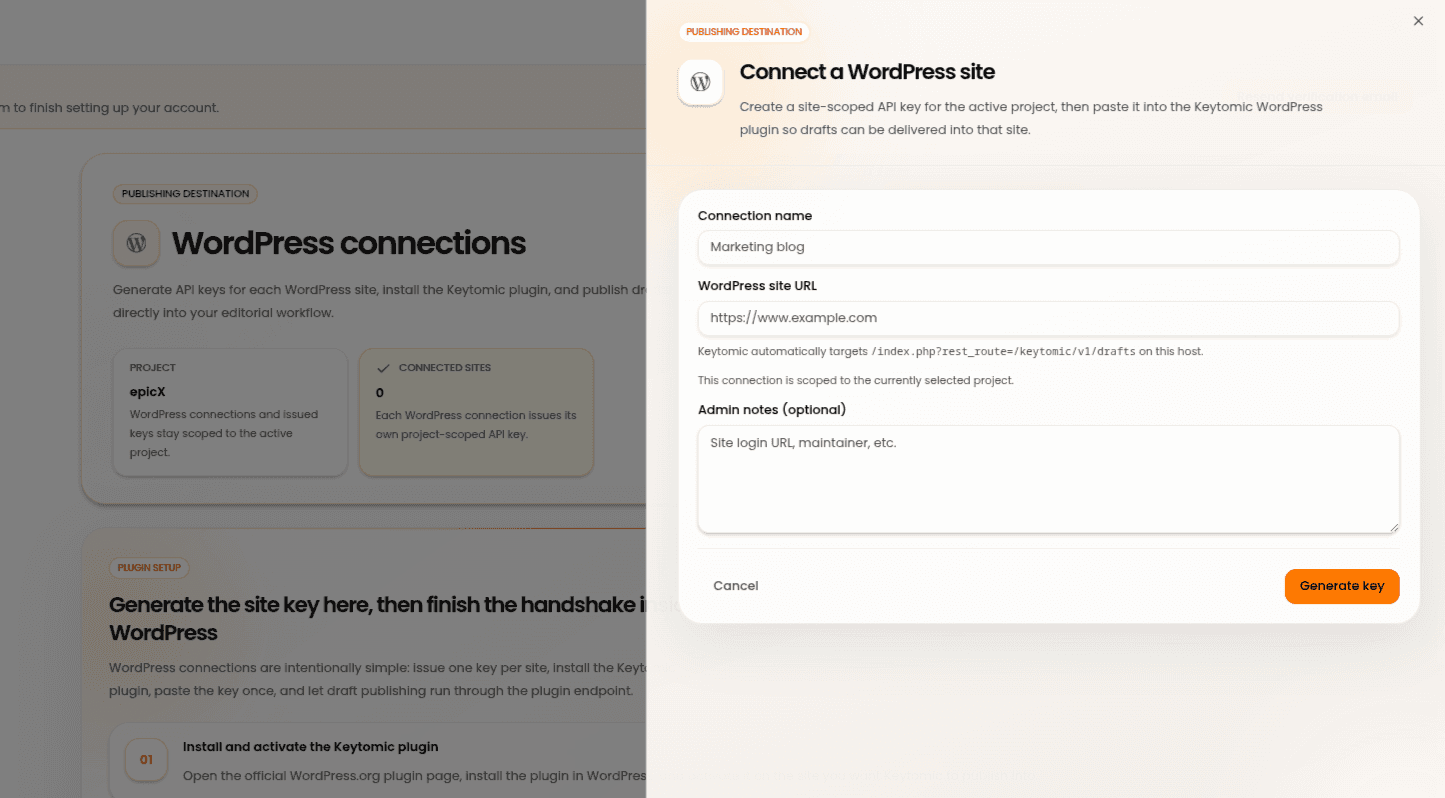
That's it. Once you're done, test connection and proceed to Calendar to publish your blogs directly.
WordPress Integration with Keytomic
Generate the site key here, then finish the handshake inside WordPress
WordPress connections are intentionally simple: issue one key per site, install the Keytomic plugin, paste the key once, and let draft publishing run through the plugin endpoint.
01. Install and activate the Keytomic plugin
Open the official WordPress.org plugin page, install the plugin in WordPress, and activate it on the site you want Keytomic to publish into.
02. Open the Keytomic settings screen in wp-admin
After activation, go to Plugins → Installed Plugins → Keytomic or open Settings → Keytomic to reach the plugin configuration screen.
03. Generate one API key per site and paste it once
Create the connection here, copy the generated key immediately, and paste it into the WordPress plugin settings to complete the handshake.
Keytomic targets /index.php?rest_route=/keytomic/v1/drafts automatically on the site host you enter.
That's it. Once you're done, test connection and proceed to Calendar to publish your blogs directly.
More Integrations
More Integrations
Explore other tools that connect with Keytomic to track performance and publish content.
Explore other tools that connect with Keytomic to track performance and publish content.
Webflow Integration with Keytomic
Publish content into your selected Webflow CMS collection.
Contentful Integration with Keytomic
Publish Keytomic content into Contentful entries.
Go High Level Integration with Keytomic
Publish SEO content into a selected Go High Level blog.
Notion Integration with Keytomic
Send Keytomic drafts into Notion as child pages under a shared parent page.
Shopify Integration with Keytomic
Connect your Shopify store using a custom app setup.
Framer Integration with Keytomic
Publish content into a Framer collection using the Framer Server API.
Webflow Integration with Keytomic
Publish content into your selected Webflow CMS collection.
Contentful Integration with Keytomic
Publish Keytomic content into Contentful entries.
Go High Level Integration with Keytomic
Publish SEO content into a selected Go High Level blog.
Notion Integration with Keytomic
Send Keytomic drafts into Notion as child pages under a shared parent page.
Shopify Integration with Keytomic
Connect your Shopify store using a custom app setup.
Framer Integration with Keytomic
Publish content into a Framer collection using the Framer Server API.

Start Getting Cited By Google
and AI Searches on Auto-Pilot


AI SEO agents research keywords, write & publish ranking content, track AI citations, and grow your brand visibility — while you focus on the business.


Trusted by 300+ users

4.5
Start Getting Cited By Google
and AI Searches on Auto-Pilot
Automate your SEO to rank faster, and showing up in AI search, without the guesswork.
Trusted by 300+ users
4.5
Start Getting Cited By Google
and AI Searches on Auto-Pilot
AI SEO agents research keywords, write & publish ranking content, track AI citations, and grow your brand visibility — while you focus on the business.
Trusted by 300+ users