Getting your page indexed by Google is not the same as getting it to rank. Indexing confirms Google has stored your page in its database; ranking means Google considers it the best result for a specific query. Most pages that sit in search invisibility are not suffering from a crawl problem, they are suffering from a relevance, quality, or structure problem that no amount of resubmitting will fix.
Why Indexed Pages Still Fail to Rank
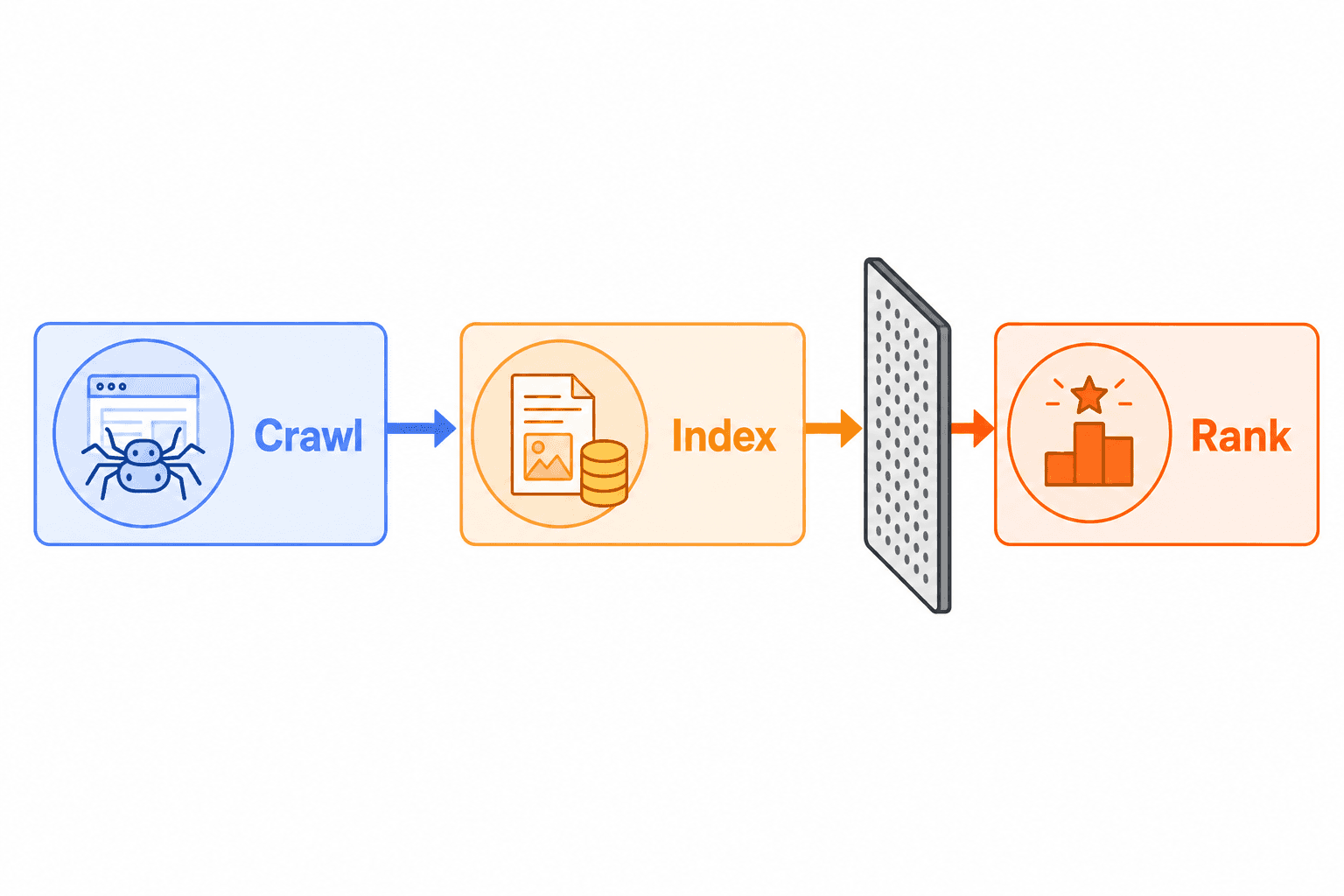
Here is the distinction that trips up most content teams: Google Search operates across three separate stages. First, Googlebot crawls your page by following links and discovering content. Second, the page gets indexed, meaning Google analyzes and stores it in its database. Third, and entirely separately, Google decides whether your page ranks for a given query, based on hundreds of relevance and quality signals.
As Google’s own documentation explains, a page that appears in Search Console as “indexed” can still fail to show in search results if the content is irrelevant to users’ queries or does not meet quality thresholds. Indexing is Google saying, “we know this page exists.” Ranking is Google saying, “this is the best result for this searcher.”
These are two completely different decisions, made by different systems, on different timelines.
The Three-Stage Pipeline Most Teams Misunderstand
Think of it as a funnel with sharp gates:
Crawl: Googlebot visits your URL and downloads the content.
Index: Google processes, stores, and assigns your page to its index. The Page Indexing report in Google Search Console reflects this status.
Rank: Google’s ranking systems evaluate relevance, authority, depth, and searcher intent before placing your page in results.
Passing the first two gates tells you nothing about the third. A page can sit indexed for months, even years, while generating zero impressions. The cause is almost always in the ranking gate, not the crawl or index gate.
Why Teams Confuse the Two
The confusion is understandable. Most SEO reporting treats “indexed” as a milestone worth celebrating. It is not. It is a prerequisite. Seeing “Indexed” in Search Console and expecting traffic to follow is like getting a library card and assuming every book will be checked out. The library knows the book exists; that does not mean anyone will choose it.
Search Intent Mismatch and Weak Topical Relevance
The most common reason an indexed page never ranks is not thin content or bad links. It is intent mismatch: your page answers a question nobody asked in the way they asked it.
For ecommerce examples, see how to diagnose category pages that are indexed but not ranking.
Google’s ranking systems are built to match the format, angle, and depth of the top results to what the searcher actually expects. When your page delivers a long editorial when the searcher wants a comparison table, or delivers a generic overview when they want a step-by-step tutorial, Google has no strong reason to surface your result.
How Intent Mismatch Looks in Practice
Here are common patterns that create the indexed-but-invisible problem:
Format mismatch: You published a narrative essay; the top-ranking pages for that query are listicles or how-to guides.
Angle mismatch: Your page targets a broad topic, but the searcher wants a specific subtopic (e.g., “content gap analysis for SaaS” rather than “content gap analysis” in general).
Depth mismatch: Your page gives a surface-level overview; competing pages include worked examples, comparisons, and decision criteria.
Heading structure mismatch: Your H2s do not mirror the subtopics users actually want answered.
A practical check: open incognito, search your target keyword, and read the top three results. Note the format, the headings, and the depth. If your page does not match those signals, Google will not treat it as competitive for that query.
Topical Coverage Gaps That Suppress Rankings
Searchers do not just want the main topic; they want the surrounding context. A page about seo content strategy that never addresses keyword research workflows, content refresh cycles, or performance measurement is topically thin, even if it is 2,000 words long. Google’s systems look for topical completeness as a proxy for genuine expertise.
Running a proper content gap analysis against the entities and subtopics covered by top-ranking competitors reveals exactly which coverage gaps are suppressing your page.
How Google Evaluates Content Quality Signals
Once a page is indexed, Google’s ranking systems apply a separate evaluation layer covering multiple on-page signals. None of these are a secret; they are described plainly in Google’s Search Quality Evaluator Guidelines.
On-Page Signals That Determine Ranking Eligibility
Signal | What Google Looks For | Common Failure Pattern |
|---|---|---|
Title relevance | Exact and semantic keyword alignment | Generic or clever titles that omit the target term |
Content depth | Thorough coverage of the topic and adjacent subtopics | Surface-level overviews with no unique insight |
E-E-A-T signals | Evidence of experience, expertise, authoritativeness, and trustworthiness | Unattributed content with no author credentials or cited sources |
Internal linking | Contextual links from related, ranked pages pointing to this page | Orphan pages with no internal links from high-authority sections |
Content freshness | Recent publication date or recent updates for time-sensitive topics | Articles published in 2022 with no updates since |
Duplicate content | Unique page-level content vs. near-duplicates on the same domain | Pages that differ only in one or two sentences from similar pages |
The freshness signal deserves special attention right now. After Google’s June 2025 Core Update introduced more aggressive quality thresholds, content that was previously tolerated at a lower quality bar is now being actively demoted or removed from competitive positions. Thin, AI-generated content with no editing, sourcing, or real expert input is particularly exposed.
The Duplication Trap
If your content closely resembles other pages on the same domain, Google may index the page but choose a different URL as the representative for that topic. This is called canonical consolidation in practice, and it means two pages competing internally for the same keyword will often result in neither ranking well. The fix is to differentiate content clearly or merge and redirect where appropriate.
You can verify your canonical tags are set correctly using the free canonical URL checker.
Technical and Crawl Path Issues That Slow Rankings
Most indexed-but-not-ranking problems are content problems, not technical ones. That said, technical issues can compound content weaknesses or independently suppress pages that would otherwise perform.
Common Technical Suppressors
Orphan pages: Pages with no internal links pointing to them from indexed content. Google finds these through sitemaps but treats them as low-priority because your own site architecture does not signal they matter.
Canonical confusion: A page marked with a canonical tag pointing to a different URL essentially tells Google to rank the other URL instead. Canonical errors are common after site migrations and CMS changes.
Crawl budget waste: Sites with large numbers of low-value URLs (pagination, filters, session parameters) train Googlebot to crawl less frequently. New and updated pages take longer to get evaluated.
Weak sitemap inclusion: Pages buried in sitemaps with low priority signals or missing from sitemaps entirely get crawled less often and re-evaluated less frequently after updates.
Redirect chains: Multiple 301 hops dilute crawl signal and slow Googlebot, which can reduce crawl frequency over time for that section of the site.
According to Google’s Search Central documentation, relevancy for ranking is determined by hundreds of factors. Technical issues rarely explain ranking failure alone, but they consistently amplify content weaknesses.
Internal Linking as a Ranking Signal
This point is consistently underestimated. When your site architecture does not include contextual internal links to a target page, you are withholding two important signals from Google: the topical relevance of the page (carried through anchor text) and the editorial importance of the page (carried through link placement and frequency). Pages that receive strong internal links from already-ranked content get reprocessed faster and tend to gain ranking traction sooner.
Teams that automate their SEO content workflow build internal linking into the publishing process from the start rather than treating it as an afterthought
How to Diagnose Pages That Are Indexed but Invisible
A structured audit will isolate the real bottleneck within 30 to 45 minutes per page cluster. Here is the workflow.
Step 1: Confirm Actual Indexing Status
Open Google Search Console and navigate to Indexing > Pages. Filter for “Indexed” pages and cross-reference with the Performance report. If a page shows as indexed but has zero impressions across a 90-day window, it is effectively invisible.
Also use the URL Inspection Tool for each priority page. This is the most reliable per-page diagnostic in Search Console. It shows the Google-selected canonical, the last crawl date, and any rendering issues. If Google’s selected canonical is a different URL than you intended, you have a canonical conflict to resolve.
Step 2: Run a Manual Query Check
Search the exact keyword you are targeting in incognito. If your page does not appear on the first five pages, open the Performance report in Search Console and check average position for that specific query. If impressions exist but position is 40 to 100, the page is ranking very weakly. If there are zero impressions, Google is not treating the page as relevant for that query at all.
Step 3: Audit Search Intent Alignment
Compare your page’s format, heading structure, and depth against the top three ranking pages for your target keyword. Ask:
Does my format match what the SERP rewards (guide, list, comparison, definition, tool page)?
Do my H2 and H3 headings address the same subtopics the top results cover?
Is my page longer or more specific than the results already ranking?
If the answers are mostly no, intent misalignment is the primary bottleneck.
Step 4: Check Internal Link Support
Search site:yourdomain.com "[anchor phrase]" to find which pages link to the target URL. If fewer than three to five relevant internal pages link to it using descriptive anchor text, the page is under-supported internally. Add contextual internal links from already-ranked content in related topic clusters.
Step 5: Assess Content Quality and Topical Depth
Read the page critically. Ask whether it covers the topic completely enough that a reader would not need to visit a competing site afterward. If the honest answer is no, the page needs substantive expansion, not a title tag tweak.
Fixes, Priorities, and When to Refresh vs Rewrite
Not every underperforming page needs the same fix. Getting the diagnosis right before deciding on action saves significant time and avoids the common mistake of rewriting content when a focused expansion would have been enough.
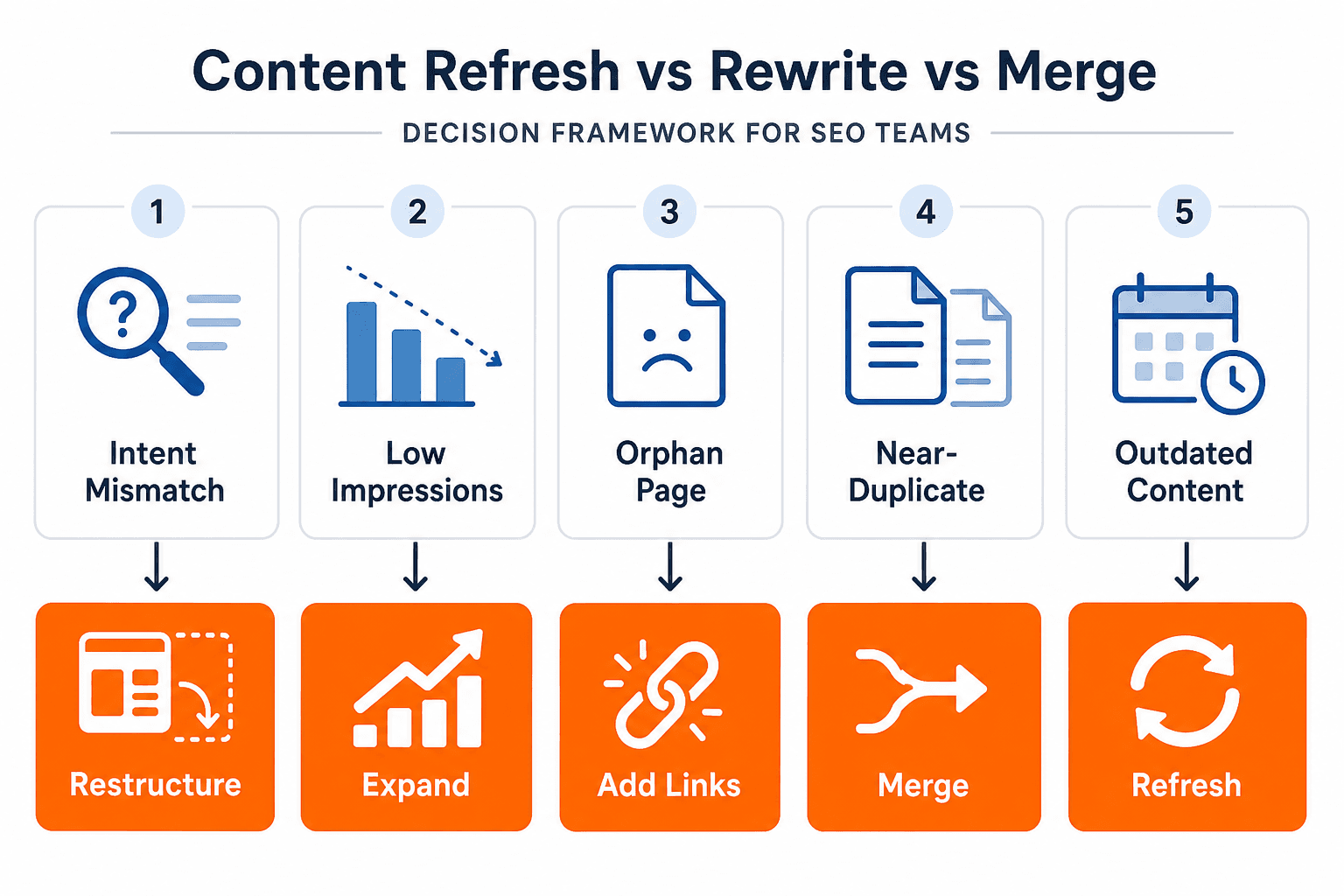
Decision Framework: Refresh, Expand, Merge, or Retire
Page Situation | Recommended Action |
|---|---|
Indexed, low impressions, intent mismatch | Restructure format and heading hierarchy to match SERP format |
Indexed, some impressions, position 15 to 40 | Expand topical depth; add examples, comparisons, or missing subtopics |
Indexed, position 40 to 100, zero clicks | Full content audit: check intent, quality, internal links, and canonical |
Near-duplicate of another page | Merge and 301 redirect to the stronger version |
Orphan page with no internal links | Add 3 to 5 contextual internal links from ranked related content |
Outdated content, factual drift | Refresh with current data, updated sections, and a revised publish date |
Priority Actions to Work Through First
Fix canonical errors before anything else. If Google is indexing the wrong canonical, all other fixes are applied to the wrong page.
Add internal links from your highest-traffic, already-ranking content to the underperforming page. This is the fastest single change that improves crawl frequency and topical signal.
Rewrite your H1 and H2 structure to match the intent format the SERP rewards. Do not change what you are saying; change how you structure the information.
Expand topical coverage to include the subtopics and entities present in top-ranking competitor pages. Use a structured content gap analysis to identify missing coverage objectively.
Update outdated sections with current data, examples, or updated recommendations. A timestamp refresh without substantive content change does not fool Google’s quality systems.
The honest reality is that most content teams publish faster than they audit. Pages accumulate, intent drifts, internal links never get built, and the gap between indexed and ranked pages grows quietly. A recurring content audit cadence, supported by a structured SEO content strategy, is essential if you want consistent organic growth. It is the baseline.
How Keytomic Helps Teams Close the Gap Between Indexing and Rankings
The root cause of most indexed-but-not-ranking pages is structural. Content gets published without a clear keyword strategy, without proper intent alignment, and without the internal linking architecture that signals topical authority to Google. These are not one-time mistakes. They are the result of treating content creation, keyword research, and publishing as separate manual tasks.
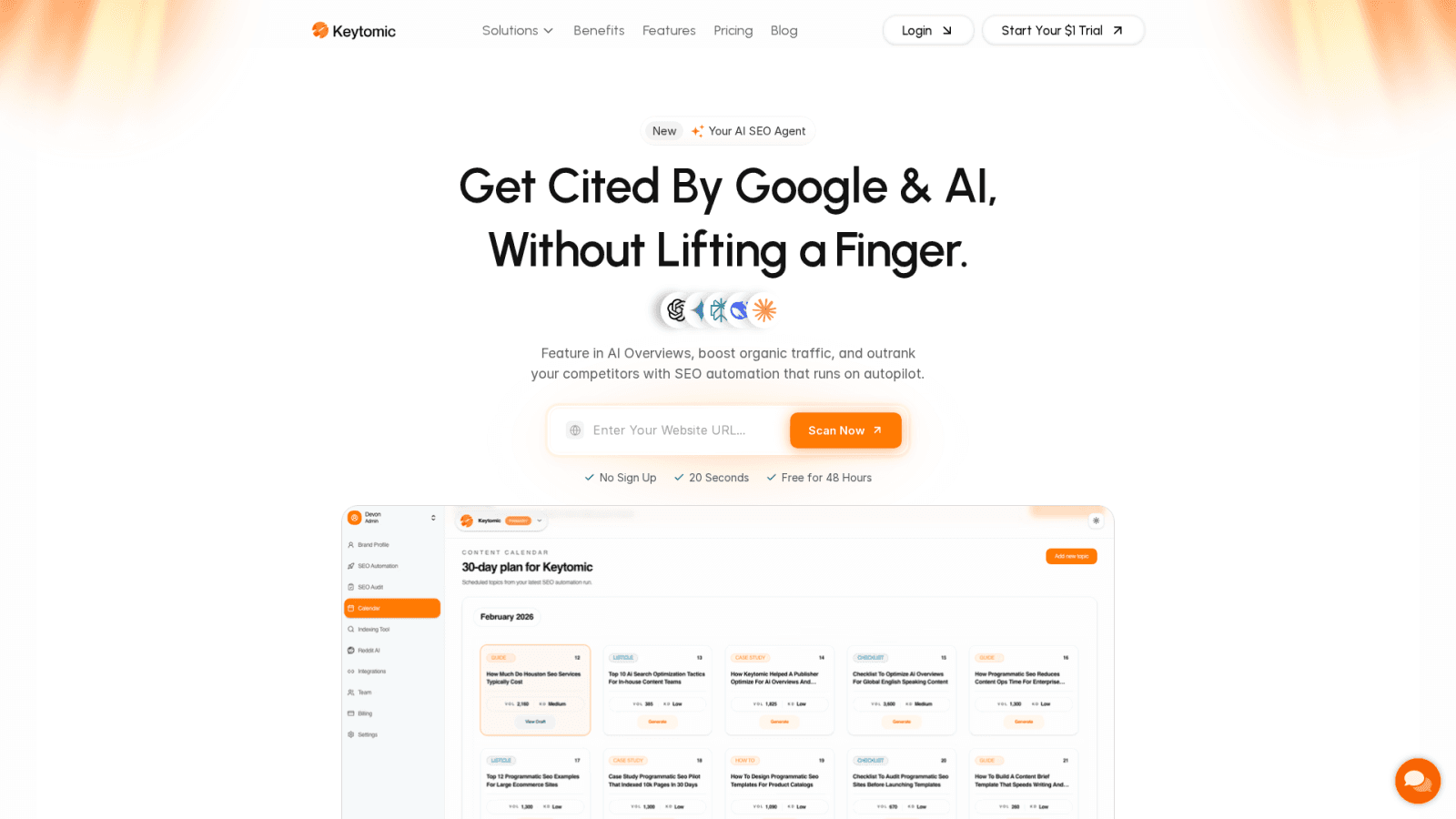
Keytomic is an autonomous SEO engine that connects these steps into a single pipeline. Every piece of content is planned around search intent before it is written, published with internal linking built in, and submitted to Google’s index automatically. For teams dealing with a backlog of underperforming indexed pages, start your $1 trial to see how the platform handles the full workflow
Frequently Asked Questions
Does being indexed mean Google will eventually rank my page? No. Indexing means Google has stored your page. Ranking is a separate decision based on relevance, quality, and competition. Many indexed pages never rank for any meaningful query.
How long should I wait for an indexed page to start ranking? For competitive keywords, expect three to six months minimum. If a page shows zero impressions after 90 days, a content or intent problem is almost certainly the cause.
Can internal links really affect whether a page ranks? Yes. Internal links signal topical importance and pass crawl authority to target pages. Orphan pages with no internal links are among the most common reasons indexed content stays invisible.
What does search intent mismatch mean in practical terms? It means your page format or angle does not match what Google has determined searchers actually want for that query. A guide when they want a list, or a definition when they want a comparison, are common examples.
Should I delete pages that are indexed but never rank? Not immediately. First diagnose the root cause. If the page has no unique value, overlaps with a stronger page, and has received zero impressions for 12 months or more, merging or retiring it is often the right call.