WooCommerce is the most widely deployed ecommerce platform on the web, powering 4,076,168 stores as of Q1 2026.
That’s due to its versatility and its integration with WordPress. But that ubiquity also makes WooCommerce sites some of the most poorly optimized organic search assets on the web. The underlying technology is solid - but the architecture that sits on top of it is not optizised for search.
Duplicate content proliferates. Category pages sit empty. URLs are set up with defaults that Google doesn’t like to see. The capability is there. The configuration, more often than not, is not.
The results are predictable. Sites with great product catalogues and brands that are known to be the best, find themselves in positions 30-50 for terms they should be dominating.
The culprits are rarely a single, dramatic mistake - they are an accumulation of structural oversights: filter pages generating thousands of duplicate URLs, blog content that exists in isolation from the product catalogue, schema markup that was never implemented, and plugin stacks that have quietly pushed page load times past the threshold where Google and shoppers both walk away.
These are not arcane problems. They are the baseline of most unoptimized WooCommerce stores.
Here, we will discuss the most common WooCommerce SEO problems and how to fix them. This is not a list of basic settings. It is a framework for SEO based on how these sites tend to fail (and how those that rank well differ).
If you have a WooCommerce store and traffic is lower than you might expect, given the scale of your store, then one or more of the following issues is likely to be a factor.
What Makes WooCommerce SEO Unique?
WooCommerce is a WordPress plugin - and that’s important. WooCommerce is not hosted, like Shopify, and so store owners have complete control over every aspect of the store’s structure. URL structures, robots.txt, canonical tags, structured data, server settings, cache and crawl directives are all open to modification. This is a good thing. It means you can create a WooCommerce store that is as optimized for search as any other platform.
The problem is that this is a double-edged sword. The same freedom that allows advanced optimization also means there is no filter to prevent poorly set up websites from doing damage to search engine optimization. A WooCommerce store selling 500 products with 20 facets to filter those products can create tens of thousands of duplicate URLs without the store owner doing anything. The platform does not stop this. Someone needs to tell it to stop.
This is what sets WooCommerce apart from other platforms. When it is set up right it is one of the best ecommerce platforms in terms of SEO. When it is not, it can often produce systematic, recurring SEO issues. The sections below address the most common of those problems - and explain, specifically, how to resolve each one. For context on how these issues compare to those found on other major platforms, see our breakdown of common Shopify SEO issues and how to fix them.
WooCommerce stores benefit from full technical control, but many teams eventually move some or all of their content workflow to a dedicated automation layer. Keytomic supports both WordPress and Shopify publishing, so you can keep the same content engine even if you run hybrid or multi-platform setups. See the WordPress and Shopify integration pages for details.
Most Common WooCommerce SEO Issues - And How To Fix Them
The issues listed below are not listed in order of rarity. They are ranked by how frequently they appear in WooCommerce stores that are actively underperforming in search. The solution to that problem is listed beside each issue.
1) Duplicate Content from Categories, Tags, and Filters
WooCommerce creates multiple URL paths for the same product by default. An item will be listed under /product/blue-trainers/, /product-category/footwear/blue-trainers/, /product-tag/running/blue-trainers/ and any number of facet URLs. All of these appear to be different pages to Googlebot. This results in a waste of crawl budget, link juice, and pages competing for rankings in search engines.
The Fix: There are two parts to the solution. First, configure all product pages with a canonical tag pointing to the main variant product URL (Yoast SEO and RankMath do this automatically when set up properly). Next, noindex all tags archive pages and faceted filter pages. Filter parameters like ?color=blue&size=medium should be excluded from the index via robots.txt or a plugin directive. To audit your current canonical set-up, Keytomic’s canonical URL checker detects canonical issues on the site.
2) Poor URL Structure and Permalink Settings
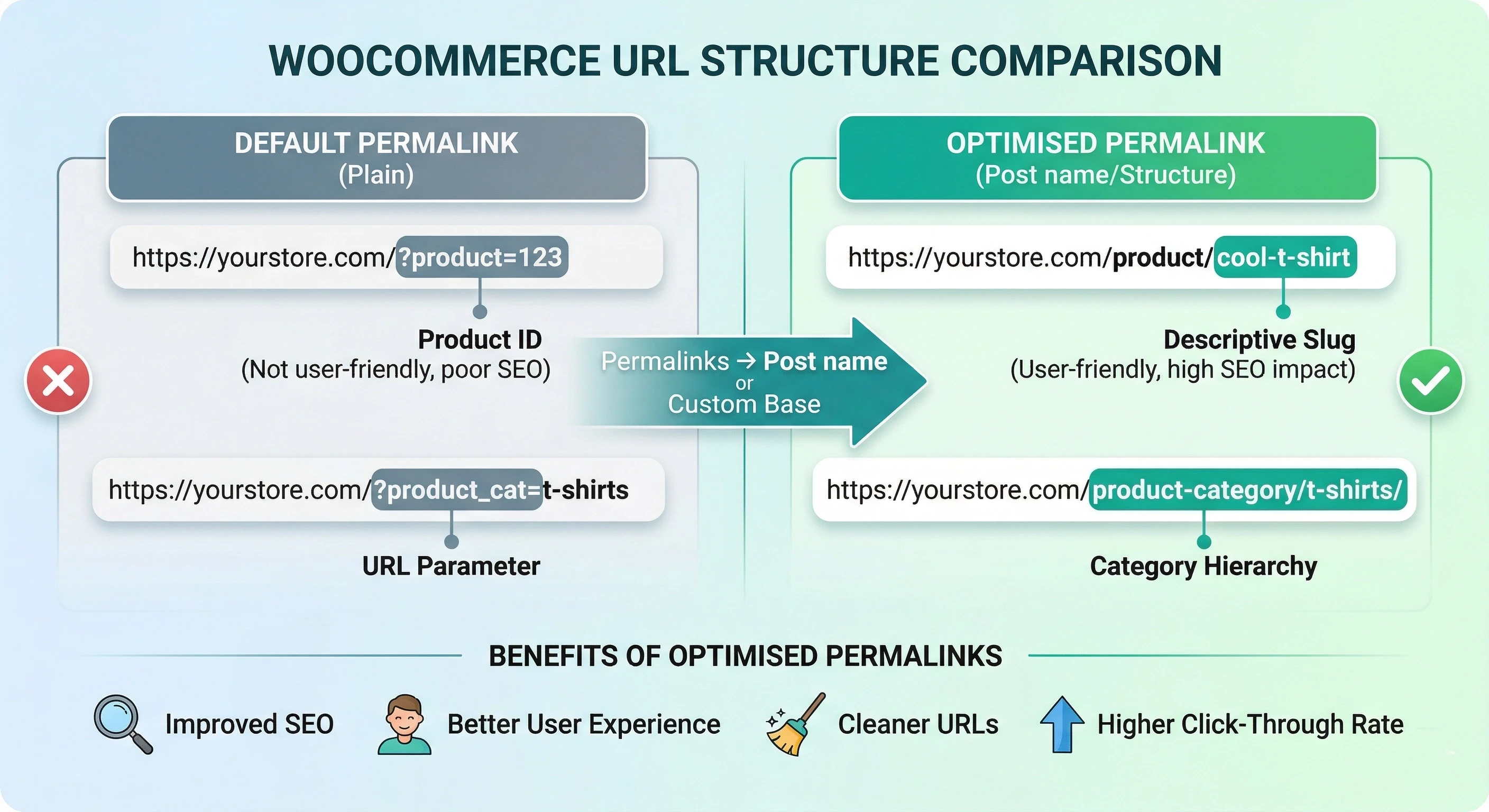
WooCommerce’s default product permalink is /?p=123 - a simple query string that provides no information to search engines about the content. Even if a store moves to pretty permalinks, they tend to adopt a category-prefixed URL structure such as /shop/product-category/footwear/trainers/blue-running-shoes/, which can result in long and unwieldy paths, and makes changing the structure in future more complicated.
The Fix: Best practice is short and simple: /product/[slug]/ for products and /product-category/[slug]/ for categories. These are easy to read, and relevant. If the store has been around for a while and moving to a new structure would cause existing URLs to break, ensure you set up 301 redirects (redirect chains and broken URLs from URL restructurings can be more harmful than the original poor structure if not done correctly).
3) Thin or Missing Category Page Content
Category pages are the most important pages in most WooCommerce sites - and by far the most overlooked. By default, a WooCommerce category page is a product grid with a title. There is no page content, no category description, no indications to Google about what the page is about, and no reason for the page to rank for anything other than the category name.
The Fix: The solution is to turn each major category page into a landing page, not a filter. Include 150-300 words of keyword-focused content above the grid - describing the category, explaining what the shopper will find, and of course including the keywords they will use to search for the category. Include a short FAQ section below the grid in the form of FAQ schema. Add links to related categories and to blog posts. For a complete playbook on this, see this guide on category page SEO best practices, which covers each aspect of the ideal category page structure.
4) Plugin Overload Affecting Performance
WooCommerce’s strength is also its weakness from an SEO perspective. A website with 40+ active plugins (dedicated plugins for reviews, wishlists, currency conversion, popups, live chat, A/B testing, analytics and so on) has a hefty performance burden. Every plugin introduces additional requests, scripts and queries. The impact on page speed is compounding.
The Fix: The solution is a plugin audit. Turn off any plugin that is doing something that another existing tool in the stack is doing. Combine if you can - a caching plugin that also offers CDN, image optimisation and script management is better than four separate plugins that each do one of those things. Once you’ve audited, benchmark page load speed with Google PageSpeed Insights and record the performance gain for each plugin removed. This can free up a lot of performance.
5) Weak Internal Linking Structure
Few WooCommerce stores pay attention to internal linking. Blog content is published without regard to the product list. Category pages don’t link to each other. Products don’t link to related products with valuable anchor text. It looks, to Google, like a series of isolated pages, rather than a unified store with a strong focus on a particular subject. And this is increasingly important to understand for AI search rankings, as AI search engines rely on entity relationships to determine authority.
The Fix: Map out your internal linking strategy: all blog articles that reference a topic related to a product category should link to the product category page with informative anchor text. Category pages should link to subcategories and to the most relevant blog content. Product pages should cross-reference related products. This spreads link authority and signals to search engines and recommendation engines that there is rich content on the topic.
6) Slow Page Speed
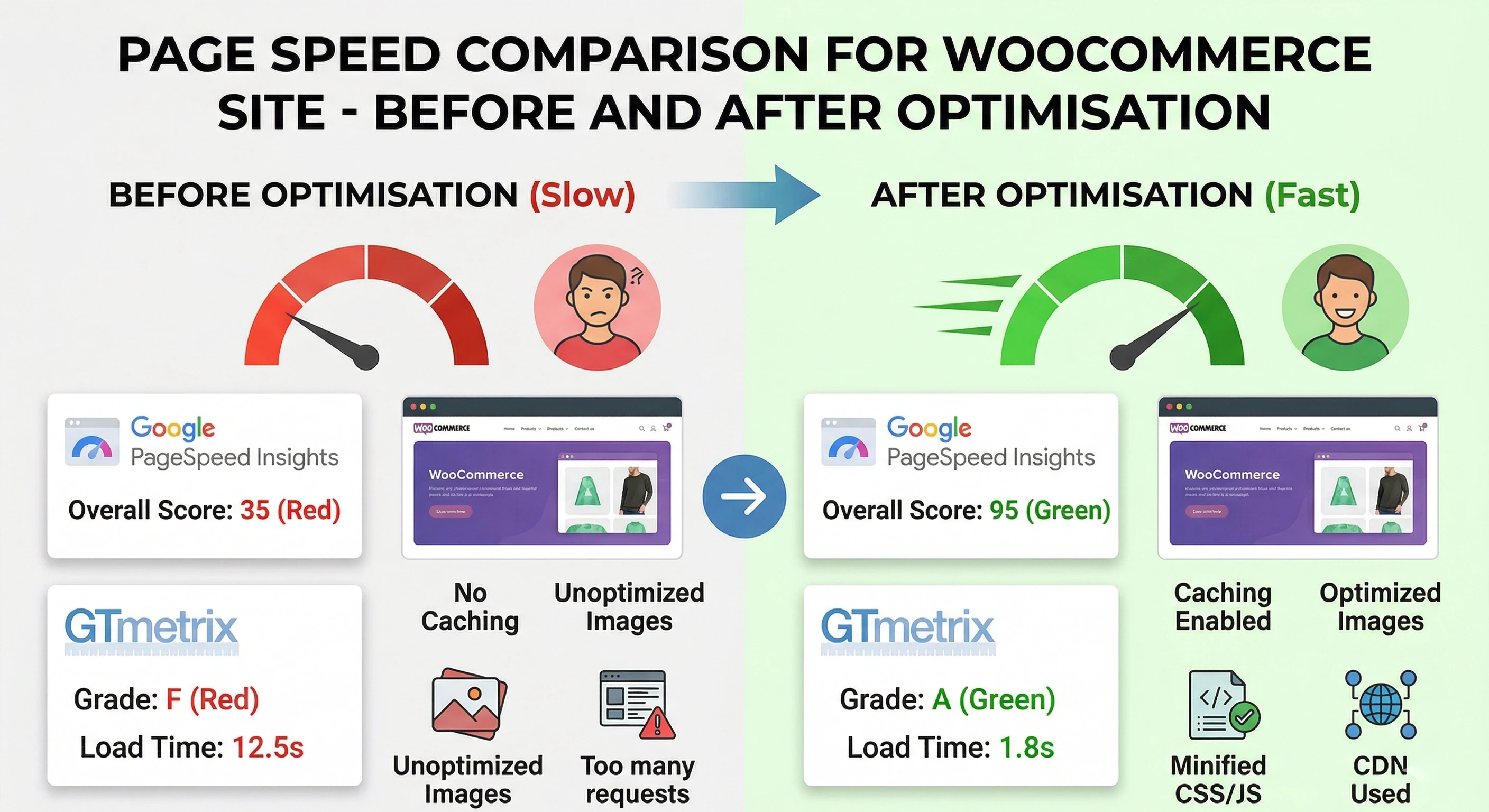
WooCommerce sites that load in under two seconds see a 40% higher conversion rate compared to slower counterparts (Blacksmith Agency, 2026). Page speed is not only important from a user experience point of view, it’s a ranking factor and a consideration for whether AI engines will trust a site to recommend it. The average ecommerce site scores only 67/100 when measured by Google Lighthouse, according to a 2025 Reboot Online analysis of more than 25,000 ecommerce sites.
The Fix: The biggest gains come from implementing a caching layer (WP Rocket or LiteSpeed Cache are the typical choices for WooCommerce), compress and export images in WebP format, use a CDN to minimise latency for geographically dispersed customers, and load non-critical JavaScript asynchronously. For the latest breakdown of page speed and its impact on rankings, see the 2026 guide on how important page speed is for SEO for a rundown on the ranking factors.
7) Indexing Issues: Pagination, Filters, and Archives
WooCommerce generates several categories of URLs that should not be indexed but often are: paginated category pages (/product-category/footwear/page/2/), filtered parameter URLs, shop archive pages, and date-based archives pulled in from WordPress. All of these use up crawl budget that could be used more efficiently elsewhere.
The Fix: Use robots.txt to bulk disallow the parameter URLs. For paginated pages, use rel=prev/next markup (or, if these contain enough unique content to be worth indexing, canonical the first page). Periodically audit your site with Keytomic’s sitemap URL extractor to ensure that you’re only submitting the pages you want to index. An intentional sitemap is the quickest way to increase crawl efficiency for medium- to large-sized WooCommerce sites.
8) Missing or Incorrect Schema Markup
Schema is now mandatory for ecommerce sites to get rich results, be trusted by AI engines, and be eligible for featured snippets. WooCommerce sites that implement full Product schema (with price, availability, reviews, and SKU), BreadcrumbList schema on category pages, and FAQ schema on category and informational pages always perform better than those that don’t, especially in AI-powered search engines that crawl the web for structured data to evaluate the trustworthiness of entities.
The Fix: RankMath and Yoast SEO both create basic Product schema. The difference is mostly in the fine points - priceValidUntil, availability, or review schema. Test all schema against Google’s Rich Results Test, and generate schema for FAQ on key pages
WooCommerce SEO Issues & Fixes - Quick Reference
Issue | Cause | Solution |
Duplicate Content | Multiple taxonomy & filter URLs generating identical pages | Set canonical tags; noindex faceted/filter pages via Yoast or RankMath |
Poor URL Structure | Default WooCommerce permalink settings | Customize permalinks to /product/[slug]/ and /product-category/[slug]/ |
Thin Category Pages | Empty or auto-generated category descriptions | Add keyword-rich introductory content and FAQs above/below product grid |
Plugin Overload | Too many active plugins degrading page speed | Audit, deactivate redundant plugins; merge functionality where possible |
Slow Page Speed | Unoptimized images, render-blocking scripts, no caching | Implement caching plugin, compress images, use a CDN, defer non-critical JS |
Weak Internal Linking | No connections between categories, products, and blog | Build a structured linking plan: blog → category → product |
Indexing Issues | Pagination, filter, and archive pages consuming crawl budget | Noindex or canonicalize paginated/filter URLs; use robots.txt strategically |
Missing Schema Markup | No structured data on product or category pages | Implement Product, BreadcrumbList, and FAQ schema via plugin or custom code |
Internal Linking Strategy for WooCommerce Stores
Internal linking is more important to WooCommerce SEO than you may think. Equity is transferred from pages that gain authority from external links (usually the homepage and blog posts) to category and product pages that need to be ranked. Without a strategic approach to internal linking, this equity sits at the top of the site and does not flow to the pages vying for category keywords.
The practical approach is tri-directional: blog posts link to category pages (passing equity and thematic relevance), category pages link to subcategories and relevant blog posts (deepens the cluster), and product pages link to related products and parent category pages. This establishes a network of interlinked pages that pass equity and let Google know how the pages relate.
For stores using content marketing as an SEO channel, every piece of content should be mapped to a product or category before it is published. A buying guide on hiking footwear should link to the hiking boots category. A comparison review of trail shoes should link to the product pages. Content that sits in a bubble, and does not link to the product catalogue, is content that isn’t working for commercial SEO. Knowing how to make the most of GEO and AI search engine ranking strategies is increasingly part of the mix - internal link structure is one of the factors AI engines consider to determine topical authority.
To identify broken internal links that may be leaking equity, use Keytomic’s broken link checker as part of a regular site health audit. One broken internal link on a popular category page can be enough to stop equity from flowing to product pages.
Common WooCommerce SEO Mistakes Worth Noting
When it comes to WooCommerce, the problem is not that it’s missing functionality, it’s missing a focused SEO strategy. The most common mistakes have less to do with technical SEO. They are strategic: not treating category pages like landing pages, not linking categories to product pages, and not considering the cumulative impact of the plugins installed.
The most important mistake is neglecting technical SEO. Robots.txt, canonical tags, indexation and structured data are not advanced tactics - they are hygiene. If not done, stores miss a big chunk of their organic opportunity, no matter how good their content and products are.
Poorer keyword targeting is another common problem. Too many WooCommerce sites chase competitive keywords they don’t have the authority to rank for, and ignore low competition transactional keywords where they could rank straight away. Ecommerce stores should build their keyword strategy from transactional terms - what do people search for when they are about to purchase? - and work their way out.
Finally, poor website architecture - categories with four levels of subcategories, subcategories with only two or three products, products with multiple conflicting URL paths - makes it hard for search engines to crawl, and they solve the problem by simply pushing the site down the rankings. Simpler is always better than complex.
WooCommerce Category Page: Recommended SEO Structure
The structure below is an example of a top-performing WooCommerce category page structure - one that strikes a balance between user experience and factors used by Google and AI engines to assess page quality.
H1: Category name (e.g., Running Shoes)
Intro paragraph (150–200 words): Explains what the category covers, target shopper, and key product benefits. Includes primary and secondary keywords naturally.
Category filters: Size, brand, price range, color - kept indexable only if generating unique value.
Product grid: Clean layout with alt-tagged images, product schema on each item, and clear CTA.
SEO content section: 200–300 words below the grid covering category-level buying guidance, linked to relevant blog posts.
FAQ block: 4–6 questions with FAQ schema markup, targeting question-format search queries.
Internal links: To related categories, subcategories, and top-of-funnel blog content.
Conclusion
WooCommerce SEO problems are common, but they are also known and resolvable. Stores that don’t perform well in search don’t suffer from inherent limitations of the platform. They are suffering because they have not overridden the default settings. Content duplication, URL structure, category descriptions, schema, site speed - none of these are arcane or difficult. They are just steps that most store owners and developers don’t take.
What changes when they are taken is often striking: category pages begin ranking for commercial terms they were previously invisible for, crawl efficiency improves as duplicate URL inflation is removed, and structured data starts returning rich results that lift click-through rates. These improvements compound. My experience is that WooCommerce is one of the best possible ecommerce platforms from an SEO perspective - provided it’s set up right. When optimized, it can rival the best in search.
FAQs
Is WooCommerce good for SEO?
Yes, provided it’s set up properly, WooCommerce is among the most SEO-friendly ecommerce platforms. It’s built on WordPress, allowing complete control of URL structures, canonical tags, robots.txt, schema markup, caching and crawl directives. The power and flexibility of the platform is also its weakness: if not carefully optimised, this can lead to major SEO issues.
What are the biggest WooCommerce SEO issues?
The most common WooCommerce SEO issues are duplicate content from taxonomies and filter pages, empty or thin category pages, suboptimal URL structures caused by default settings, excessive plugins that slow down page load times and lack of schema markup.
How do I fix duplicate content in WooCommerce?
Set canonical tags on all product pages to point to the primary product URL — this can be done through Yoast SEO or RankMath. Block the display of all tag archive pages and filtered URLs in robots.txt or with a plugin directive. Auditing your existing canonical implementation before fixing it ensures that any fixes are done site-wide and don’t cause new canonical issues.
How do I optimize WooCommerce category pages for SEO?
Make every key category page a landing page. Include 150-300 words of keyword-focused content above the products grid, add FAQ schema below the grid, and include internal links to other categories and relevant blog articles.
Does WooCommerce support SEO plugins?
Yes. WooCommerce supports all major WordPress SEO plugins (the most popular are Yoast SEO and RankMath, both of which have a WooCommerce addon to manage product schema, breadcrumb navigation, sitemaps and canonical tags). If you are weighing platforms, here are the Shopify SEO apps that cover the equivalent jobs.
How important is page speed for WooCommerce SEO?
Page speed is critical. WooCommerce stores that load in less than two seconds have 40% higher conversion rates than their slower competitors, and Google has declared page speed as a ranking factor. For AI search engines, speed also equates to quality - slow sites are not likely to be recommended in AI search results.
How do WooCommerce stores rank in AI search engines?
WooCommerce stores that load quickly, are logically organised, and employ rich structured data are favoured by AI search engines - such as Google AI Overviews, Perplexity and ChatGPT. Entity-based SEO (clearly signalling the types of products a store sells and the pain points they address), FAQ structured data on category pages, and an internal linking structure that mirrors the depth of topics covered are the main drivers of AI search visibility.