
An agent-ready website is a site that AI systems can access, interpret, and quote without struggling through blocked bots, weak structure, or unclear page signals. In practice, that means clean crawl access, indexable pages, consistent canonical tags, useful structured data, and answer-first content. It is not a separate AI-only version of your site, and there is no formal universal standard for the term. Platforms like Perplexity publish crawler guidance for PerplexityBot and recommend allowing it in robots.txt for search visibility.
You keep hearing the phrase “agent-ready,” but nobody seems to agree on what it means. Is it a schema thing? A new file you add to the root of your site? A GEO or AEO strategy? The confusion is understandable because the terminology is genuinely still settling.
The real question underneath the jargon is simpler: can AI systems accurately access, understand, and cite my site? That framing is more useful than chasing the latest file format or optimization label.
This guide separates what actually matters from what is still experimental. Some of it overlaps with work you should already be doing for search. Some of it is genuinely new. And for some teams, much of this can wait.
What an agent-ready website actually means
There is no official certification body or formal specification that defines an “agent-ready website.” The term is a practical concept, not a technical standard.
Used in an SEO and AI-search context, it describes a website whose public pages are easy for AI systems to access, parse, verify, and quote. That includes AI agents, LLMs used in search like ChatGPT and Perplexity, and systems like Google AI Overviews and Gemini that retrieve and synthesize web content.
In simple terms: an agent-ready website does not fight the machine trying to read it. The content is findable, the structure is clear, and the signals are consistent.
Public pages return clean 200 status codes
Crawlers are not blocked unintentionally by robots.txt or WAF rules
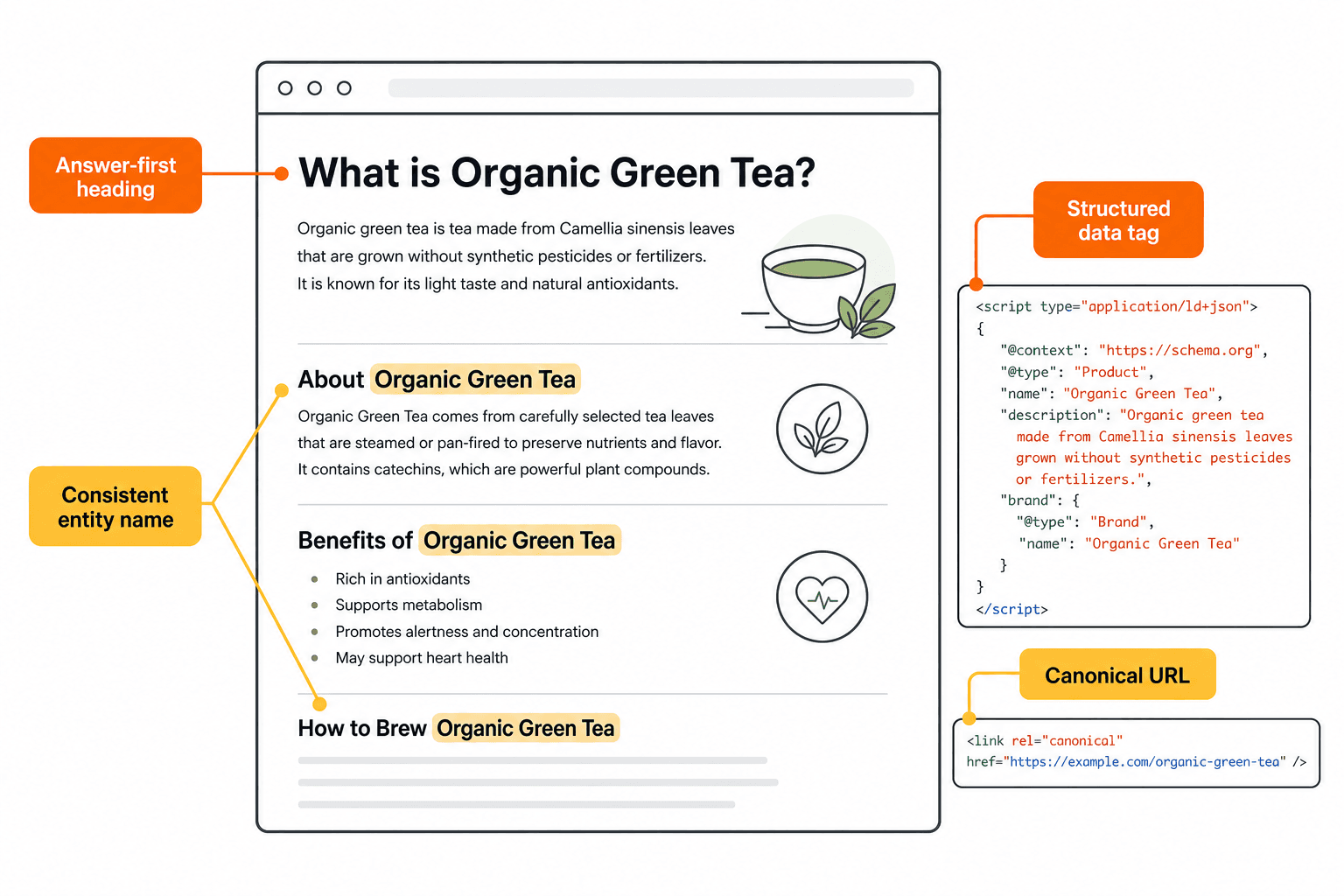
Headings describe what each section actually covers
Key facts and definitions appear early in the page, not buried in disclaimers
Structured data matches the content type
Entity names are consistent across the site (your product is always called the same thing)
How agent-readiness differs from traditional SEO hygiene
Agent-readiness and SEO hygiene overlap significantly, but they are not identical.
Traditional SEO hygiene | Agent-readiness adds |
|---|---|
Crawlability and indexability | Explicit permissions per AI crawler user-agent |
Title tags and meta descriptions | Answer-first heading structure for direct extraction |
Internal linking for PageRank flow | Entity consistency for machine interpretation |
Schema markup for rich results | Schema that clarifies page type and relationships |
Fast load times | Clean HTML with minimal rendering dependencies |
Canonical consolidation | Canonical signals that reduce AI confusion about the authoritative page |
According to Google’s crawling and indexing documentation, the foundational access and indexability layer is still the entry gate for any web-based discovery. Agent-readiness builds on that foundation rather than replacing it.
Should you make your website agent-ready right now?
For most SaaS teams: yes, but with realistic expectations about what to prioritize.
If your buyers research products in AI tools like ChatGPT, Perplexity, or Google AI Overviews before talking to sales, then being easy for those systems to read and cite is a legitimate business concern. It is not a replacement for traditional SEO. It is a layer on top of it.
The honest caveat: if your site has thin content, broken architecture, or inconsistent messaging, fixing those problems will do more for AI visibility than any AI-specific experiment.
When agent-readiness is worth doing now
Content-led SaaS products where buyers ask AI tools comparison and research questions
Documentation-heavy sites where developers use AI assistants to navigate your product
Comparison-driven categories where AI answers regularly include product recommendations
Lean teams that already publish quality content and want to make sure it can be found and cited
Brands running AI search monitoring who can actually measure whether fixes improve citation rates
When it is too early or low priority
Your site has major technical issues, noindex errors, or broken canonical tags that have not been fixed yet
Content is thin, duplicated, or inconsistently messaging your product
Your ICP and positioning are still in flux
All content is behind a login wall with no public pages for crawlers to read
You have no way to measure whether AI systems are surfacing your brand at all
I would not start with llms.txt or ai.txt experiments before the fundamentals are solid. Access, indexability, and content structure are the real levers.
How AI agents and AI answer engines use websites
AI systems that retrieve web content during answer generation follow a sequence that is not entirely different from what search engine crawlers do, but there are key differences in what they prioritize.
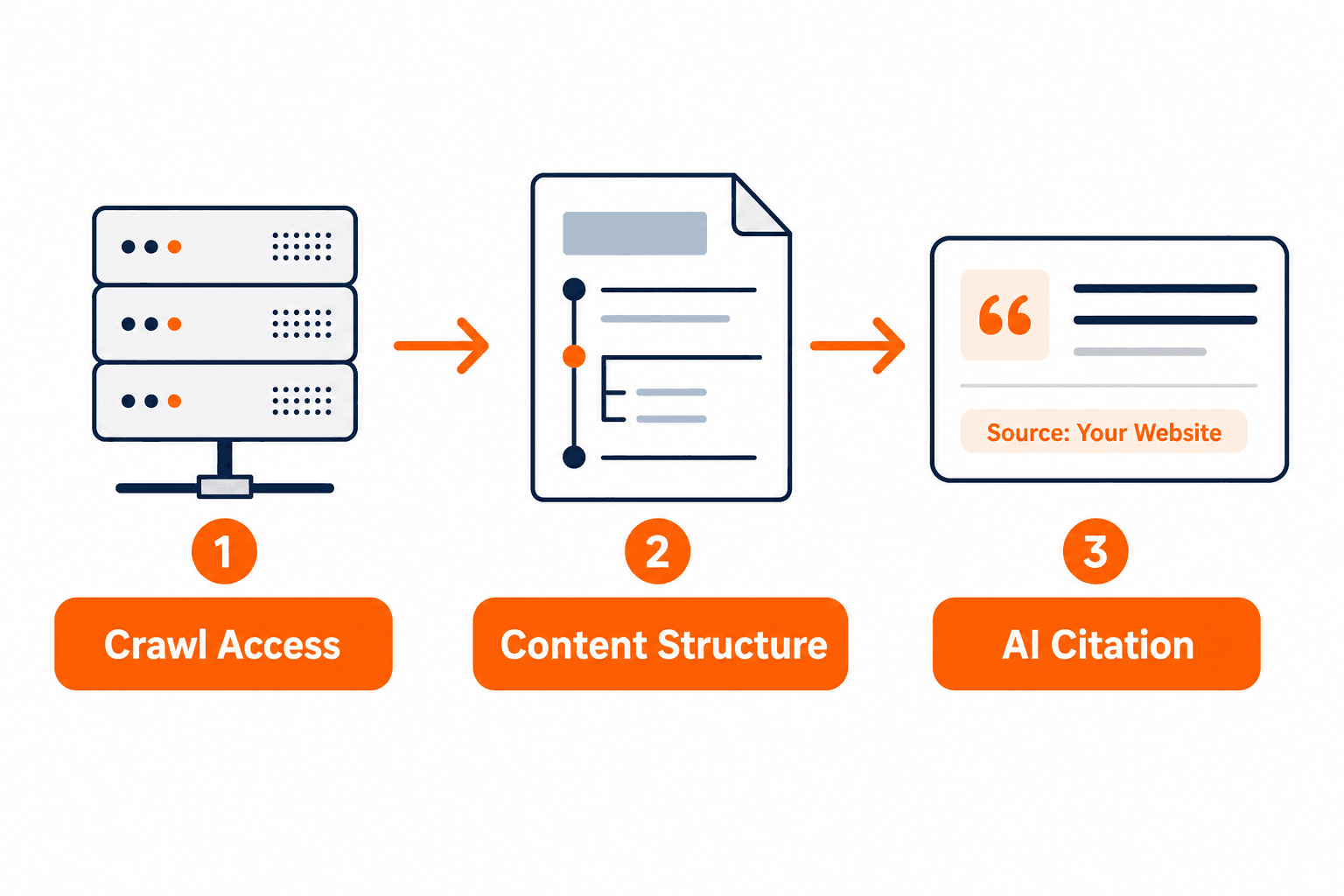
Step 1: Access. The system sends a bot to fetch the page. If robots.txt disallows it, a WAF blocks the request, or a CAPTCHA intercepts it, the content is simply skipped. According to OpenAI’s crawler guidance, WAF settings, CDN rules, and CAPTCHA systems can all block access even when the page URL exists and is publicly visible.
Step 2: Parsing. The bot reads the HTML. Pages that rely heavily on JavaScript rendering are harder to parse because the content may not appear in the raw HTML response. Clean, server-rendered HTML is more reliable.
Step 3: Extraction. The system identifies what the page is about, who it is for, and what key facts it contains. Descriptive headings, definitions near the top of sections, and consistent entity naming all help here.
Step 4: Citation. When a page is cited in an AI answer, it is usually because the content directly and clearly answers the question being asked. Answer-first structure helps. Vague introductions do not.
What AI systems can usually access
Static HTML text that loads without JavaScript execution
Heading structure (H1 through H4)
Links and internal navigation
Structured data in JSON-LD, Microdata, or RDFa format
Pages listed in the XML sitemap
Pages that are publicly available without authentication
What often breaks AI understanding
JavaScript-heavy rendering where content only loads after client-side execution
Blocked bots via aggressive WAF rules or CDN settings that treat AI crawlers like malicious scrapers
Canonical conflicts where different pages claim to be the preferred version
Thin pages with little original content to extract or cite
Template clutter where navigation, footers, ads, and repeated boilerplate dilute the actual page content
Vague headings that describe sections without signaling what information the section contains
What should you change on your website to make it easier for AI systems to understand?
This is the practical audit list. Work through it in order. Earlier items have higher impact and are harder to overcome if missing.
Access and permissions
This is the gate. If AI crawlers cannot reach your pages, nothing else matters.
Check your robots.txt file and make sure retrieval crawlers like GPTBot, OAI-SearchBot, PerplexityBot, ClaudeBot, and Claude-SearchBot are not unintentionally blocked
If you are on Cloudflare, check the AI bot blocking setting in your security dashboard. Perplexity’s documentation notes that WAF configurations may require explicit whitelisting for their crawlers to access content
Verify that key pages return a 200 status code, not a redirect chain or error
Make sure no login wall, CAPTCHA, or paywall sits between crawlers and your public content
Test: request the page using a plain HTTP client without a browser. If the content appears, crawlers can likely read it
Indexability and canonical clarity
Once access is confirmed, the next question is whether the page signals that it should be indexed and which version is preferred.
Issue | Symptom | Fix |
|---|---|---|
noindex tag on public content | Pages not appearing in AI results or search | Remove noindex from pages you want discovered |
Canonical points to a different URL | AI cites wrong version of the page | Set canonicals to the correct preferred URL |
Page missing from XML sitemap | Crawlers may never discover it | Add all key public pages to the sitemap |
Duplicate content without canonicalization | Signals split across multiple URLs | Consolidate with canonical tags or redirects |
Google’s canonical consolidation guidance applies directly here: canonical tags and sitemap signals help AI systems identify which version of a page is authoritative.
Content structure and extraction
Content that is easy for humans to scan is generally easier for AI systems to extract. The key habits:
One topic per page. Pages that try to cover everything give AI systems conflicting signals about what the page is for.
Descriptive H2s. A heading like “Pricing options” is weaker than “How much does [Product] cost?”
Direct answers under headings. Put the answer in the first sentence, then expand. Do not bury it after three context-setting paragraphs.
Tables for comparisons and specs. AI systems can extract tabular data effectively.
Consistent entity names. If your product is “Keytomic,” call it “Keytomic” every time, not “the platform,” “our tool,” or “KT.”
Structured data and entity signals
Schema markup from schema.org helps machines interpret page type, authorship, topic, and relationships. It does not guarantee AI citation, but it reduces ambiguity.
Useful schema types for most SaaS blogs and product pages include Article or BlogPosting, FAQPage when FAQ content is visible on-page, Organization, Person for pages with real author attribution, and BreadcrumbList for navigational context.
According to Google’s robots meta tag documentation, structured data exposes page information in ways that can be treated differently from snippet controls, so your metadata choices affect what gets extracted.
Performance and template cleanliness
Page speed and clean rendering matter, but they are lower priority than access, indexability, and structure. A slow page that loads cleanly will still be read. A fast page that requires JavaScript execution to reveal its content may not be.
Keep boilerplate minimal. The more clutter AI systems have to filter through, the harder it is for them to isolate the signal they are looking for.
Common mistakes that make sites hard for AI systems to trust or cite
Mistake | Why it hurts AI visibility | How to spot it | Fix first |
|---|---|---|---|
Blocking AI crawlers in robots.txt | Bot cannot access content to cite it | Check robots.txt for GPTBot, OAI-SearchBot, PerplexityBot entries | Update robots.txt to allow retrieval crawlers |
Conflicting canonical tags | AI cannot determine the authoritative page | Crawl with Screaming Frog or similar; look for canonical mismatches | Set canonical to the correct preferred URL on all versions |
JS-rendered content only | Raw HTML lacks extractable text | Fetch URL with curl or similar; check if body text is present | Move key content to server-rendered HTML |
Thin or duplicate pages | Low information value, nothing worth citing | Check page word count and near-duplicate detection | Consolidate or expand thin pages before promoting them |
Inconsistent entity naming | AI cannot reliably identify what the brand or product is | Audit content for varying references to the same entity | Standardize terminology across the site |
Vague or generic headings | Signals poor relevance to specific queries | Review H2s and H3s: do they answer a question or describe a topic? | Rewrite headings to be specific and answer-first |
Can one file or schema type make your site agent-ready?
No. And anyone suggesting otherwise is oversimplifying.
There are two files that get a lot of attention in AI-search discussions: llms.txt and ai.txt. Both are worth understanding, but neither is a shortcut to agent-readiness.
What llms.txt is and why it is still optional
llms.txt is a proposed convention, introduced in September 2024, for a Markdown file at your domain root that gives LLMs a curated summary of your most important pages. Think of it as a hint file for AI systems, not a directive they are required to follow.
The important context: as of mid-2026, Google has confirmed it does not use llms.txt, and no major LLM provider has officially committed to treating it as a signal in their production search surfaces. A 300,000-domain study found no measurable improvement in AI citations from having the file. The bots that drive most AI search citations largely do not request it in meaningful volume.
For SaaS documentation sites where developers use AI coding assistants, it can genuinely improve how those tools reason about your API or product docs. For general content sites, it is low-cost insurance, not a proven ranking factor.
Treat llms.txt as optional and worth considering if your audience includes developers using AI-assisted tools.
Why strong pages still matter more than add-on files
AI systems cite pages that clearly answer questions, not pages that have a particular file in the root directory. The levers that matter most are:
Content clarity: Can a bot extract a direct answer to a specific question from this page?
Unique information: Does the page offer something beyond a restatement of generic facts?
Consistent entities: Is it clear who you are and what your product does, every time?
Accessible public pages: Is the content reachable without friction?
ai.txt is a separately proposed framework intended to address limitations in how robots.txt handles AI-specific interactions. It is not a broadly adopted web standard and should be treated with the same caution: follow it as it develops, but do not treat it as a proven solution.
How Keytomic helps teams improve AI visibility without turning this into a manual project
Keytomic is the platform behind this article.
Most teams understand what needs fixing. The harder problem is execution at scale across planning, writing, publishing, indexing, and tracking, especially for lean teams that cannot afford to split that work across multiple tools or large operations.
Keytomic AI SEO automation platform is built specifically for teams that want agency-level SEO throughput without assembling a stack of point solutions. It covers keyword research, content planning, AI-assisted article generation, publishing workflows, and indexing in one system.
Where Keytomic fits in the workflow
For teams working on AI search optimization specifically, Keytomic’s AI Visibility Tracker helps measure whether AI systems are actually surfacing your brand in responses. That matters because most teams have no visibility into whether their content improvements are translating into AI citations or appearances in Google AI Overviews.
The workflow also includes content planning and generation tools that apply the structural principles covered in this guide: answer-first headings, entity-consistent copy, and structured output ready for publishing. If you want to understand how to choose the right setup for your team, the guide on how to choose SEO automation tools is a useful starting point.
For teams exploring what an AI search monitoring platform actually does in practice, that piece covers how measurement connects to strategy.
When Keytomic is not the right fit
Teams that do not publish content regularly and need a content strategy before tooling
Teams still working through basic positioning or ideal customer profile decisions
Buyers who need a single point solution (just a rank tracker, just a schema generator) rather than a broader workflow platform
Decision framework: do this now, later, or not at all
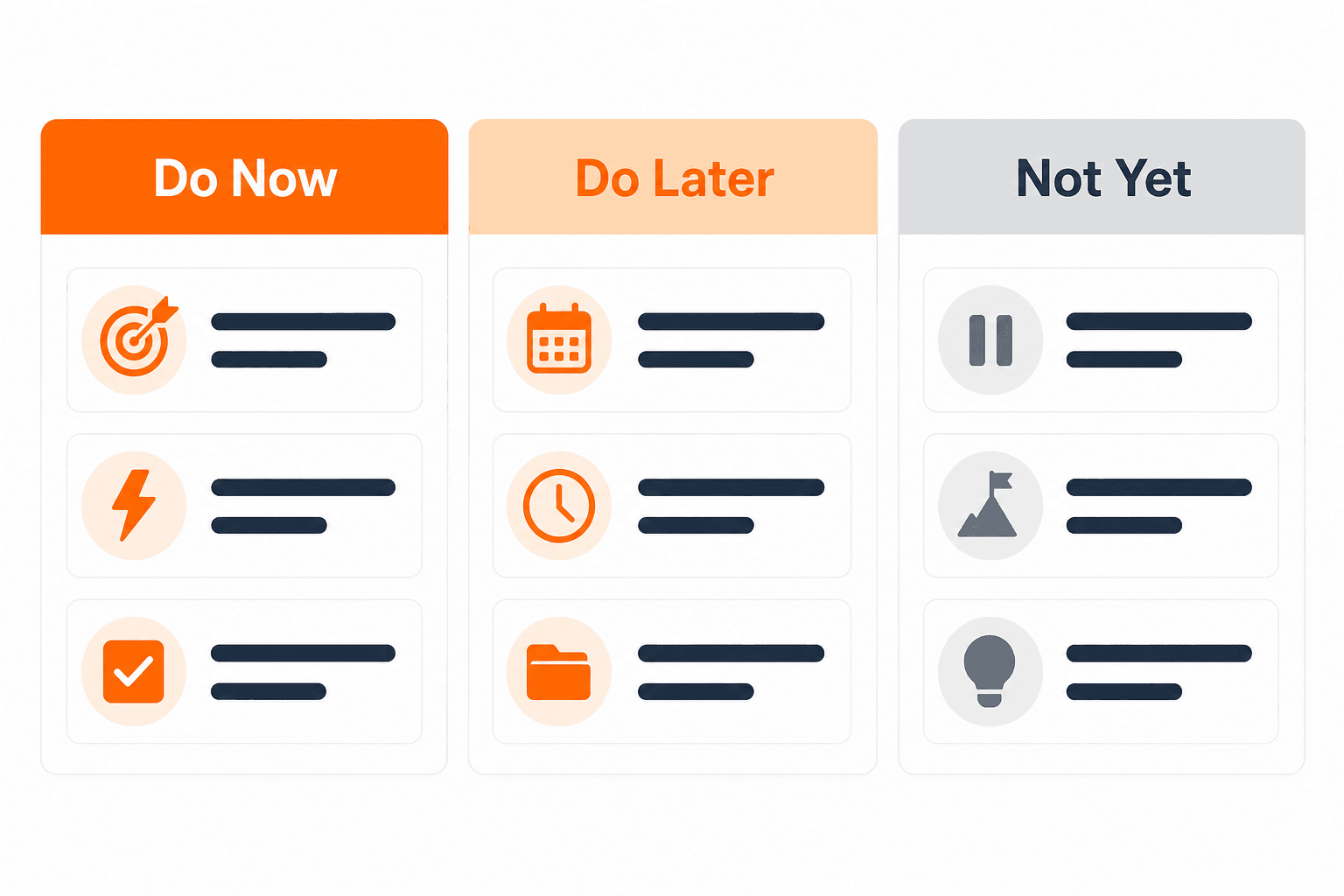
Do now | Do later | Do not prioritize yet |
|---|---|---|
Audit robots.txt for unintentional AI crawler blocks | Add llms.txt if your audience includes developers using AI coding tools | ai.txt implementation until broader adoption is confirmed |
Fix canonical conflicts and noindex errors on public pages | Expand and restructure thin pages with low information density | Deep structured data implementation before access issues are resolved |
Move key content out of JavaScript-only rendering | Add schema markup to high-priority pages | Chasing specific “rank in ChatGPT” tactics without fixing fundamentals |
Set consistent entity naming across the site | Monitor AI visibility with a tracking tool | Redesigning site architecture specifically for AI before SEO basics are stable |
Verify public pages return 200 and are listed in XML sitemap | Experiment with answer-first heading rewrites on high-traffic pages | Investing in AI-specific content formats before general content quality is strong |
FAQ
What is an agent-ready website? An agent-ready website is a site that AI systems can access, parse, and cite without technical or structural friction. There is no formal universal standard for the term.
Is an agent-ready website different from SEO? They overlap significantly. Agent-readiness extends SEO hygiene by adding emphasis on crawler permissions, answer extraction, and entity clarity beyond classic ranking signals.
Do AI agents use the same signals as Google? Partly. Both rely on crawlability and indexability, but AI answer engines weight content answerability and entity clarity more directly than traditional ranking signals.
Will schema markup get my site cited by ChatGPT? No. Schema reduces ambiguity about page type and content, but it does not guarantee AI citation. Content quality and direct answers matter more.
Does llms.txt make a website easier for AI to understand? Possibly, in specific contexts like developer documentation. For general content sites, the major AI search crawlers do not request it in meaningful volume as of mid-2026.
Why do AI tools fail to cite some websites? Common reasons include blocked crawlers in robots.txt or WAF settings, JavaScript-only rendering, thin content, canonical conflicts, and vague heading structure.
Should startups care about agent-readiness yet? Yes, but fix the fundamentals first. Crawl access, indexability, and content structure have far more impact than any AI-specific experiment for most early-stage sites.
Can a JavaScript-heavy site still be agent-ready? It is harder. Server-side rendering or static generation of key content is the most reliable fix. Some AI crawlers handle JavaScript better than others, but it remains a common failure point.
How do I know if my site is hard for AI systems to parse? Fetch a key page using curl or a plain HTTP client without JavaScript execution. If the main content does not appear in the raw response, AI crawlers likely cannot read it either.
What should I fix first if I want better AI visibility? Start with access: confirm AI retrieval crawlers are allowed in robots.txt and not blocked at the WAF layer. Then check canonical tags and noindex tags. Then improve content structure.
Next step: fix the basics first, then improve for AI discovery
Most teams do not need a separate AI website strategy. They need to fix the foundational issues that also limit traditional search performance, then layer on AI-specific improvements once the basics are solid.
The sequence that makes sense in practice:
Check access and indexability. Confirm AI retrieval crawlers are allowed, key pages return 200 status codes, and canonical tags point to the right URLs.
Improve page structure and entity clarity. Descriptive headings, answer-first content, consistent naming, and structured data where it matches the page.
Measure whether AI systems surface your brand. Without visibility into where and how AI tools mention your product, you are guessing.
If you want to see where your brand stands across AI search surfaces today, book a Keytomic demo or explore the AI Visibility Tracker to start with a clear baseline.
Word


