TL;DR
Google expanded Preferred Sources into AI Overviews and AI Mode on May 27, 2026, with an improved publisher button in August 2026 that keeps readers on your site.
Users are twice as likely to click Preferred Sources; more than 600,000 unique sources have already been selected.
Any site that publishes fresh content is eligible (domain or subdomain level only).
Implementation takes two lines of JavaScript or a simple deeplink — exact code is below.
New developing-topic carousels, perspectives carousels, and Highly Cited labels further reward trusted, original content.
On May 27, 2026, Google made a meaningful move for publishers. Preferred Sources — the feature that lets users select their favorite websites so those sites stand out in search — expanded into AI Overviews and AI Mode.
AI Overviews and AI Mode are Google’s own answer surfaces. For a wider look at Google and its competitors, see our guide to Google alternatives.
Just a few months later, in mid-August 2026, Google improved the publisher-side experience with a new embeddable button that adds a site as a Preferred Source and immediately returns the reader to the page they were on.
Google reports that people are twice as likely to click through to a Preferred Source. By August 2026, more than 600,000 unique sources had already been selected (up from roughly 345,000 in late May).
As someone who works daily with brands navigating AI search visibility, I see this as one of the clearer publisher-friendly signals Google has shipped recently. It does not solve zero-click search overnight, but it gives loyal audiences a direct way to boost the sites they trust inside the experiences that increasingly answer their questions.
Here is everything you need to know — what Preferred Sources actually is, the full timeline, what experts are saying, the new carousels and Highly Cited labels that launched alongside it, and the exact steps to implement the button or deeplink on your own site so readers can add you in one click.
What Are Google Preferred Sources?
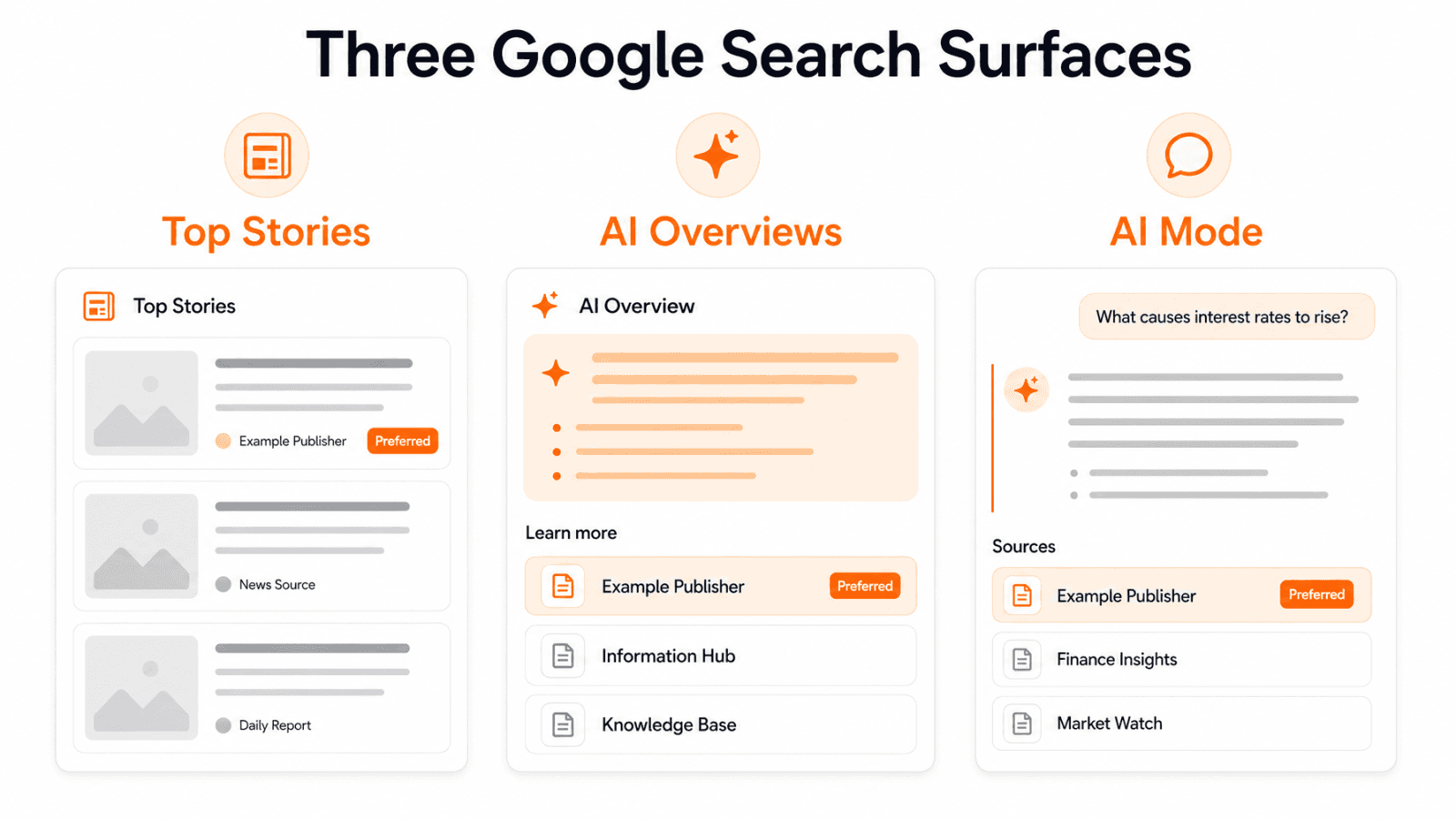
Preferred Sources is a user-controlled personalization feature. Readers choose the websites they want to see more of. Once selected, those sites receive a clear “Preferred” badge when they appear in Top Stories, AI Overviews, or AI Mode.
Any website that publishes fresh content is eligible. The feature works at the domain or subdomain level only. A subdirectory such as example.com/blog cannot be selected as its own Preferred Source.
Google’s documentation states that selected sites are more likely to appear in Top Stories when they have fresh, relevant content. Inside AI Overviews and AI Mode, links from a user’s Preferred Sources carry the “Preferred” label so they stand out among the other citations.
This is not a ranking guarantee. It is a visibility and click-through boost driven by explicit user preference.
When Was Preferred Sources Released and What Changed in 2026?
2025: Preferred Sources began as a Google Labs experiment, then launched for Top Stories in the United States and India around August.
April 2026: Global expansion to all languages.
May 27, 2026: Official rollout into AI Overviews and AI Mode. Duncan Osborn, Product Manager for Google Search, announced the change on the Google Blog: “you’ll be able to easily spot links in AI responses from the sources you’ve already selected. Just like in Top Stories, your Preferred Sources will be clearly labeled to stand out.”
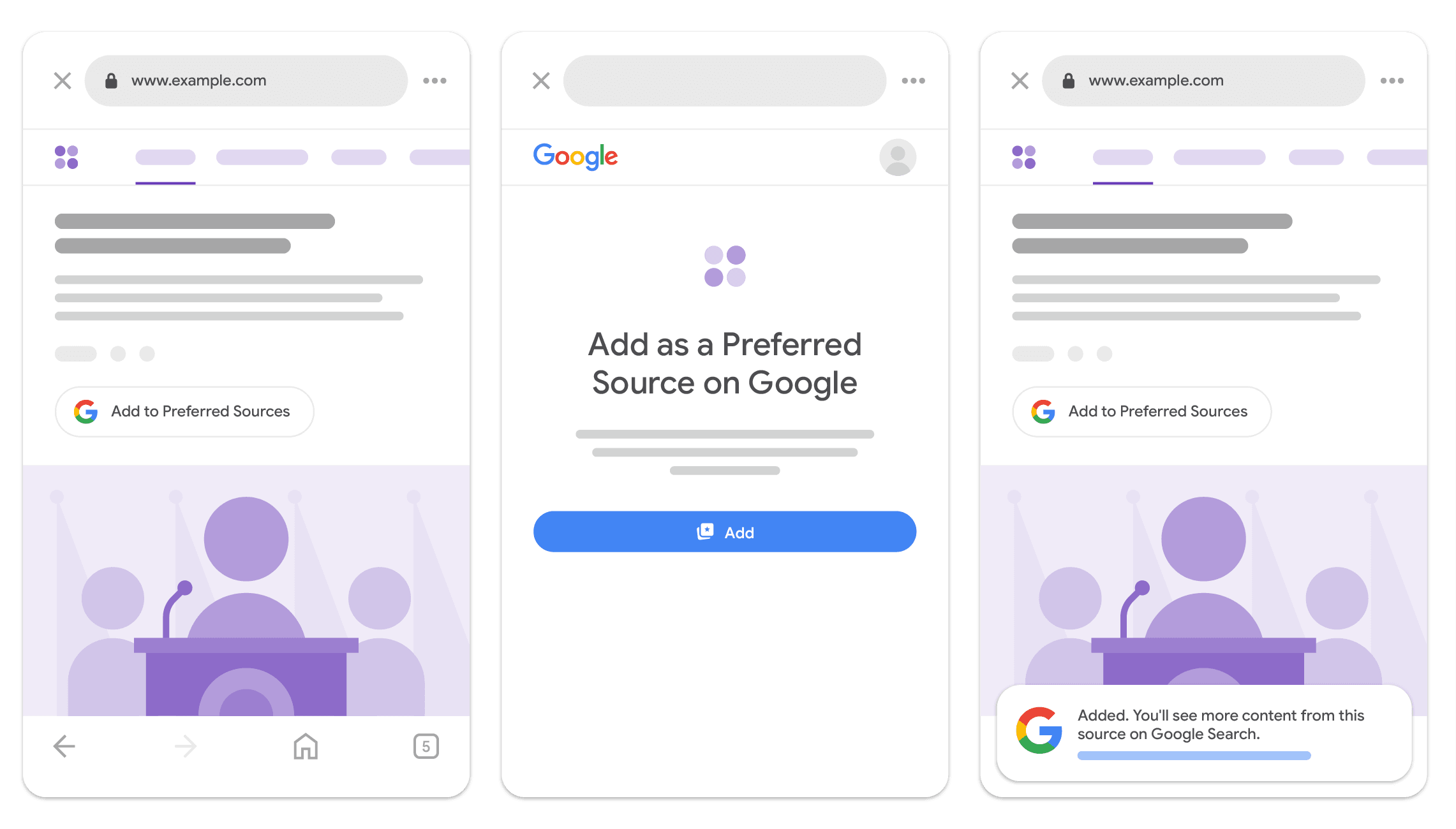
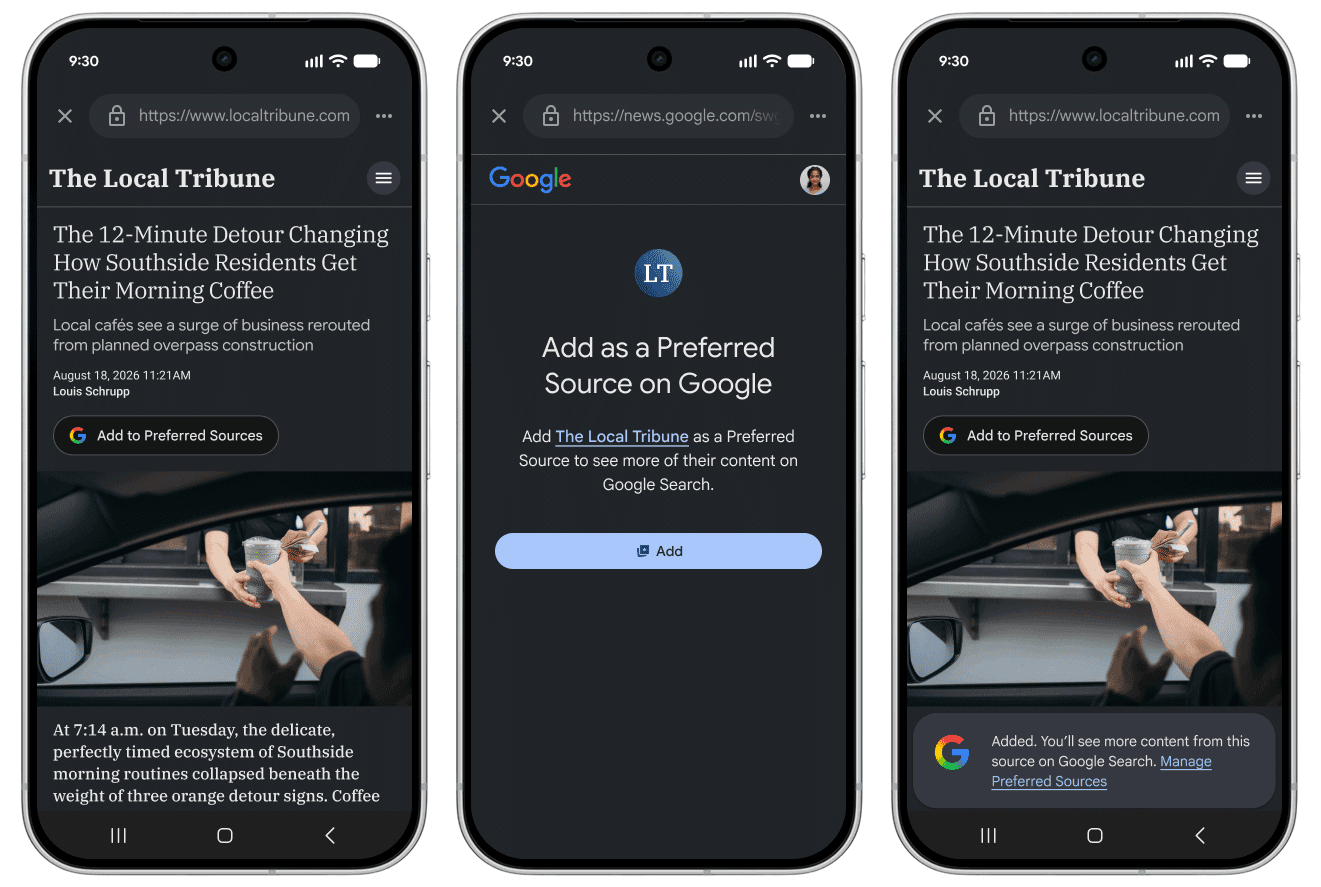
August 20–21, 2026: Google released an improved embeddable button. Clicking it now adds the site as a Preferred Source and returns the reader to the exact page they left. The older approach sent users to Google’s source preferences tool and left them there. At the same time, Google reported that more than 600,000 unique sources had been selected.
Alongside the May expansion, Google introduced two additional features that matter for publishers:
A prominent carousel that appears on some queries about developing or breaking topics. The carousel surfaces timely articles and also highlights Preferred Sources.
A similar carousel (rolling out) that pulls firsthand perspectives from online discussions, forums, and social media.
Expanded “Highly Cited” labels on more web article links across Search, plus indicators when an article references a Highly Cited source.
These updates reinforce Google’s stated goal of helping users find original, high-quality content and trusted sources more easily inside AI experiences.
What Experts Are Saying
Glenn Gabe, AI Search Consultant, captured the publisher sentiment clearly in an X post the day of the announcement: the expansion “sort of proves Google is trying to drive more clicks to publishers.” He pointed to the new carousels for developing topics and for discussions/forums/social media, and directed people to Barry Schwartz’s detailed coverage and screenshots.
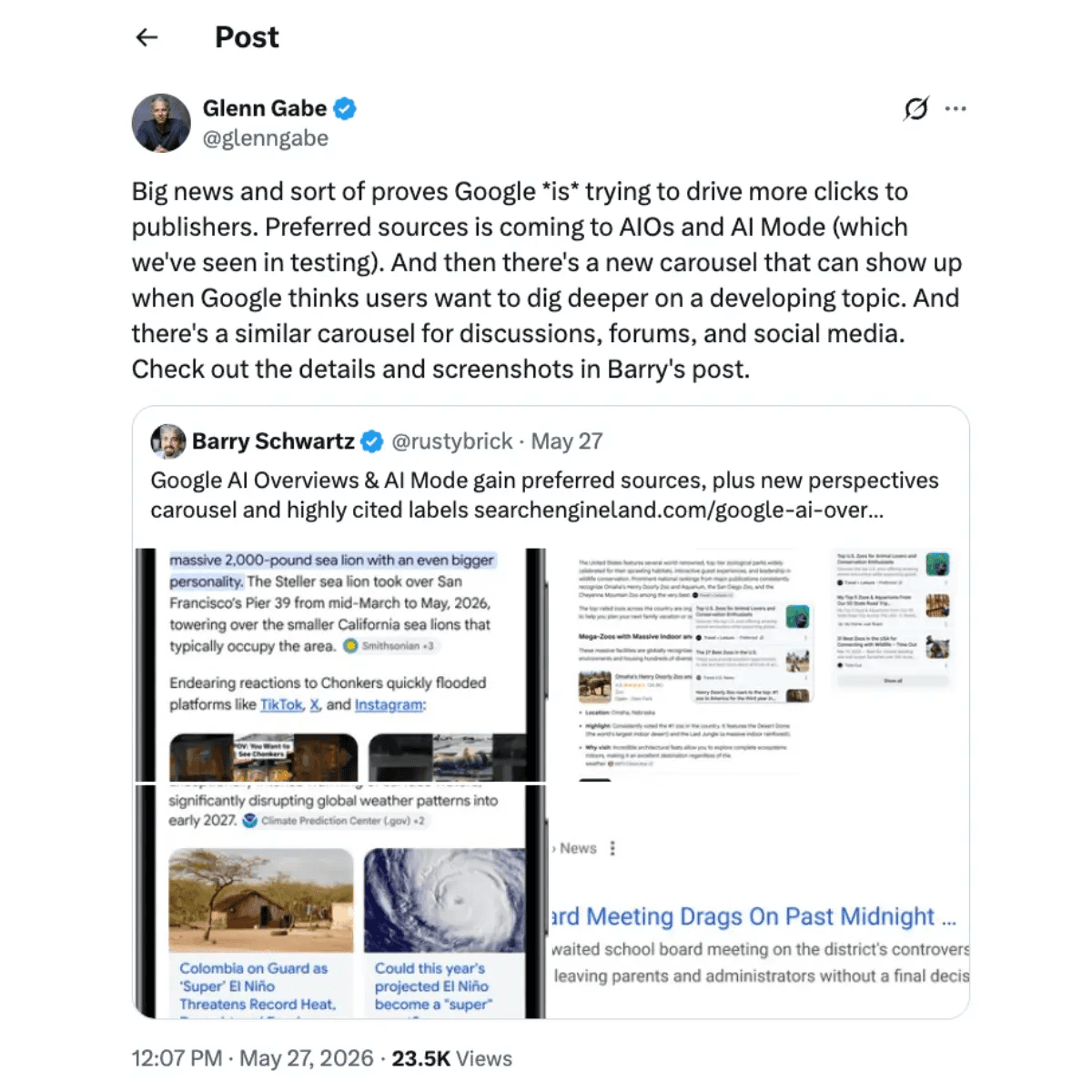
Barry Schwartz (Search Engine Land and Search Engine Roundtable) documented the testing that appeared roughly a week before the official launch and published the final screenshots showing Preferred badges inside AI responses. Industry coverage from Semrush, Android Authority, 9to5Google, and others has been consistent: this is a rare user-driven lever that can increase click-through at a time when AI answers are absorbing more of the traditional results page.
From my perspective, the value is straightforward.
Brands that already have an engaged audience now have a low-friction way to convert that loyalty into higher visibility inside the AI surfaces that matter most. The 2x click-through figure Google cites is the number that should get every publisher’s attention.
How Preferred Sources Appear in AI Overviews and AI Mode
When one of a user’s selected sources appears among the citations in an AI Overview or AI Mode response, Google attaches a “Preferred” badge. The badge works the same way it already does in Top Stories.
At launch the feature primarily labels sources that would have appeared anyway. Google has indicated it is working on using Preferred Sources as a stronger ranking signal so that selected sites surface more often across its AI features.
The new developing-topic carousel also highlights Preferred Sources, giving timely articles from those sites additional prominence. The perspectives carousel (forums, discussions, social) is expected to follow a similar pattern.
No special technical requirements exist beyond standard Search eligibility: the page must be indexed and eligible to appear with a snippet.
How to Implement Preferred Sources on Your Website (Exact Steps)
Google provides three official methods. The recommended approach is the standard JavaScript button because it keeps the reader on your page after they add you. Full details live in the official Google Search Central documentation.
1. Standard JavaScript Implementation (Recommended)
This is the method most publishers should use. It requires only two lines of code and automatically localizes the button.
Step 1
Add this script tag to your page, preferably in the <head>:
Step 2
Place this div wherever you want the button to appear (article footer, sidebar, near social sharing buttons, etc.):
Optional customizations
Theme (light is default):
Language override:
Google supplies a list of supported language codes in its documentation.
After a reader clicks the button they see a confirmation screen (“Add as a Preferred Source on Google”), click “Add,” and are returned to the exact spot on your page. That seamless return is the key improvement shipped in August 2026.
Image placement: Button flow screenshots (click → confirmation → return to page)
URL: https://www.seroundtable.com/google-preferred-source-button-update-41912.html
2. Advanced JavaScript Implementation (Custom Design)
If you want to trigger the flow from your own button or UI element instead of the standard Google-styled button, use the programmatic SDK.
ES Module approach (modern build setups):
Standard script + callback queue (if you prefer a classic script tag):
Google maintains a live demo of both approaches linked in its documentation.
3. Deeplink Implementation (No JavaScript Required)
If your CMS or setup cannot support the JavaScript button, use a direct link to the source preferences tool with your domain pre-filled:
Replace yourdomain.com with your actual domain (no https:// or path).
You can use this as a text link:
Or wrap an image (Google provides downloadable button assets in multiple languages):
Official button image assets are available as a zip download from the Google documentation page.
Placement and Promotion Tips That Actually Work
Put the button near your existing social share icons or at the end of high-engagement articles.
Mention it in newsletters and social posts: “If you find our coverage useful, add us as a Preferred Source so you see more of us in Google.”
Test both light and dark themes against your site design.
Confirm your site appears in the source preferences tool first by visiting https://www.google.com/preferences/source and searching for your domain.
Remember: only domain and subdomain level are eligible. Subdirectories are not treated as separate sources.
What This Means for Brands’ AI Visibility
Being selected as a Preferred Source does not replace strong technical SEO, original reporting, or E-E-A-T. It amplifies the sites that users already trust.
The 2x click-through rate Google cites can meaningfully change traffic patterns as more queries are answered inside AI Overviews and AI Mode. Publishers who actively encourage their existing readers to select them stand to gain the most.
The feature also pairs well with the new developing-topic and perspectives carousels. When those carousels appear, Preferred Sources receive additional visual emphasis.
How Keytomic Helps You Capitalize on Preferred Sources and AI Visibility
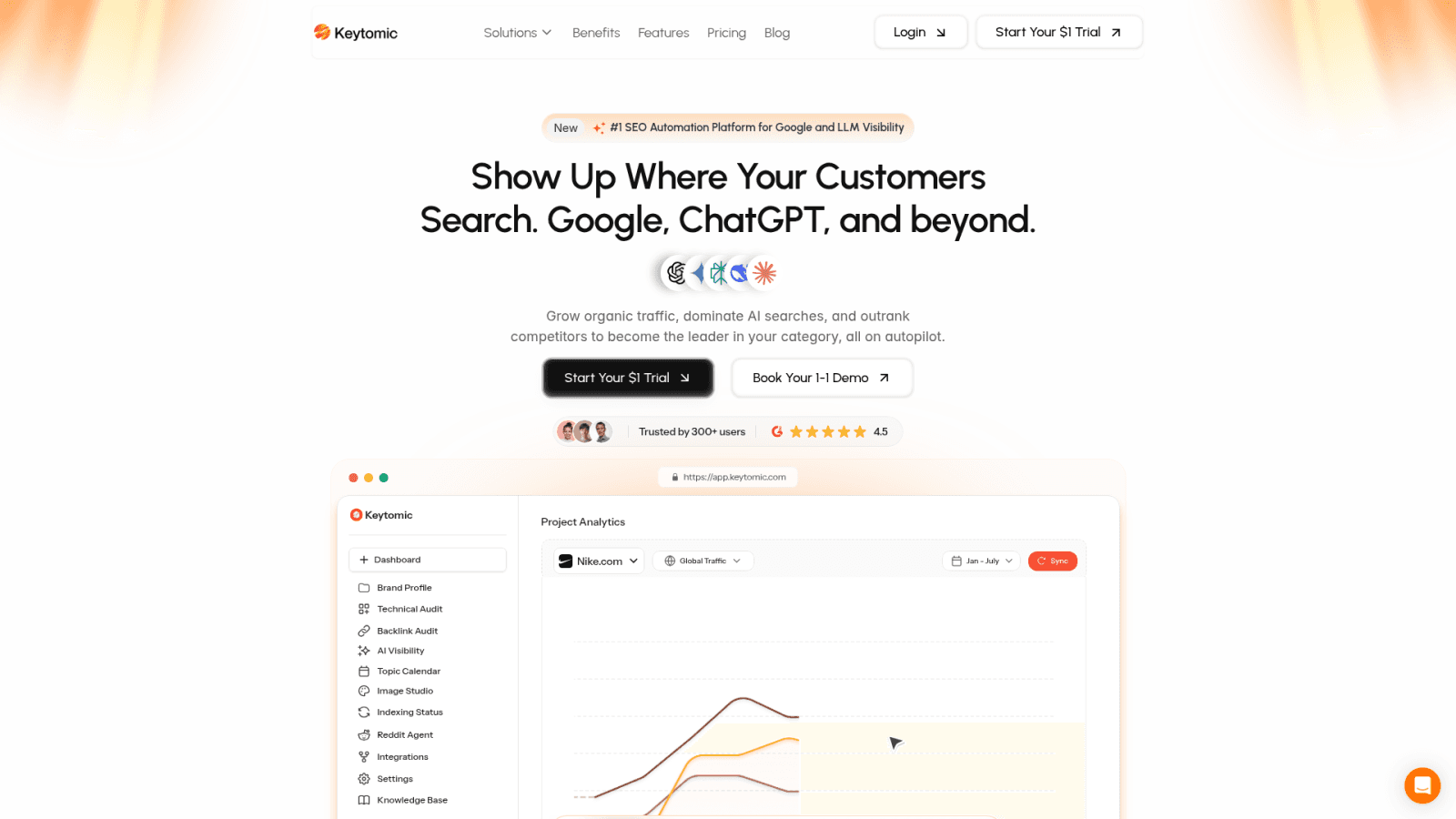
Preferred Sources is a powerful user-driven signal, but it still depends on you consistently publishing the kind of fresh, high-quality content that makes readers want to choose you.
Keytomic is an AI SEO automation platform built for exactly that environment. It helps teams research high-intent topics, generate E-E-A-T-aligned content optimized for both traditional search and AI citation, maintain a 30-day content calendar, publish directly to major CMS platforms, force indexing, and track brand visibility and citations across Google AI Overviews, AI Mode, ChatGPT, Perplexity, Gemini, Claude, and others.
If your goal is to produce the volume and quality of content that turns casual readers into people who actively select you as a Preferred Source — while measuring the impact across AI surfaces — explore the Keytomic AI Visibility Tracker and start a trial.
Key Takeaways
Preferred Sources expanded to AI Overviews and AI Mode on May 27, 2026.
An improved publisher button that keeps readers on your site launched in August 2026.
Users are twice as likely to click Preferred Sources; more than 600,000 unique sources have been selected.
Implementation is simple: two lines of JavaScript for the recommended button, or a one-line deeplink.
New carousels for developing topics and perspectives, plus expanded Highly Cited labels, further reward original and trusted content.
The real work remains producing content worth preferring — and making it easy for your audience to select you.
Frequently Asked Questions
What are Google Preferred Sources and how do they work in AI Overviews?
Preferred Sources lets signed-in users select websites they want to see more of. When those sites appear in AI Overviews or AI Mode, they receive a “Preferred” badge. The feature originally worked only in Top Stories and expanded to AI experiences in May 2026. See the official Google documentation.
How do I add the Preferred Sources button to my website?
Add the publisher.js script and the <div google-add-preferred-source-btn></div> element. Full code and options are in the section above and on Google’s official documentation page. The button returns the reader to your page after they add you.
Does being a Preferred Source improve ranking in Google AI Mode?
It currently highlights sources that already appear. Google has stated it is working on using Preferred Sources as a ranking signal so selected sites surface more often. Fresh, relevant content remains essential.
Who is eligible and how many sources have been selected?
Any website that publishes fresh content is eligible at the domain or subdomain level. As of August 2026, Google reports more than 600,000 unique sources have been selected by users.
Ready to turn Preferred Sources into real AI visibility?
Run a free AI Visibility Audit with Keytomic or start your trial today and begin producing the content that makes readers choose you.
Official sources for further reading: