
SEO client management software helps an agency organize client accounts, campaign tasks, owners, approvals, billing, and reporting across multiple websites. No single tool does it all. SEO platforms with agency features (Keytomic, SE Ranking, Semrush) run the SEO work itself; AgencyAnalytics handles client reporting; Teamwork.com, ClickUp, and Productive handle project delivery; Scoro covers agency operations end to end; and Assembly, Plutio, SPP, and OneSuite handle client portals, onboarding, and billing. Pick by the job that's breaking, then test client access and integrations in a short pilot.
If your client work lives in briefs, task boards, CMS logins, approval threads, and status emails, the problem usually isn't a shortage of SEO tools. It's that nobody can see who owns what for which client.
A reporting dashboard won't fix that on its own. Dashboards show what happened; they rarely track who approved a draft or who holds publishing rights. Choosing SEO client management software starts with separating those jobs.
Disclosure: Keytomic publishes this guide and is included in the list. Tools are described from their public product pages and documentation as of October 2026, and prices are left out because plans change often.
What SEO client management software should handle
Think of this category as the operating layer for agency-client work: which client a task belongs to, who owns it, what's waiting on approval, and what actually went live. Plenty of agencies run two or three tools side by side, and that's fine, as long as you know which tool covers which job.
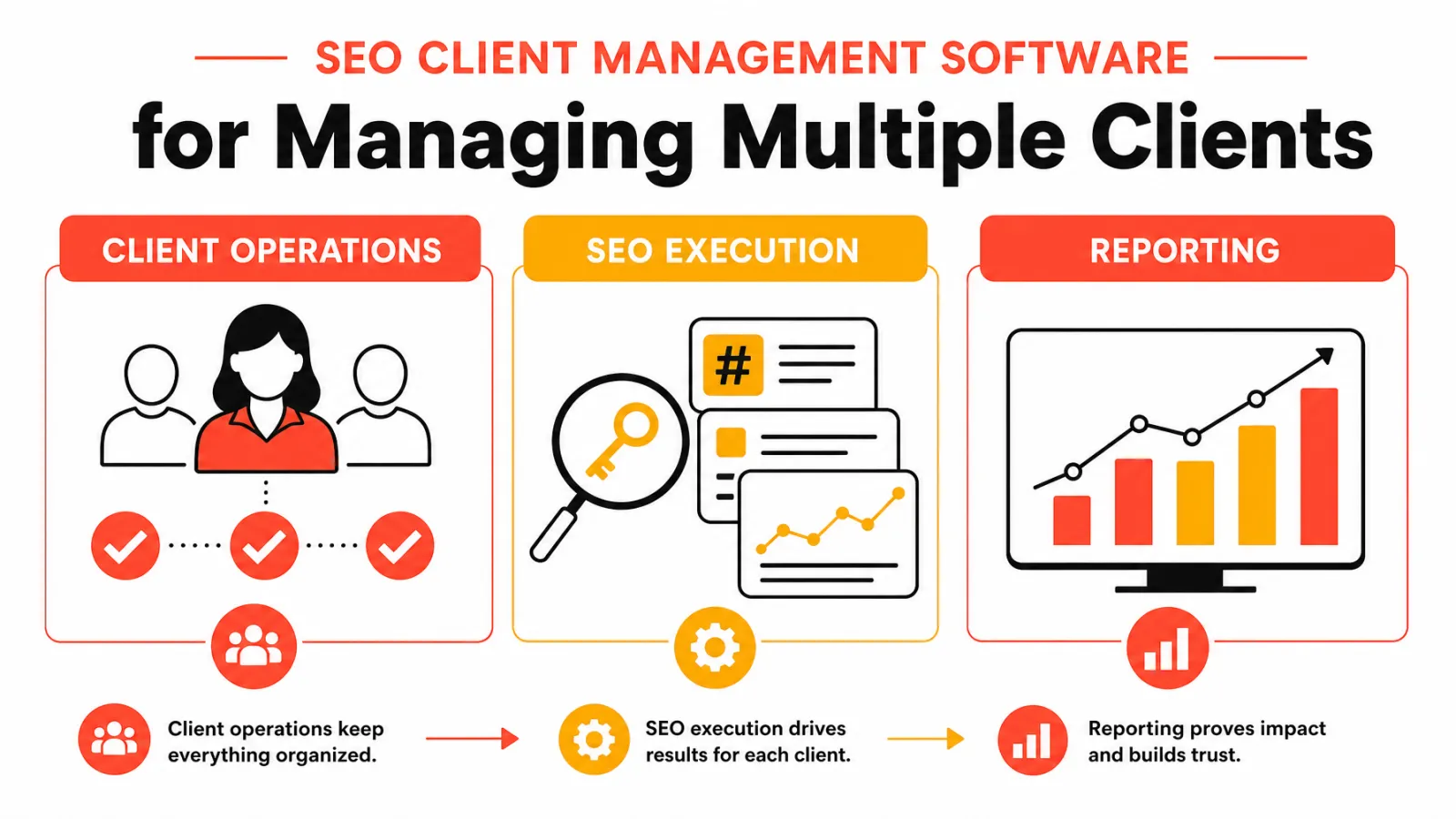
Client operations, SEO execution, and reporting are different jobs
SEO execution: Keyword research, content planning, audits, drafting, publishing, and rank tracking for each client site.
Reporting: What changed in clicks, impressions, rankings, and conversions, and how do you explain it?
Client operations: Which client is this for, who owns it, who approves it, what's been invoiced, and what can the client see?
If reporting is your main gap, our guide to agency SEO reporting tools covers that job on its own, and the SEO KPIs clients care about tell you what those reports should show.
12 SEO client management software options by agency workflow
Most lists of SEO software for agencies mix data platforms, reporting tools, and project managers as if they were interchangeable. They aren't, so this shortlist is grouped by the job each tool does.
At-a-glance comparison
Tool | Category | Client-facing features | Best for | Main limitation |
|---|---|---|---|---|
Keytomic | SEO platform | Approval-based content workflow | Moving many sites from keyword to published page | Not a CRM, billing, or client portal |
SE Ranking | SEO platform | White-label reports and client access | Budget-conscious agencies tracking many sites | Lighter on content production |
Semrush | SEO platform | Agency CRM, client portal, white-label reports | Agencies already running research in Semrush | Agency features sit in a paid add-on |
AgencyAnalytics | Reporting | White-label dashboards and automated reports | Performance reporting across clients | Not a task or approval tool |
Teamwork.com | Project delivery | Client users and time tracking | Multi-client project tracking | SEO data comes from elsewhere |
ClickUp | Project delivery | Guest access, forms, docs | Teams that like to customize | Needs setup to fit SEO workflows |
Productive | Agency operations | Budgets, resourcing, profitability | Scaling agencies that need forecasting | Heavier than small teams need |
Scoro | Agency operations | Quotes, projects, time, billing, CRM | Agencies that want one system for ops and finance | Longer setup than lighter tools |
Assembly | Client portal | Branded portal, messaging, files, billing | Client experience and retention | Doesn't run SEO work itself |
Plutio | Client management | Proposals, contracts, invoices, portal | Small agencies and freelancers | Light on SEO-specific features |
SPP (Service Provider Pro) | Productized services | Order forms, recurring billing, portal | Agencies selling packaged SEO services | Less suited to bespoke retainers |
OneSuite | Agency operations | Client communication, projects, billing | Digital and SEO agencies wanting one ops hub | No keyword research, audits, or content tools |
SEO platforms with agency features
These tools run the SEO work for each client and add agency layers on top, such as multi-site projects, client access, and white-label reports.
Keytomic: SEO execution across client sites

Keytomic combines keyword research, topical planning, AI-assisted content, technical SEO audits, automated CMS publishing, and AI visibility tracking in one approval-based workflow built for agencies. It fits when your bottleneck is getting several sites from keyword to published page without rebuilding the process every time, and it publishes into the CMS platforms clients already use.
Limitation: it doesn't replace a CRM, billing system, or client portal, so pair it with one of the operations tools below. For the wider category, see our list of SEO automation software for agencies.
SE Ranking: multi-client rank tracking and white-label reporting
SE Ranking covers rank tracking, site audits, keyword and competitor research, and content tools, and its Agency Pack adds white-label reports, a branded client dashboard, and client seats so clients can see their own projects. Best for: agencies that track many client sites and want reporting included at a mid-range price. Limitation: content production and publishing are lighter than in an execution platform.
Semrush: agency CRM on top of a research suite
Semrush's Agency Growth Kit adds a client CRM, a client portal, white-label PDF reports, and a listing on its agency directory, all connected to the research and audit data you already have in Semrush. Best for: agencies whose team already lives in Semrush. Limitation: the agency features are a paid add-on on top of the core subscription. If you're weighing a move away, see our Semrush alternatives.
Client reporting
AgencyAnalytics: client-facing SEO reporting

AgencyAnalytics pulls SEO, PPC, and analytics data into white-label client dashboards and automated reports. Swydo is a comparable option focused on automated report scheduling. Best for: agencies whose bottleneck is explaining results. Limitation: neither tracks tasks or approvals, so pair them with a delivery tool. A good SEO client report template helps whichever you use.
Project delivery and agency operations
Teamwork.com: multi-client project delivery
Teamwork.com is a project management platform built around client work, with projects per client, task owners, time tracking, and client users who can see progress. Best for: agencies whose main pain is deadline tracking across many campaigns. Limitation: briefs, SEO checklists, and CMS handoffs need templates you build yourself.
ClickUp: flexible project management
ClickUp lets you model almost any workflow with lists, custom fields, docs, and automations, and it offers guest access for clients. Best for: cost-conscious teams that like to customize. Limitation: the flexibility means setup time, and SEO data still lives in other tools.
Productive: agency operations and profitability
Productive combines projects, time tracking, budgeting, resource planning, and profitability reporting. Best for: scaling agencies that need to forecast capacity and margins per client. Limitation: it's more system than a three-person team needs.
Scoro: end-to-end agency management
Scoro brings quotes, projects, time tracking, billing, CRM, and financial reporting into one system, so a retainer can move from proposal to invoice without changing tools. Best for: agencies that want operations and finance in the same place. Limitation: the breadth means a longer setup than lighter project tools.
Client portals, onboarding, and billing
Assembly: branded client portal
Assembly (formerly Copilot) focuses on the client experience: a branded portal with messaging, file sharing, forms, and billing. Best for: agencies whose clients complain about scattered updates. Limitation: it coordinates the relationship rather than running SEO work.
Plutio: all-in-one client management for small agencies
Plutio bundles CRM, proposals, contracts, invoicing, projects, and a client portal. Best for: small agencies and freelancers who want onboarding through billing in one place. Limitation: it isn't SEO-specific, so research and reporting stay elsewhere.
SPP (Service Provider Pro): productized SEO services
SPP is client management and billing software for agencies that sell packaged services, with order forms, recurring billing, ticketing, and a client portal. Best for: agencies selling fixed SEO packages, such as monthly content or link-building bundles. Limitation: bespoke retainers with shifting scopes fit less neatly into fixed service packages.
OneSuite: operations hub for digital and SEO agencies
OneSuite positions itself as an operations platform for digital agencies, covering client communication, projects, and billing in one place. Best for: SEO agencies that want ops consolidated in a tool aimed at their niche. Limitation: it's built for running the agency, not the SEO, so keyword research, audits, and content still need an SEO platform.
Other tools agencies shortlist
Accelo: client work management for professional services, covering sales, projects, retainers, and billing.
Wayfront: a client portal with onboarding, billing, and service delivery for productized agencies.
HighLevel: CRM, pipelines, and automations for marketing agencies that bundle several services; Keytomic integrates with HighLevel for publishing.
BrightLocal: local rank tracking, listings, and white-label local reports, worth adding for agencies with many local clients alongside our list of local SEO software for agencies.
How to compare SEO client management platforms before you commit
Run a short pilot with two real clients before you consolidate anything. Use a simple scorecard with four columns: requirement, evidence, pass or fail, and owner. Then work through these questions:
Are client data and permissions actually separated?
Who can view, edit, and approve content?
Are task owners, due dates, and recurring workflows configurable?
Which CMSs and data sources are supported?
What can the client see, and what stays internal?
How do billing, exports, and offboarding work?
Which agency jobs still need another tool?
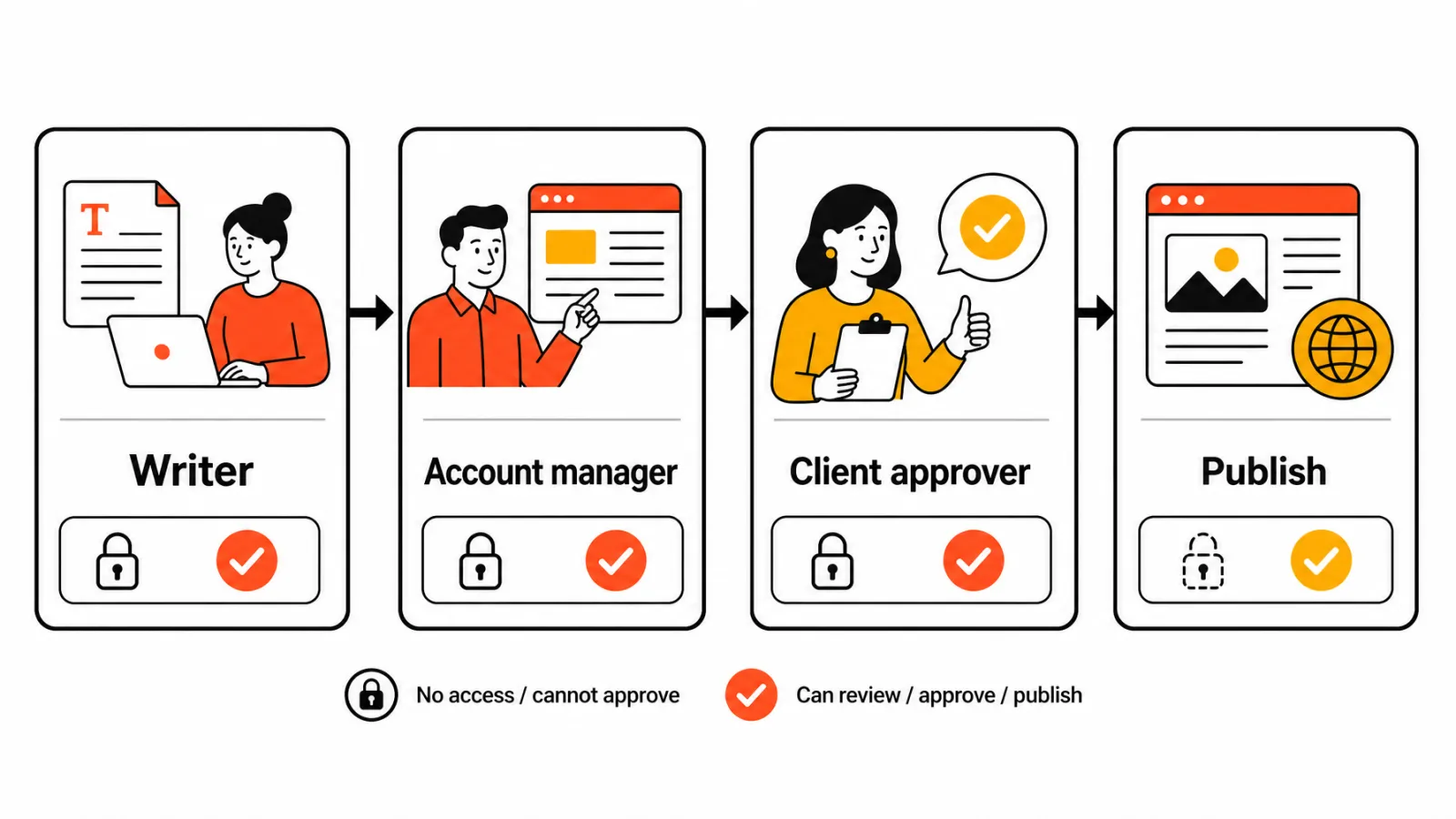
Test roles, permissions, and client-visible views in a live demo, since a workspace label doesn't guarantee separate permissions. For Search Console, review how Search Console users and owners are managed, so you know who can remove access later. If you need white-label delivery specifically, our list of white-label SEO software covers that requirement.
Build a repeatable content workflow across multiple SEO campaigns
The goal is a sequence every client follows, with an owner at each step:
Agree on scope and deliverables.
Set up access and agree on goals, using an SEO client onboarding checklist.
Record a baseline with an SEO audit template and Search Console data.
Prioritize topics and pages.
Write briefs and assign a writer and an approver.
Review claims and quality (this step stays human).
Publish with client authorization.
Review outcomes and log next actions.
Stage | Owner | Approval or evidence | Done when |
|---|---|---|---|
Onboarding and scope | Account manager | Signed scope, access in place | Goals and access are recorded |
Research and planning | SEO strategist | Client-approved topic list | Priorities are agreed |
Brief and draft | Writer | Brief approved internally | Draft is ready for review |
Review and approval | Editor and client contact | Written sign-off | Approval is logged |
Publish and review | Publisher and strategist | Search Console comparison against baseline | Next actions are recorded |
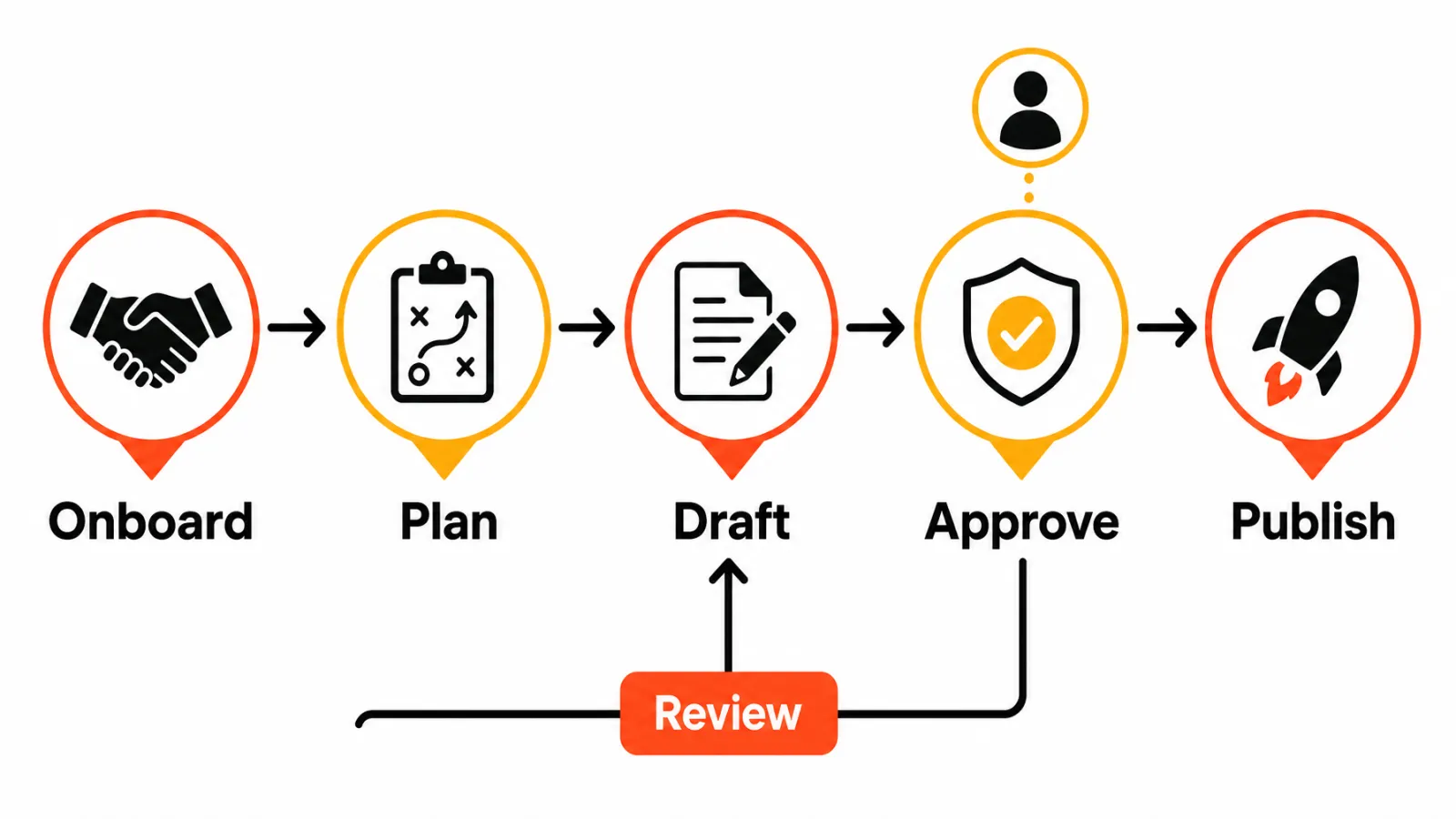
Human review is the part tools shouldn't skip. Google's spam policies on scaled content are worth knowing before you automate drafting at volume. Once the workflow is stable, it's what lets you scale an SEO agency without adding a coordinator per client, and it's a strong answer when prospects ask how you work.
When is a single platform not the right fit?
An SEO platform won't replace a client portal, a billing or CRM system, or a general project-management tool on its own, and a project manager won't do keyword research. If you need complex account permissions, invoicing and profitability tracking, or bespoke client reporting, treat those as separate requirements. For agencies weighing whether software can take on delivery itself, our comparison of an AI SEO agent vs an agency covers where the line sits.
Frequently asked questions about SEO client management software
What is SEO client management software?
Software that organizes client accounts, tasks, owners, approvals, billing, and reporting across websites. Some tools are SEO platforms with agency features, others are project, portal, or billing tools built for agencies.
How is SEO client management software different from SEO reporting software?
Client management tracks ownership, approvals, and communication. SEO client reporting software, such as AgencyAnalytics or Swydo, explains performance results. One organizes the work, the other describes outcomes.
Which SEO platforms have built-in client management features?
SE Ranking offers white-label reports and client seats through its Agency Pack, Semrush adds a CRM and client portal through its Agency Growth Kit, and Keytomic runs approval-based content workflows across client sites.
What features should an agency look for when managing multiple SEO clients?
Client separation, role-based permissions, task ownership, approval steps, billing, CMS publishing support, and the report exports you need.
Can one SEO platform manage client accounts and produce SEO content?
Rarely both. Execution platforms like Keytomic produce and publish content; operations tools like Scoro, Plutio, SPP, or OneSuite manage accounts and billing. Most agencies pair one of each.
How should an agency keep content approvals organized across clients?
Assign one approver per client, record the done condition for each stage, and keep drafts, comments, and sign-off together. Publish only after written client authorization.
Does Google Search Console manage multiple client campaigns?
No. Google Search Console reports search performance. It doesn't assign tasks, route approvals, or manage client projects.
Which path fits your agency's biggest workflow gap?
If the gap is running SEO across client sites, start with an SEO platform such as Keytomic, SE Ranking, or Semrush, and compare it with other AI SEO tools for marketing agencies.
If the gap is explaining results, add AgencyAnalytics or Swydo.
If the gap is ownership and deadlines, add Teamwork.com, ClickUp, or Productive.
If the gap is quotes, billing, and profitability, look at Scoro.
If the gap is onboarding and client communication, look at Assembly, Plutio, SPP, or OneSuite.


