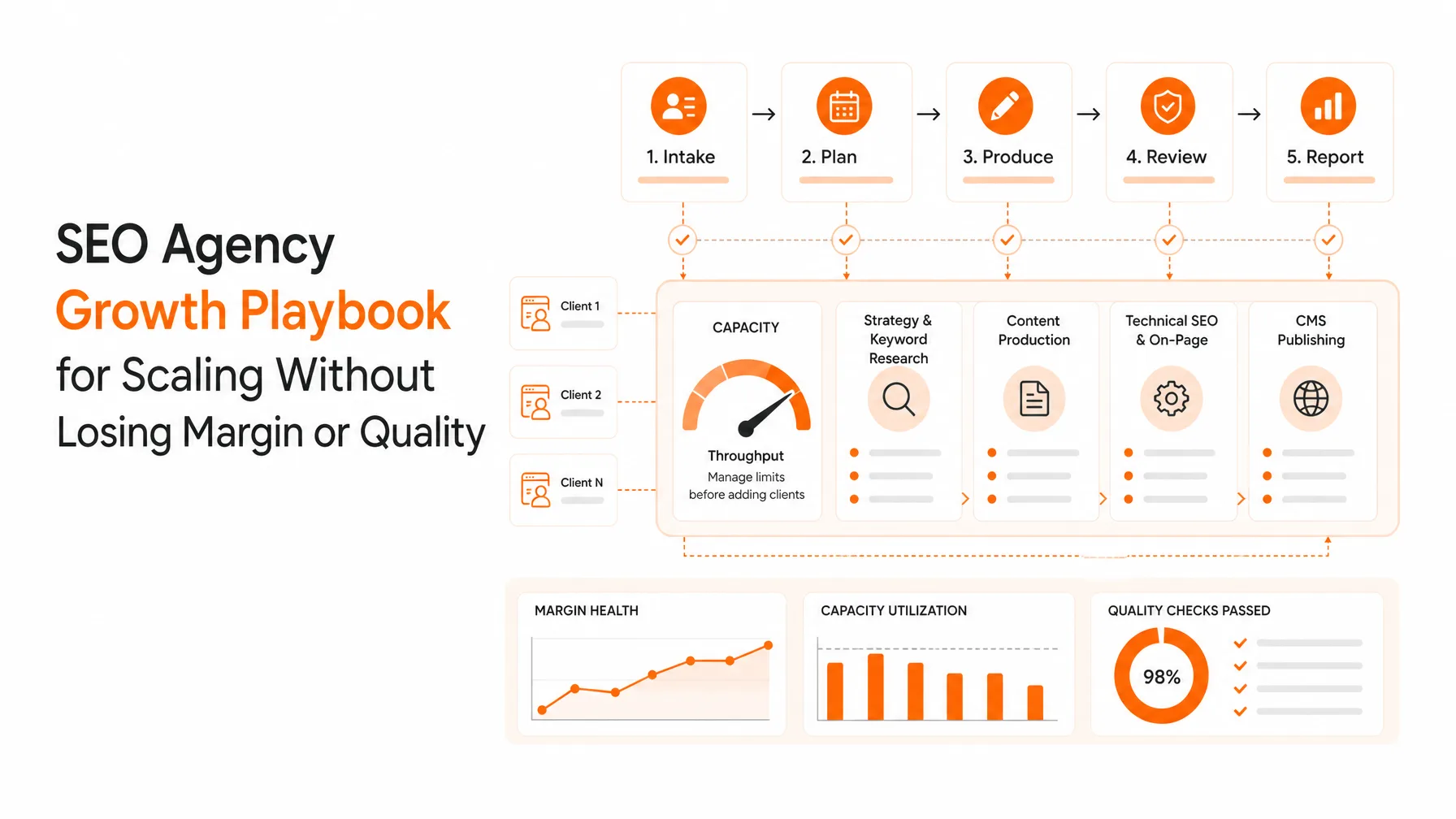
The most useful SEO KPIs for clients tie organic search to business goals: qualified organic conversions, revenue or pipeline where tracking supports it, and the quality of organic traffic. Use Google Search Console (GSC) for clicks, impressions, CTR and average position, then Google Analytics 4 (GA4) for on-site behavior, key events and revenue. Treat rankings and technical health as diagnostics that explain movement, not as proof that SEO created revenue.
Your client report has traffic, rankings, impressions and a backlink count. The client still asks whether SEO is producing leads or sales. That gap is a selection problem, not a data problem.
GSC and GA4 answer different questions. Google's documentation on using both separates search performance from on-site behavior, so the two shouldn't be treated as interchangeable. Mixing them is the fastest way to confuse a client.
This guide helps you choose a small set of SEO KPIs, map them to client goals, explain them without overclaiming, and turn them into a recurring report. It's written mainly for agencies and consultants, with in-house marketers in mind too.
Quick SEO KPI checklist for client reports
Before you send any client report, check that:
It leads with one outcome KPI tied to the client’s goal
It has two to four supporting metrics that explain the movement
Every number has a source and comparison period
GSC and GA4 figures aren’t treated as interchangeable
It ends with one next action, an owner and a date
Download the free SEO KPIs Reporting Checklist
What SEO KPIs should clients track?
SEO KPIs are the selected measurements that show whether organic search is moving a defined client goal forward. Metrics such as rankings and impressions become useful when they explain movement in conversions, qualified traffic, revenue or another agreed outcome.
A KPI measures progress toward a client goal
A KPI is a metric with a job: it's tied to a goal, a baseline and a decision. If nobody would act differently when the number moves, it's a metric, not a KPI. I'd start with the outcome the client is paying to influence, then work backward to the data.
The search-side definitions are worth getting exact. Google's performance data guide covers clicks, impressions, CTR (clicks divided by impressions) and average position as Search Console reports them.
Separate outcome KPIs from diagnostic metrics
Outcome KPIs show the business result. Diagnostics explain why that result moved.
Outcome: qualified organic conversions or key events, plus revenue or pipeline where tracking supports it
Diagnostic: impressions, CTR, average position, indexation, technical health and backlinks
Context: seasonality, site changes and tracking changes that affect either group
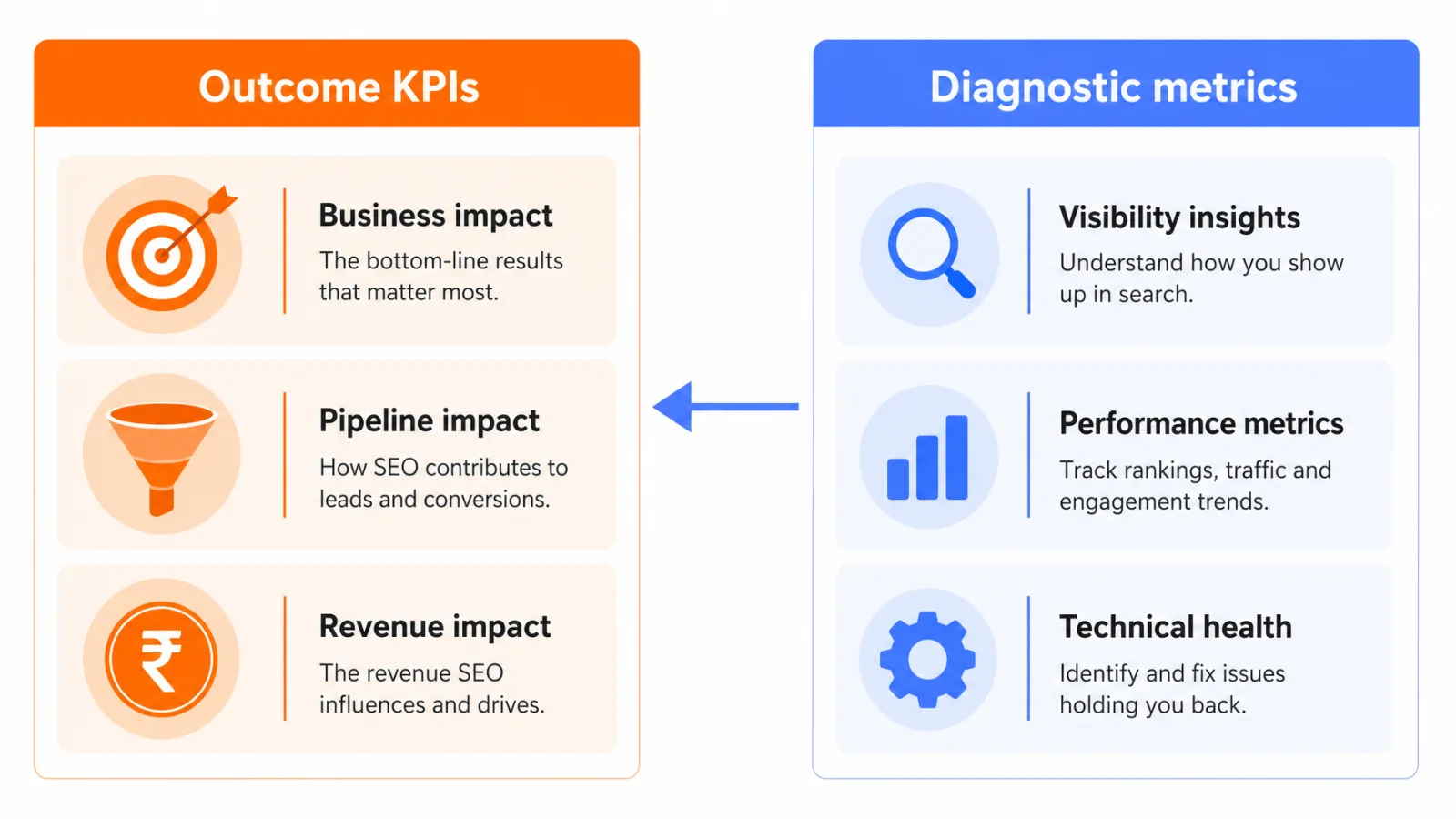
I'd keep the two groups in separate parts of the report. Otherwise a ranking gain ends up sitting next to a flat lead count with no explanation.
Use one primary outcome and a small supporting set
My rule is one outcome KPI, two to four explanatory metrics, and one next action. I call it the outcome, diagnostic, action framework. It keeps SEO performance metrics tied to a decision instead of piling up.
Which SEO metrics should appear in a client report?
A client-ready report usually needs organic conversions or key events, qualified organic traffic, GSC clicks and impressions, CTR, ranking trends, and revenue or pipeline where measurement supports it. Technical health and backlinks belong as supporting diagnostics, not automatic headline SEO KPIs.
Metric | Source of truth | What it answers | What it can't prove |
|---|---|---|---|
Qualified organic conversions or key events | GA4, plus CRM for lead quality | Did organic visits produce valuable actions? | That SEO alone caused them |
Organic sessions and users | GA4 | How many visits were recorded after arrival? | Visit quality or intent |
Clicks | GSC | How often did people click through from Google Search? | What they did next |
Impressions | GSC | How often did pages appear in results? | That anyone noticed them |
CTR | GSC | How often did an appearance become a click? | Why: titles, position and SERP features all play a part |
Average position and ranking trend | GSC, or a rank tracker with fixed settings | Is visibility for target queries rising or falling? | Traffic or revenue on its own |
Conversion rate | GA4 | What share of organic sessions completed a key event? | Anything useful if tracking is broken or the event is loose |
Revenue contribution | GA4 ecommerce data, CRM | What value is credited to organic under a stated model? | Causation without a disclosed attribution model |
Backlinks and domain authority | Third-party tools | Optional link-profile signals | Google rankings or business results |
AI visibility | An AI visibility tracker | Does the brand appear in AI answers for tracked prompts? | Google traffic, demand or revenue |
A client report should lead with conversion and revenue evidence, because every other metric in this table can improve while the business doesn't.
Organic conversions, key events, and qualified leads
Conversions or key events are the closest thing to a commercial outcome that analytics gives you. The client defines which events count, and GA4's official dimensions and metrics are the terms to use when naming them. Say conversions or key events to match how the property is configured.
For lead generation, I'd push for CRM-confirmed qualified leads rather than raw form fills.
Organic traffic, clicks, impressions, and CTR
Organic traffic metrics come in two families. GSC counts clicks from Google Search. GA4 counts sessions and users recorded once someone lands, so the totals will differ, and that's expected rather than an error.
Impressions show reach, and CTR shows how often reach became a click. If CTR dips while impressions rise, I'd check the query mix before blaming titles. The site may simply be appearing for broader queries.
Keyword rankings and average position
Keyword rankings belong in the report as a trend, not a headline. Average position is an average across queries and pages, so it can move for reasons unrelated to performance. Track a fixed set of commercially relevant queries with one consistent method.
For the narrower walkthrough, see how to build a search engine position report from GSC. This guide covers the wider KPI framework.
Revenue contribution, conversion rate, and technical diagnostics
Conversion rate is conversions divided by sessions, and I'd only read it when tracking is stable. Revenue contribution is credit assigned under a model, so report it as credited revenue under a named model, not as revenue SEO created.
Technical health sits underneath all of this. Indexability, Core Web Vitals, link and schema issues explain why pages stall, and Keytomic's technical SEO audit workflow is one way to rank them by severity. They support outcome KPIs but don't replace them, and the same goes for backlink counts and domain authority.
How do you choose SEO KPIs for different client goals?
Choose SEO KPIs by starting with the client's commercial goal, then select the search and site metrics that explain progress toward it. Lead generation needs qualified leads and lead rate, ecommerce needs organic revenue and transactions, local businesses need qualified actions, and awareness campaigns need visibility indicators with clear limits.
The right set changes with the client's conversion model, sales cycle and tracking maturity, so a universal list is less useful than a selection rule.
Lead generation and professional services
Which SEO KPI is best for lead generation clients? Qualified organic leads, confirmed in the CRM. Support it with lead rate, clicks to service pages and ranking trends for commercial queries.
What it can't prove: that a form fill was a good lead.
Ecommerce and subscription businesses
Start with organic revenue and transactions. Add conversion rate, clicks to category and product pages, and impressions for non-brand queries. For subscriptions, swap in trial starts and paid conversions.
What it can't prove: incremental sales without a disclosed attribution model.
Local visibility and appointment-driven businesses
Local clients often need calls, direction requests, map actions and booked appointments. Those only exist if the client's tracking setup captures them, so confirm that before promising them. I wouldn't set a fixed target without the client's own history.
Brand awareness and content-led campaigns
Use impressions, branded and non-brand clicks, and engaged sessions, with assisted conversions where analytics is configured. These show visibility. They don't prove demand on their own.
How should SEO performance be explained to clients?
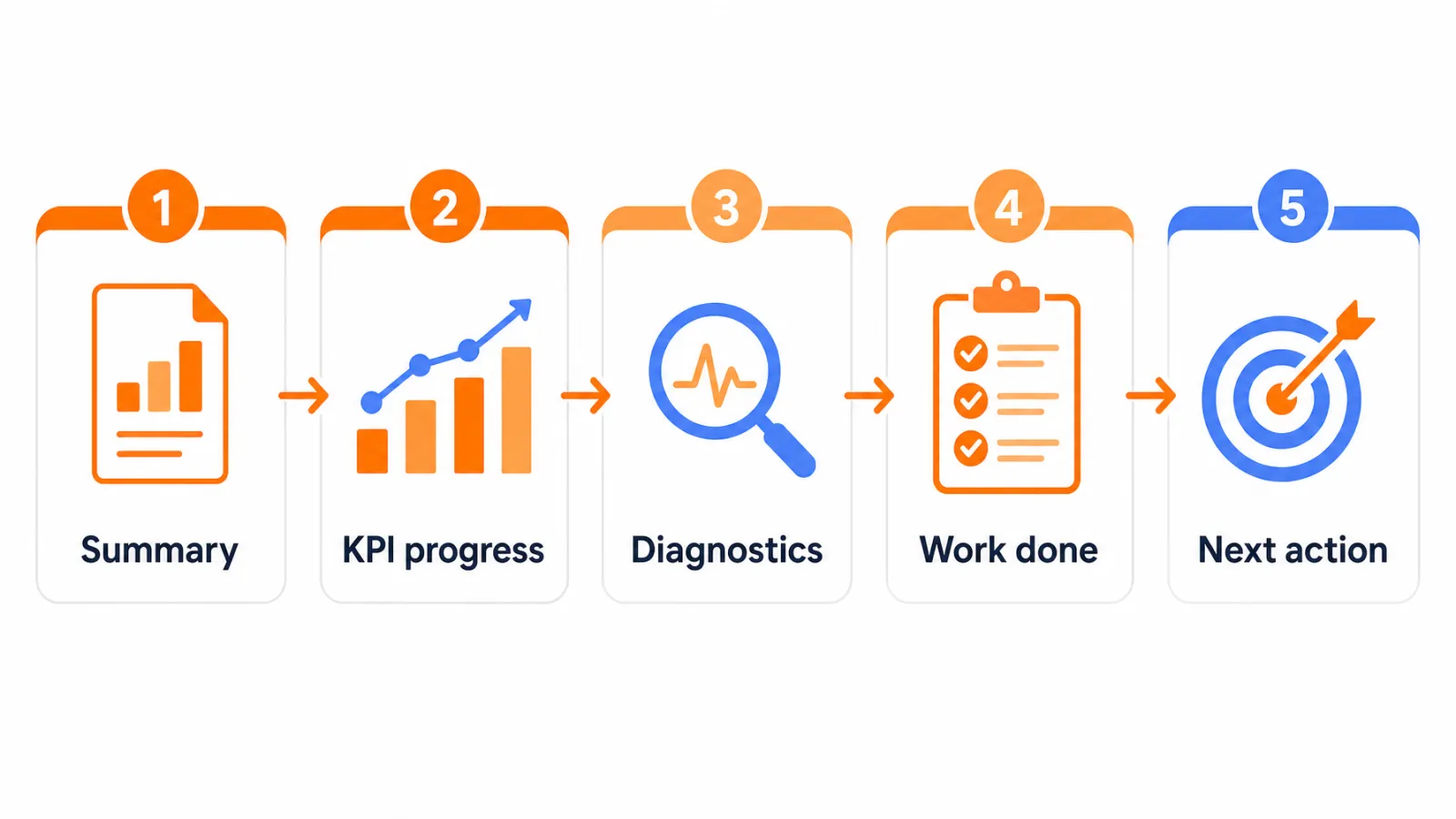
Explain SEO performance in this order: what changed, whether it moved the agreed goal, why it changed, what evidence supports the explanation, and what action follows. Put the business result before the detailed rankings and technical data. This is the backbone of good SEO reporting for clients.
Executive summary: the result in two or three sentences
KPI progress: the outcome KPI against its baseline and target direction
Search visibility diagnostics: clicks, impressions, CTR and ranking trends
Work completed and interpretation: what shipped and what it likely explains
Next action: one decision, one owner, one date
Lead with the result, then explain the cause
Here's a hypothetical example: Qualified leads from organic rose against the same period last year. Clicks to two service pages rose and their average position improved. The summary says the lead change first, and the diagnostics sit below it as support.
A SEO reporting dashboard works for live checking, while a short written summary works for decisions. Google documents how to connect Looker Studio to Search Console if you build dashboards that way.
Add context for seasonality, tracking changes, and work completed
Annotate anything that could change the numbers: seasonality, site changes, tracking changes, promotions, migrations and algorithm events. Then add an evidence row for each major claim.
Date
Change made
Comparison period
Observed movement
Competing explanations
Client SEO reports get more credible when the competing explanations are written down.
Explain attribution without overclaiming
Attribution is a model for assigning credit, and Google's attribution documentation explains how GA4 does it. Disclose the model when you report revenue contribution.
I recommend an overclaim audit: label every statement as observed, attributed, inferred or recommended. Rankings rose and leads rose is observed. Rankings caused the leads is an inference unless a defensible method supports it.
SEO KPI benchmarks and reporting cadence
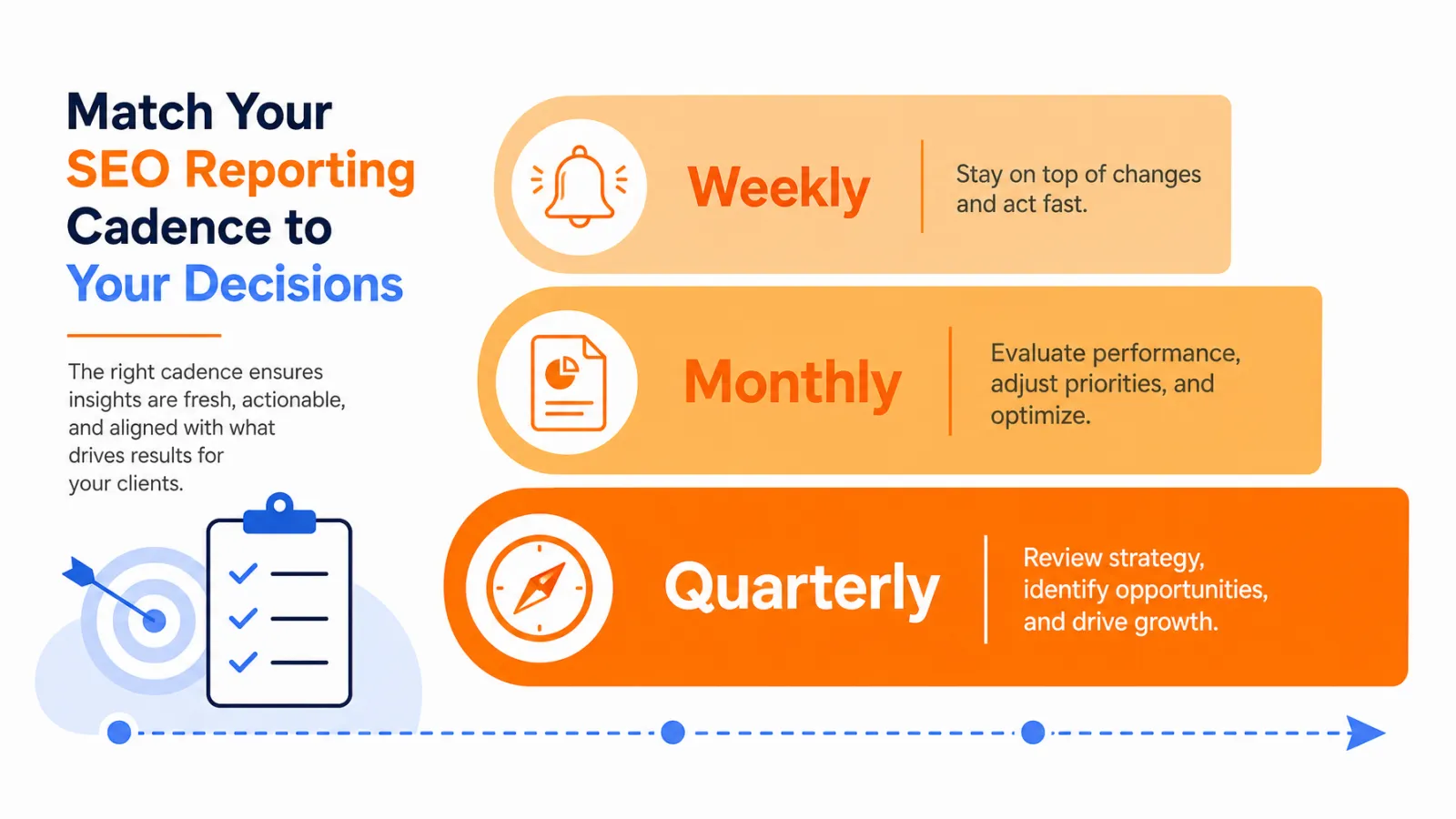
There is no universal SEO benchmark that fits every client. Establish a baseline, pick a comparison period that matches seasonality and the sales cycle, and report consistently. Use weekly monitoring for anomalies, monthly reporting for delivery, and quarterly reviews for strategy when the account needs them.
Build a baseline before setting a target
Borrowed industry numbers rarely match a client's business. A baseline worksheet works better:
Starting value
Target direction
Comparison period
Data quality note
Decision threshold
The decision threshold is the one people skip. It says what change would make you act.
Choose month-over-month, year-over-year, or rolling comparisons
Month-over-month suits fast-moving accounts with steady demand. Year-over-year is safer when seasonality is strong. Rolling averages help low-volume sites where one week of data can swing wildly.
I wouldn't promise results on a fixed schedule. Search data doesn't work that way.
Use weekly monitoring, monthly reporting, and quarterly review selectively
Tie cadence to decisions, not habit.
Weekly: check anomalies such as sudden click drops, indexing problems or tracking breaks
Monthly: deliver the client report with outcome KPIs and next actions
Quarterly: revisit goals, KPI choices and strategy when the sales cycle justifies it
A consistent baseline and comparison method gives clients more useful insight than a benchmark with no matching business context.
Common SEO reporting mistakes to avoid
The most damaging mistakes are leading with rankings, treating traffic as revenue, using vanity metrics without context, changing definitions month to month, and hiding attribution limits. Each one has a specific fix.
Reporting rankings without commercial relevance
A report full of ranking gains for queries nobody buys from looks good and means little. Fix it by tying tracked queries to commercial pages and reporting rankings as a trend beside conversions.
Treating impressions or traffic as proof of revenue
More impressions or sessions can sit alongside flat leads. Fix it by adding conversion, revenue or pipeline context, and by stating what each number can't prove.
When traffic drops, avoid a vague apology. Follow Google's guide to debugging traffic drops: identify affected pages and queries, check tracking and seasonality, then name the next fix.
Including vanity metrics because they are easy to export
Raw keyword counts, total backlinks and domain authority export easily and persuade poorly. Fix it by keeping them as optional diagnostics with stated limits, never as business outcomes.
Changing definitions or KPI sets every month
If the KPI set changes monthly, trends become impossible to trust. Fix it by documenting definitions at onboarding and recording any change as an annotation.
How to automate client SEO reporting without losing judgment
Most client reports aren’t slow because the analysis is hard. They’re slow because the data lives in five places. Someone exports Search Console, pulls GA4 separately, checks which new pages got indexed, runs a crawl, then pastes it all into a deck. Repeat that for every account each month, and reporting quietly eats the hours you meant to spend on interpretation.
An SEO automation tool can take over the collecting and assembling. It can’t take over the judgment. Here’s how the split usually looks:
Step | Manual workflow | Connected workflow |
|---|---|---|
Gather data | Export GSC and GA4 separately | Search Console and GA4 data in one place |
Plan content | Spreadsheet calendar | Calendar tied to keyword research |
Publish and index | CMS plus manual URL submission | Direct publishing plus automatic submission and index status |
Check health | Separate crawler | Built-in technical audit |
Report | Assembled by hand | Dashboards and branded reports |
What stays with your team is everything this guide has covered: choosing the outcome KPI, checking that tracking is sound, labeling claims as observed or inferred, and deciding the next action. Automation removes handoffs. It doesn’t explain to a client why leads moved.
What to look for in a reporting-friendly tool
Native GSC and GA4 connections, so search and on-site data aren’t merged by hand or confused with each other.
Per-client projects and white-label reports, so each account keeps its own baseline and definitions.
Index status per URL, which helps you separate “not ranking” from “not indexed” when traffic drops.
AI visibility kept as its own signal, separate from Google traffic and conversions.
If you’re comparing options, our roundup of SEO reporting tools for agencies covers the main choices.
SEO KPI reporting checklist
Before sending a client SEO report, confirm that every KPI maps to a stated goal, every number has a source and comparison period, every attribution claim is qualified, and every report ends with a decision or next action.
Client onboarding checklist
Confirm the client's primary business goal
Name one outcome KPI and its owner
Verify key event and conversion setup in GA4
Get GSC and GA4 access
Agree on brand versus non-brand segmentation where relevant
Record the baseline and comparison method
Monthly report checklist
State the reporting period and comparison period
Lead with outcome KPI progress
Add two to four diagnostic metrics
Note seasonality, site changes and tracking changes
End with one next action, owner and review date
Quality-control checklist before delivery
Every number has a named source
GSC and GA4 figures are not presented as interchangeable
Dashboard and report definitions match last month's
Each statement is marked observed, attributed, inferred or recommended
Frequently asked questions about SEO KPIs for clients
What is the most important SEO KPI for a client?
It depends on the agreed goal. Qualified organic conversions or key events usually sit closer to the commercial outcome than rankings alone.
Should keyword rankings be included in an SEO client report?
Yes, as trend evidence tied to commercially relevant queries. Rankings explain movement; they shouldn't be the headline result.
How do you measure SEO conversions?
Define key events in analytics, connect them to organic traffic, and disclose the setup and attribution model. Use CRM data to confirm lead quality.
What is the difference between GSC clicks and GA4 organic sessions?
GSC counts clicks from Google Search results. GA4 counts sessions or users recorded after arrival on the site, so the totals rarely match.
Is organic traffic enough to measure SEO success?
No. Traffic needs quality, conversion, revenue or pipeline context where that data exists, otherwise it can rise while results stay flat.
How often should SEO reports be sent to clients?
Monthly is a common cadence. Add weekly monitoring and quarterly strategy reviews when account volatility or decision cycles justify them.
What is a good SEO benchmark for a client?
There's no universal benchmark. Use the client's baseline, seasonality, historical trend and an agreed target direction.
Should backlinks and domain authority be SEO KPIs?
They can be supporting diagnostics. Raw counts and third-party authority scores shouldn't replace business outcomes or search performance evidence.
How should agencies report a drop in organic traffic?
Identify affected pages and queries, compare an appropriate period, check tracking and seasonality, then state the next investigation or fix.
Should AI visibility be included in a client SEO report?
Yes, as a separate emerging metric when the client's audience uses AI search. Keep it apart from Google traffic and revenue unless referral or assisted-conversion data exists.
Choose the smallest KPI set you can defend
Start with the client's outcome, pick the smallest supporting set that explains movement, and write down what the data can't prove. Good SEO KPIs are the ones you can defend in one sentence, and a short report that ends in a decision beats a dashboard of unconnected numbers.
Choose the outcome KPI the client is paying to influence.
Verify the data source, comparison period and attribution model.
Assign the next action, an owner and a review date.
If a number's source, period and limits don't fit in one sentence, I'd leave it out. If you run several client accounts and want research, publishing, indexing, technical checks, AI visibility and reporting connected, review Keytomic's current plans and see what fits your workflow.