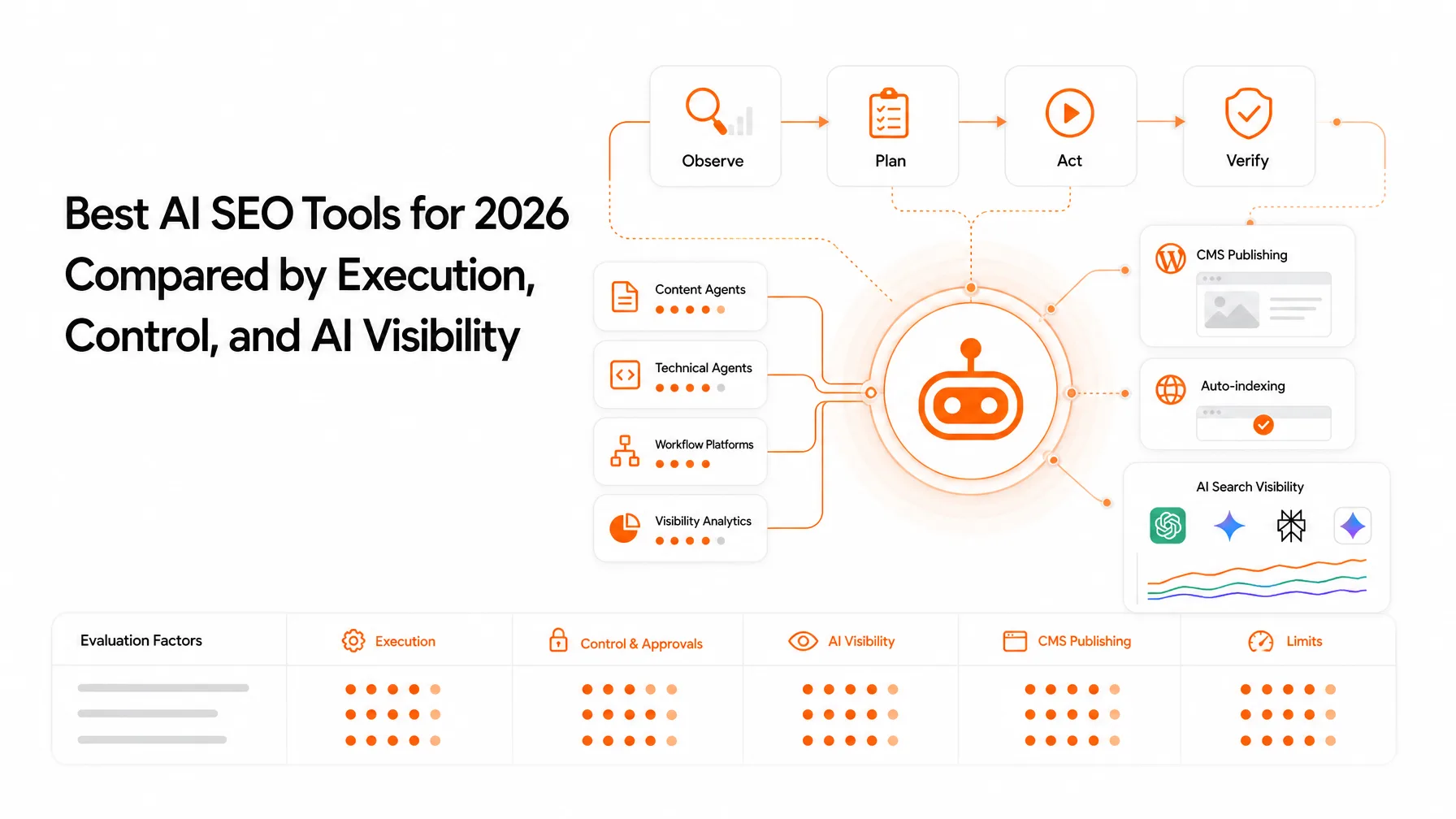
An SEO client onboarding checklist should cover signed scope, business goals, success criteria, platform access, baseline data, first priorities, named owners, approvals, and reporting. Complete those items before major optimization work so the first month is based on evidence rather than assumptions. Request access through each platform's own permission system, including Google Search Console (GSC), Google Analytics 4 (GA4), the CMS, and Google Business Profile (GBP) when local SEO is in scope.
The contract is signed, the client has sent over a website URL, and nobody has said who approves a title tag change. That's usually where onboarding problems begin, and they rarely look like problems until week three, when a report is due and nobody can find the starting numbers.
Here's the thing: a checklist isn't about collecting every detail you could ask for. It's about collecting the details that change what your team does next. At Keytomic, I look at this through a product and growth lens, where a repeatable workflow matters as much as a clever strategy. If you're still at the stage of winning the account, start with our guide on how to get SEO clients, then come back here once the contract is signed.
This guide starts with a copy-ready checklist, then walks through each step in the order it needs to happen: business goals, questionnaire, access, baseline review, keyword and content priorities, kickoff, and workflow. It includes a welcome email, an access register, and a sample timeline you can adapt.
What should be included in an SEO client onboarding checklist?
SEO client onboarding is the handoff from signed scope to evidence-based delivery. A good client onboarding checklist prevents guessing instead of collecting every possible detail. It works in five gates: scope, context, access, baseline, and first plan.
Onboarding isn't the same as an SEO audit. The audit evaluates the website. Onboarding sets up the relationship and gathers the inputs, access, and decisions that make the audit, and everything after it, possible.
Confirm scope before collecting access
Start with what's in and what's out: deliverables, markets, pages, and decision owners. Once the client knows what you'll touch, access requests get shorter and easier to approve.
Use five onboarding gates
These gates are my editorial framework, not an industry standard. Each one needs a clear yes before the next phase starts.
Gate | Question it answers | Ready when |
|---|---|---|
Scope | What are we doing, and what isn't included? | The signed scope lists deliverables and exclusions |
Context | What does the business sell, and to whom? | Goals, offers, and constraints are recorded |
Access | Can we see and change what the scope requires? | The access register is complete or blockers are logged |
Baseline | Where are we starting? | A dated baseline is saved with data limits noted |
First plan | What happens next? | Priorities have owners and approvers |
Define when onboarding is complete
Onboarding is complete when the team knows what matters, who owns each decision, what evidence exists, and what happens next. If one of those is missing, you're still onboarding, whatever the calendar says.
The copy-ready SEO client onboarding checklist
Paste this into your project tool and mark each item complete, pending, blocked, or not applicable. The sections below explain the reasoning behind every line.
Before kickoff
☐ Signed scope filed, with deliverables, exclusions, and markets listed
☐ Welcome email sent with the questionnaire and access instructions
☐ Questionnaire returned and reviewed
☐ Primary contact and approver named for each workstream
☐ Access requested through named-user invitations (no shared passwords)
Access
☐ Google Search Console access confirmed at the right property level
☐ GA4 access confirmed, with key conversions identified
☐ CMS access granted with a role limited to agreed edits
☐ Google Business Profile manager access (local SEO only)
☐ Hosting, DNS, tag manager, or CRM access (only if in scope)
☐ Access register created with an owner for removing access at the end
Baseline and audit
☐ Dated baseline saved: date range, sources, filters, known tracking gaps
☐ Indexing, sitemap, robots.txt, and redirect checks recorded
☐ Priority pages and queries documented with current performance
☐ Evidence log started, with unknowns marked as unknown
First plan and kickoff
☐ Priority offers mapped to target pages and search intent
☐ Existing pages checked for overlap before proposing new ones
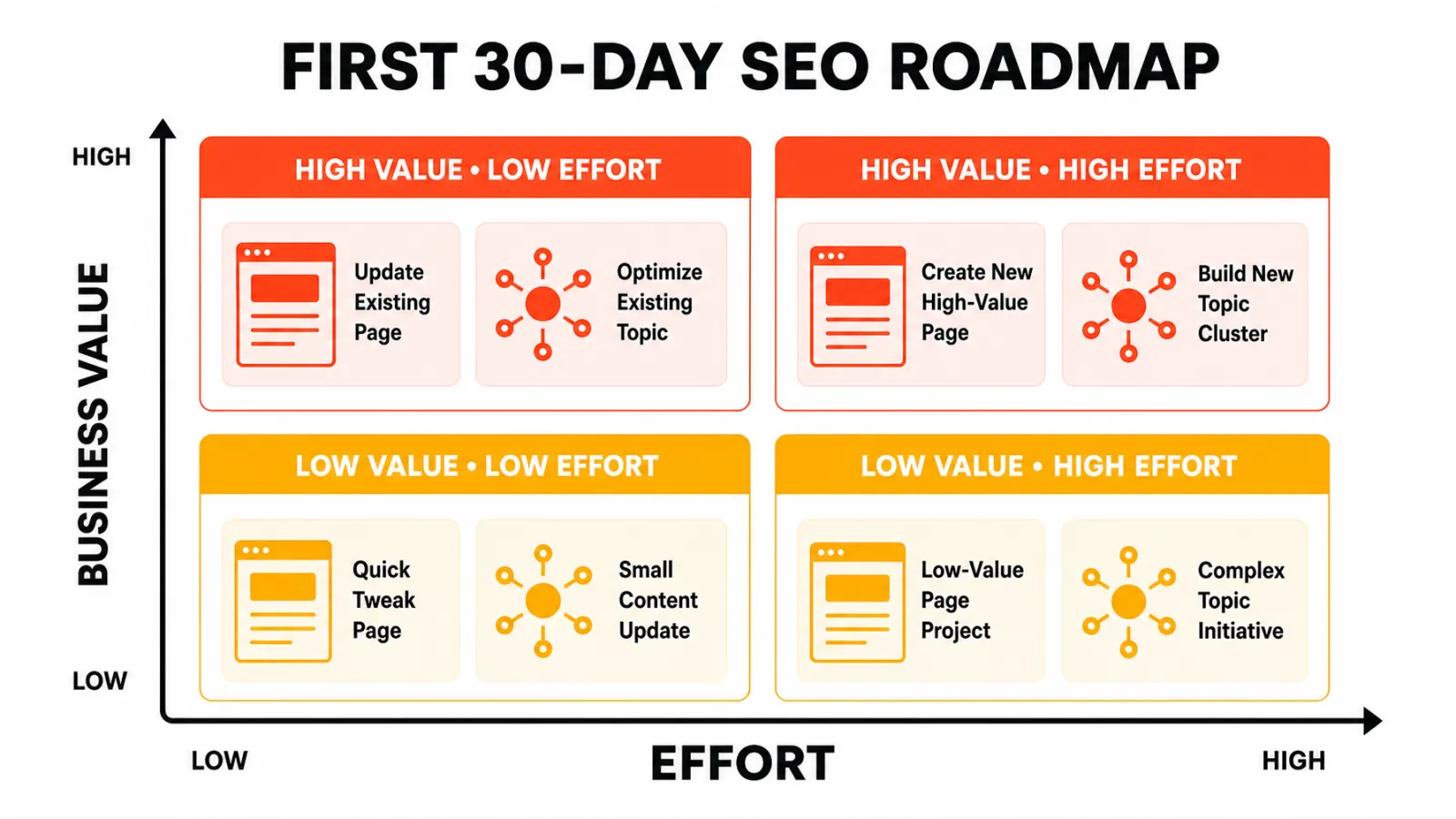
☐ First 30-day roadmap ranked by value, demand, effort, and dependencies
☐ Kickoff held, recap sent the same day with owners and dates
☐ Reporting cadence and one-line metric glossary agreed
Sample onboarding timeline
Every engagement moves at the speed of client access and approvals, so treat this as an illustrative sequence, not a promise.
When | Agency does | Client does |
|---|---|---|
Days 1 to 2 | Send welcome email, questionnaire, and access instructions | Name contacts and approvers |
Week 1 | Review questionnaire, chase access, start the access register | Return questionnaire, grant access |
Week 2 | Save the baseline, run audit checks, start the evidence log | Answer follow-up questions, share past reports |
Week 3 | Build priority map and first 30-day roadmap, hold kickoff | Approve priorities and approval routes |
Week 4 | Begin first approved work, send first status note | Review first deliverables on the agreed schedule |
1. Confirm the client's business goals and success criteria
Before anyone opens a keyword tool, get the business model on paper. Ask what the client sells, who buys, which offers matter most, and which markets are in scope.
Separate business outcomes from SEO activities
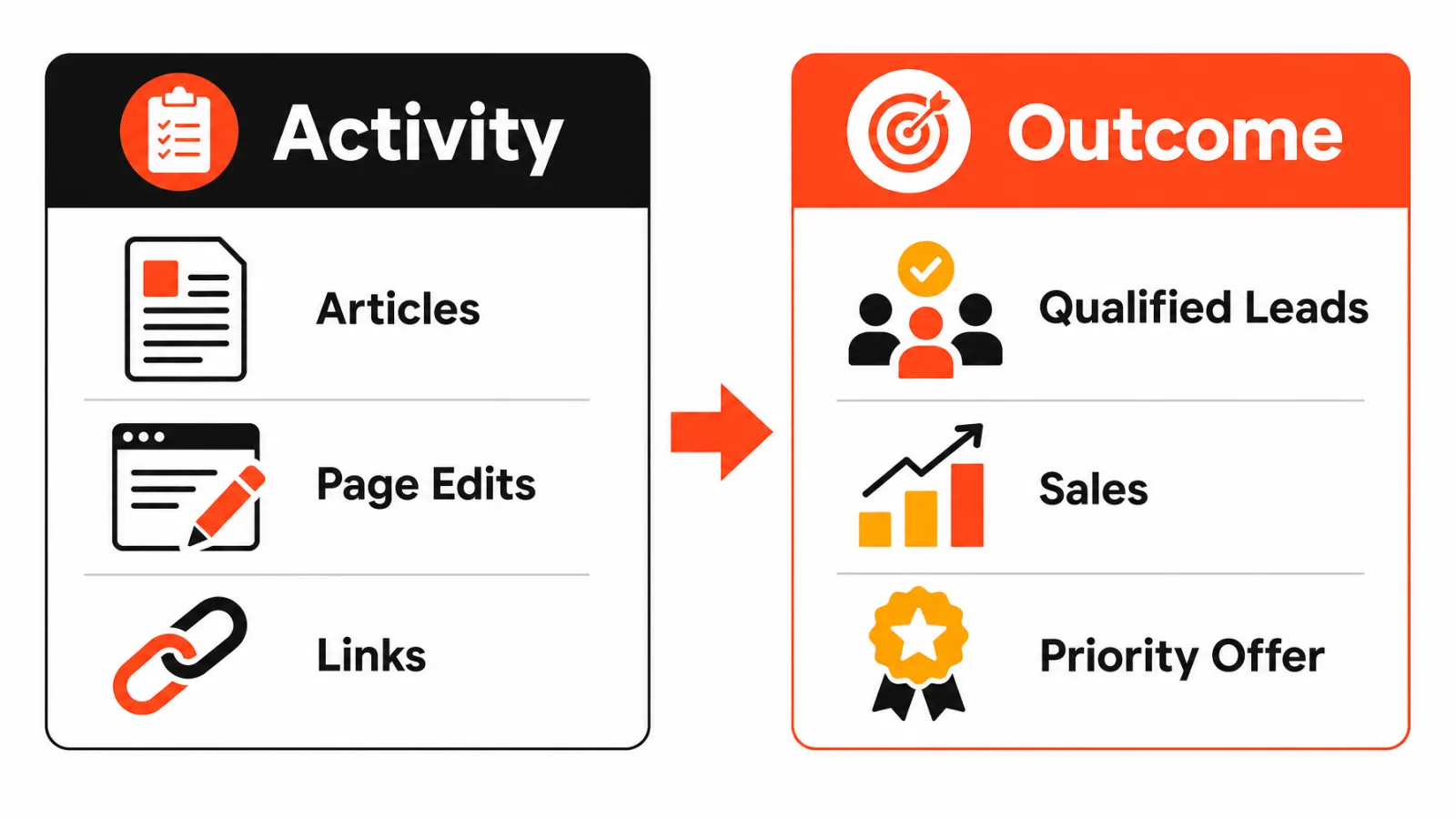
Publishing twelve articles is an activity. Qualified inquiries for a priority service is an outcome. Success criteria should describe the outcome, while the activity list explains how you plan to get there.
Define conversions, priorities, and non-priorities
Ask these questions in the first conversation:
What counts as a qualified conversion, and where is it tracked?
If SEO could improve only one product, service, or market in the first planning cycle, which one would matter most?
Which locations or markets are in scope?
What is explicitly out of scope?
Conversion values and targets belong to the client, so pull them from the CRM, analytics, or signed scope rather than estimating them yourself.
Agree on realistic measurement windows
Agree on what you'll review and when, and keep that separate from any promise. Google's SEO Starter Guide says there's no guarantee a site will be added to its index and no secret that automatically ranks a site first. It also notes that changes can take anywhere from a few hours to several months to show, and suggests waiting a few weeks before judging whether a change worked. Put that expectation in plain language in your scope.
2. Collect business, brand, and SEO history
A 40-question form wastes everyone's time. Keep the questions that change strategy and skip the ones that are merely nice to know.
Send a focused SEO client questionnaire
A good SEO client questionnaire stays at about a dozen core prompts. The test for each one: does the answer change what you do next?
Question | What the answer changes |
|---|---|
What do you sell, and which offers matter most? | Which pages get priority |
Who is your ideal customer, and what do they ask before buying? | Topics, intent, and page angles |
Which markets or locations matter? | Local scope, language, and GBP work |
What does a qualified conversion look like? | What you measure and report |
What SEO work has been done, and what happened? | What to avoid repeating |
Which pages, claims, or terms can't change without approval? | Change-control rules |
Who reviews content, and how quickly? | Realistic publishing pace |
Which brand guidelines and approved terminology apply? | Writing and editing rules |
Which subject-matter experts can we reach? | Depth and credibility of content |
Are any migrations, redesigns, or launches planned? | Timing and technical risk |
Who are your competitors? | Research inputs (see the four buckets below) |
Which reports do you expect, and how often? | Reporting cadence and format |
Which systems will we need access to? | The access register |
Gather brand, customer, and offer evidence
Ask for brand guidelines, customer questions from sales or support, current offers, and any content inventory. Then split competitors into four buckets: business competitors, search competitors (the sites that actually appear for target queries), admired brands, and rivals the sales team names.
Those buckets produce different research inputs, so don't merge them.
Record previous SEO work and known constraints
Capture past reports, redirects, migrations, and content that worked or flopped. If a client mentions a penalty or a traffic drop, check it against platform data before you repeat it in a report.
3. Request website, analytics, and platform access
Request only the systems the agreed scope needs. Roles vary by platform and by task, so ask for the lowest permission that finishes the job.
What access does an SEO agency need from a new client?
For most engagements that means analytics, Search Console, and the CMS, plus GBP when local SEO is in scope. Hosting, DNS, tag management, and CRM access only make sense when the scope touches them.
Use platform-native invitations and named users
Don't ask for shared passwords. Invite named users through each platform's own permission system, use multi-factor authentication where it's available, and decide up front who removes access when the engagement ends.
A welcome and access request email you can adapt
Send this the day the contract is signed. It sets the tone and gets the slowest step, access, moving immediately.
GSC, GA4, GBP, CMS, hosting, tag management, and CRM
Google documents Google Search Console user permissions with four roles: Owner, Full user, Restricted user, and Associate. In GA4, users can be added at the account or property level, so Google Analytics property access depends on where the client grants it.
For local SEO, Google Business Profile manager access is separate from Owner access. WordPress, Shopify, and Webflow each name their roles differently, so check the platform's documentation before asking for administrator rights.
System | Purpose | Client owner | Requested role | Status |
|---|---|---|---|---|
Google Search Console | Search performance and indexing data | Site owner or marketing lead | Full or Restricted user, based on task | Pending |
Google Analytics 4 | Traffic and conversion data | Analytics owner | Property-level access that fits the task | Pending |
Google Business Profile | Local listing work (local SEO only) | Business owner | Manager, only if local SEO is in scope | N/A or pending |
CMS (WordPress, Shopify, Webflow) | Agreed page and content edits | Web or marketing lead | A role limited to the agreed edits | Pending |
Bing Webmaster Tools | Bing search data, if the client tracks it | Site owner | User access, if in scope | N/A or pending |
Hosting and DNS | Server or domain changes, if in scope | Developer or IT | Only if scope requires it | N/A or pending |
Tag management | Tracking changes, if in scope | Analytics or developer | Only if scope requires it | N/A or pending |
CRM | Lead quality and revenue context | Sales or ops lead | Read access to shared reports | Pending |
Maintain an access register with owners and status
Turn that table into a living register: system, purpose, client owner, permission level, request date, status, and removal owner. It tells you what's blocked and who to chase, which beats a vague email thread.
4. Complete the initial SEO audit and baseline review
Save a baseline before you change important pages. Without one, you can't show what moved, and you can't tell a win from noise. For the audit itself, our SEO audit template for agencies gives you the checks, finding fields, and prioritization model to reuse across clients.
Freeze a dated baseline before changes
Record the date range, source systems, filters, known tracking gaps, migrations, and seasonality. Search Console performance reports are a common source for clicks, impressions, and queries, and our guide to building a search engine position report from Search Console covers how to read them without misreading average position. The exact baseline fields are my recommendation, not a Google requirement.
Review technical, content, conversion, and visibility signals
Keep the review focused on signals that affect the first plan:
Indexing and crawlability, including the XML sitemap, robots.txt, and redirects
Titles, internal links, and content quality on priority pages
Clicks, impressions, and rankings for priority queries
Conversion paths from landing page to inquiry or sale
Backlinks and AI visibility, where you measure them
Separate evidence, assumptions, and open questions
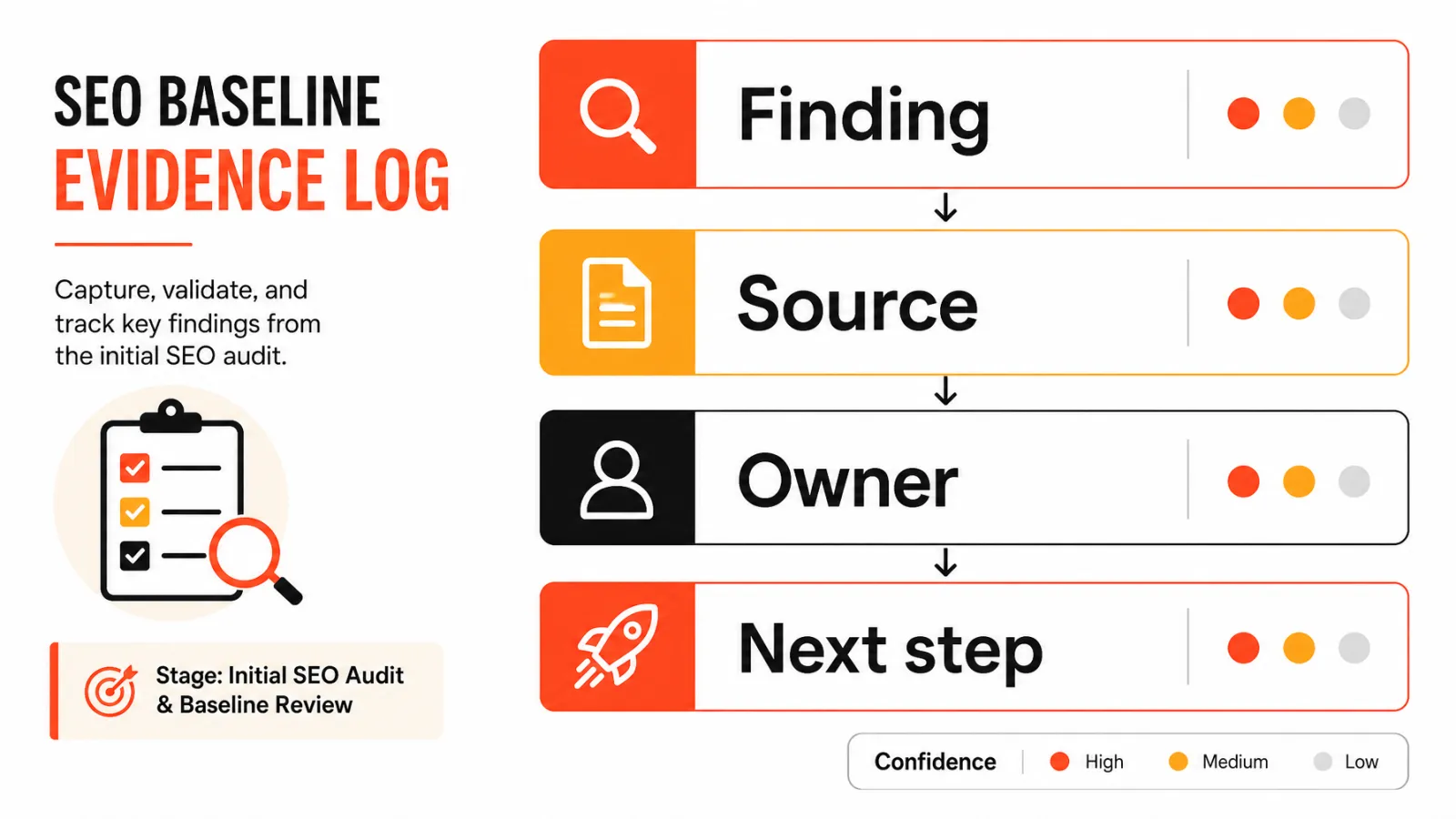
Keep an evidence log with these columns: finding, source, confidence, impact, effort, owner, and next validation step. If you can't source a baseline value, write unknown. Never fill the gap with a guess.
5. Build the initial keyword and content priorities
Start with business priorities, then map queries to the right page. Keyword research should answer which page serves which intent, not just which terms look attractive.
Map business priorities to pages and topics
Give each priority offer a target page, a search intent, and a business reason. Check the live results before assuming the page type, because the SERP often shows what searchers expect.
Check content gaps and competing pages
See whether an existing page already serves the intent before proposing a new one. Otherwise you risk keyword cannibalization. Volume, difficulty, and competitor notes should come from connected SEO data and a live SERP review, not memory.
Sequence a realistic first 30-day roadmap
Rank candidate work by these factors:
Business value
Evidence of demand
Effort
Dependencies, such as access or developer time
Client approval capacity
Here's a stop rule I like: don't add a topic to the calendar until you can name the page, the search intent, the business reason, and the evidence of demand. Once priorities are ranked, how to create an SEO post calendar shows how to turn them into a publishing roadmap.
6. Run a clear SEO client kickoff meeting
By now, the questionnaire has done the discovery. Use the kickoff to confirm decisions, not to rediscover the business.
Use the kickoff to confirm decisions, not rediscover the business
Here's a suggested 30 to 45 minute agenda (a format, not an industry standard):
Goals and scope
Access status and blockers
Baseline limitations
First priorities
Owners and approvals
Communication channel and reporting cadence
Assign owners, approvals, and escalation paths
Name an approver for each workstream, set response expectations, and agree on who to contact when something stalls. Mark every item complete, pending, blocked, or not applicable so nobody has to guess.
Send a written recap with dates and blockers
Send the recap the same day, with owners, dates, and open blockers. It becomes the first entry in your decision log.
7. Set up the SEO workflow and reporting process
This is where SEO strategy becomes operational. A repeatable SEO client onboarding process connects every step from intake to the report, and each step needs an owner.
Connect intake, briefs, review, publishing, and reporting
A workable sequence runs from intake to brief, review, implementation or publishing, validation, and report. For each step, name who recommends, who creates, who approves, who implements, who validates, and who receives the report. If you're deciding which steps to systemize, SEO automation workflows worth automating separates repetitive tasks from the ones that need human judgment.
Define the approval and change-control process
Document how change requests and blocked tasks are logged, who can approve them, and how technical recommendations reach a developer. Keep brand, subject-matter, legal, and executive approvals distinct when they apply.
Choose a reporting cadence and metric glossary
Set the cadence in the scope, then define each metric in one line so clients read numbers the same way you do. Our free SEO client report template gives you a starting structure, and the roundup of white label SEO software for agencies compares tools if you want reports under your own brand. Finish onboarding with a one-page completion artifact: scope, access status, baseline, priority map, owners, risks, and next actions.
How Keytomic supports repeatable SEO client onboarding
Disclosure: Keytomic is the publisher of this article, so product references are included for context. Evaluate them against current official documentation.

Centralize research, planning, audits, and content workflow
Once priorities and access are settled, the Keytomic SEO automation platform can consolidate repeatable work: keyword research, topical planning, technical SEO audits, AI-assisted content creation, CMS publishing, and visibility monitoring across Google and AI answer engines. Connecting the client's Google Search Console during onboarding puts baseline data in the same place as the work. Agencies can see how this fits multi-client work on the Keytomic page for agencies.
Pull baseline answers from your AI assistant
If your team works in Claude or ChatGPT, the Keytomic MCP server lets the assistant read each client project's Search Console data and site audit through one connection. During onboarding, that means you can ask for quick wins, decaying pages, or index coverage problems in plain language while you build the baseline, and switch between client projects by asking.
Keep human approval in the publishing loop
Keytomic uses an approval-based model, so your team still sets strategy, checks facts, and decides what ships. Automation handles repetition, and it doesn't replace client sign-off or specialist judgment.
When Keytomic is not the right fit
A platform may not suit clients who need bespoke technical engineering, deep forensic backlink investigation, legal or regulated content review, or tools it doesn't currently support. If you're weighing options, how to choose SEO automation software covers the evaluation criteria, and Keytomic pricing lists current plans.
SEO client onboarding mistakes to avoid
These are practical failure modes, not statistics. Each has a fix you can apply this week.
Starting work before scope and access are clear
Beginning without access or a signed scope leads to rework and disputes. If scope, access, baseline, or approval ownership is blocked, document the blocker and limit work to tasks that don't depend on it. Also resist asking for every permission, and never accept shared passwords.
Reporting activity instead of business progress
A report full of tasks completed doesn't show whether priority offers are getting visibility. Skip the baseline and you can't report progress at all. Tie keywords to business value, not raw traffic, and report decisions as well as numbers.
Promising rankings, speed, or automation without evidence
Rankings, indexing, traffic, and AI citations are possible outcomes, not guarantees. Frame them that way, define how you'll measure them, and name the client approver for each workstream so approvals don't stall delivery.
SEO client onboarding FAQ
What is SEO client onboarding?
SEO client onboarding is the structured handoff from signed scope to active SEO delivery, covering access, goals, baseline, owners, and first priorities.
What questions should an SEO client questionnaire ask?
An SEO client questionnaire should ask about business priorities, customers, previous SEO work, access, constraints, approvals, reporting expectations, and success criteria, because each group changes the plan.
What access should an SEO agency request?
An SEO agency should request only the access its agreed scope requires, usually analytics, Search Console, the CMS, and GBP for local SEO. Roles vary.
Can SEO work begin before all access is available?
Limited discovery can begin without every login, but implementation and reliable measurement should wait. Log each blocker in the access register.
How long does SEO client onboarding take?
There's no universal timeline because scope, access, client responsiveness, and technical dependencies vary. A simple engagement often moves through onboarding in about four weeks, as in the sample timeline above, but plan by milestones rather than a fixed promise.
What should an SEO kickoff meeting cover?
An SEO kickoff should confirm goals, scope, access status, baseline limits, owners, approvals, communication, and first priorities, then end with a written recap.
Who should approve SEO recommendations and content?
The client should name an approver for each workstream before delivery begins, separating brand, subject-matter, legal, developer, and executive approvals when relevant.
What should be included in an SEO baseline?
An SEO baseline should record the date range, source systems, key performance signals, known data gaps, and business context. The exact metrics depend on scope.
When is SEO client onboarding complete?
Onboarding is complete when scope, access, goals, baseline, owners, approvals, risks, and next work items are documented. Mark each item complete, pending, blocked, or not applicable.
What to do after onboarding is complete
Turn the approved roadmap into assigned work
Before work starts, check that each task has an owner, evidence, a dependency, an approval, and a validation step. If it does, SEO client onboarding has done its job.
Review the first shipped change and next decision
After the first change ships, log what happened and decide the next step. Completing the checklist doesn't guarantee rankings or leads, but it makes the work defensible. If you want one workflow to hold these tasks together across clients, see how Keytomic works for agencies.