An SEO client report template should connect one business outcome to search evidence, work completed, risks, and a next action. Use Google Search Console (GSC) for clicks, impressions, CTR, and average position, and Google Analytics 4 (GA4) for sessions and key events. Keep the source, comparison period, and attribution limits beside every important number.
You've got GSC open in one tab, GA4 in another, a rank tracker export on your desktop, and a half-finished task list from the month. Pulling all of that into something a client will actually read is the slow, annoying part of the job.
Most people searching for an SEO client report template aren't after a prettier layout. They need a repeatable way to answer four things: what changed, whether it mattered, what evidence supports the explanation, and what happens next.
Below you'll find a copyable report structure, a metric-to-source map, template variations by client type, executive summary guidance with a filled-in example, a monthly workflow, and a traffic-drop playbook. I'm Salam Qadir, Product & Growth Lead at Keytomic.
What Should an SEO Client Report Include?
An SEO client report is a decision document: a dated record of what moved in organic search, what work was done, what the evidence supports, and what should happen next. It isn't a data dump from your tools.
Every section earns its place by answering one client question:
Outcome KPI: Did the agreed business goal move? (GA4 or CRM)
Search visibility: Are more people seeing and clicking our pages? (GSC)
On-site behavior: What did visitors do after arriving? (GA4)
Work log: What changed, and when? (project records)
Risks and limits: What could make these numbers misleading? (tracking notes)
Next action: What should we decide now? (account lead)
Start With the Client's Outcome KPI
I'd lead with the outcome the client agreed to, not a ranking count. For a lead-gen site that might be organic form submissions; for a store, organic purchases under the client's chosen attribution model. Everything else in the report supports or explains that one line.
Separate Search Evidence From On-Site Behavior
GSC shows what happens in Google Search before someone clicks, including queries, pages, impressions, and clicks, as Google's Search Console documentation describes. GA4 shows what happens after the visit starts, and its traffic acquisition report in GA4 covers sessions and sources.
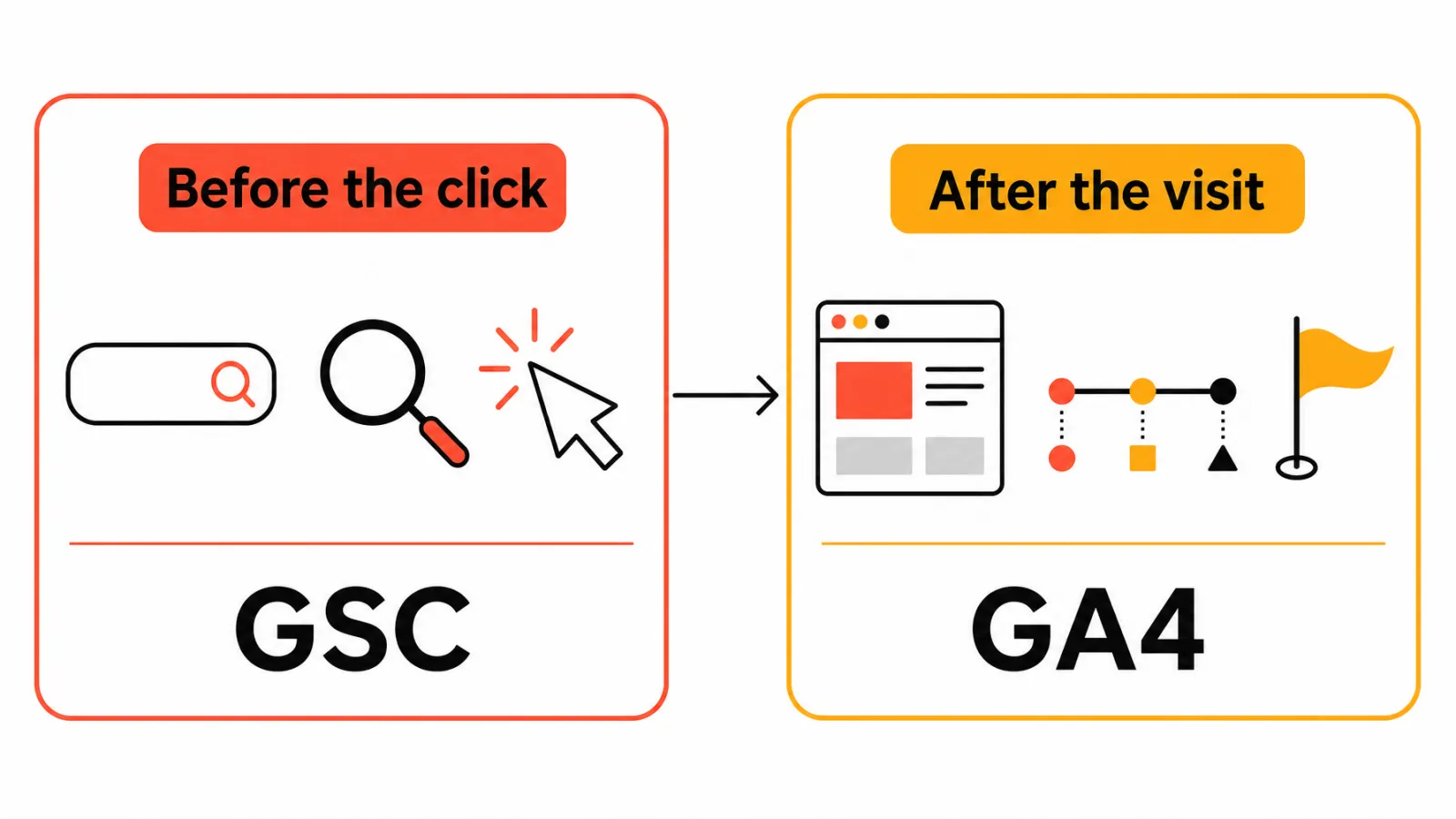
Don't expect the two to match. Google explains why Search Console and Analytics totals differ, so give each its own row.
Add Work Completed, Risks, and the Next Action
A report that only shows numbers leaves the client guessing what you did about them. List the pages published, updated, or fixed, then add the risks: tracking gaps, seasonality, data delays, or hypotheses you haven't verified. Close with one action, one owner, and one review date.
Free SEO Client Report Template
Copy this SEO client report template into a doc or spreadsheet and replace each placeholder with verified client data. Every value below is a placeholder, so don't publish a number you can't source.
The Core Report Structure
Client name, reporting period, comparison period, and data cutoff:
{client},{period}One outcome KPI and its direction of movement
Two to four supporting diagnostics
Biggest gain, with evidence
Biggest loss or risk, with evidence
Work completed during the period
Data limitations or tracking changes
Next action, owner, and review date
Executive Summary Fields
What changed:
{metric}moved from{prior}to{current}({source}).Did it affect the goal? Yes, no, or unclear.
Evidence: the two or three data points behind your reading.
Evidence label: observed, attributed, inferred, or recommended.
What this can't prove: one plain sentence.
Metric, Source, Comparison Period, and Limitation Fields
This is the part most templates skip. Each row names the source system and states what the number cannot prove.
Field | What to enter | What this number cannot prove |
|---|---|---|
Outcome KPI | Value, prior value, direction, source (GA4 or CRM) | That SEO alone created the result |
GSC search visibility | Clicks, impressions, CTR, average position, key pages or queries | On-site behavior or conversions |
GA4 on-site behavior | Organic sessions, key events, conversion rate | Search demand or ranking changes |
Rankings | Fixed query set, tracking method, date | A guaranteed position for every searcher |
Technical context | Indexing status, critical issues, site changes | That a fix caused a traffic change |
Backlinks | New referring domains, named source platform | Business value on their own |
AI search visibility (optional) | Engines, prompts, location, sampling date | Traffic, conversions, or equivalence with GSC |
Work Log and Next-Step Fields
Work log: page or change, type (published, updated, fixed), date, owner.
Next action: action, owner, reason, expected signal, review date.
Optional AI visibility: engines, prompt set, sampling date, mentions or citations.
The template is free: copy it from this page, no signup or payment. The expected signal is something to watch, not a promise.
Adapting the Template by Client Type
The structure stays the same for every client. What changes is the outcome row and one or two diagnostics:
Local business: calls, direction requests, or bookings as the outcome; add Google Business Profile actions as a diagnostic row.
Ecommerce: organic purchases or revenue under the stated attribution model; segment GSC data by category and product pages.
SaaS or B2B: demo requests, trials, or qualified leads from the CRM; split brand and non-brand queries.
Publisher or content site: engaged sessions or newsletter signups; flag pages showing content decay for refreshes.
Which SEO Metrics Matter Most to a Client?
Sort metrics into outcomes (conversions, revenue), diagnostics (GSC movement, rankings, technical health), and context (seasonality, tracking changes). Pick one outcome and two to four diagnostics. If you need help choosing, our guide to SEO KPIs for clients goes deeper.
Google Search Console Metrics
Clicks and impressions: how often pages appeared and were clicked in Google Search. They can't show on-site behavior.
CTR and average position: averages across queries, not a fixed rank.
The Performance report keeps about 16 months of data, so export your monthly figures if you want longer comparisons.
Google Analytics 4 Metrics
Use organic sessions, key events, and conversion rate or revenue where they're configured. A GSC click isn't a GA4 session, and consent settings, redirects, and attribution rules can all create gaps. Report each in its own row.
Rankings, Technical Health, and Backlinks
Rankings help when you track a fixed query set with a consistent method, and here's how to build a Search Console position report. Treat indexing and critical technical issues as supporting diagnostics. Backlinks and referring domains are context: name the platform and date, and don't present them as proof of performance.
When to Add AI Search Visibility
Add it when the client's audience uses AI answer engines and you have a consistent way to measure. Record engines, prompt set, location, and sampling date, and keep it separate from GSC traffic and conversions. Without that discipline, month-to-month numbers aren't comparable.
How Do You Write an SEO Executive Summary?
Use a five-part formula: what changed, whether it moved the goal, what the evidence supports, what remains uncertain, and what happens next. Put it at the top of your SEO client report template, in a paragraph a non-technical stakeholder can read in a minute.
State What Changed
Lead with the outcome KPI and the comparison period. Hypothetical example: organic leads moved from {prior} to {current} versus last month (GA4 key events).
Explain What the Evidence Supports
Name the two or three data points behind your reading, and label each as observed, attributed, inferred, or recommended. Add one sentence on what the data can't prove, such as whether the change was caused by specific work.
End With One Action, Owner, and Review Date
Pick one action, not a wish list. Hypothetical example: the content lead updates {pages} by {date}, and the team reviews GSC clicks on {review date}.
A Filled-In Executive Summary Example
Illustrative example for a B2B services client (not real client data):
Organic demo requests rose from 18 to 24 in September versus August (GA4 key events, equal 30-day periods). GSC clicks to the three core service pages grew over the same period, mostly from non-brand queries, which lines up with the August title and intro rewrites (inferred, not proven). One limit: a consent banner change on September 9 may have increased tracked sessions. Next action: the content lead updates the two remaining service pages by October 15, and we review GSC clicks and demo requests on November 5.
Five sentences, one decision, and every number has a source. That is the bar for the top of the report.
Monthly SEO Reporting Workflow
Monthly is a common rhythm, not a rule, so match your cadence to how often the client makes decisions. Run your SEO client report template through these six steps, each with an owner:
Collect data from named sources (analyst).
Confirm date ranges and tracking health (analyst).
Annotate migrations, promotions, seasonality, and releases (account lead).
Compare the same KPI definitions against the prior period (analyst).
Log work completed separately from outcomes (content lead, technical owner).
Deliver with one decision or request (account lead, client).
Collect the Data From Named Sources
Pull GSC, GA4, your rank tracker, CRM, and audit data into one working file. Write the source beside every figure.
Validate Tracking and Comparison Periods
Check that key events still fire and that both periods cover equal days. A broken tag can look exactly like a traffic drop.
Interpret Movement Without Overclaiming
Use words like observed, coincided with, or may have contributed to. Save caused and drove for cases where the evidence really supports them.
Deliver the Report and Record Decisions
Send the report with one clear request, then record what the client decided. That record becomes next month's starting point.
How Do You Explain a Traffic Drop in an SEO Report?
Stay calm and show your work. Google's guide to debugging drops in Search traffic is a solid backbone for the investigation.
Isolate the Affected Pages, Queries, and Dates
Start with the exact dates and pages. Then check whether GSC clicks, GA4 sessions, or both declined, and segment by query, device, country, and brand versus non-brand where the data allows.
Check Tracking, Seasonality, Indexing, and Site Changes
Rule out tracking changes and indexing problems before blaming content. Then look at seasonality, site changes, and any Google update that lines up with the dates.
Separate Observed Facts From Working Hypotheses
Give each statement a status and a competing explanation, so correlation doesn't pass as causation.
Statement | Status | Competing explanation |
|---|---|---|
Clicks fell on | Observed | Seasonality or a tracking gap |
Title changes coincided with the drop | Inferred | Algorithm event or competitor change |
Review the affected titles by | Recommended | Needs more data first |
Common SEO Client Reporting Mistakes
Each mistake below comes with a one-line fix you can paste into your template.
Reporting Vanity Metrics Without a Decision
Symptom: a ranking count with no commercial context. Fix: tie every metric to the outcome KPI or cut it.
Mixing GSC and GA4 Numbers
Symptom: clicks and sessions treated as the same thing. Fix: keep separate rows and name the source.
Treating Rankings or Traffic as Revenue
Symptom: credited revenue presented as SEO-created revenue. Fix: state the attribution model beside the figure.
Hiding Data Gaps and Attribution Limits
Symptom: smooth charts with no caveats, or no next step. Fix: add the limitation line and one owned action to your SEO client report template.
SEO Client Report FAQs
What should an SEO client report include?
An outcome KPI, GSC search data, GA4 on-site data, work completed, risks, data limits, and one next action with an owner and review date.
How often should SEO reports be sent to clients?
Monthly is common, but match the client's decision cycle. Send a short alert between reports if something urgent appears, like a tracking break.
Which SEO metrics matter most to clients?
Start with one outcome, such as organic key events or revenue, then add two to four diagnostics like GSC clicks, impressions, and rankings.
What is the difference between GSC clicks and GA4 organic sessions?
GSC clicks count activity in Google Search results; GA4 sessions count visits recorded on your site. Totals differ because scope and measurement rules differ.
Should keyword rankings be included in an SEO client report?
Yes, as a diagnostic. Track a fixed query set with a consistent method, and don't present ranking movement as a business outcome.
How long should an SEO client report be?
As short as the evidence allows. A one-page summary plus a supporting appendix often works, but let the client's decisions set the length.
How should an agency report a traffic drop?
Show the dates, affected pages, and queries, check tracking and indexing, then separate observed facts from hypotheses and propose one next investigation.
Can SEO reporting be automated without losing human judgment?
Yes, for collection and organization. People still need to validate tracking, interpret movement, and approve claims before the report reaches the client.
Should AI search visibility be included in a client report?
Include it when the audience uses AI answer engines and you can record engines, prompts, and sampling dates. Report it separately from GSC and GA4.
Is the free SEO client report template really free?
Yes. The template above is copyable on this page without signup or payment. Replace the placeholders with your own verified client data.
Choose the Smallest Report You Can Defend
Pick the format that matches your bottleneck:
Spreadsheet or document template: when you need a simple, repeatable report and have reliable source access.
Dashboard: when the client needs ongoing visibility and your team can maintain connectors, permissions, and definitions.
Workflow platform: when reporting has to connect to research, content production, publishing, technical checks, and visibility monitoring.
Whichever you choose, the rule behind this SEO client report template stays the same: pick the smallest KPI set you can defend, name the source and comparison period, state what the data can't prove, and assign the next action.
If you are comparing dashboards, our breakdown of SEO reporting tools for agencies covers that side. If the slow part is chasing work across research, publishing, and audits before you can even start the report, that is the gap Keytomic closes: the work log, audit findings, and visibility data live in one approval-based workflow, so most of your inputs are already in one place.