Every Shopify SEO checklist online seems to be written by someone testing whether you’ll actually make it past the third bullet point. “Implement canonical tags correctly.” Cool, thanks, very actionable. I’ll get right on that, right after I figure out why my inventory count is wrong again and what to name this season’s new candle scent.
Here’s the thing nobody says out loud: most of these checklists aren’t written for you. They’re written for someone who already knows what a canonical tag is, which means the one person who actually needs the explanation never gets it. You get a to-do list with no instructions, like being handed IKEA furniture with the manual removed.
So this one works differently. Every single item explains the concept in plain words first, tells you why it’s worth your ten minutes, and then shows you exactly what “done right” looks like, often right next to what “done wrong” looks like, so you can just copy the good version and move on with your day.
I’m Salam Qadir. I’ve spent the last seven-plus years doing SEO for SaaS companies, service businesses, and ecommerce stores, and I’ve personally gone through 150+ Shopify stores line by line looking for exactly the kind of problems this checklist covers. What surprised me every time wasn’t carelessness. It was smart, capable store owners who’d simply never had any of this explained to them in a way that actually made sense. That’s the gap this is meant to close.
One number worth sitting with before you scroll further: organic search still drives roughly 43% of all ecommerce traffic. That’s nearly half your potential customers showing up without you paying a cent per click. This checklist is how you actually earn that, instead of leaving it sitting on the table for a competitor to pick up.
Let’s get into it.
What Shopify Already Does For You (So You Know What’s Actually Left to Fix)
This matters because a lot of the advice floating around the internet tells you to “fix” things Shopify already handles, which wastes your time, or skips things Shopify definitely does NOT handle, which is where the real damage happens.
Shopify Handles Automatically | You Still Have to Do This Yourself |
|---|---|
SSL / HTTPS (the padlock icon) on every page | Writing product and collection descriptions that are actually good |
Creating and updating your XML sitemap | Telling Google that sitemap exists (it won’t find it on its own) |
Basic canonical tags on product pages | Checking those tags didn’t break after a theme update |
A mobile-friendly theme layout | Keeping that theme fast once you’ve added five apps to it |
Fields where you CAN type a title and description | Actually typing a good one, instead of leaving it blank |
A default robots.txt file | Checking an app hasn’t quietly changed it |
Basic product schema code | Filling in the parts that make it actually useful (more on this below) |
Notice the pattern? Shopify builds the container. You still have to put something good inside it.
Section 1: The Foundation (Do This Before Anything Else)
Think of this section like checking the address on an envelope before you spend hours writing the letter inside. If Google can’t find your pages or gets confused about which version is “real,” nothing else in this checklist will help, because the work will never be seen.
1. Make sure your domain and HTTPS are set up cleanly
What this means: Your store should be reachable at exactly one web address. If someone can reach your store at both yourstore.com and www.yourstore.com, or through an old http:// (unsecured) link, that confuses search engines about which version is the “real” one.
Why it matters: Imagine you had two business cards with slightly different addresses. Some mail goes to one, some to the other. You’d rather everything land in one mailbox.
How to check it: Type both yourstore.com and www.yourstore.com into a browser. Both should land on the same final page, with a padlock icon, and no warning about the connection being insecure.
2. Confirm your store isn’t accidentally hidden from Google
What this means: Shopify has a setting, usually turned on automatically while a store is being built, called “Restrict search engines from indexing your store.” It’s found in Online Store → Preferences. Store owners often finish building their site, launch it, and forget this one checkbox is still switched on.
Why it matters: This single setting is like putting a “closed” sign on your shop door and then wondering why nobody’s walking in. I’ve seen fully built, good-looking stores with zero organic traffic for months because of exactly this.
How to check it: Go to Online Store → Preferences in your Shopify admin and make sure that box is unchecked.
3. Submit your sitemap to Google
What this means: A sitemap is just a list, an actual file, of every page on your site, so Google knows what exists. Shopify creates and updates this list automatically at yourstore.com/sitemap.xml. But Shopify doesn’t tell Google the list exists, that part is on you.
Why it matters: Without this, Google has to stumble across your pages on its own, which takes longer and sometimes never fully happens, especially for a new store.
How to check it: Create a free Google Search Console account, verify your domain, and submit yourstore.com/sitemap.xml under the Sitemaps section.
4. Check your robots.txt file
What this means: robots.txt is a small text file that tells search engines which parts of your site they’re allowed to look at. Think of it as a set of instructions taped to your front door. Shopify writes a sensible default one for you, but some apps you install can quietly rewrite parts of it.
Why it matters: If an app accidentally adds a rule blocking your product or collection pages, Google simply won’t look at them, even though nothing looks “wrong” when you browse the site yourself.
How to check it: Visit yourstore.com/robots.txt directly in your browser (it’s just a page, no login needed) and skim it after installing any new app.
5. Check that duplicate product URLs point back to one “real” version
What this means: Here’s a genuinely confusing quirk of Shopify: the same product can be reached through more than one web address. A pair of shoes might live at /products/blue-runners, but also be reachable at /collections/new-arrivals/products/blue-runners if it’s featured in that collection. To a shopper, these look identical. To Google, they look like two separate pages showing the same content.
A “canonical tag” is a small piece of invisible code on the page that says, in effect, “hey Google, treat this URL as the official version, even if you found me through a different address.” Shopify usually adds this automatically, pointing back to the clean /products/ version.
Why it matters: When Google isn’t sure which version is “real,” it can split its attention between them, weakening both instead of putting full ranking strength behind one clear page. It’s the SEO equivalent of getting half your fan mail sent to a decoy address.
Example of it working correctly:
That’s correct. Google now knows to credit the clean /products/ version.
How to check it: Use our free canonical URL checker, paste in a product URL reached through a collection, and it tells you exactly where the canonical tag is pointing, no need to dig through code yourself.
6. Clean up your URL handles before you publish
What this means: The “handle” is the part of the web address after /products/. Shopify creates this automatically from whatever you type as the product title, which sometimes produces a mess.
Good example: yourstore.com/products/merino-wool-hiking-socks Bad example: yourstore.com/products/mens-premium-merino-wool-hiking-socks-3-pack-available-in-multiple-colors-2026
The second one isn’t wrong, exactly, it’s just needlessly long, harder to share, and dilutes the words that actually matter.
How to check it: When creating a product, look for the “URL and handle” field near the bottom of the page in Shopify admin and manually shorten it before you hit publish.
7. Always set up a redirect when you change a URL
What this means: A “301 redirect” is an instruction that says “anyone looking for this old address, send them to this new one instead.” If you rename a product or retire a collection, the old web address stops working unless you set one of these up.
Why it matters: Without a redirect, anyone who bookmarked that page, or any search engine that had it saved, hits a dead end (a “404 Page Not Found” error). Any ranking value that old page had earned just evaporates.
How to check it: Whenever you change a product or collection’s URL, immediately go to Shopify Admin → Navigation → URL Redirects and point the old address to the new one. It takes about thirty seconds and it’s the single easiest thing on this list to forget.
8. Check for broken links regularly
What this means: A broken link is any link, on your own site, pointing to a page that no longer exists.
How to check it: Run our free broken link checker once a month, especially after you’ve done a bulk product update or changed your theme.
Section 2: Making Sure Google Can Actually Navigate Your Store
Section 1 was about Google finding your store at all. This section is about Google (and real shoppers) being able to move around inside it without getting lost.
9. Keep every important page within 3 clicks of your homepage
What this means: Count the clicks it takes to get from your homepage to any given product. Homepage → Collection → Product is 2 clicks. That’s ideal. If a shopper has to click through four sub-menus to find a bestseller, it’s buried too deep, and so is its ranking potential.
Why it matters: Search engines treat “how easy is this page to reach” as a rough signal of “how important is this page.” A product nobody can find in 3 clicks is telling Google, unintentionally, that it doesn’t matter much.
10. Find and fix “orphan” pages
What this means: An orphan page is a page that technically exists on your site but that nothing else links to. It’s not in your navigation, not featured in any collection, not mentioned in a blog post. It just… sits there.
Why it matters: If nothing on your own site links to a page, it’s much harder for Google to find it, and much harder for a shopper to stumble onto it either.
How to check it: Pull a full list of your pages (Shopify Admin → Products/Collections/Pages) and, for each one, ask: is this linked from anywhere else on my site? Anything you can’t answer “yes” to needs a link added somewhere relevant.
11. Stop filter and sort combinations from creating hundreds of junk pages
What this means: Say your store has 20 color options and 10 sizes. A shopper can filter by both at once, and Shopify generates a unique web address for that exact combination, even though it’s showing basically the same products as the main collection page. Multiply that across every possible combination, and you can end up with hundreds of nearly-identical, low-value pages that are technically crawlable.
Why it matters: Google has a limited amount of attention (called “crawl budget”) for any given site. If it spends that attention crawling 200 filter combinations of your shoe collection, it has less left over for your actual, valuable pages.
How to check it and fix it: Add a “noindex” instruction (a small piece of code that says “you can look at this page, but don’t include it in search results”) to filter and sort URLs. This usually requires a small edit in your theme’s code or a properly configured app, so if you’re not comfortable editing theme files, this is a good one to hand to a developer or a workflow tool.
12. Handle “page 2, page 3” pagination correctly
What this means: When a collection has more products than fit on one page, Shopify creates /collections/shoes?page=2, ?page=3, and so on.
Why it matters: These pages sometimes get indexed and show up in search results competing with your main collection page for the same search term, splitting your ranking power instead of concentrating it.
How to check it: Either implement rel="prev" and rel="next" tags correctly (these tell Google “this is part of a series, treat the group together”), or simply set page 2 onward to noindex, letting your main collection page carry all the ranking weight.
13. Check your indexation health once a month
What this means: Inside Google Search Console, there’s a report called “Pages” that tells you, page by page, whether Google has actually included each one in its index (meaning: it’s eligible to show up in search results) or excluded it, and why.
How to check it: Compare the number of “Valid” pages against how many products and collections you actually have. If you have 300 products but only 180 are “Valid,” that gap is worth investigating before you spend more time writing new content that might hit the same wall.
14. Make sure breadcrumbs show the correct category
What this means: Breadcrumbs are that small trail of links near the top of a page, “Home > Collections > Running Shoes > Trail Runner Pro,” that shows a shopper where they are. When a product sits in more than one collection, Shopify sometimes shows the wrong one as the “primary” breadcrumb.
How to check it: Open a product page and check whether the breadcrumb trail actually reflects the collection where that product logically belongs.
Section 3: Figuring Out What People Are Actually Searching For
15. Match the right page type to the right kind of search
What this means: Not every search wants the same kind of answer. Someone typing “buy waterproof hiking boots” wants to see products right now. Someone typing “how to waterproof hiking boots” wants a helpful article, not a shopping cart.
What someone’s searching | What they actually want | Best page for it |
|---|---|---|
“buy waterproof hiking boots” | To purchase, right now | A product page |
“best waterproof hiking boots 2026” | To compare a few options | A collection or comparison article |
“how to waterproof hiking boots” | Advice, not a purchase (yet) | A blog post |
“[your brand] hiking boots” | Your specific store | Your homepage or brand collection |
Why it matters: If you build a product page for a search that actually wants an article, or vice versa, Google usually won’t rank it, no matter how well-written it is, because it doesn’t match what the searcher wanted.
16. Check that you’re not competing against yourself
What this means: “Keyword cannibalization” is a fancy way of saying two of your own pages are trying to rank for the same search term, so instead of one strong page, you have two mediocre ones splitting the same traffic.
How to check it: In Google Search Console, look at your five most important product or category searches and check whether more than one URL from your own store shows up for each. If a blog post and a collection page are both fighting for “running shoes for flat feet,” pick the one that should win and link the other one into it instead of letting them compete.
17. Actually look at the search results before deciding what to build
What this means: Before writing a page, type the exact search term into Google yourself and look at what’s already ranking. If the results are all blog articles, that tells you plainly: Google has decided this search wants information, not a product listing, no matter how much you’d prefer to sell something there.
18. Build a simple map of keyword → page before you write anything
What this means: Before creating new content, write down which specific page (a URL, not just a topic) each keyword or group of related keywords should belong to. This prevents the cannibalization problem in #16 before it starts, and it’s exactly the kind of groundwork our AI keyword research tool is built to speed up if you’d rather not do it by hand for every product.
Section 4: Product Pages (Where the Money Actually Lives)
19. Give every product a genuinely unique title
Bad example: “Tote Bag” Good example: “Organic Cotton Tote Bag – 15L, Natural Beige”
Why it matters: The good version tells both a shopper and Google what the product actually is, its size, and a distinguishing detail, all in one glance. No two products on your store should share an identical title tag.
20. Rewrite descriptions in your own words, especially for supplier products
What this means: If you sell a product you sourced from a supplier or manufacturer, and you paste their description straight in, you’re now using the exact same words as every other store selling that same item. Google has to pick one to show, and a small, newer store rarely wins that fight.
Bad example: “Beautiful ceramic mug. Great for coffee or tea. Makes a great gift.” Good example: “This 12oz hand-glazed ceramic mug is dishwasher and microwave safe, sized for a full cup of coffee without crowding your cupboard. Each one is glazed individually in small batches, so slight variation in color is normal, not a flaw. Ships in reusable packaging within 2 business days.”
Notice the good version answers real questions a buyer has (is it dishwasher safe? how big is it? why does the color look slightly different in photos?) instead of just describing the vibe.
21. Answer the objections a buyer is silently having
What this means: Before someone buys, they’re usually quietly wondering: will this fit me? Does it work with what I already own? How do I clean it? Answer these directly in the description instead of hoping the buyer scrolls down to reviews to find out.
22. Keep your prices and stock status consistent everywhere
What this means: The price and availability shown on the actual page a shopper sees needs to match exactly what’s written in the invisible schema code (we’ll get to schema properly in Section 7). If they don’t match, it can cause your product to become ineligible for the star-rating and price display Google sometimes shows in search results.
23. Rename your image files before uploading
Bad example: IMG_4231.jpg Good example: navy-wool-crew-sweater-front.jpg
Why it matters: Google reads filenames as one more small clue about what’s in the image. A filename that describes the actual product helps; a camera’s default naming does nothing.
24. Write alt text that describes the picture, not a keyword list
What “alt text” is, simply: It’s a short written description attached to an image, originally meant to be read aloud by screen readers for visually impaired shoppers. Search engines read it too.
Bad example: alt="socks buy cheap socks best hiking socks 2026" Good example: alt="Woman wearing navy merino wool hiking socks on a rocky trail"
The bad version helps nobody, not a screen reader user, and not your rankings, since search engines are specifically built to recognize and discount keyword stuffing like this.
25. Only add review stars or FAQ answers to your page if they’re real and visible
What this means: You can add special code that makes Google show star ratings or expandable FAQ answers next to your listing. But that code has to accurately describe something a visitor can actually see when they land on the page. Marking up five-star reviews that don’t exist, or FAQ answers that are hidden and never load, isn’t a shortcut, it’s the kind of thing that can get a page flagged.
26. Link each product to its collection and a few related items
What this means: Make sure every product page links back to the collection it belongs to, and to 2–3 genuinely related products (not randomly chosen ones). This helps shoppers keep browsing and helps Google understand how your catalogue connects.
Section 5: Collection Pages (Your Most Underused Asset)
27. Add real, useful writing below the product grid
What this means: By default, a Shopify collection page is just a title and a grid of products. No context, no explanation, nothing for Google to actually read and understand.
Bad example (the default): A page titled “Running Shoes” with a grid of products and nothing else.
Good example: The same page, with 150–250 words underneath the grid that might read something like:
“Our running shoe collection is built around three things runners actually care about: cushioning, breathability, and weight. If you’re training for your first 5K, look at our Cloud Series for extra cushioning underfoot. Training for trail conditions? Our Trail Runner Pro line adds grip without the extra bulk. Every pair here ships with a 60-day fit guarantee, because we know finding the right running shoe usually takes a couple of tries.”
That paragraph does three things at once: it uses natural language a real runner would search for, it helps a shopper actually choose between options, and it gives Google something substantial to read and rank.
Where to put it: Below the grid, never above it, especially on mobile, where pushing products down the page frustrates shoppers who just wanted to start browsing.
Why this is consistently the highest-impact fix I find: A bare grid of products, no matter how good the products are, gives search engines nothing to evaluate. Adding real writing here is often the single fastest way I’ve seen a Shopify collection page start ranking for terms it previously had no shot at.
28. Name collections the way customers actually talk, not your internal system
Bad example: “Winter Range Q4” Good example: “Outerwear for Cold Climates”
Nobody searches for your internal product-line codename. They search in plain, ordinary language.
29. Link related collections to each other
What this means: Your “Men’s Running Shoes” collection should link to “Running Socks” and “Running Shorts,” and vice versa. This keeps shoppers moving through your store instead of leaving after one page, and it helps Google understand your categories are related.
30. Check that your H1 heading is the page title, not your logo
What this means: An “H1” is the main heading tag on a page, the single most important piece of text on it, as far as search engines are concerned. A surprisingly common issue: a theme codes the store’s logo text as the H1 on every page, while the actual, meaningful page title (like “Running Shoes”) is displayed using regular, non-heading text.
How to check it: Right-click a collection page, choose “View Page Source,” and search for <h1>. What’s inside those tags should be the actual page title, not your brand name repeated on every page.
31. Keep products visible above the fold, even with new copy added
What this means: “Above the fold” means what a visitor sees on their screen before scrolling, especially important on a phone. If your new collection copy (from #27) is so long it pushes every product below the visible screen, you’ve traded one problem for another.
Section 6: Site Speed (Explained Without the Jargon)
32. Test your speed with a free tool
What to do: Go to Google PageSpeed Insights, paste in your homepage and your two or three best-selling product pages, and read through the specific suggestions, not just the score at the top.
33. Understand the three speed metrics Google actually measures
I’ll explain these the way I’d explain them out loud, because the acronyms are genuinely unhelpful on their own:
LCP (Largest Contentful Paint): How long it takes for the biggest thing on the page, usually your main product photo, to actually appear. Aim for under 2.5 seconds. That’s Google’s current published threshold as of August 2026; you may see some blog posts claiming this recently tightened to 2 seconds, but Google’s own documentation still lists 2.5 seconds, so don’t panic-optimize based on an unverified number.
INP (Interaction to Next Paint): How quickly the page responds after someone taps a button, like “Add to Cart.” Aim for under 200 milliseconds, fast enough that it feels instant.
CLS (Cumulative Layout Shift): Whether things jump around while the page loads, like when you’re about to tap a button and an ad banner shoves it downward at the last second. Aim close to zero.
34. Audit your apps every few months
What this means: Every app you install can add its own code that loads on every single page, even after you stop actively using it. Review widgets, chatbots, upsell popups, they all add weight.
Why it matters: Around 79% of Shopify traffic comes from mobile devices, where connections are slower and patience is shorter, so speed problems affect the vast majority of your visitors, not a small edge case.
How to do it: Go through your installed apps list every quarter and ask honestly: am I still using this? If not, uninstall it, don’t just stop using it. Before adding a replacement, check how the main Shopify SEO apps overlap on schema, sitemaps and meta tags.
35. Compress your images before uploading
What this means: A photo straight off a phone or camera can be 4–8 megabytes. Compressed properly (and converted to a format called WebP, which Shopify has supported natively since 2024), the same photo can look nearly identical at under 200 kilobytes, roughly 20-40 times smaller.
36. Delay scripts that aren’t essential to the first thing a visitor sees
What this means: Things like chat widgets and retargeting pixels don’t need to load the instant the page opens, they can load a second or two later without anyone noticing, freeing up that first crucial second for your actual content.
Section 7: Structured Data (Also Called “Schema”) — Explained From Zero
I want to slow down here specifically, because “structured data” is the concept most Shopify store owners nod along to without actually understanding, and it’s genuinely not that complicated once you see it laid out plainly.
What schema actually is: It’s a small block of extra code, invisible to a shopper browsing your page, written in a specific format Google and other search engines know how to read. It states facts about your product explicitly instead of making Google guess by reading your paragraph of description text.
A real, simplified example. Say you sell a ceramic mug for $24, in stock, with a 4.5-star average rating. The schema code on that page (put here in a simplified, readable form) looks roughly like this:
That’s it. That’s genuinely most of what “Product schema” is doing. It’s just a structured, machine-readable version of facts that are (or should be) also visible on the page itself. This is what makes Google able to show a star rating and price directly in search results, instead of a shopper having to click through to find out.
37. Check your existing schema is valid
How to do it: Paste any product URL into Google’s Rich Results Test. It will show you exactly what Google can currently read from your schema code, and flag anything broken or missing.
38. Fill in the complete Product schema, not just the basics
Most Shopify themes add the bare minimum automatically. Make sure yours includes: brand, current price and currency, availability status, and, if you have genuine reviews, the average rating and review count. Leaving these blank is like handing Google a form with half the fields left empty.
39. Add BreadcrumbList schema
What this means: Remember the breadcrumb trail from #14 (“Home > Collections > Running Shoes”)? BreadcrumbList schema is just that same information, written in the invisible, machine-readable format, so Google can display it cleanly in search results too.
40. Check for two schema blocks fighting each other
What this means: This one catches people off guard. If your theme adds Product schema, and you’ve also installed a review app or SEO app that adds its own separate Product schema block, you can end up with two versions describing the same product on the same page, sometimes with different prices, if one hasn’t been updated recently.
Example of the problem:
Google doesn’t know which one to believe, and this kind of contradiction is exactly the sort of thing that can trigger a manual review flag.
How to fix it: Check your page source for more than one Product schema block. If you find two, pick whichever is more reliably kept up to date (usually the theme’s native one) and turn off the schema output in the app’s settings.
41. Keep FAQ schema, but understand what changed in May 2026
Here’s something worth knowing if you’ve been adding FAQ schema hoping for that little expandable dropdown under your search listing: Google officially stopped showing FAQ rich results in search on May 7, 2026, with the related reporting tools being phased out through June and August. The dropdown feature is genuinely gone now, for everyone.
What this means for you: Don’t rip out your FAQ content, and you can still add the schema. It’s just no longer going to earn you that visual dropdown in Google. What it’s still useful for is helping AI systems like ChatGPT and Perplexity understand and potentially cite your answers. Same code, different job now.
Our free FAQ schema generator and article schema generator build the correct code for you without needing to write it by hand, which is genuinely one of the more fiddly bits of code to get exactly right on your own.
Section 8: Content and Showing Up in AI Search
42. Write blog content around real questions, not generic filler
What this means: Pick topics your actual customers ask, not generic “10 Tips For X” posts that exist purely because a competitor has one. If you sell skincare, “how to build a routine for oily skin” is worth writing. Every post should link into the collection or product it naturally supports.
43. Use the same names for the same things, everywhere
What this means: If your product is called “TrailBlaze Pro Hiking Boots” on the product page, don’t call it “our best hiking shoe” in a blog post and “Trail Boot” in the collection description. Search engines (and AI systems) build understanding of your store by connecting the dots between mentions of the same thing across your site. Inconsistent naming breaks those connections.
44. Write so a single sentence could be pulled out and understood on its own
What this means: Put the direct answer near the start of each section, not buried three paragraphs in after a lot of throat-clearing. This matters more than it used to: organic click-through rate drops by roughly 61% on searches where an AI Overview appears, meaning more people are getting their answer straight from an AI summary instead of clicking through to a website. Being the source that summary pulls from and credits is genuinely valuable now, and that depends entirely on whether your content can be understood in a self-contained way.
If you want a way to actually see whether this is working, whether your store’s content is showing up when people ask ChatGPT or Perplexity shopping questions, our AI visibility tracker shows that directly, rather than leaving you guessing.
Section 9: Getting Other Websites to Vouch for You
45. Build a few genuine backlinks
What a backlink is, simply: A link from someone else’s website pointing to yours. Search engines treat these as a vote of confidence, if other sites are willing to link to you, you’re probably worth showing to more people.
Realistic ways to get a few, without hiring a PR agency:
If you’re an authorized retailer for a brand you sell, ask to be added to their “where to buy” page
Pitch a seasonal gift guide with a genuinely good product photo attached
Partner with a non-competing, complementary brand for a natural cross-link (a coffee brand and a mug maker, for example)
What to check first: Run our backlink profile audit to see what links you already have, sometimes stores have more than they realize, sitting unused.
FAQs
Is Shopify good for SEO? Yes, for the boring-but-important basics: HTTPS, sitemaps, canonical tags, mobile-friendly themes. No, in the sense that it won’t write your product descriptions or fix a thin collection page for you. Both things are true at once.
I’m not technical at all. Can I actually do this myself? Most of this checklist, yes, especially Sections 3, 4, 5, 8, and 9, which are entirely about writing and understanding, not code. Sections 1, 6, and parts of 7 involve small technical checks; if you get stuck on any single item, that’s a reasonable thing to hand to a developer for an hour rather than the whole list.
How long until I see results? Fixing something broken, like the “hidden from Google” checkbox in #2, can show movement within days. Writing genuinely better collection and product content usually takes a few months to show its full effect, since it compounds over time.
Do I need to hire someone or buy an app to do all this? No. Every item here is doable with Shopify’s built-in admin tools, a free checker, or a small theme edit. Apps and tools can save you time once your catalogue gets large, but nothing on this list requires you to buy anything.
What’s the one thing I should do first if I only have an hour today? Check #2 (make sure your store isn’t accidentally hidden from Google) and #27 (add real writing to your best-selling collection page). Those two, together, fix the most common and most damaging issue I see, in under an hour.
If your catalogue grows to the point where going through all 45 of these by hand every quarter stops being realistic, that’s genuinely the situation KeyTomic’s Shopify platform was built for, it connects to your store and keeps content, schema, and AI visibility maintained in the background instead of you re-running this list from memory every few months. No pressure either way, everything above works perfectly well done by hand too.
TL;DR
Start with indexability, HTTPS, robots.txt, XML sitemaps, canonical URLs, redirects, mobile usability, and Core Web Vitals.
Map each search intent to one Shopify page type: homepage, collection, product, blog post, or supporting page.
Improve product and collection content, internal links, image data, structured data, and measurement before adding more content.
Shopify handles several technical basics automatically, but merchants still need to review page quality, filters, templates, performance, links, schema, and outcomes.
Your store has products, collections, a theme, and a handful of apps. But when it comes to deciding what to actually fix for SEO, there is no clear order, and the advice online contradicts itself.
In 2026, Shopify’s defaults cover a meaningful slice of technical plumbing: SSL is provisioned automatically, sitemaps are generated and updated, and canonical tags are set by the platform. That matters. But content quality, page architecture, performance, schema accuracy, and measurement still need a human decision at every step.
This checklist works through 27 checks in dependency order: technical foundations first, then keyword and page mapping, product pages, collections, content and internal links, structured data, and finally measurement. The Keytomic workflow section appears near the end, after the foundational work is addressed.
Methodology note: The 27 checks are grouped by dependency, not by marketing priority. The order follows official Shopify SEO documentation and Google’s ecommerce SEO guidance, live SERP pattern review, and decision usefulness. This is not a ranking of apps or vendors.
Shopify SEO Checklist: What to Complete First
Fix crawlability and indexability before anything else. A page with excellent copy and schema still cannot rank if Google cannot reach it, index it, or understand its place in your store hierarchy.
How to prioritize the 27 Shopify SEO checks
The table below shows the five workstreams in dependency order. Complete priority 1 before starting priority 3.
Priority | Workstream | Example checks | Acceptance test |
|---|---|---|---|
1 | Discovery and indexability | HTTPS, robots.txt, XML sitemap, noindex, canonical URLs | Important URLs are crawlable, indexable where intended, and visible in Search Console |
2 | Architecture | Homepage, collections, products, breadcrumbs, internal links | Priority pages are reachable through descriptive links |
3 | Page quality | Product titles, descriptions, collection copy, metadata, images | Each target page has unique, useful, intent-matched content |
4 | Eligibility and performance | Product schema, mobile UX, LCP, INP, CLS | Markup matches visible content and performance issues are documented |
5 | Measurement and iteration | Search Console, GA4, rank tracking, revenue | Baselines and review checkpoints are recorded |
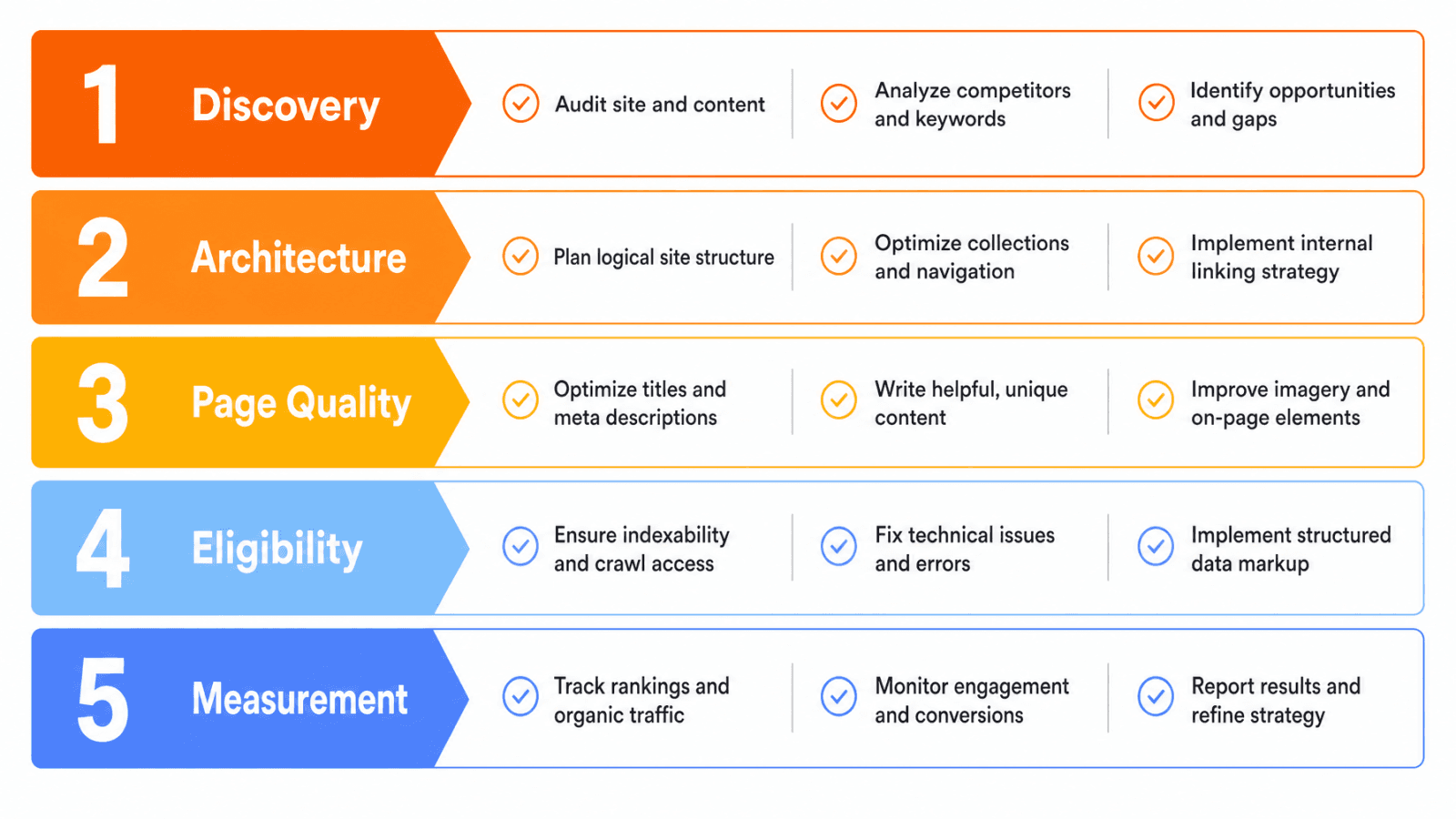
Shopify stores should fix indexability and page architecture before adding more content.
What Shopify handles automatically and what it does not
Shopify documents built-in SEO features including SSL, editable metadata fields, canonical tags, XML sitemaps, and robots.txt generation. What it does not manage for you: page copy quality, collection descriptions, internal link structure, schema accuracy, filter URL behavior, Core Web Vitals, and whether your measurement tools are configured correctly.
Knowing this boundary prevents two common mistakes: assuming Shopify has handled everything, and paying for apps that duplicate what the platform already provides.
The Shopify page hierarchy that supports rankings
Google discovers and evaluates your store through links, not just URL paths. A product at /products/example that is not linked from any collection or navigation element may be indexed but will carry far less authority than one reached through Homepage > Collection > Product.
Internal links from collection pages to products, and from blog posts to collections, are how you signal importance to crawlers and buyers alike.
Shopify Technical SEO Foundations
Checks 1 through 6 address the discovery and architecture layers. Complete them in order because each one affects the validity of the next.
1. Confirm the custom domain and HTTPS setup
Action: Confirm your custom domain is connected, HTTPS resolves without errors, and both www and non-www variants redirect cleanly to one preferred version. Why it matters: A split between www and non-www, or an HTTP version that returns a 200 status, can divide link equity and confuse canonical signals. Verify: Type both variants into a browser and check the address bar. Use a redirect checker to confirm the response code chain. Source: Shopify Admin > Domains.
2. Verify indexability, robots.txt, and the XML sitemap
Action: Check your live robots.txt file at yourdomain.com/robots.txt. Shopify documents default rules that block admin, cart, checkout, and internal search URLs. Confirm that your product and collection URLs are not accidentally disallowed. Then submit your sitemap at yourdomain.com/sitemap.xml through Google Search Console. Why it matters: Shopify automatically updates sitemap files when products, collections, pages, or blog posts are added or changed, but it does not submit the sitemap or alert you when a page is excluded. Verify: Search Console > Sitemaps. Check the submitted URL count against your actual published product and collection count. Source: Shopify Help Center, Google Search Console.
3. Check canonical URLs and duplicate product paths
Action: Shopify sets canonical tags automatically, but products reached through collection paths (e.g., /collections/shoes/products/example) or tag pages can generate secondary URLs. Use a canonical URL checker to confirm the intended canonical resolves correctly. Why it matters: If collection-filtered or tag-appended URLs are indexed without canonicals pointing back to the product URL, crawl budget and link signals may dilute. Verify: View page source on a product page accessed through a collection. Confirm the canonical tag points to /products/[handle], not the collection path. Source: Google Search Console URL Inspection.
4. Protect URL handles and 301 redirects
Action: Use descriptive, concise URL handles for all new products, collections, and pages. When an existing handle changes (e.g., a product is renamed or a seasonal collection is retired), create a 301 redirect immediately in Shopify Admin > Navigation > URL Redirects. Why it matters: A changed handle without a redirect returns a 404. Any links or indexed URLs pointing to the old path stop working and lose their value. Verify: After changing a handle, test the old URL in a browser and confirm it redirects to the correct destination with a 301. Use a broken link checker on a regular schedule. Source: Shopify Admin redirect tools.
5. Test mobile usability and Core Web Vitals
Action: Run your store’s key pages through Google PageSpeed Insights and review the Core Web Vitals report in Google Search Console. Why it matters: Google defines Core Web Vitals thresholds as LCP under 2.5 seconds, INP under 200 milliseconds, and CLS under 0.1. Pages that fail these thresholds may have a ranking disadvantage compared to pages that pass, though performance is one signal among many. Verify: Search Console > Core Web Vitals > check both mobile and desktop reports. Document which page types fail and whether the issue is theme code, image size, or a third-party app. Source: Google Search Central Core Web Vitals documentation.
6. Validate templates, headings, and indexable page types
Action: Confirm each page type renders one H1 tag, a unique title tag, and a correct canonical. Check that collection pagination (page 2, page 3) is handled consistently and that faceted navigation URLs are not sending unintended indexing signals. Why it matters: A theme update or app install can introduce duplicate H1s, missing title tags, or unintended noindex rules at scale. Verify: Spot-check three to five product pages and three collection pages using browser source view and Google Search Console URL Inspection. Source: Google Search Console, theme documentation.
Keyword Research for Shopify Products and Collections
Checks 7 through 10 address intent-to-page mapping. The goal is not to find keywords with high volume but to assign one clear intent to one URL before writing anything.
7. Map search intent to the correct Shopify page type
The table below assigns intent categories to the most appropriate Shopify page type, with an example predicate and the internal link destination that supports each.
Search intent | Best first page type | Example predicate | Internal link destination |
|---|---|---|---|
Transactional | Product page | Buy or order a specific product | Related collection and complementary product |
Commercial investigation | Collection or comparison page | Best, compare, suitable for | Product pages and buying guide |
Informational | Blog post or guide | How, why, what, care, sizing | Relevant collection or product |
Navigational | Homepage, brand, or product page | Brand or product name | Primary store path |
The page type should follow the intent, not the keyword volume.
8. Build a product and collection keyword map
Action: Group keywords by product type, attribute, use case, audience, and problem query. Assign each group to one URL: a product page for specific transactional queries and a collection page for category-level commercial queries. Verify: Check the primary query for each target URL in Google Search Console. Confirm the page ranking for that query is the intended one, not a blog post or homepage competing by accident.
9. Prevent keyword cannibalization between store pages
Action: Assign one primary intent to one URL. If a blog post is ranking for a query that belongs to a collection page, update the blog post to link to the collection rather than competing with it. Use Google Search Console > Performance > filter by query to check which pages appear for the same term. Verify: For your five most important commercial queries, confirm that only one URL appears in impressions data for each.
10. Build supporting topic clusters around buyer questions
Action: Identify buying guides, care guides, sizing content, and comparison articles that answer real pre-purchase questions. Each piece of supporting content should link to the most relevant collection or product page. Verify: Every blog post in a topic cluster has at least one contextual internal link to a collection or product page it supports.
Read More: ++Which Ecommerce Platform Is Best For SEO in 2026++
Shopify Product Page SEO Tips
Checks 11 through 16 cover Shopify product page SEO. Treat each product page as a commercial landing page, not just a display card.
11. Write unique product titles that match search intent
Action: Use the product type and key differentiating attribute in customer language. Avoid copying supplier or manufacturer titles directly. A title like “Organic Cotton Tote Bag - 15L Natural Beige” communicates more to both buyers and search engines than a generic product code. Verify: No two product pages on your store share the same title tag.
12. Write product descriptions around use cases and objections
Action: Cover benefits, specifications, materials, compatibility, and limitations. Anticipate buyer objections (does this fit, will this work with X, how do I care for it) and answer them in the description without inventing details you cannot verify. Verify: Descriptions are written from approved product data. No claims appear that are not confirmed by the supplier or brand.
13. Handle variants, availability, and product attributes consistently
Action: Keep variant names (size, color, material), identifiers, availability language, and price consistent between the visible page and any structured data. Inconsistencies between what a shopper sees and what structured data reports can cause eligibility issues. Verify: Open a product page, then inspect structured data using Google’s Rich Results Test. Confirm price, availability, and variant labels match the rendered page.
14. Optimize product images and alt text
Action: Use descriptive image filenames before uploading (e.g., navy-wool-crew-neck-sweater-front.jpg rather than IMG_4231.jpg). Write alt text that describes the image accurately. Alt text that does not describe the image is not useful to visually impaired users or to search engines. Verify: Open three to five product pages. View source and check that alt attributes contain descriptive text, not keyword strings.
15. Add reviews and FAQs only when they are real and visible
Action: Use review markup only when genuine review content exists and is visible on the rendered page. FAQs must answer real product questions and be visible to users. Structured data that describes content not visible on the page can be flagged as a policy violation. Verify: If you add FAQPage or Review schema, confirm the content is rendered in HTML, not loaded asynchronously in a way crawlers may miss.
16. Review title tags, meta descriptions, H1s, and internal links
Action: Confirm each product page has a unique title tag, unique meta description, one H1 matching the product name, links to related products, and links to the parent collection. These elements are editable in Shopify’s product editor under the “Search engine listing” section. Verify: Audit five product pages manually. Check Search Console for any pages with missing or duplicated title tags.
Check | Verify against |
|---|---|
Product title | Visible product page and supplied catalog |
Description | Brand-approved product data |
Variants | Shopify product record and visible page |
Images | Media library and rendered page |
Reviews and FAQs | Review provider, product page, or supplied FAQ source |
Metadata and schema | Rendered source and Rich Results Test |
Every product page should pass all six checks before it is considered ready for active SEO investment.
Read More: 12 Best SEO Tools for Ecommerce AI Visibility in 2026
Collection Page and Category SEO
Checks 17 through 21 position collection pages as commercial landing pages, not empty product grids. For a deeper look at structure and intent mapping, see ecommerce category page SEO best practices.
Google recommends crawlable ecommerce navigation from categories to products and notes that internal links are how importance is inferred across a site.
17. Name collections around category intent
Action: Use the language buyers use when searching, not internal taxonomy names. A collection called “Outerwear for Cold Climates” may match commercial intent better than “Winter Range Q4.” Verify: Check the primary search query for each collection in Search Console and confirm the collection name and H1 align with it.
18. Add useful collection copy without pushing products down
Action: Write a short introductory paragraph that explains who the collection is for and what it contains. Deeper supporting content, such as buying guidance or category context, can sit below the product grid where appropriate. There is no universal word count rule; the copy needs to be useful, not just present. Verify: The product grid is visible above the fold without being buried by copy.
19. Control filters, sorting URLs, and pagination
Action: Review how your theme handles filter and sorting URLs before changing robots.txt or theme code. Shopify’s default robots.txt blocks many filtered collection URLs, but theme apps and customizations can override this behavior. Verify: Check a filtered collection URL (e.g., ?filter.p.tag=red) using Google Search Console URL Inspection to confirm its index status before making changes. Source: Shopify robots.txt documentation.
20. Add breadcrumbs and related collection links
Action: Confirm your theme renders breadcrumbs on collection and product pages. Add links between parent collections, subcollections, and relevant buying guides where they help users navigate. Verify: View source on a collection page. Confirm breadcrumb links are present in HTML and that a BreadcrumbList schema element is rendered or can be added.
21. Link priority products from collections and supporting content
Action: Products that receive internal links from multiple sources (collection pages, buying guides, related product sections) accumulate more crawl and link signals than products with one entry point. Feature your highest-margin or highest-converting products in collection descriptions, buying guides, and related product sections. Verify: Use a broken link checker to confirm every product linked from collection copy and blog posts resolves correctly.
Shopify Content, Internal Linking, and AI Search Visibility
Checks 22 through 25 connect your content strategy to collection and product rankings. AI search visibility is an extension of clear SEO fundamentals, not a separate track.
Understanding the difference between SEO and answer engine optimization helps clarify what changes for AI-surfaced results and what stays the same. For stores investing in structured content for AI discovery, a GEO strategy for AI search visibility explains the underlying framework.
22. Publish buying guides that support product discovery
Action: Choose blog topics from real buyer questions, such as sizing comparisons, material guides, use case matchups, and care instructions. Each guide should link to the most relevant collection or product pages it supports. Verify: Every published buying guide has at least one contextual link to a collection or product page.
23. Build blog to collection to product pathways
Action: Treat internal linking as architecture. A blog post about “how to choose a trail running shoe” should link to the trail running collection, which links to individual product pages. Every link must serve a clear user purpose. Verify: Map your top ten blog posts. Confirm each one links to a relevant collection or product, not just back to the homepage.
24. Format answers so search engines and AI systems can extract them
Action: Use direct answer sentences at the top of each section, descriptive headings, tables for comparisons, and explicit entity names (brand names, product categories, materials). Shopify documents that AI-powered search and shopping assistants can help customers discover and compare products, and clear structured content makes that process more reliable. Why it matters: Clear structure does not guarantee citation in Google AI Overviews, ChatGPT, Perplexity, or Gemini, but it improves the machine-readability of your content. Verify: Each heading on key landing pages answers a real buyer question. Key facts appear in the first sentence of their section, not buried in paragraph three.
25. Keep product entities and attributes consistent across the store
Action: Use the same brand names, product names, category terms, materials, dimensions, and availability language consistently across product pages, collection copy, blog posts, and structured data. Inconsistent naming fragments entity signals and creates confusion for both buyers and crawlers. Verify: Search your own store for a product name. Confirm that the same name appears in the product title, collection copy referencing it, and any blog post that links to it.
Image, Video, Structured Data, and Measurement QA
Checks 26 and 27 close the loop between execution and evidence.
26. Validate Product, BreadcrumbList, Article, and eligible FAQ markup
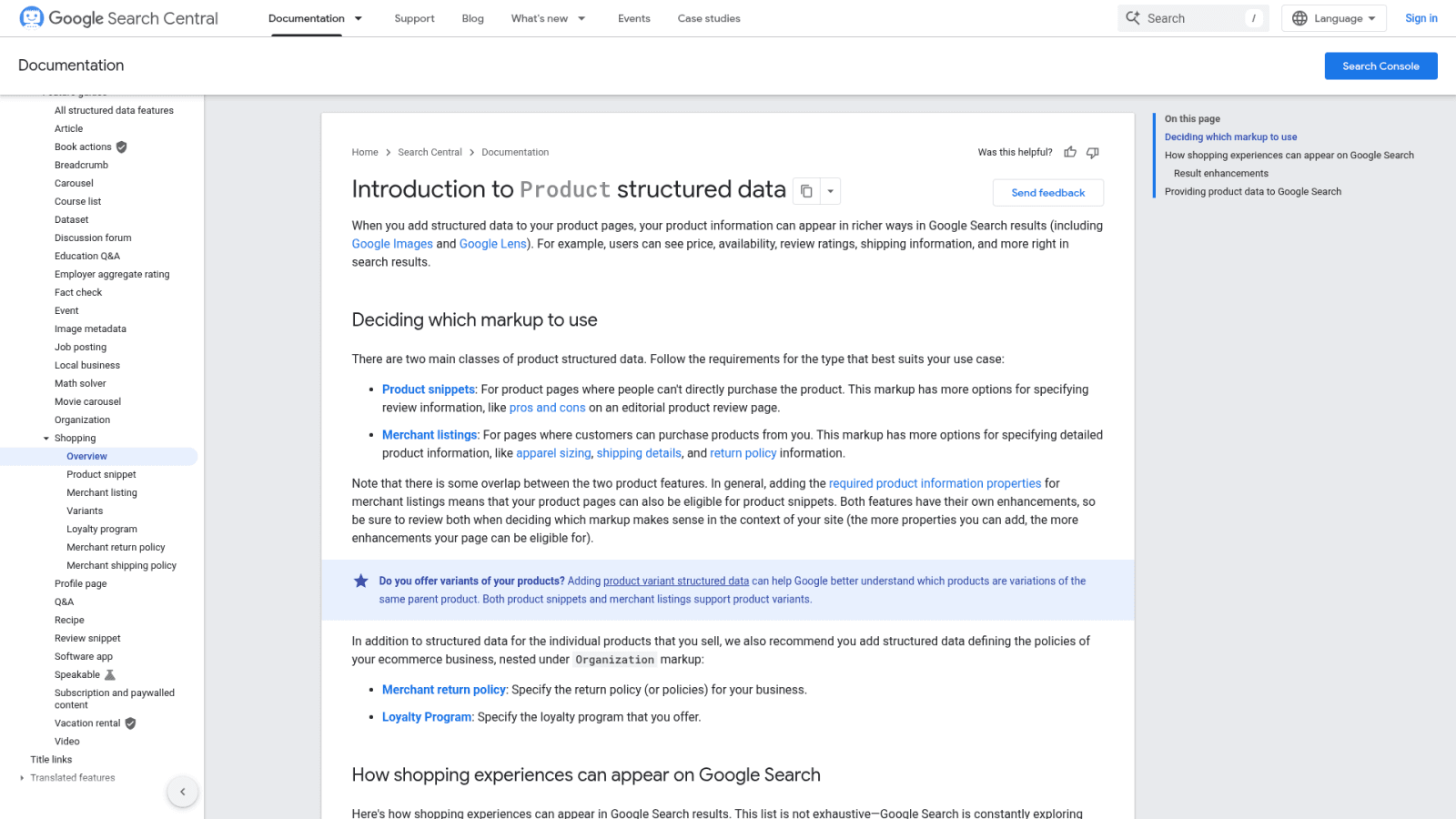
Action: Use Google’s Rich Results Test and URL Inspection to validate structured data on product pages, collection pages, and blog posts. Product structured data can describe price, availability, reviews, variants, shipping, and return information, but only when the markup matches visible page data exactly. Why it matters: Markup that contradicts the visible page, or that describes reviews that do not exist on the page, can create policy issues. Use a FAQ schema generator only for FAQ content that is genuinely visible and answers real product questions. Verify: Rich Results Test shows no errors on your five most important product pages. Any warnings are documented and assigned to a developer or theme review. Source: Google Search Central Product structured data documentation.
27. Track performance and maintain the store after launch
Action: Connect Google Search Console for search performance (impressions, clicks, CTR, average position, index coverage) and Google Analytics 4 for on-site behavior and ecommerce events. Use rank tracking alongside these tools to monitor query movement over time. Why it matters: Search Console shows how your pages appear in search results. GA4 explains what users do after they arrive. Connecting both to revenue or conversion data is where performance decisions get grounded in outcomes, not vanity metrics. Verify: Search Console property is verified and receiving data. GA4 has ecommerce events configured and is recording product views, add-to-cart actions, and purchase completions. Use the AI visibility tracker to monitor brand citation patterns in AI-powered search summaries where relevant.
Review the store at 14, 30, 60, and 90 days. Check indexed commercial pages, query-to-page alignment, crawl errors, rich result eligibility, and Core Web Vitals changes after each theme update or app install.
How Shopify Teams Can Use Keytomic Without Skipping Human Review
The Keytomic SEO automation platform is built to handle the repeatable parts of an SEO workflow: keyword discovery, topical planning, content generation, CMS publishing, technical audits, indexing workflows, and AI visibility monitoring.
For Shopify teams, that means less time managing a fragmented toolstack and more time reviewing outcomes.
Product feature and Shopify connection claims were checked against official Keytomic pages in August 2026. Recheck those claims before publication if the page is updated later.
Where Keytomic fits in the Shopify SEO workflow
The table below shows where Keytomic’s documented capabilities map to the Shopify SEO workflow described in this checklist. Review Keytomic pricing and SEO workflow features to confirm which capabilities match your current plan before building a workflow around them.
Stage | Shopify SEO task | Keytomic role (verified August 2026) | Human review requirement |
|---|---|---|---|
Discover | Find topics and page opportunities | Keyword and topic discovery | Confirm business fit and page ownership |
Plan | Build a prioritized roadmap | Topic calendar and planning workflow | Approve intent, entities, and internal links |
Create | Draft supporting content | Content generation and optimization | Fact-check, edit brand voice, verify claims |
Publish | Send content to the CMS | Shopify publishing connection | Confirm template, metadata, images, and links |
Validate | Check indexing, schema, and page quality | Technical audits and indexing workflow | Test rendered output and structured data |
Monitor | Review rankings, traffic, and AI visibility | Analytics and AI visibility features | Interpret business outcomes and revise strategy |
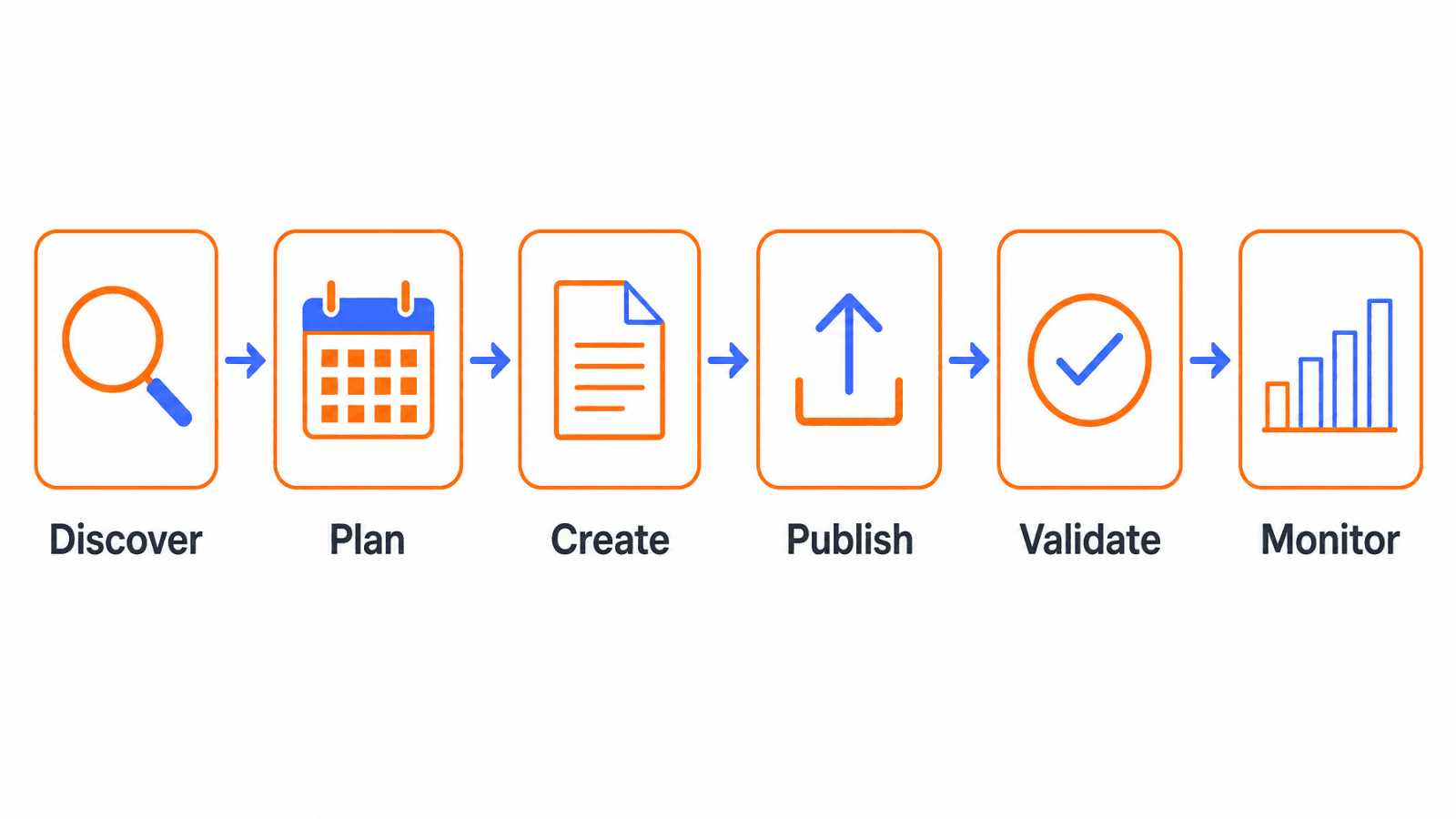
Keytomic Shopify integration can reduce repetitive SEO workflow work, but it does not replace human review of product data accuracy, brand voice, or structured data validation.
For context on how to evaluate workflow tools alongside Keytomic, see how to choose SEO automation tools and SEO automation software evaluation criteria.
What still needs merchant or developer approval
Keytomic does not control theme code, collection template logic, canonical URL implementation at the theme level, filter crawl behavior, product data in the Shopify catalog, schema validation results, brand voice, legal copy, or final publishing decisions. Those still require a merchant or developer to review before going live.
If the workflow described above fits your team’s situation, you can book a Keytomic SEO workflow demo to see the discovery, planning, publishing, and monitoring steps in a live session.
Ready to Automate Your Shopify SEO? Start your free Keytomic trial today.
Shopify SEO Checklist FAQs
Is Shopify good for SEO?
Shopify provides a solid technical baseline: automatic SSL, canonical tags, XML sitemaps, editable metadata, and structured URL paths. Ranking still depends on page quality, architecture, content, links, performance, and measurement, which remain merchant responsibilities.
How long does Shopify SEO take to work?
There is no fixed timeline. Results depend on site history, competition, technical condition, content quality, link profile, and how quickly Google crawls and indexes changes. Stores with a clean technical foundation and strong content can see movement in weeks; others may take months.
Does Shopify automatically create a sitemap and robots.txt file?
Yes. Shopify automatically generates and updates both files. The sitemap at /sitemap.xml updates when products, collections, pages, or blog posts change. Merchants still need to submit the sitemap in Google Search Console and verify that important pages are included and unwanted pages are excluded.
Do Shopify stores need an SEO app?
Not automatically. Decide based on workflow gaps, theme limitations, and governance needs. Many fundamental optimizations are available through Shopify’s built-in fields and theme customization. Adding an app that duplicates existing platform functionality can slow your store and create conflicting outputs.
How do I fix duplicate content in Shopify?
Start by verifying canonical tags using URL Inspection in Search Console. Check filtered collection URLs and product tag pages for unintended indexing. Manage redirect chains when handles change. Do not prescribe theme code changes without first testing which URL patterns are actually being indexed.
Should Shopify SEO target product pages or collection pages?
Both can matter, but the page type should match search intent and buying stage. Transactional queries with a specific product name belong on product pages. Broader category or comparison queries belong on collection pages or dedicated comparison content.
How often should a Shopify store publish blog content?
There is no universal publishing frequency that improves rankings. Publish at a cadence your team can sustain, focused on unanswered buyer questions that link to relevant collection and product pages. Three well-researched posts per month will outperform ten thin posts with no internal linking purpose.
Can Shopify stores appear in AI search results?
Shopify stores can be discovered by AI-powered search and shopping systems including Google AI Overviews, ChatGPT, and Perplexity. No tool or markup format guarantees citation or recommendation. Clear structure, consistent entity naming, accessible pages, and accurate structured data improve machine-readability without promising inclusion.
How should Shopify SEO be measured?
Use Google Search Console for search performance data: impressions, clicks, CTR, and average position. Use Google Analytics 4 for on-site behavior and ecommerce event data. Connect both to revenue or conversion outcomes where tracking is configured and valid. These two tools measure different things and should not be expected to show identical numbers.
What should I fix first on a Shopify store?
Follow the priority sequence: indexability and canonical control first, then page-type mapping, then product and collection content quality, then internal links, then Core Web Vitals and performance, then schema validation, and finally measurement setup. Do not invest in content before you know the pages that will carry it are crawlable and correctly canonicalized.
Your Next 30 Days of Shopify SEO Work
The 27 checks divide naturally into a four-week sequence:
Week 1: Fix indexability. Confirm HTTPS, custom domain, robots.txt, sitemap submission, canonical tags, 301 redirects, and URL handle accuracy. Set up Google Search Console if it is not already connected.
Week 2: Map intent to pages. Build or audit the keyword-to-page map. Identify cannibalization conflicts. Review the five most important product pages and five most important collection pages against the product audit table.
Week 3: Improve content, links, and media. Update product descriptions and collection copy where they are thin or duplicated. Fix image filenames and alt text. Add or correct internal links. Validate Product and BreadcrumbList schema.
Week 4: Establish measurement. Confirm GA4 ecommerce events are firing. Review Core Web Vitals in Search Console. Set a recurring monthly check covering indexed pages, query movement, and crawl errors.
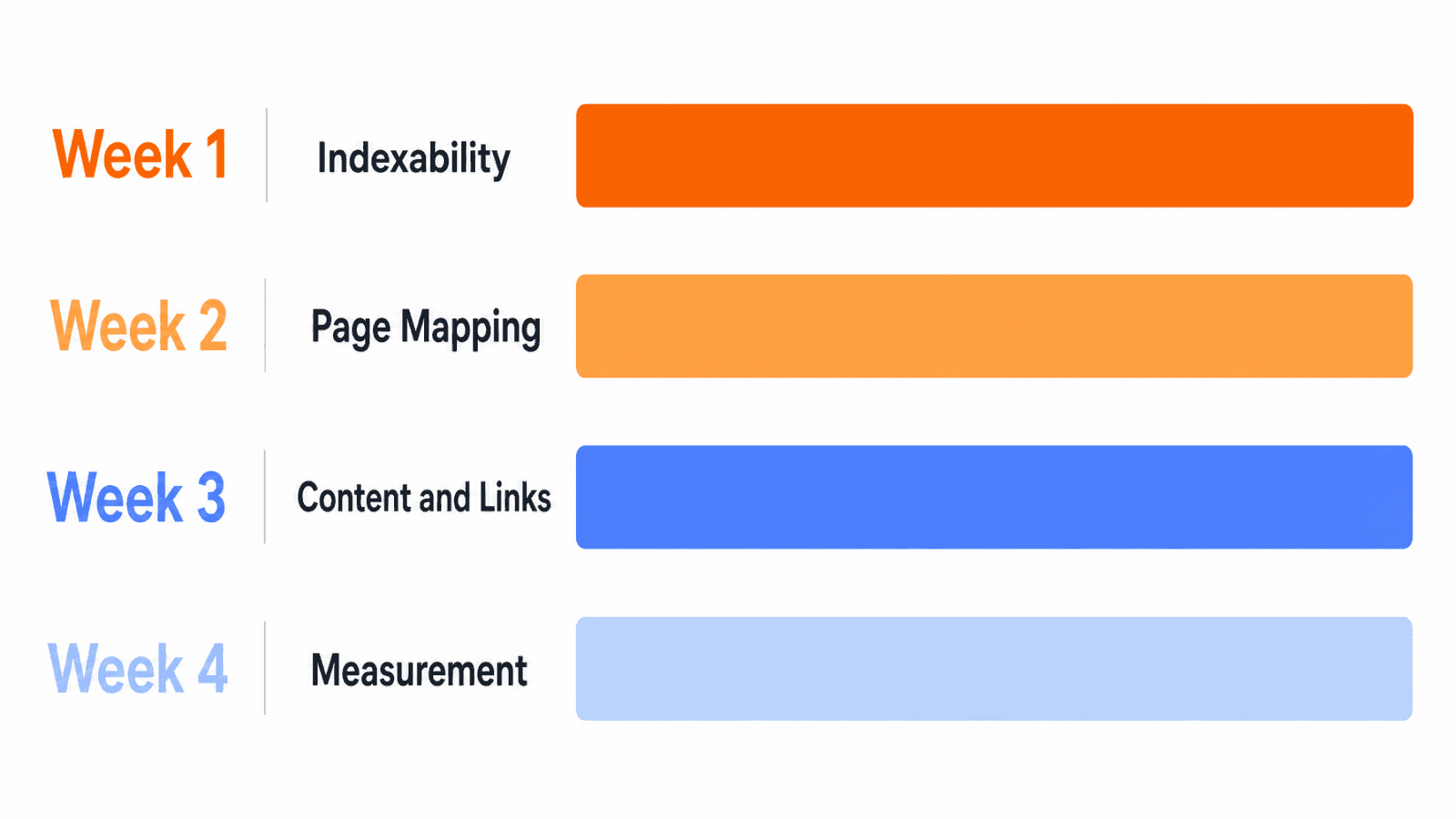
After completing the foundational work, the decision point is simple: can your team sustain keyword discovery, content planning, publishing, and performance monitoring at the cadence the store requires? If the answer is no, that is where a workflow tool makes sense.
Review your options, including Keytomic pricing and SEO workflow features, against your specific workflow gaps before committing.