
Auto repair SEO automation uses software and repeatable workflows to organize keyword research, local service content, publishing, and performance checks. It cuts down the routine handoffs, not the thinking. Automate the routine steps, but have a person verify shop details, review policy, service-area accuracy, and every page before it goes live.
You run a repair shop, not a marketing department. Between estimates, parts orders, and a ringing phone, nobody has time to research keywords, update pages, and check Google Search Console. So auto repair SEO happens in bursts, then stalls for months.
This guide walks through a workflow that starts with real shop services, builds local foundations, plans useful pages, routes every draft through approval, and measures what changed. You can run it by hand, with a tool, or with both. For context on how automation fits into a broader local SEO strategy, see how local SEO works for auto repair shops.
What SEO automation can do for an auto repair shop
SEO automation is software handling the repeatable parts of search work: grouping keywords, preparing briefs, scheduling approved pages, and watching performance. It doesn't decide which services you promote, and it can't confirm that a page tells the truth about your shop.
That second part matters. Google's people-first content guidance cautions against using automation to produce content that adds no real value, so the review step carries as much weight as the tool.
Here's a simple split of who does what:
Task | Automation can assist with | A person still checks |
|---|---|---|
Keyword research | Grouping searches by service and intent | Whether the shop actually offers the service |
Drafting | Preparing briefs and first drafts | Repair facts, tone, and promises |
Publishing | Scheduling approved pages in the CMS | Phone, hours, and offers before going live |
Monitoring | Pulling visibility and page data on a schedule | What the numbers mean for the business |
These are general workflow examples, not features of any one tool. Put plainly, auto repair SEO automation means software handles the handoffs and you handle the judgment. For a broader look at how automation compares to doing SEO manually, see automated SEO vs. manual SEO.
Build a local SEO foundation before automating content
Automation can't fix a wrong phone number. If your Google Business Profile lists the wrong hours or services, every page you publish sends people to bad information. Fix the basics first — this is the groundwork for local SEO for service businesses.
How you set up the profile depends on how customers deal with you. A garage where people drop off cars is a storefront. A mobile mechanic with no customer-facing location is service-area-only, and a hybrid shop that also offers roadside service may be able to show its storefront and set a service area, subject to Google's guidelines for representing your business. Don't assume every shop should add a service area or list every nearby town.
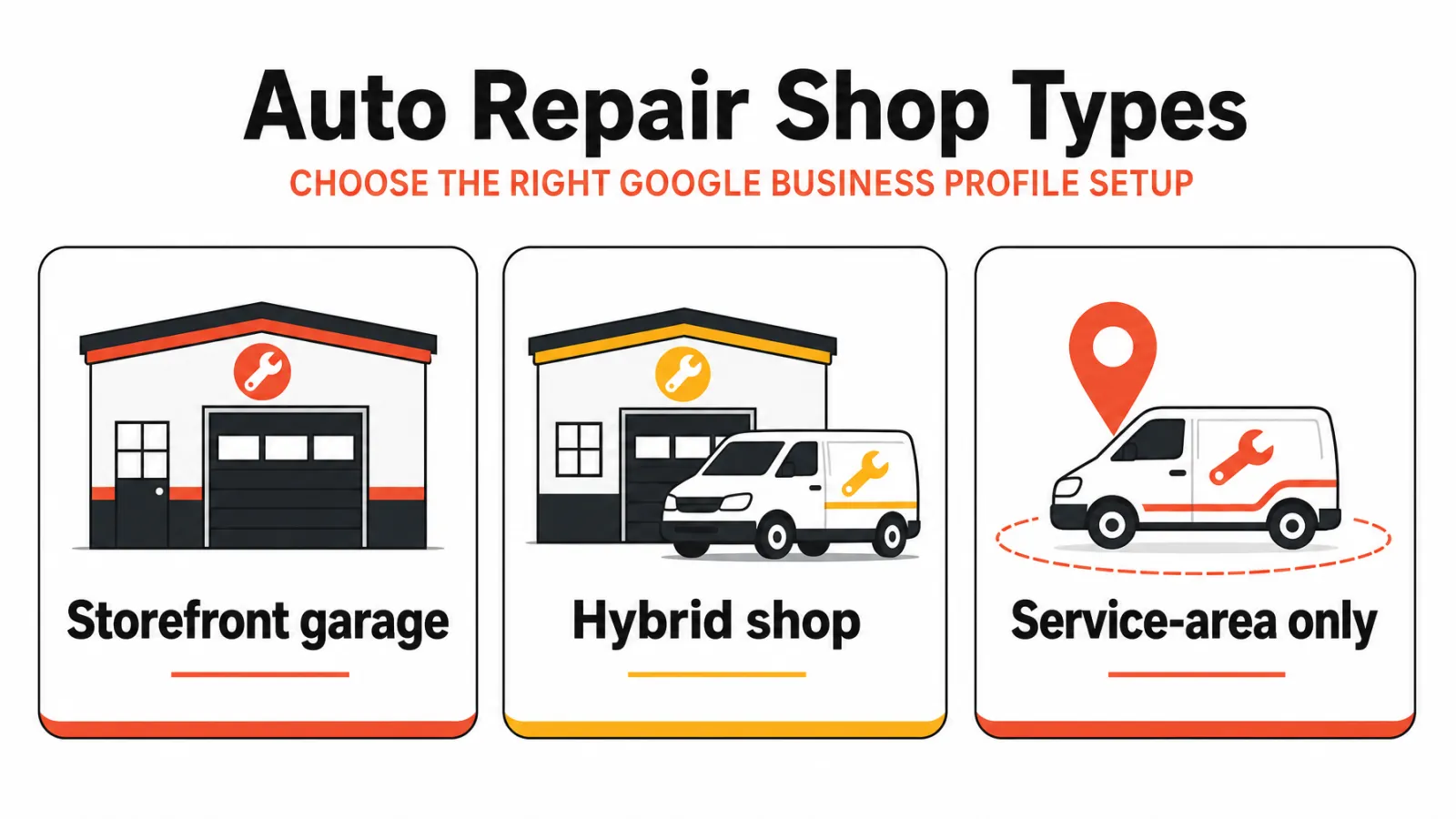
Confirm these against the real world:
Shop name as customers see it on your sign and invoices
Address, or the service-area setup if you don't serve customers on site
Hours, including holiday changes
Main phone number and website URL
The services you actually perform
How can a repair shop improve its local SEO?
Local results depend mainly on relevance, distance, and prominence, according to Google's explanation of local ranking factors. Google also says businesses can't pay for a better local ranking, and distance isn't something you control. So your controllable work is accurate details, relevant content, and a genuine reputation.
Reviews belong in that last bucket. Ask customers for honest feedback after a job, and don't offer anything in exchange, because Google's policy on incentivized reviews prohibits that.
Map the shop's actual services to local search intent
Start with what you confirm you do. Not what competitors list, and not what a keyword tool suggests. That's the sensible starting point for auto repair SEO keyword research, and it works in four steps:
List every service you perform and want more of.
Write the searches a customer might use for each, including patterns like "brake repair in [city]".
Group each search by intent: urgent (something's wrong now), planned (routine maintenance), or informational (the customer wants to understand a problem).
Match each group to one page or action, and check your existing pages before creating another.
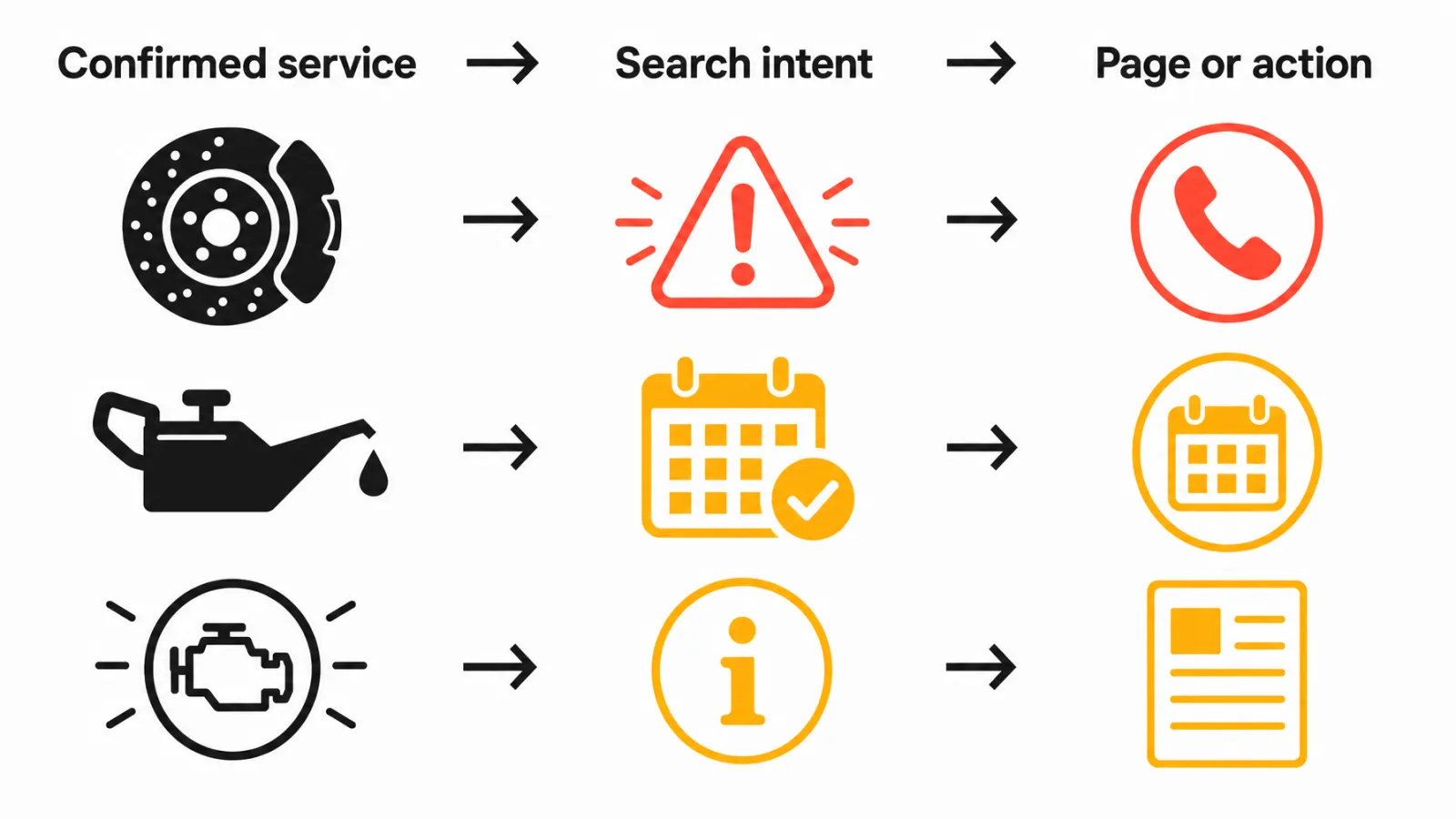
If you offer brake repair, urgent searches probably deserve a service page with a visible phone number and an appointment option. Oil changes lean toward planned searches, so a service page with booking details fits. Check engine diagnostics mixes urgent and informational intent, so pair a service page with a supporting article that a technician has reviewed.
Use real keyword data only if you can verify it; otherwise skip the numbers. Two pages chasing one search need can compete with each other, so one topic gets one page. That mapping is the core of auto repair SEO keyword work.
Create useful service pages and supporting content
A useful service page does a few things well:
Explains the service accurately and in plain language
Tells customers what to expect, without promises you can't keep
Offers a clear next step: call, appointment request, or directions
Links to genuinely related pages or articles
Supporting articles can answer questions customers ask about a service. If they touch repair facts, someone qualified at the shop should check them before anything goes live.
City and neighborhood pages need more care. Swapping a place name into a template doesn't make a page locally useful, and Google's guidance on helpful, people-first content asks whether content gives readers real value. Before creating location pages for SEO, use this test:
Do you really offer the service or serve that area?
Is there a distinct search need behind it?
Can you add accurate detail a customer can use?
Is there a useful next step on the page?
If any answer is no, fold the topic into an existing page. That keeps auto repair shop SEO tidy instead of sprawling.
Automate repeatable SEO tasks without losing quality control
Here's the auto repair SEO workflow to set up. Software handles most steps, but step five is a person, and it isn't optional.
Confirm services and location facts from shop records, not guesses.
Research and group search needs by service and intent.
Pick one page or update to work on next.
Prepare a brief or draft.
Have someone at the shop verify service details, address, phone, offers, and promises.
Approve and publish.
Check internal links, indexing, and early performance.
Revise only when evidence or business details change.
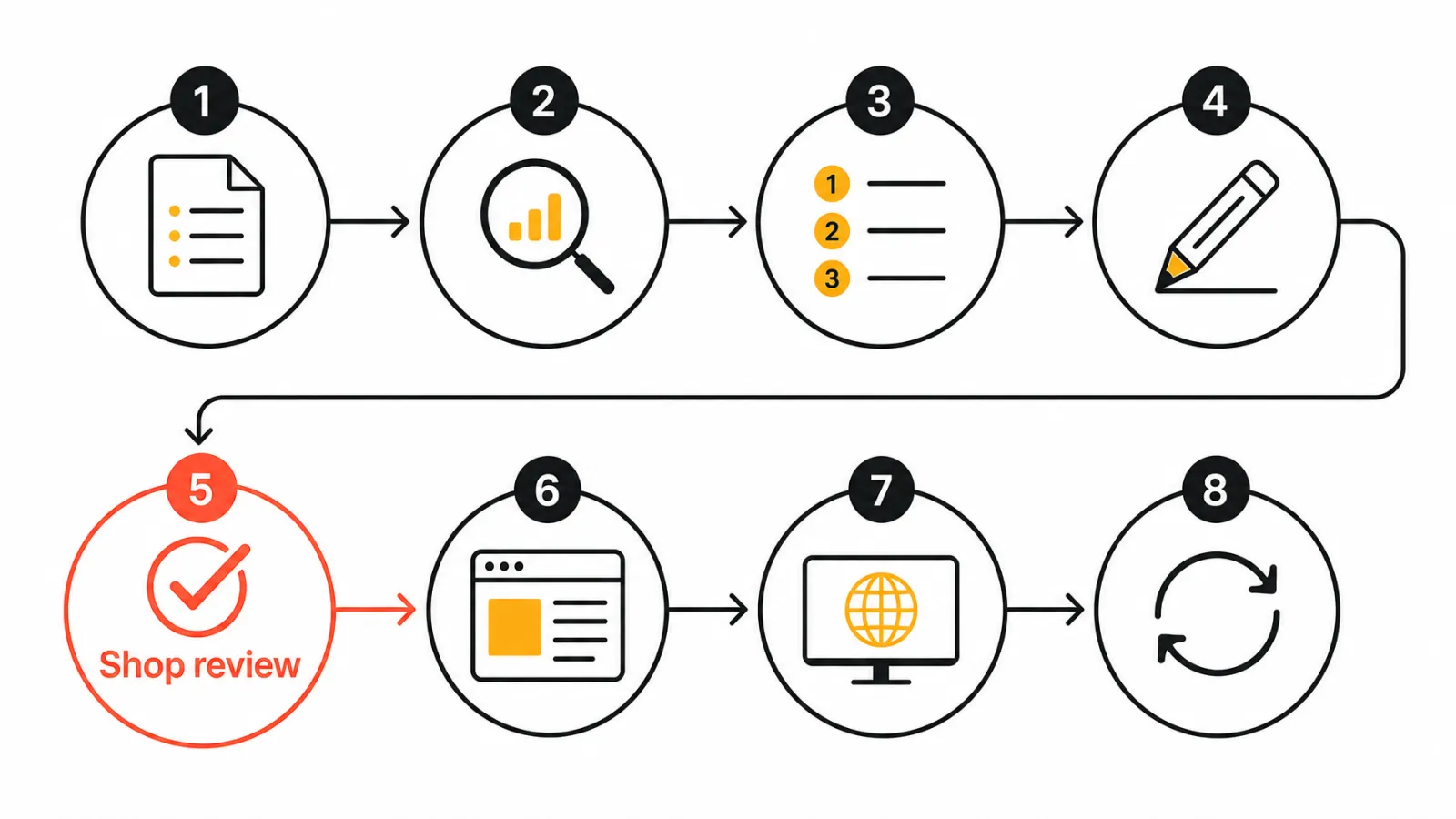
The approval gate is where most automation goes wrong. A draft can read well and still list a service you don't offer or quote a price you stopped charging.
Name one reviewer, hand them the fact list from step five, and treat "approved" as a deliberate click, not a default. For broader examples and templates, see these SEO automation workflows. You can also look at n8n and Zapier SEO automation workflows if you want to connect tools without code.
Track local search performance and adjust the workflow
Measuring auto repair SEO means keeping two kinds of data apart: what people did in search, and what they did with your shop. Search Console's performance data covers impressions, clicks, and queries. It won't tell you who called or booked a brake job.
Question | Data source | What it tells you | Limitation |
|---|---|---|---|
Are people seeing our pages? | Google Search Console | Impressions and queries by page | Doesn't show who contacted you |
Are they clicking? | Google Search Console | Clicks and click-through by page | Clicks aren't customers |
Are they calling or booking? | Call tracking, appointment records, or CRM | Contacts and booked work | Needs separate setup and access |
Which page needs work? | Search Console plus site analytics | Changes by page and query group | Seasonality and competition affect results |
Record a baseline before you change anything. Then compare the same pages and query groups over a meaningful period, with a blank sheet: page, query group, impressions, clicks, calls or bookings, notes.
As AI search engines become a larger part of local discovery, tracking AI visibility for local businesses is an emerging layer on top of traditional Search Console data. Rankings depend on competition, location, demand, and search systems you don't control, so don't expect a fixed timeline — but if a page earns impressions and no clicks or calls, it needs work.
Frequently asked questions about auto repair SEO automation
What does SEO automation do for an auto repair shop?
It handles repeatable work like keyword grouping, brief preparation, CMS scheduling, link checks, and recurring performance reporting. The result is fewer stalled handoffs between research, writing, and publishing. People still approve all facts, services, and promises before anything goes live — automation removes the admin, not the judgment.
Which SEO tasks can a repair shop automate?
Keyword grouping, draft preparation, CMS scheduling, internal link checks, and recurring performance reporting are all good candidates. Service priorities, repair facts, local accuracy, and any customer-facing promise should stay with a person who knows the shop. The best local SEO tools can handle the data side; your team handles the truth side.
Does every auto repair service need its own page?
Not necessarily. Give a service its own page when you offer it, people search for it distinctly, and you can explain it accurately with a clear next step. If the search volume is thin or the service is closely related to another, fold it in rather than publish a thin standalone page that competes with itself.
Should a repair shop create a page for every nearby city?
No. Create a location page only when you have accurate, useful local information and a distinct reader need — not just to swap a city name into a template. Near-identical city pages are a pattern Google's spam policies describe as doorway abuse. Read location pages and doorway page risks before building out a location cluster.
How should an auto repair shop ask customers for reviews?
Ask for genuine feedback after a completed job — a text, email, or verbal request is appropriate. Google prohibits offering discounts, gifts, or rewards in exchange for reviews. Read Google's review policies before building any review-request process. Incentivized reviews can get your profile penalized, so check the current rules for your region.
Can Google Search Console show calls or repair bookings?
No. Search Console reports search performance — impressions, clicks, and queries — but it stops at the click. Calls and bookings need call tracking software, appointment records, or CRM data configured separately. Pairing Search Console with Analytics and a call-tracking number gives a more complete picture of what your SEO is actually producing.
How long does auto repair SEO take to show results?
There is no reliable fixed timeline. Results depend on your site, competition, location, demand, and implementation quality. Google says changes can take hours to several months to reflect. Set a baseline in Search Console before making changes, then compare like-for-like date ranges at 60 and 90 days rather than checking weekly for movement.
Should a repair shop use SEO software or hire an agency?
It depends on how much you want to manage yourself and how consistent your internal capacity is. Software organizes repeatable work and keeps costs predictable; an agency or consultant adds human judgment, strategy, and execution. Some shops combine both. See automated SEO software vs. automated SEO services for a practical breakdown of when each makes sense.
Can AI-written service pages be published without shop review?
No. Someone who knows the shop should verify services, location details, phone numbers, hours, offers, and repair claims before any page goes live. Google cautions against automation that produces content with no real value. A draft that reads well can still list a service you stopped offering or quote a price you changed — that's what the approval gate in step five of this workflow is for.
Put the workflow into practice
Auto repair SEO automation works best as a sequence your shop can actually maintain. Pick one thing, finish it, and build the habit before adding more steps.
Start with your Google Business Profile and one service page. Run them through the approval workflow above, record a Search Console baseline, and revisit in 60 days. If you want a platform that handles the keyword research, content planning, publishing, and technical SEO audit steps in one place, start with a Keytomic free trial — and keep your reviewer in the loop at step five.


