If you have ever stared at your Shopify analytics and wondered why organic traffic stays flat while your Meta ads keep costing more, you are not alone.
Here’s an uncomfortable truth about Shopify SEO: your store can have flawless product photos, five-star reviews, and a theme that looks like it belongs in a design magazine, and Google will still treat it like it doesn’t exist. I have watched founders spend more time picking a font for their hero banner than they have ever spent on their sitemap. If that’s you, no judgment. I have opinions about fonts too.
I’m Salam Qadir, and I’ve been doing e-commerce SEO for over 7 years now and have helped over 150 Shopify stores. The pattern is almost always the same. Store owners spend real money on beautiful photos, clean themes, and paid ads. Then they open Google Search Console, see almost no impressions, and feel stuck.
The good news is that ranking a Shopify store is not magic. It is a set of practical decisions about how your pages are organised, what they say, and how easy they are for both people and search engines to understand. In 2026 this matters even more because shoppers are no longer only using Google. They are also asking ChatGPT, Perplexity, and Google’s AI Overviews where to buy things.
This guide is written for store owners who know Shopify well but do not want to become full-time SEO specialists. You will find clear priorities, simple actions you can take inside the Shopify admin, and honest notes about what is worth your time.
Let’s start with why this still matters.
TL;DR
Shopify SEO in 2026 is less about stuffing keywords and more about making sure Google and AI tools can clearly understand your products, collections, and answers.
Focus first on the pages that actually sell: product pages and collection pages.
Fix the basics that stop Google from seeing your store properly (indexation, duplicates, speed).
Treat AI search the same way you treat Google: clear product data and useful answers win.
Consistency beats one big optimisation push. Small improvements every week compound.
Why Shopify SEO Matters in 2026
Organic search still drives a large share of ecommerce traffic. A 2025 industry report found organic search drives at least 43% of all traffic to ecommerce websites, and that number has stayed relatively stable even as paid advertising costs have risen.
What has changed is the way people discover products. Shopify’s Q2 2026 earnings report showed that AI-driven traffic and orders to merchant storefronts tripled year over year, and AI-referred shoppers converted at nearly 50% higher rates than organic search visitors, spending 14% more per order. People still type queries into Google, but many also ask AI tools questions such as “best waterproof hiking boots under $150” or “where can I buy organic cotton sheets that actually last.”
If your product pages and collection pages give clear, accurate answers, you become eligible to appear in both traditional results and AI recommendations. If the information is thin, confusing, or missing, both Google and the AI systems simply move on to a competitor.
There is also a cost angle. Meta and Google ads can generate sales quickly, but the moment you pause the campaigns the traffic usually stops. Organic rankings and AI citations keep working after the budget is spent. Stores that build a solid SEO foundation often see their customer acquisition cost drop over time because a growing share of buyers arrive without a paid click.
This does not mean you should turn off ads tomorrow. It means SEO and paid channels work best together. Ads can prove which products and messages convert. SEO can then turn those same products into long-term search assets.
For most Shopify stores the biggest opportunity is still on the pages that already exist: the product pages and the collection pages. Blog posts help, but they are supporting players. The money lives in the catalogue.
One more practical reason SEO matters in 2026 is trust. AI systems prefer sources that look consistent and well-documented. Clean product data, accurate prices, real reviews, and clear shipping information all act as trust signals. When those signals are strong, both Google and AI tools are more willing to recommend your store.
Here’s an example to make the even easier to understand:
Two stores sell the same $60 ceramic mug. Store A’s product page says “Ceramic Mug – Blue.” Store B’s page says “12oz hand-glazed ceramic mug, dishwasher and microwave safe, made in small batches, ships in 2 days.”
When someone asks an AI assistant “what’s a durable ceramic mug that’s dishwasher safe,” Store B has the specific details the AI needs to match the query. Store A doesn’t exist as far as that answer is concerned.
What Shopify Does For You (and What You Still Own)
Shopify removes a lot of the technical headaches that used to slow stores down. At the same time it does not make every SEO decision for you. Understanding the split saves time and prevents frustration.
Here is a simple way to look at it:
Shopify Handles Automatically | You Still Own |
|---|---|
SSL certificate (HTTPS) on every page | Writing unique, useful product and collection descriptions |
XML sitemap generation and updates | Submitting the sitemap to Google Search Console |
Basic canonical tags on product pages | Checking that canonicals still work after theme or app changes |
Mobile-responsive themes by default | Making sure your theme stays fast after you add apps |
Editable title and meta description fields | Writing titles and descriptions that match what people actually search |
robots.txt file | Reviewing the file if apps add unwanted rules |
Shopify’s automatic features give you a solid foundation. The platform creates a sitemap at yourstore.com/sitemap.xml and updates it when you add or change products. It also adds canonical tags so that a product reached through a collection path usually points back to the clean /products/ version of the URL, as Shopify’s own Help Center explains in its SEO FAQ.
What Shopify cannot do is decide which keywords matter for your specific catalogue, write descriptions that answer buyer questions, or remove the extra scripts that slow your pages down after you install five or six apps. Those decisions stay with you or your team.
This boundary is important. Many store owners assume that because Shopify is “good for SEO” the hard work is already finished. In reality the platform removes barriers so you can focus on the work that actually moves rankings: clear content, sensible site structure, and clean data.
If you want a deeper comparison of how Shopify stacks up against other platforms on SEO, you can read our overview of the best ecommerce platforms for SEO.
The rest of this guide focuses on the parts you control. We will keep the language practical and the steps tied to what you can actually click inside the Shopify admin.
The 5 Things to Fix First This Week
When a store is not ranking, the temptation is to open twenty tabs and try to fix everything at once. That usually leads to overwhelm and very little progress. After working with more than 150 Shopify stores I have found that five foundational items deliver the biggest early results for most shops.
1. Confirm Google can actually see your store
Log into Google Search Console, add your domain if you have not already, and submit your sitemap (yourstore.com/sitemap.xml). Then check the Pages or Coverage report. Look for large numbers of “Excluded” or “Discovered – currently not indexed” URLs. If important product or collection pages are missing, that is the first fire to put out.
2. Clean up duplicate product URLs
Shopify creates a second URL for a product when it appears inside a collection (for example /collections/shoes/products/blue-runners). The platform usually adds a canonical tag that points back to the main /products/ version, but themes and apps sometimes interfere. Use a free tool such as our canonical URL checker on a few product pages to confirm the correct version is marked as the primary one.
3. Rewrite the title tags and meta descriptions on your top 10–20 pages
These are the lines people see in Google results. A clear title that includes the main product or category name plus one useful detail almost always outperforms a generic or keyword-stuffed version. Aim for roughly 50–60 characters for titles and 140–160 for descriptions. Use our meta title and description length checker to test before you publish. You can edit both directly in the Shopify admin under each product or collection.
4. Check basic page speed on mobile
Open Google PageSpeed Insights, test your homepage and two or three important product pages on mobile, and note the largest problems. In most cases the biggest wins come from compressing large images and removing apps you no longer use. You do not need a perfect score on day one. You just need to remove the worst offenders.
5. Connect Google Analytics 4 if it is not already linked S
hopify has a built-in integration. Without accurate traffic and conversion data it is hard to know whether your SEO changes are helping. Set it up once and then look at organic sessions and revenue once a month.
These five steps will not make you rank for competitive terms overnight. They will, however, remove the most common blockers that keep good products invisible. Once they are handled, the rest of the work becomes more effective.
If you prefer a longer printable list, our separate Shopify SEO checklist expands on every item in more detail.
Indexation, Sitemaps, and Crawl Checks
Before you spend hours rewriting product descriptions, make sure Google can actually find and index the pages that matter. This step is often skipped, yet it is one of the most common reasons good Shopify stores stay invisible.
I still see stores with hundreds of products that have never been properly indexed. The photos look great, the prices are competitive, and the ads convert, but Google has only crawled a fraction of the catalogue. Until that changes, rankings stay limited.
Check What Google Has Actually Indexed
Start inside Google Search Console. After you verify your domain and submit the sitemap, open the Pages report (previously called Coverage).
Look at three numbers:
Valid pages (these are indexed)
Excluded pages
Discovered but not indexed
A healthy Shopify store usually has most of its important product and collection pages in the Valid group. If you see a large gap between the number of products in your admin and the number of indexed product pages, something is blocking discovery or indexation.
This is a more common problem than most store owners assume. On Shopify’s own community forums, store owners with large catalogues have reported as much as 90% of their pages sitting outside the index, usually a mix of unresolved canonicals, redirect chains, and robots.txt blocks stacking up as the catalogue grows. Not every store will see numbers that extreme, but a meaningful gap is common enough that it is worth checking rather than assuming.
Use the URL Inspection tool on your top collection and product pages. Paste the URL and check the last crawl date and indexing status. If Google last crawled an important page months ago, request indexing and then fix whatever is preventing regular visits.
Keep Low-Value URLs Out of the Way
Shopify automatically generates a sitemap at yourstore.com/sitemap.xml and updates it when you add or change products, collections, pages, or blog posts. That part is helpful.
What Shopify does not do is decide which URLs deserve to be indexed. Filter pages, sort-order pages, and some tag pages can end up crawled even when they add little value. These low-value URLs consume crawl attention that would be better spent on your main collection and product pages.
A practical rule I follow with clients is simple: only pages that can meaningfully rank for a search query should stay fully indexable. Parameter pages that only change the order of products (price low to high, newest first) almost never need to be indexed. The same applies to many thin tag pages that contain just a handful of products and no unique content.
You can review your live robots.txt file by visiting yourstore.com/robots.txt. Shopify lets you edit this file through the theme code if needed. Most stores never have to touch it, but it is worth checking once after you install new apps, because some apps quietly add rules that block more than they should. Our robots.txt validator is a quick way to spot-check the file without digging through theme code.
Submit and Monitor the Sitemap Properly
Inside Google Search Console go to Sitemaps and submit https://yourstore.com/sitemap.xml if you have not already. Shopify creates several sitemap files (one for products, one for collections, one for pages, and so on) and links them from the main sitemap. Search Console will show you how many URLs were discovered and whether any could not be read.
Check this report once a month. A sudden drop in submitted URLs or a spike in errors usually means something changed in the theme, an app, or a bulk product update.
Stores that actively monitor indexation tend to catch problems while they’re small: a canonical tag broken by a theme update, a bulk edit that accidentally added noindex tags, a new app writing to robots.txt. Stores that treat the sitemap as a “set and forget” file often discover months later that large parts of the catalogue stopped being crawled.
Simple Weekly Habit
Once the foundation is clean, you only need a light weekly check:
Open Search Console Pages report and note any new spikes in excluded or not-indexed URLs.
Spot-check three important product pages with the URL Inspection tool.
Confirm the sitemap still shows a healthy number of discovered URLs.
This takes less than ten minutes and prevents small problems from becoming expensive ones. If you want a free way to double-check individual canonical tags while you work, you can use our canonical URL checker. It is quick and does not require any login.
When indexation is under control, the content and structure work you do next has a much higher chance of producing results.
Site Structure and Navigation
Think of your site structure as a set of directions you give to two very different visitors at the same time: a shopper who has never seen your store, and a Googlebot that is trying to figure out what your store is about and how important each page is.
Treat Collections as Category Hubs
Your collection pages are not just filters, they are category hubs that should own a clear commercial intent. A collection like /collections/mens-running-shoes should read like a small landing page: a short intro explaining what the shopper will find, then the product grid. I’ve worked with stores that treated collections as an afterthought, just a grid with zero text, and watched them lose ground to competitors whose collection pages actually explained what made their running shoes different (cushioning type, terrain, weight).
A simple rule: one collection should answer one clear question a shopper is asking. If you find a collection trying to serve three different intents (“Men’s Shoes” covering running, hiking, and dress shoes), split it. Narrower collections rank for more specific, less competitive searches and convert better because the shopper feels like the page was made for them.
Keep Every Important Page Within Three Clicks
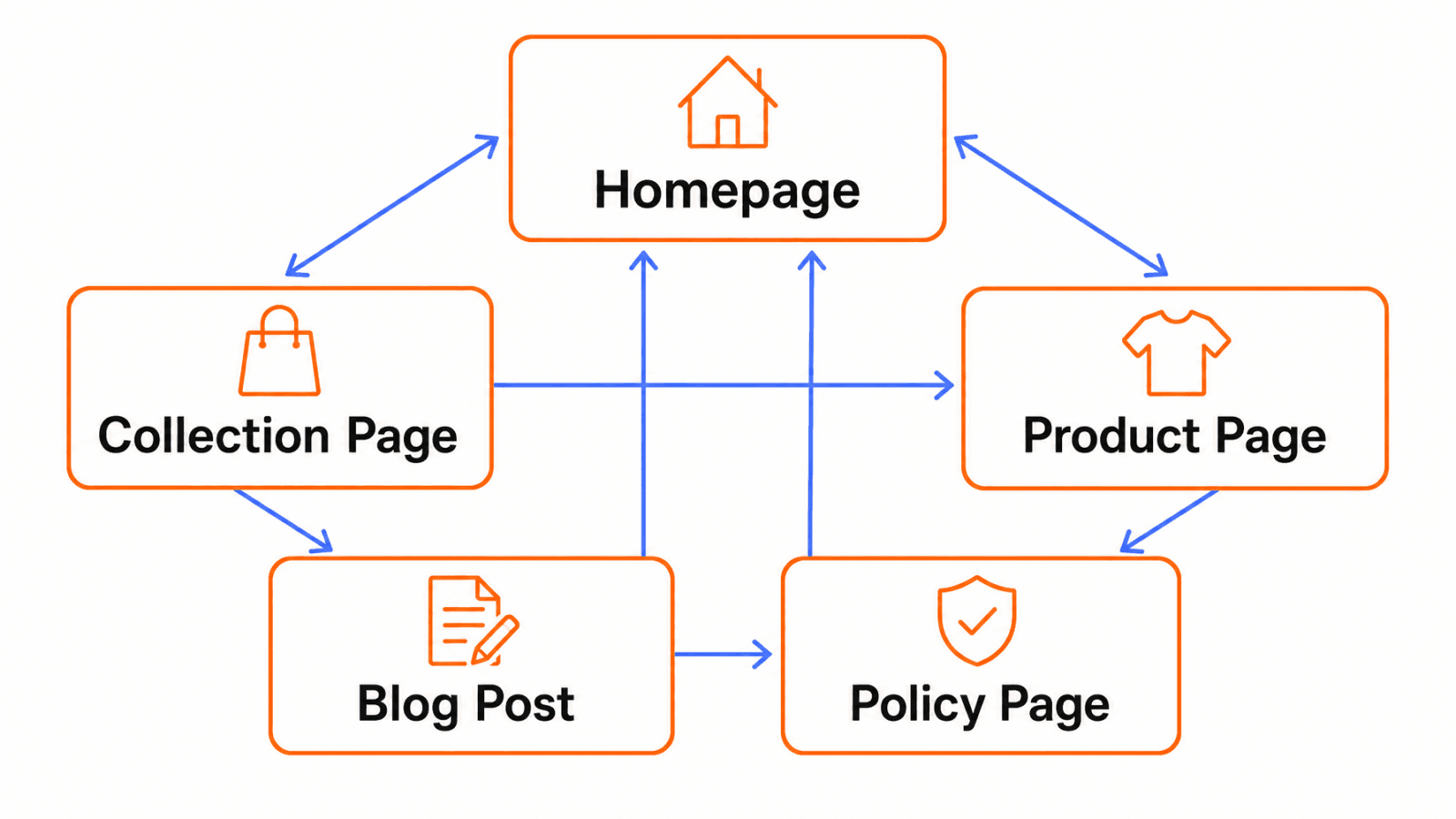
A shopper (or a crawler) should be able to reach any product from your homepage in three clicks or fewer: homepage → collection → product. If a product is buried five levels deep, it is telling Google that page is not very important, even if it is one of your best sellers.
Avoid Orphan Pages
An orphan page is any page with no internal links pointing to it. It might exist, it might even be in your sitemap, but nothing on your site actually links to it. These pages get crawled less often and rank worse. A quick way to check: pull your full page list and cross-reference it against your navigation menu, collection pages, and blog posts. Anything with zero internal links pointing to it is orphaned.
Structure Element | Good Practice | Common Mistake |
|---|---|---|
Homepage | Links to top 5–8 collections | Links only to “Shop All” |
Collections | Each has a distinct commercial intent | One giant “Shop” collection for everything |
Products | Reachable in 3 clicks, linked from at least one collection | Only reachable via search or direct URL |
Navigation menu | Reflects how customers actually shop | Reflects internal warehouse categories |
For a deeper look at how to structure category pages specifically, see our guide on ecommerce category page SEO best practices.
Keyword Research and Search Intent
Keyword research sounds intimidating, but for a Shopify store it really comes down to one question: what would someone type into Google right before they buy what you sell?
How Beginners Should Think About Keywords
Forget spreadsheets full of search volume for a moment. Start by writing down, in plain language, every way a real customer might search for your products. If you sell scented soy candles, that list might include “vanilla candle gift,” “soy candle for anxiety,” “best long-burning candles,” and “candle that smells like a bakery.” Then check Google’s autocomplete and the “People also ask” box for each phrase. This alone will surface long-tail variations most tools miss.
Transactional vs Informational Intent
Transactional: “buy vanilla soy candle,” “soy candles under $20” — these searches want a product page or collection page.
Informational: “how long do soy candles burn,” “are soy candles safer than paraffin” — these searches want a blog post or FAQ answer.
Mixing these up is a common mistake. Sending a transactional search to a 2,000-word blog post, or an informational search to a bare product page, both hurt rankings and frustrate the visitor.
Map Keywords to the Right Page Type
Search Intent | Example Query | Best Page Type |
|---|---|---|
Transactional | “buy waterproof hiking boots” | Product or collection page |
Commercial investigation | “best waterproof hiking boots 2026” | Blog post or comparison guide |
Informational | “how to waterproof hiking boots” | Blog post |
Navigational | “[your brand] hiking boots” | Homepage or brand collection |
Read the SERPs Before You Commit a Page
Before writing a page, search the term yourself and look at what’s actually ranking. If the top results are all blog posts, Google has decided that query wants information, not a product listing, no matter how much you want it to convert. If the top results are product listings and shopping ads, that’s your cue to build or improve a commercial page instead.
Tools like our AI keyword research feature can speed this process up by clustering related queries and surfacing intent automatically, but the underlying thinking above works even with nothing but Google’s search bar.
Page Titles, URLs, Meta Data and Their Impact
Write Titles That Earn the Click
Your title tag is the blue headline in Google results. It needs to do two jobs: tell Google what the page is about, and convince a human to click over a competitor’s listing. A pattern that works well for product pages: Product Name – Key Detail | Brand. For example: Merino Wool Hiking Socks – 3-Pack | Trailhead Goods tells a shopper exactly what they’re getting and who’s selling it, without wasting characters.
Meta Descriptions and Click-Through Rates
The meta description does not directly affect rankings, but it strongly affects whether someone clicks your result over the one above or below it. Write it like ad copy: mention the main benefit, a specific detail (material, size range, shipping speed), and a light nudge to click. Avoid generic filler like “We offer the best products for the best prices,” which says nothing and blends into every other listing on the page.
Clean URL Handles
Shopify auto-generates a URL handle from your product title, but it’s worth editing manually. /products/product-847-final-v2 tells Google and shoppers nothing. /products/merino-wool-hiking-socks tells them everything. Keep handles short, lowercase, and hyphenated, and avoid changing them once a page has started ranking, since that requires a redirect and can cause a temporary dip.
Element | Good Example | Weak Example |
|---|---|---|
Title | Merino Wool Hiking Socks – 3-Pack | Trailhead Goods | Socks - Trailhead Goods - Buy Now Best Price |
URL handle | /products/merino-wool-hiking-socks | /products/product-847-final-v2 |
Meta description | Merino wool hiking socks with reinforced heels, moisture-wicking, sold in 3-packs. Free shipping over $50. | Shop our amazing selection of socks today at great prices! |
Use our meta title and description length checker to make sure your titles and descriptions don’t get cut off in search results, and our headline checker if you want a second opinion on whether a title is likely to earn clicks.
Duplicate Content Issues and Canonicals
Duplicate content is one of the most common technical problems on Shopify, and it happens almost invisibly because of how the platform structures URLs.
Where Duplicates Come From
When a product sits in multiple collections, Shopify can generate a separate URL for each one: /collections/new-arrivals/products/blue-runners and /collections/mens-shoes/products/blue-runners might both load the exact same product. Shopify typically canonicalizes these back to /products/blue-runners, but that canonical tag can break after a theme update, a migration, or certain apps.
Filter and sort parameters create the same issue: /collections/shoes?sort_by=price-ascending and /collections/shoes?color=blue are technically different URLs showing overlapping or identical content.
How to Check and Fix It
Pick five or six of your best-selling products and check the canonical tag on each collection-path version (view page source, search for rel="canonical"). It should point to the clean /products/ URL. Our canonical URL checker does this for you without needing to read source code.
Duplicate Pattern | Example | Fix |
|---|---|---|
Collection-path product URL | /collections/shoes/products/runners | Confirm canonical points to /products/runners |
Sort parameters | ?sort_by=price-ascending | Usually self-canonicalizing, leave as-is unless indexed separately |
Filter parameters | ?color=blue&size=10 | Canonical to unfiltered collection URL |
Copied product descriptions | Same manufacturer text across stores | Rewrite in your own words |
That last row matters more than most store owners realize. If you sell a product from a supplier and paste the manufacturer’s description as-is, dozens of other stores selling the same item likely did the same thing. Google has to pick one version to show, and it’s rarely the smallest or newest store. Rewriting even a short paragraph in your own voice, with your own specific details, is often enough to stop competing against your own suppliers.
For a broader list of the technical issues that trip up Shopify stores, see our guide on common Shopify SEO issues and how to fix them.
Site Speed, Core Web Vitals, and Analytics
Speed is not just a technical checkbox, it is directly tied to revenue. A widely cited Deloitte study of 37 major retail websites found that a 1-second delay in page load time costs the average ecommerce store roughly 7% of its conversions, a finding that has been replicated across multiple independent studies since.
The good news for Shopify merchants specifically: Chrome real-world performance data shows nearly 80% of Shopify stores pass all Core Web Vitals thresholds, among the best of any major ecommerce platform. That means the platform itself is rarely your speed problem. Apps, oversized images, and heavy themes usually are.
Core Web Vitals in Plain English
LCP (Largest Contentful Paint): how long it takes the biggest visible element (usually your hero image or main product photo) to load. Aim under 2.5 seconds.
CLS (Cumulative Layout Shift): whether elements jump around as the page loads (annoying when you’re about to tap “Add to Cart” and a banner shoves the button down). Aim close to zero.
INP (Interaction to Next Paint): how responsive the page feels when someone taps or clicks. Aim under 200 milliseconds.
Where the Slowdown Usually Comes From
In my experience auditing Shopify stores, the biggest offenders are almost always the same three things: uncompressed product images (a single unoptimized photo can be 3–5MB when it should be under 200KB), too many apps loading their own scripts on every page, and third-party pixels (retargeting, reviews, chat widgets) that load before the actual content.
Simple Fixes
Run your homepage and two top product pages through Google PageSpeed Insights and note the specific recommendations, not just the score.
Compress images before uploading. Shopify supports WebP, and most themes will serve it automatically once the source image is optimized.
Audit installed apps quarterly. Uninstall anything you’re not actively using, since many apps keep loading scripts even after you stop using their features.
Delay non-essential scripts (chat widgets, some review apps) so they load after the main content.
Connecting Analytics
Shopify has a native Google Analytics 4 integration under Online Store > Preferences. Once connected, the two reports worth checking monthly are Organic Search sessions (are you growing?) and Landing Page performance (which pages actually bring in organic revenue?). Pair this with Google Search Console to see which queries are driving impressions versus clicks.
For a full breakdown of why page speed still matters as much as ever, see our guide on how important page speed is for SEO in 2026.
Product and Collection Page SEO Optimisation
This is where the money lives, so it deserves more than a quick pass.
For a closer look at ecommerce category page SEO, use this guide to plan collection structure, content, and filters.
Collection Pages Carry the Category Keywords
Your collection pages should target the broader, higher-volume terms (“women’s running shoes”), while your product pages target the specific, lower-volume, higher-intent terms (“Nike Pegasus 41 women’s running shoes”).
A short 100–150 word intro at the top of a collection page, written in plain language about who the collection is for and what makes it different, gives Google the context a bare grid of products never can.
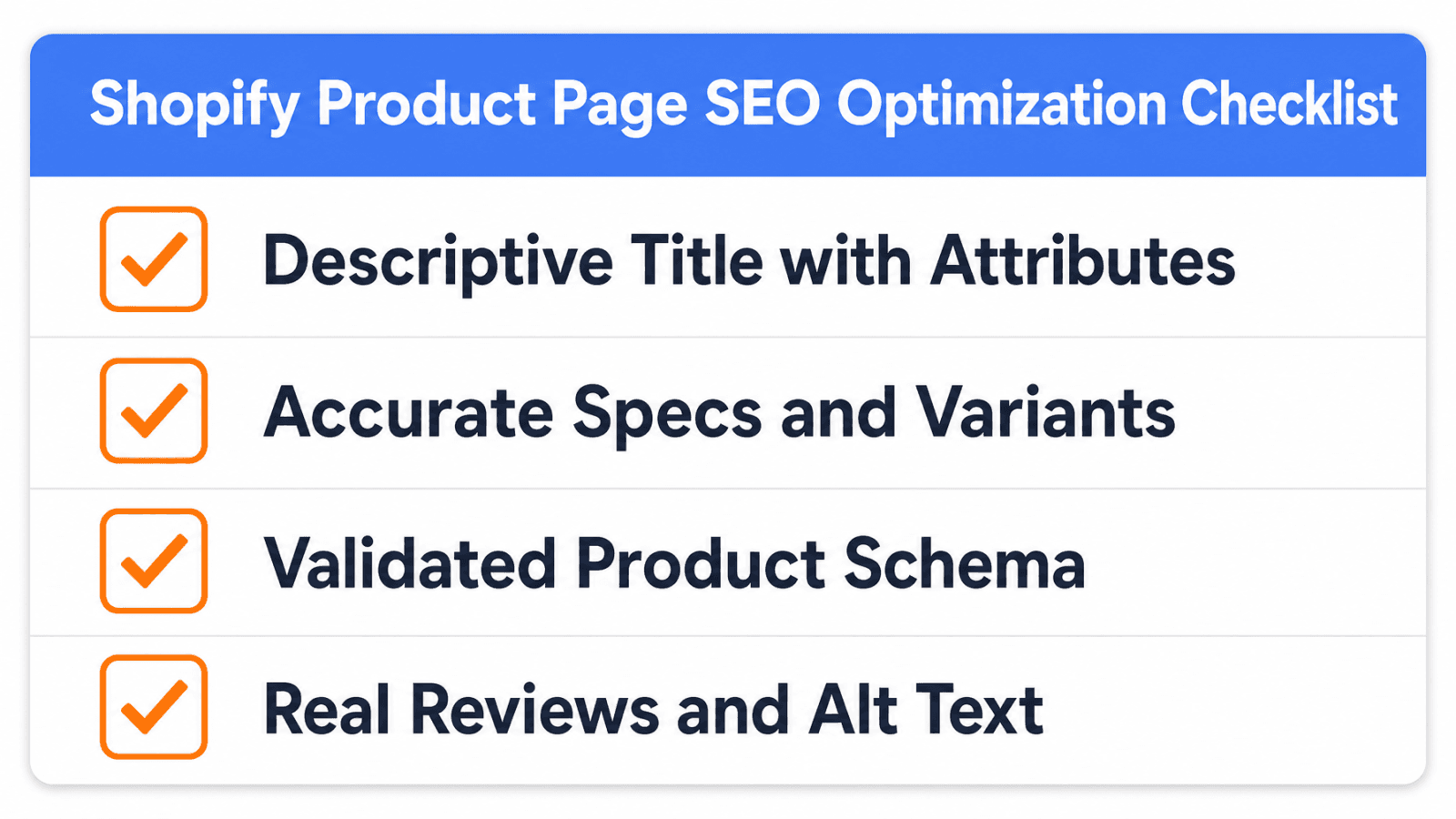
Product Pages Win on Clarity, Not Word Count
I’ve reviewed product pages that were 1,500 words long and still failed to answer the three things a buyer actually wants to know: what is this, who is it for, and why should I trust it. Length is not the goal. A genuinely useful product page usually covers:
What the product is and its main use case, in the first sentence
Materials, dimensions, or specifications a buyer would actually search for
Who it’s best suited for (and, honestly, who it’s not for)
Real customer reviews, ideally with photos
Clear shipping, returns, and warranty information
Example: Before and After
Before: “Beautiful ceramic mug. Great for coffee or tea. Makes a great gift.”
After: “This 12oz hand-glazed ceramic mug is dishwasher and microwave safe, sized for a full cup of coffee without crowding your cupboard. Each one is thrown and glazed individually in our Portland studio, so small variations in the glaze are normal, not a defect. Ships in reusable packaging within 2 business days.”
The second version gives a shopper (and an AI assistant summarizing options) concrete facts to work with: capacity, care instructions, origin, and shipping speed. The first version could describe almost any mug on the internet.
Internal Linking Is the Cheapest Ranking Lever You Have
Link from relevant blog posts to the products and collections they mention. Link from product pages to 2–3 related or complementary products (“frequently bought together” sections do this automatically, but manual contextual links inside descriptions work too). This spreads authority around your site and keeps shoppers browsing instead of bouncing.
Page Type | Primary Job | Typical Word Count | Key Elements |
|---|---|---|---|
Collection page | Rank for category keywords | 100–200 words of intro copy + products | Intro text, filters, internal links to top products |
Product page | Convert + rank for specific product terms | As long as needed to answer real buyer questions | Specs, use case, reviews, shipping info, schema |
Structured Data, Product Feeds and Google Merchant Center
Structured data (also called schema markup) is code that explicitly tells search engines and AI systems what’s on a page, rather than making them guess. For ecommerce this is not optional in 2026, it’s how you become eligible for star ratings, price display, and availability directly in search results.
Why It Matters More Than Ever
In one of the earliest and most cited examples, Google reported that Rotten Tomatoes added structured data to 100,000 pages and saw a 25% increase in click-through rate. That gap has only grown as AI systems have become more dependent on structured data to understand and cite pages accurately.
Shopify automatically adds basic Product schema to product pages, but it’s often incomplete, missing review ratings, availability status, or brand information that would make the listing eligible for richer results.
Setting Up Google Merchant Center
Google Merchant Center is where you upload your product feed so your items can appear in Google Shopping results and shopping ads, and it also feeds into free product listings that show up in regular search. Shopify has a direct integration through the Google & YouTube sales channel. The key is keeping your feed accurate: if a product goes out of stock in your store but Merchant Center still shows it available, Google will eventually penalize your feed’s reliability.
Keeping Product Data Accurate
Match your product titles in the feed to what people actually search, not just your internal product names
Keep GTIN/UPC codes filled in where you have them, since Google trusts feeds with proper identifiers more
Update stock status in near real-time (Shopify’s native integration handles this automatically once connected)
If you want to generate valid FAQ or Article schema without writing JSON-LD by hand, our FAQ schema generator and article schema generator do this for free. For a deeper look at how structured data influences whether AI tools cite your pages, see our guide on schema markup and AI visibility.
Image Optimisation, Alt Text and Accessibility
File Formats, Compression and Page Weight
Product photography sells, but an unoptimized photo can quietly sabotage your page speed. A photo straight off a modern camera or phone can easily be 4–8MB. Compressed and converted to WebP, the same image can look nearly identical at under 150–200KB. Multiply that saving across a product page with six images and a collection page with forty products, and the difference in load time is substantial.
Practical steps:
Resize images to the actual display size before uploading (a photo doesn’t need to be 4000px wide if it displays at 800px)
Export as WebP where possible
Use Shopify’s built-in lazy loading (most modern themes handle this automatically) so images below the fold don’t block the initial page render
Alt Text That Describes Rather Than Stuffs
Alt text serves two purposes: accessibility for visually impaired shoppers using screen readers, and additional context for search engines. Good alt text describes what’s actually in the image: “Woman wearing navy merino wool hiking socks on a rocky trail,” not “hiking socks buy cheap hiking socks best hiking socks 2026.” Keyword-stuffed alt text is both a poor accessibility practice and something Google’s algorithms are specifically tuned to discount.
Our image generation AI tool can also help fill gaps in your product photography for variants or lifestyle shots you haven’t shot yet.
Blogs, Content, Internal Linking and Topical Authority
How a Blog Actually Helps Product and Collection Rankings
A Shopify blog rarely converts on its own, its job is to answer the informational questions your buyers have before they’re ready to purchase, and to link that traffic toward the pages that do convert. If you sell hiking gear, a post like “how to choose the right hiking boot size” can rank for a genuinely useful query, then link directly into your hiking boots collection at the natural point in the article where sizing is discussed.
Simple Internal Linking Rules
Every blog post should link to at least one relevant product or collection page
Every collection page benefits from at least one inbound link from a related blog post
Avoid linking the same exact anchor text to different pages, it confuses both users and search engines about which page actually deserves to rank for that phrase
Building Topical Authority Without Writing 100 Posts
You don’t need a massive content library to be seen as an authority. Ten to fifteen genuinely useful posts that comprehensively cover your product category’s real questions will outperform fifty thin, generic posts. Group them into a simple cluster: one pillar piece (like this guide) linking out to several focused posts, which link back to the pillar. This is exactly the structure that helps both traditional rankings and AI citation, since it signals depth on a topic rather than scattered, disconnected content.
Tools like our SEO topical map generator and autoblog publishing can help plan and produce this kind of cluster without it becoming a full-time job. For more on the concept itself, see what topical authority means in SEO.
SEO Apps, Themes and Integrations
When an App Helps and When It Hurts
Shopify’s App Store has hundreds of SEO apps, and I’ll be direct: most stores need far fewer than they install. A good SEO app fills a specific gap, like generating image alt text in bulk or automating redirects, without adding significant page weight. A bad one duplicates something Shopify already does natively (basic sitemap generation, for example) while loading its own scripts on every page.
Before installing an app, ask: does this do something Shopify’s native settings can’t already do? If the answer is no, skip it. If you do need one, our roundup of the best Shopify SEO apps compares pricing, free plans and what each one actually does.
Theme Choice and Performance
Free Shopify themes like Dawn are built by Shopify’s own team and are generally fast and clean by default. Paid themes can look more distinctive but sometimes carry more built-in JavaScript than a store actually needs. Whichever you choose, test it with PageSpeed Insights before committing, and re-test after each major customization.
Useful Free Tools
Tool | What It’s For |
|---|---|
Google Search Console | Indexing status, search queries, technical errors |
Google Analytics 4 | Traffic and conversion data |
PageSpeed Insights | Speed and Core Web Vitals diagnosis |
Keytomic’s free tools (canonical checker, robots.txt validator, meta length checker) | Quick technical spot-checks without a subscription |
If you’re weighing whether you need a dedicated Shopify SEO platform versus stitching together individual apps, our Shopify platform page walks through what a connected setup looks like, and the Shopify integration page covers exactly how the connection works.
Tracking, Measurement and Monthly Routine
You cannot improve what you don’t measure, but you also don’t need a dashboard with forty metrics. A simple monthly routine catches problems early and shows whether your work is paying off.
What to Check Monthly
Organic sessions (Google Analytics 4): Is the trend up, flat, or down compared to the previous month and the same month last year?
Search Console Performance report: Which queries are gaining impressions? Which pages are losing clicks?
Indexation health: Any new spikes in excluded or not-indexed pages?
Top landing pages by organic revenue: Are your best product pages the ones actually bringing in organic sales, or is traffic landing somewhere that doesn’t convert?
Metric | Where to Find It | What a Problem Looks Like |
|---|---|---|
Organic sessions | GA4 | Flat or declining month over month |
Indexed pages | Search Console > Pages | Growing gap vs. total product count |
Click-through rate | Search Console > Performance | High impressions, low clicks (title/meta problem) |
Organic conversion rate | GA4 | Traffic growing but revenue isn’t |
A simple pattern to watch for: rising impressions with flat clicks usually points to a title or meta description problem, the page is showing up but not earning the click. Rising clicks with flat conversions usually points to a page-content or trust problem once the visitor arrives.
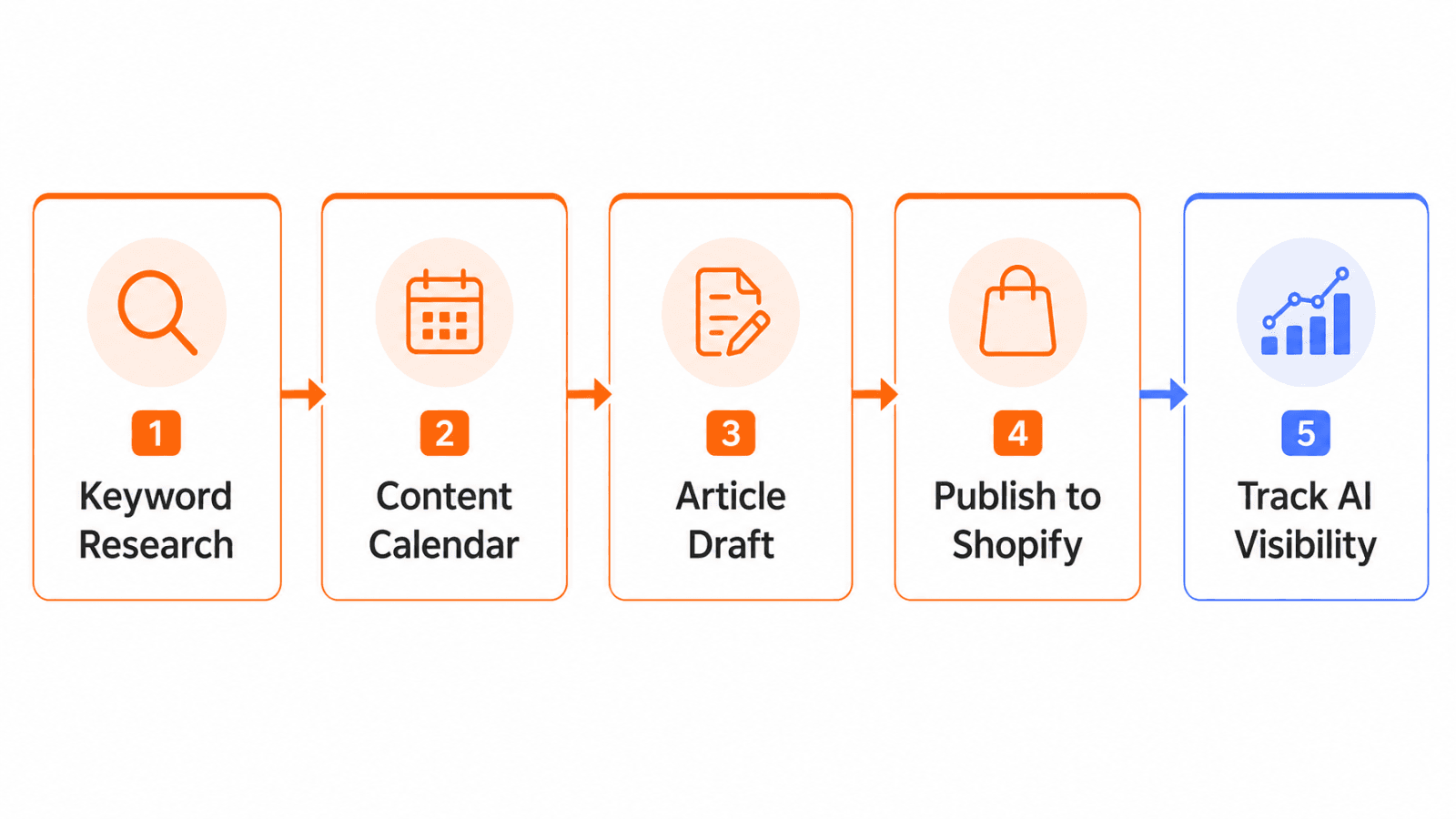
Our AI visibility tracker extends this same monthly habit into AI search, showing whether your products are actually being surfaced in tools like ChatGPT and Perplexity, not just traditional Google results.
Link Building & Authority for Shopify Stores
Backlinks (other websites linking to yours) remain one of the strongest ranking signals, but small stores don’t need an expensive PR agency to build them.
Realistic Methods for Small Stores
Supplier and manufacturer pages: if you’re an authorized retailer, ask to be listed on the manufacturer’s “where to buy” page
Local directories and Google Business Profile: even for online-only stores, a well-filled Google Business Profile builds trust signals and sometimes local backlinks
Gift guides and roundups: journalists and bloggers regularly publish seasonal gift guides; a short, specific pitch with a high-quality product photo has a real shot
Genuine partnerships: co-marketing with complementary (non-competing) brands, like a coffee brand and a mug maker cross-linking, is natural and mutually beneficial
Digital PR around something newsworthy: a genuinely interesting founder story, an unusual sourcing process, or original data from your own store can earn organic press mentions
What I’d avoid: buying links in bulk from link farms or “guest post” networks. Google’s algorithms are specifically built to detect unnatural link patterns, and the short-term ranking bump rarely survives the next update.
Our backlink profile audit is a useful starting point to see what links you already have and whether any look risky.
AI Search, GEO and the Future of Shopify SEO
What AI Overviews and Chatbots Change
AI search doesn’t replace Google, it sits alongside it. Shopify’s own Q2 2026 data (discussed in Section 1) showed AI-driven traffic and orders to merchant stores tripling year over year, with over half of AI-referred sessions landing directly on a product detail page rather than a homepage. That last detail matters enormously: an AI assistant is doing the browsing and comparison work that used to happen on your site, then sending the shopper straight to the specific product it decided best matches their question.
How to Make Your Store More Likely to Be Cited
AI systems favor pages that:
State facts clearly and directly, rather than burying them in marketing language
Have accurate, complete structured data (see Section 11)
Show consistent information across the page, your Google Business Profile, and any third-party listings
Include genuine specifics: exact materials, dimensions, use cases, and limitations, not vague claims
A practical exercise: read your top product page and ask, “could an AI assistant lift a clean, accurate one-sentence answer out of this for someone asking ‘is this good for X’?” If the honest answer is no, that’s the gap to close.
Freshness and Trust Signals
Keeping stock status, pricing, and seasonal information current matters more for AI systems than it did for traditional SEO, since these tools are trying to give someone an answer they can act on right now, not just a ranking. A collection page that hasn’t been touched in two years, with discontinued products still listed, actively works against you here.
Traditional SEO Signal | AI Search (GEO) Signal |
|---|---|
Keyword in title tag | Clear, direct factual statements |
Backlink count | Consistency of information across sources |
Page authority/age | Structured data completeness |
Meta description CTR | Whether an answer can be extracted cleanly |
For a deeper dive into this shift, see our guides on how to improve visibility in Google AI Overviews, what GEO actually means, and how to make your website agent-ready.
Shopify SEO for New Stores
New stores face a different set of problems than established ones: no domain history, no backlinks, and often an empty or thin product catalogue.
The First 90 Days
A new domain doesn’t get penalized, but it also doesn’t have any track record for Google to lean on, so early results tend to build more slowly than store owners expect. In my experience, this is the single biggest reason new store owners give up on SEO too early: they expect month-one results and don’t see them.
Timeframe | Focus |
|---|---|
Days 1–30 | Verify Search Console, submit sitemap, complete all product and collection descriptions, set up GA4 |
Days 31–60 | Fix any indexation issues found in month one, publish 3–5 genuinely useful blog posts, start basic link outreach |
Days 61–90 | Review Search Console query data, expand collections/content around what’s actually getting impressions, refine titles based on early click-through data |
A Realistic Expectation
Indexing itself usually happens within the first few weeks for a clean, well-structured new store. Meaningful rankings for competitive terms typically take longer, often several months, since Google is still gathering signals about how trustworthy and relevant your site is. This is normal and not a sign that something is broken.
SEO vs Paid Ads and Customer Acquisition Cost
SEO and paid ads solve different problems, and treating them as competitors rather than partners is a common mistake I see new store owners make.
Paid ads (Meta, Google Ads) give you immediate, controllable traffic, you can turn a campaign on today and see sales tomorrow. The tradeoff is that the moment you stop paying, the traffic stops. SEO takes longer to build, often 3–6 months before you see meaningful movement, but the traffic keeps arriving without an ongoing cost per click once a page is ranking well.
A practical way to use both together: run ads on your best-converting products to validate messaging and offers quickly, then invest SEO effort into those same validated products and their supporting content, since you already know the messaging works.
Over time, stores with a strong organic foundation typically see their blended customer acquisition cost fall, since a growing share of orders arrive through channels that don’t carry a per-click cost. This doesn’t mean cutting ad spend, it means SEO becomes a second engine running alongside it.
Shopify SEO Apps and Tools Compared (What Actually Helps)
Rather than listing dozens of apps, here’s the honest, functional breakdown of what different tool categories actually solve:
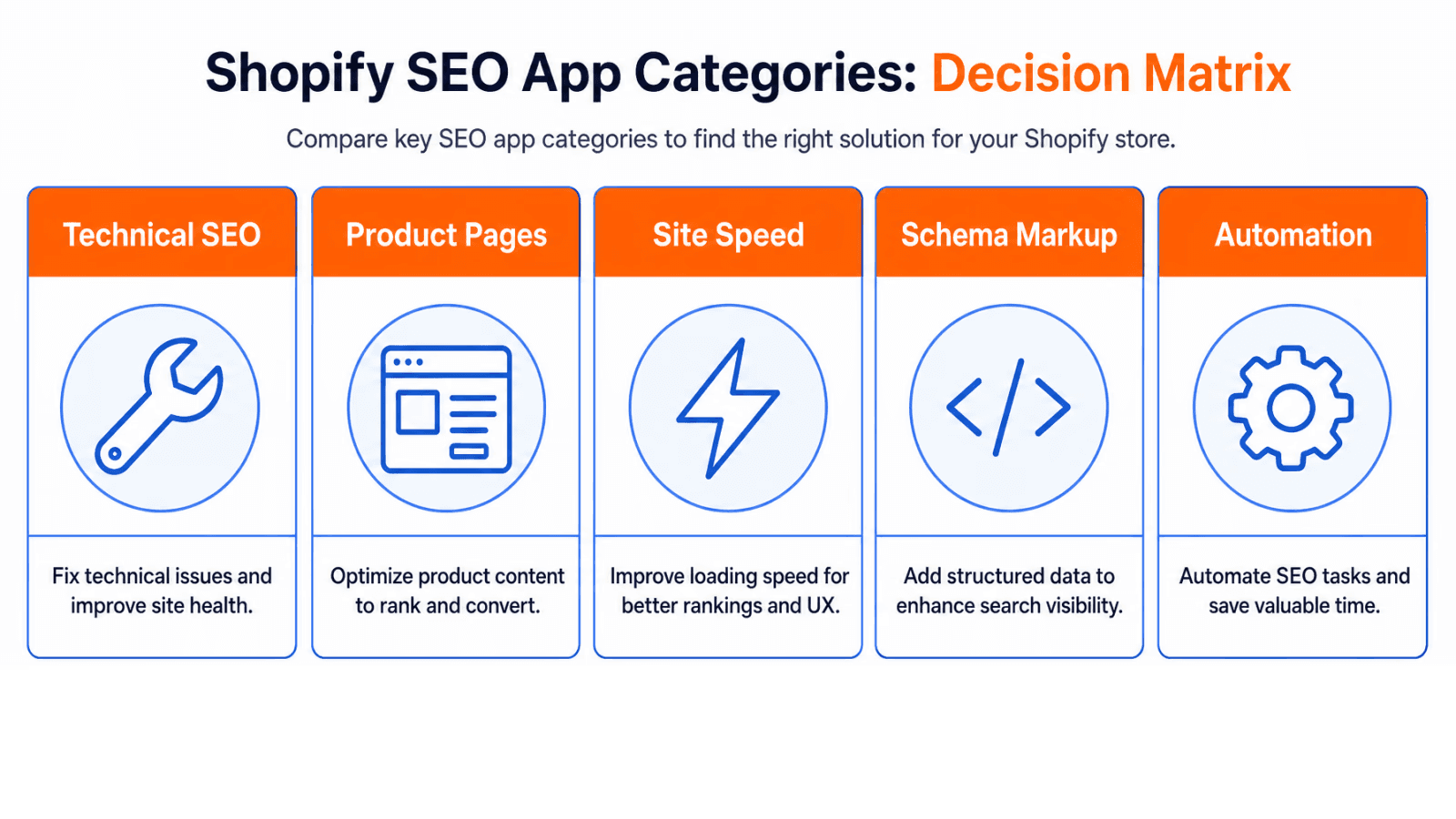
Category | What It Solves | Watch Out For |
|---|---|---|
Bulk metadata editors | Editing titles/alt text across many products at once | Overlap with what you can already do manually for smaller catalogues |
Redirect managers | Preventing broken links after URL changes | Some duplicate Shopify’s native redirect tool unnecessarily |
Schema/structured data apps | Filling gaps in Shopify’s default schema | Test that they don’t conflict with theme-native schema |
Speed optimization apps | Lazy loading, script deferral | Ironically, some add more scripts than they remove |
AI SEO/content platforms | Keyword research, content planning, AI visibility tracking, automated publishing at scale | Make sure output still reflects your actual product details, not generic filler |
The honest rule of thumb: the fewer apps loading scripts on every page, the better your baseline speed. Audit what’s installed every few months and remove anything you’re not actively using. If you want an app-by-app comparison with pricing and free-plan details, we cover the main options.
Migrating to Shopify Without Losing Rankings
If you’re moving to Shopify from another platform, the biggest risk isn’t Shopify itself, it’s losing the rankings and backlinks your old site had built up.
The Three Things That Protect Rankings During a Migration
A complete 301 redirect map. Every old URL that had traffic or backlinks needs a permanent redirect to its new Shopify equivalent, mapped individually, not just redirected to the homepage.
Matching or improving content. If your old product pages ranked because of specific content, make sure that content (or better) exists on the new page before launch, not weeks after.
Immediate resubmission. Submit your new sitemap to Search Console the day you go live, and use the URL Inspection tool to request indexing on your highest-value pages rather than waiting for Google to find them naturally.
A temporary dip in traffic during the first few weeks after a migration is common even when everything is done correctly, since Google needs time to process the redirects and re-crawl the new site. A dip that doesn’t recover within 4–6 weeks usually points to a redirect gap or a content mismatch worth auditing.
22. When the Manual Work Becomes Too Much
Everything in this guide is something you can genuinely do yourself with a free Google account and a bit of patience.
The honest limitation isn’t skill, it’s time. As a catalogue grows past a few hundred products, or as you start publishing content regularly, the manual side of this work (writing unique descriptions at scale, monitoring indexation across thousands of URLs, tracking AI visibility, keeping schema accurate) starts competing directly with the time you’d rather spend on product, ops, or customers.
This is the point where store owners I work with typically start looking at automation, not to replace strategy, but to handle the repeatable execution: publishing content on a schedule, generating and validating schema at scale, monitoring indexing across a large catalogue, and tracking whether your products are actually showing up in AI search results.
If that’s where you are, KeyTomic’s Shopify platform is built specifically to connect to a Shopify store and handle this layer of ongoing work, and the Shopify integration page walks through exactly how the connection works if you want the technical details before committing to anything.
30-Day Shopify SEO Action Plan
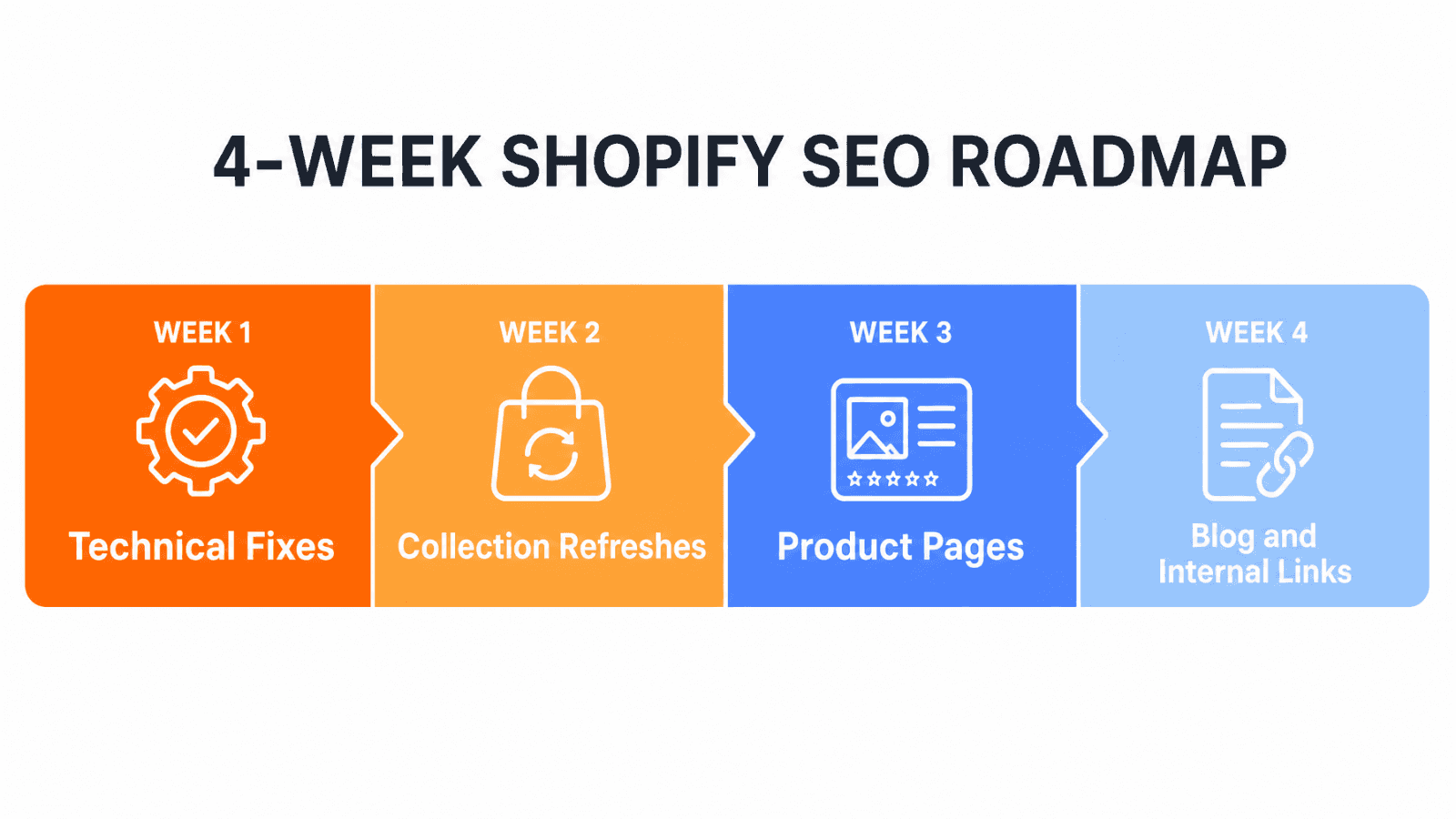
Week | Focus |
|---|---|
Week 1 | Search Console + GA4 setup, indexation check, fix top duplicate/canonical issues |
Week 2 | Rewrite titles and meta descriptions on top 20 pages, run PageSpeed audit and fix biggest speed issues |
Week 3 | Improve top 10 collection pages with intro copy, audit and rewrite thin product descriptions |
Week 4 | Add/validate schema markup, publish 1–2 content pieces linking into key collections, review Search Console data and adjust |
For the full, printable version of this plan with every task broken out individually, see our Shopify SEO checklist.
Common Shopify SEO Mistakes (and How to Avoid Them)
Mistake | Why It Happens | The Fix |
|---|---|---|
Copying manufacturer product descriptions | Saves time when listing products | Rewrite in your own words with specific details |
Ignoring collection pages | They feel like “just a filter” | Add genuine intro copy and treat them as category hubs |
Installing too many apps | Each one solves a small problem | Audit quarterly, remove unused apps |
Never checking Search Console | Feels technical and intimidating | 10-minute monthly check catches most issues early |
Changing URLs without redirects | Done during a rebrand or cleanup | Always set up a 301 redirect before changing a live URL |
Treating SEO as a one-time project | Expecting a single optimization push to “finish” SEO | Build a light monthly routine instead |
FAQs
Is Shopify good for SEO?
Yes, in the sense that Shopify handles the technical basics well (SSL, sitemaps, canonical tags, mobile responsiveness). It’s not automatically good for SEO in the sense that rankings still require the content, structure, and ongoing maintenance covered throughout this guide.
How long does Shopify SEO take to see results?
Most stores start seeing meaningful movement within 3–6 months of consistent work, though fixing acute technical issues (like indexation problems) can show impact faster, sometimes within a few weeks.
Do Shopify SEO apps actually help?
Some do, particularly for tasks that would be tedious to do manually at scale, like bulk alt text or schema generation. Others duplicate what Shopify already does natively while adding page weight. Evaluate each app on whether it solves a genuine gap.
How important are collection pages for Shopify SEO?
Very. Collection pages typically carry your broader, higher-volume category keywords and are often under-optimized compared to product pages, making them one of the highest-leverage places to focus.
Does Google Merchant Center help SEO?
It doesn’t directly affect organic rankings, but it makes your products eligible for Google Shopping results and free product listings, which is a meaningful additional visibility channel alongside organic search.
Should I hire a Shopify SEO agency?
It depends on your catalogue size and available time. Everything in this guide is doable in-house. An agency or platform makes more sense once the manual workload (content, technical monitoring, AI visibility tracking) outgrows what you or your team can realistically maintain.
Why isn’t my Shopify store showing up on Google?
The most common reasons are indexation issues (see Section 4), a store that’s too new to have built ranking signals yet (see Section 18), or thin/duplicate content that Google doesn’t consider worth ranking (see Sections 8 and 10).
Making Shopify SEO Work Long-Term
Shopify SEO in 2026 isn’t a single project you finish and move on from, it’s a light, consistent habit layered on top of a store that’s technically sound. Fix the foundation first (indexation, duplicates, speed), then invest the bulk of your ongoing effort where the money actually is: your product and collection pages. Everything else, blog content, backlinks, apps, AI search optimization, builds on top of that foundation rather than replacing it.
If you’ve made it this far, you now have a genuinely complete, practical view of what actually moves the needle for a Shopify store, in plain language, without the jargon that makes most SEO guides harder to act on than they need to be. Start with the five things in Section 3, build the monthly habit in Section 15, and the rest compounds from there.
For the printable, task-by-task version of everything covered here, head to our Shopify SEO checklist. And if you’d rather have the repeatable parts of this handled for you, Keytomic’s Shopify platform is built to plug directly into your store.